Tag: Azure

Azure

Azure Functions Updates

New Release of Azure Functions

A new release of Azure Functions is now available, version 1.0.10917. The main things in this release are:

  • Application Insights integration (Preview)
  • Native TypeScript support (preview)
  • Improvements to binding extensibility for binding authors
  • JavaScript transpiler API/extension model
  • Miscellaneous bug fixes and improvements

New Experience for Azure Functions

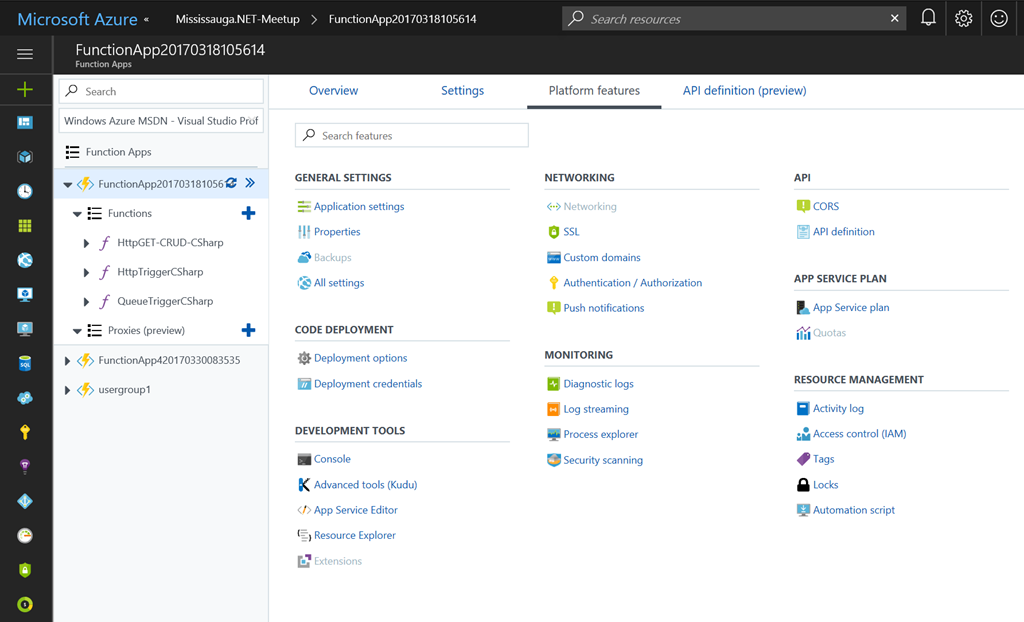
The Azure Functions portal was also completely re-vamped with a new UI experience. Some of the improvements are:

  • A dedicated browse blade for Function Apps.
  • A tree view that allows viewing and managing multiple Function Apps
  • Filters on subscription and app name, as well as an option to scope the view to just one app
  • One-click access to all App Service platform features
  • A convenient way to manage features that have already been configured
  • Overall UI enhancements to be more consistent with the rest of the Azure portal

image

You can read more about the portal changes in the announcement blog.

Enjoy!

References

https://blogs.msdn.microsoft.com/appserviceteam/2017/05/01/april-2017-app-service-update/

Azure

Azure Functions now with Application Insights integration

Earlier this month Azure Functions was updated to have direct integration with Application Insights and is currently only available on the “beta” version of Azure Functions. At this time it’s recommended to only try this out in non-production Azure Function apps until it’s a more stable release.

Getting Started

Before we can enable Azure Function Application Insights integration, we will need to setup an Application Insights instance. If you already have one skip to the next step.

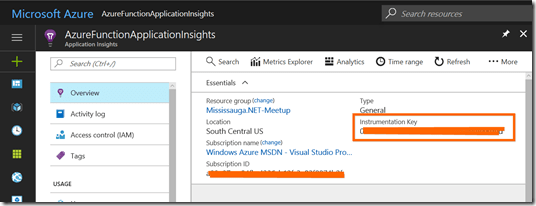
  1. Create an Application Insights instance and Application Type should be General. Once your Application Insights is setup, copy the instrumentation key which we’ll need in the next step.
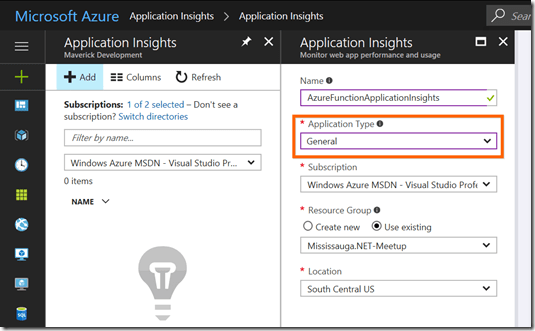
    image
    image
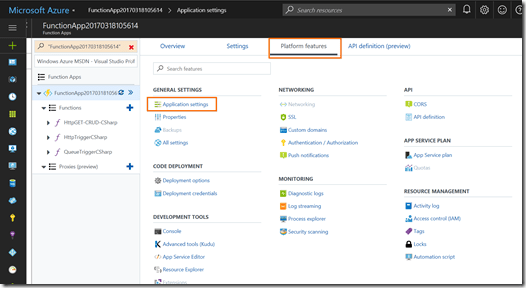
  2. Next you will need to update your Azure Function Application Settings to configure your function to run under the “beta” version and then to set your Application Insights Instrumentation Key.image
  3. Now go to Application Settings and then update App Setting “FUNCTIONS_EXTENSION_VERSION” from “~1” to “beta” and then add a new key named “APPINSIGHTS_INSTRUMENTATIONKEY” and set the value to the Application Insights Instrumentation key you copied in step 1. Now click Save to update your Azure Function.
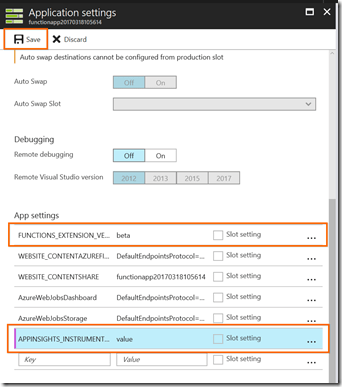
    image 

Once this is done, your Application Insights instance will start collecting telemetry from your Azure Function without any code changes.

Using Application Insights

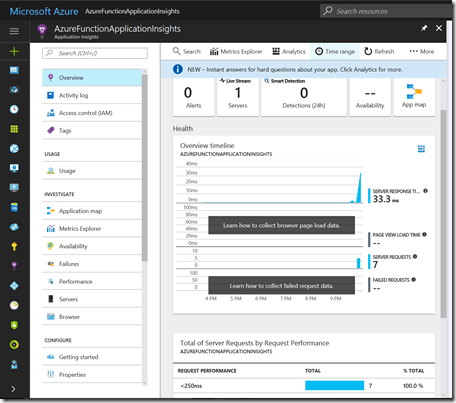
Going to your Application Insights, you can start to see some metrics showing up on the overview blade:image
Live Metrics Stream

You can get a lot more insights to real-time telemetry from the Live Metrics Stream to see what’s happening right now:
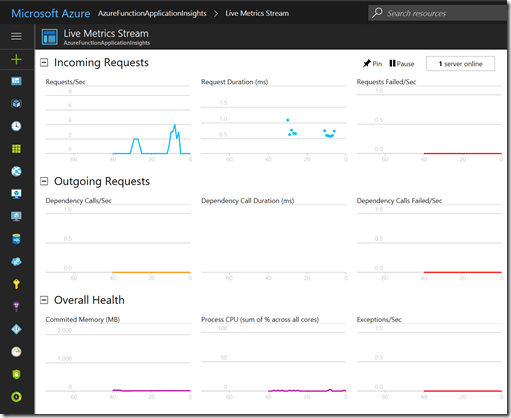
image

Analytics

Another great resource of Application Insights is the Analytics portal, which provides you the ability to write your own custom queries.
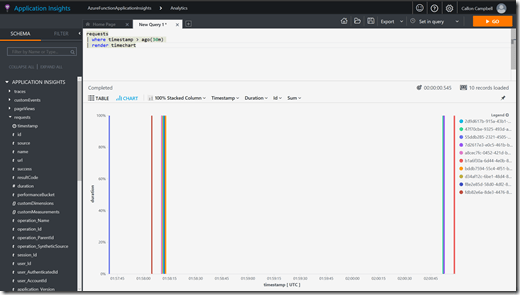
image

Alerts

The previous two options are great to see what is happening or what happened historically, but Alerts will tell you what’s happening. I suggest you checkout Alerts from the Application Insights blade, where you can define alerts based on a wide array of metrics.
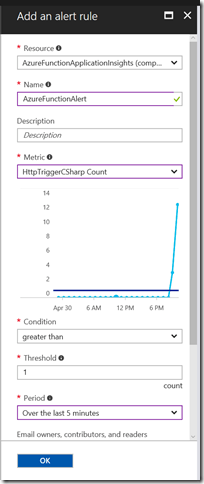
image

Summary

You can now add Application Insights to your Azure Functions with minimal effort, which is a powerful tool for monitoring your applications. Keep in mind that this is currently only available in the “beta” version of Azure Functions, but is something that should be coming to the production release in the near future now that it’s been merged into the develop branch on github.

Enjoy!

References

Azure Functions integration with Application Insights

Azure Functions now has direct integration with Application Insights

Application Insights

Live Metrics Stream docs

Azure

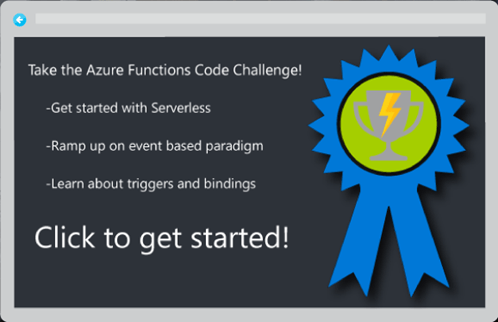
Take the Azure Functions Code Challenge!

image

Test your coding skills and learn how to build solutions using Azure Functions at the same time. Earn badges for every challenge you complete and brag to your friends! You can code these challenges in the FREE Azure Functions experience or using your existing Azure subscription. Don’t worry, Azure Functions has more than enough free executions for you to last the whole challenge experience!

Also check out the new Visual Studio Tools for Azure Functions. Use it to build and debug your function locally and then publish or zip deploy to your test function. If you already have an Azure subscription, you can also remotely debug your functions.

Azure Functions is an event-based serverless compute experience that scales based on your demand and you only pay for the resources used.

Click here to get started with the Azure Functions Code Challenge!

Enjoy!

Resources

Get started using the Try Functions experience here.

Already have an Azure Subscription, then get started with your existing account here.

Download the Visual Studio Tools for Azure Functions here.

Azure

Microsoft Azure Stack Technical Preview 3 Released

image

Today Microsoft announced that Azure Stack Technical Preview 3 has been released with several new updates.

Azure and the Azure Stack integrated systems enable businesses to focus on investing energy and talent on turning their application portfolio into a strategic differentiator for their business. This approach enables customer choice and flexibility of deploying and operating their application where it best meets their business needs. IT can deliver far greater value by empowering development teams with self-service provisioning and cloud services while partnering with them to establish DevOps workflows that meet business policies and requirements.

What’s new

  • Deploy with ADFS for disconnected scenarios
  • Start using Azure Virtual Machine Scale Sets for scale out workloads
  • Syndicate content from the Azure Marketplace to make available in Azure Stack
  • Use Azure D-Series VM sizes
  • Deploy and create templates with Temp Disks that are consistent with Azure
  • Take comfort in the enhanced security of an isolated administrator portal
  • Take advantage of improvements to IaaS and PaaS functionality
  • Use enhanced infrastructure management functionality, such as improved alerting

Roadmap update

Shortly after TP3, Azure Functions will now be available to run on Azure Stack TP3. This will be followed by Blockchain, Cloud Foundry and Mesos templates.

TP3 should the last planned technical preview before becoming available in mid-CY17.

Further reading and next steps

Learn more about Azure Stack and download Azure Stack Technical Preview 3.

Learn more about this announcement here.

References

https://azure.microsoft.com/en-us/blog/hybrid-application-innovation-with-azure-and-azure-stack/

Azure

Get Azure invoices emailed directly to your inbox

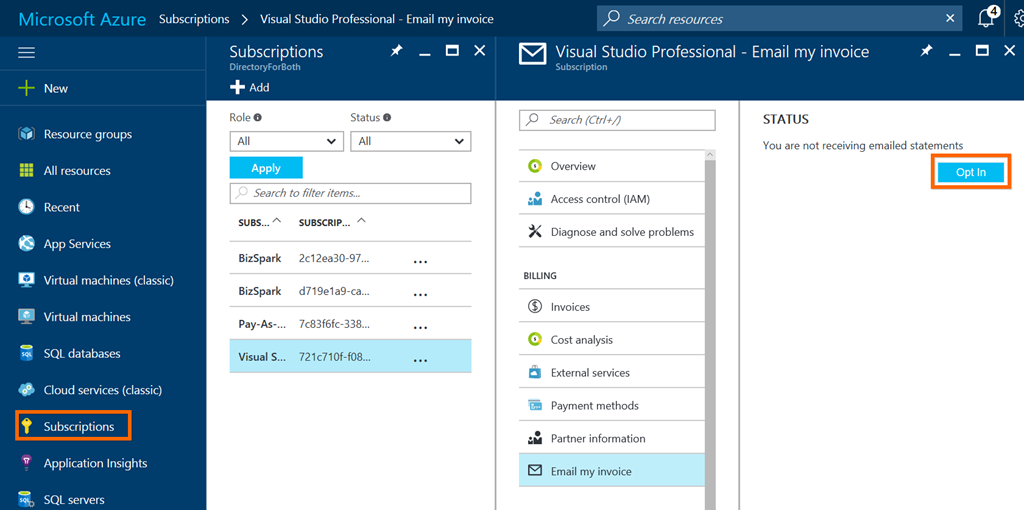
You can now get your Azure invoices sent to your inbox instead of logging in and downloading them every month. Once you’ve opted in, your  invoice will be attached to your monthly billing email.

To get started, go to your subscriptions from the Subscriptions blade and select the Send my invoice link and then select Opt In. If you don’t see this link, then your not the account admin.

image

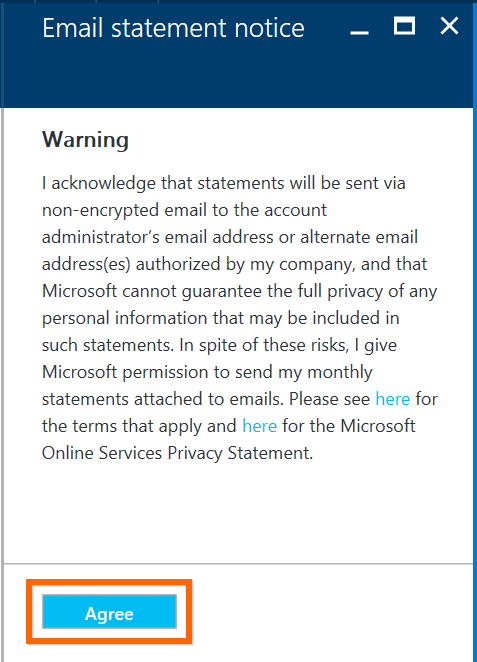
Next you will need to agree to the email statement notice:

image

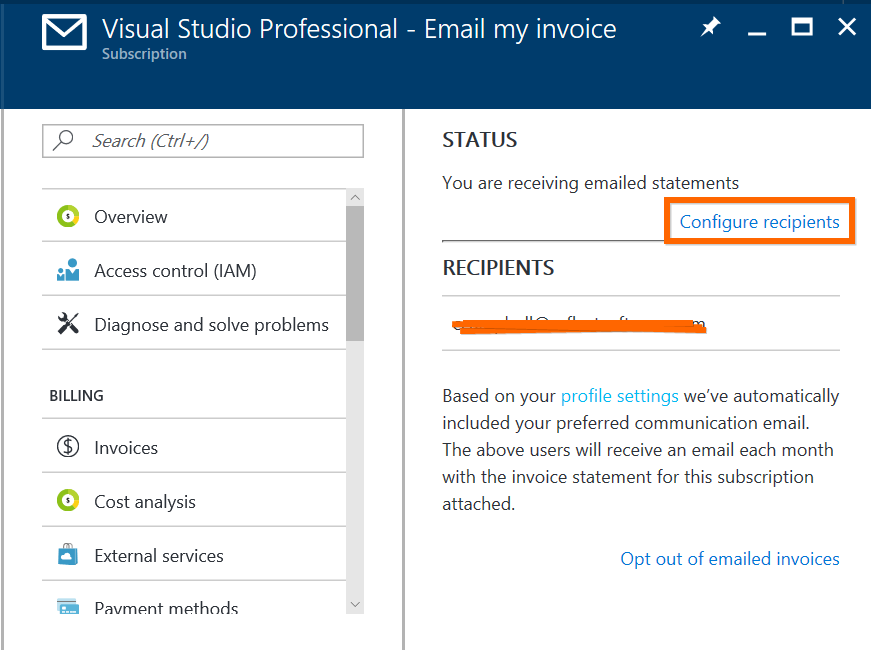
Once you’ve opted in you can configure additional recipients to be added:

image

That’s it!

Enjoy

Azure

Understanding Azure – a guide for developers

image

Microsoft recently published a free e-book on how to develop on Azure. This guides shows you how to use common design scenarios and see how the comprehensive set of application platform services can suit your needs.

Download and check it out now.

Enjoy!

AzureDevelopment

Azure Tools Extension for Visual Studio Code

Came across an awesome Visual Studio Code extension called “Azure Tools for Visual Studio Code” by Brady Gaster. Check it out!

This extension for Visual Studio Code gives Azure developers some convenient commands for creating or accessing resources directly in the editor.

Features

  • Search the Azure QuickStart Templates GitHub repository
  • Download Azure Resource Manager (ARM) template and parameter files to workspace
  • Uses the Azure Resource Manager Tools extension to simplify the template-editing experience
  • ARM template deployment to live Azure subscription
  • Login with Microsoft Account (@hotmail.com, @live.com, etc.)
  • Login with Azure Active Directory (or "Organizational") account
  • Create App Service Web Apps
  • Create App Service Function Apps
  • Create Storage Accounts
  • Get Storage Account connection string
  • Browse to resource in portal
  • Browse to resource group in portal
  • Support for multiple Azure subscriptions
  • Supports all Azure data centers

Each of these commands is visible directly from commands visible in the command palette.

Installation

Azure Tools Extension for Visual Studio Code can be installed from the built-in extension tab in Visual Studio Code. Just search for “Azure Tools” and it will be the first result. Click on the extension and then click on the green “Install” button.

image

This extension is available as an open-source project and can be found in the GitHub repository https://github.com/bradygaster/azure-tools-vscode.

Enjoy!

References

Announcing the Azure Tools Extension for Visual Studio Code

AzureDevelopment

Azure Bot Service (Preview)

dev_botframework

Last week at Microsoft’s Developer Connect(); // 2016 event, a new public cloud bot service powered by Microsoft Bot Framework is now available on Azure called the Azure Bot Service.

The Azure Bot Service will allow you to:

  • Use the Bot Framework with Azure serverless platform to run and scale your bots while only paying for your usage
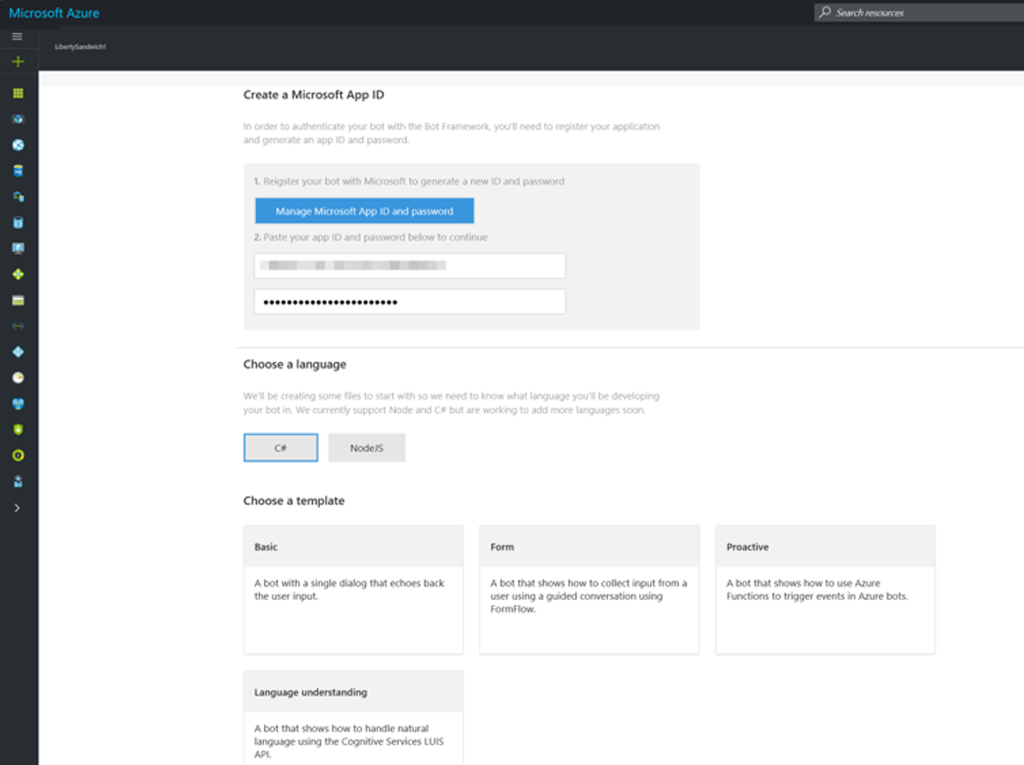
  • Get started quickly with out of the box templates for .NET and Node.js. These templates allow you to create a basic bot, a language understanding bot (LUIS), a form bot or a proactive bot:

image

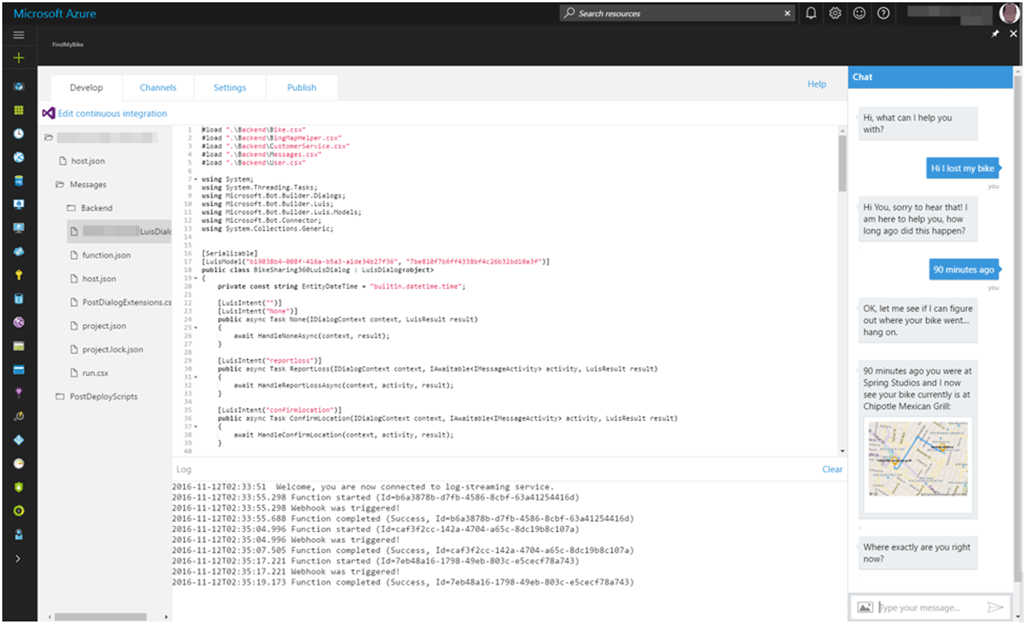
  • Write code for your bot directly in the browser within Azure. You will also be able to test your bot with the included Web Chat control:

image

  • Configure conversation channels
  • Take advantage of integrated continuous deployment (DevOps)

Now more than ever it’s so easy to get started with creating your bots and having them run on Azure.

Enjoy!

References

Azure Bot Service

LUIS: Language Understanding Intelligent Service

AzureDatabase

Azure SQL Database DTU Calculator

When considering an Azure SQL instance, one of the decisions you need to make is the pricing level (Basic, Standard or Premium) and then for the selected level the number of DTU’s you need. Now you might be asking, "which service tier and performance level should I use and how many database throughput units (DTUs) am I using now?" 

First lets look at explaining what a DTU is and then we can look at how the DTU Calculator will help.

What are Database Transaction Units (DTUs)?

“A DTU is a unit of measure of the resources that are guaranteed to be available to a standalone Azure SQL database at a specific performance level within a standalone database service tier. A DTU is a blended measure of CPU, memory, and data I/O and transaction log I/O in a ratio determined by an OLTP benchmark workload designed to be typical of real-world OLTP workloads. Doubling the DTUs by increasing the performance level of a database equates to doubling the set of resource available to that database.”

How can I determine the number of DTUs needed by my workload?

If you are looking to migrate an existing on-premises or SQL Server virtual machine workload to Azure SQL Database, you can use the DTU Calculator to approximate the number of DTUs needed.

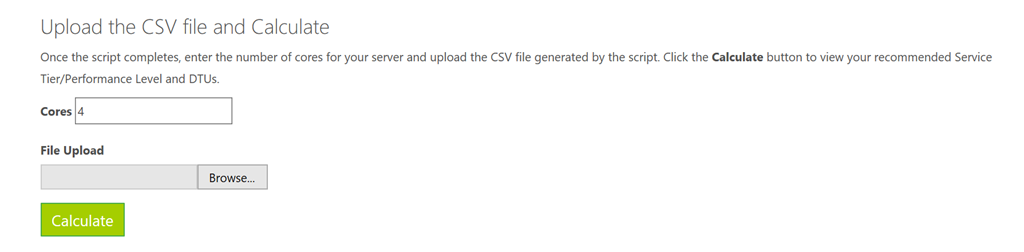
Following the instructions for the DTU Calculator, download either the Command Line Utility or PowerShell Script and run it to measure your server resource utilization. You want to get an hour worth of data.

Once the script completes, go to the DTU Calculator website and enter in the number of cores for your server and then upload the CSV file that was generated. Then click on the “calculate” button as show below.

image

After the DTU Calculator measures your server resource utilization, it will provide you the best recommendation for the number of DTU’s you should be using in Azure SQL.

Resources

AzureDevelopment

Real World Usage for Azure Functions

Came across an excellent blog post from @TroyHunt on using Azure Functions to track abusive IP addresses to a website and log them to an Azure storage account and then have another Azure Function on a timer to validate those IP addresses and block them if necessary.

https://www.troyhunt.com/azure-functions-in-practice/

Enjoy!