
If you’ve ever wondered what happens to your bag after you drop it off at the check-in counter, you’re not alone. There’s an entire world of events firing beneath the surface of every airport, and it turns out it makes for a pretty compelling real-time data scenario.
I recently put together a use case walkthrough on Bringing Real-Time Intelligence to Airport Data Streams using Microsoft Fabric. In this post, I want to break down the architecture, explain the data model, and show how you can build a real-time observability pipeline over something as relatable as baggage tracking.
Why Airports?
Airports are a great analogy for event-driven systems because every action generates a traceable event:
- You book a flight → event
- You check in → event
- You drop off your bag → event
And that bag doesn’t just teleport to the carousel. It travels through a complex network of baggage belts, ramps, weigh stations, scanners, and machinery. It gets loaded onto the plane, unloaded at the destination, sent through customs (maybe), and eventually delivered to the baggage belt — or it gets lost.
Every step is a state change. Every state change is an opportunity to capture data and act on it in real time.
The Event Model
For this use case, I modelled three categories of events published to the stream:
Baggage Events
Airport.Baggage.CheckedInAirport.Baggage.ScreenedAirport.Baggage.InspectedAirport.Baggage.RejectedAirport.Baggage.LoadedAirport.Baggage.UnloadedAirport.Baggage.CustomsClearedAirport.Baggage.WithheldAirport.Baggage.ArrivedAtBeltAirport.Baggage.DeliveredAirport.Baggage.Lost
Flight Operational Events
Airport.Flight.ClosedAirport.Flight.DepartedAirport.Flight.Arrived
Passenger Events
Airport.Passenger.CheckedIn
This structure follows a clean domain-driven naming convention that maps naturally to a topic-per-domain strategy in Event Hubs or Fabric Eventstream.
Real Airports Use Type-B Messages
In the real world, airports and airlines don’t talk to each other over REST APIs or CloudEvents — they use Aviation Type-B messages, a fixed-format ASCII text messaging standard that’s been in use since the 1960s. These messages are transmitted over dedicated aviation networks operated by SITA (Société Internationale de Télécommunications Aéronautiques) and ARINC (now part of Collins Aerospace), and they remain the backbone of operational messaging across the global aviation industry today.
The key Type-B message types that map directly to this use case are:
| Message | Name | Description |
| BSM | Baggage Source Message | Generated at check-in; carries the bag tag number, passenger details, and routing |
| BTM | Baggage Transfer Message | Used for interline transfer bags moving between airlines |
| BPM | Baggage Processed Message | Confirmation that a bag has been processed at a handling point |
| BUM | Baggage Unload Message | Signals that bags have been removed from an aircraft |
| MVT | Movement Message | Communicates flight departure (AD), arrival (AA), and estimated times (ET) |
| LDM | Load Distribution Message | Describes how cargo and baggage are distributed across the aircraft |
| CPM | Container/Pallet Distribution Message | Details the ULD (Unit Load Device) positioning on the aircraft |
IATA Resolution 753
IATA Resolution 753 mandates that airlines track every bag at a minimum of four key touchpoints:
- Passenger handover at check-in
- Loading onto the aircraft
- Delivery to the transfer area (for connecting flights)
- Return to the passenger at arrival
Resolution 753 exists because lost and mishandled bags cost the industry hundreds of millions of dollars annually, and real-time tracking directly reduces that. It came into effect in 2018 and drove significant investment in baggage scanning infrastructure and data exchange across airlines and ground handlers.
Bridging Type-B to Modern Streaming
Here’s where it gets interesting from a platform perspective. Type-B messages carry all the right information — they’re just locked inside a legacy fixed-format protocol on a private network. The modernization opportunity is to parse and bridge those messages into a modern event stream.
In practice, that means something like:
- A SITA or ARINC Type-B feed gets received by a gateway or middleware layer
- Each message is parsed and mapped to a structured event (e.g., a BSM becomes an
Airport.Baggage.CheckedInCloudEvent) - That event is published to Azure Event Hubs or a Fabric Eventstream endpoint
- From there, the full Fabric RTI pipeline takes over
The Baggage Handling Simulator in this demo effectively plays the role of that gateway — it generates CloudEvents that mirror what you’d produce by parsing a real Type-B feed. If you were building this for production, the simulator would be replaced by a Type-B parser wired up to a live SITA or ARINC connection.
Architecture Overview
Here is an overview of the architecture in Microsoft Fabric Real-Time Intelligence:
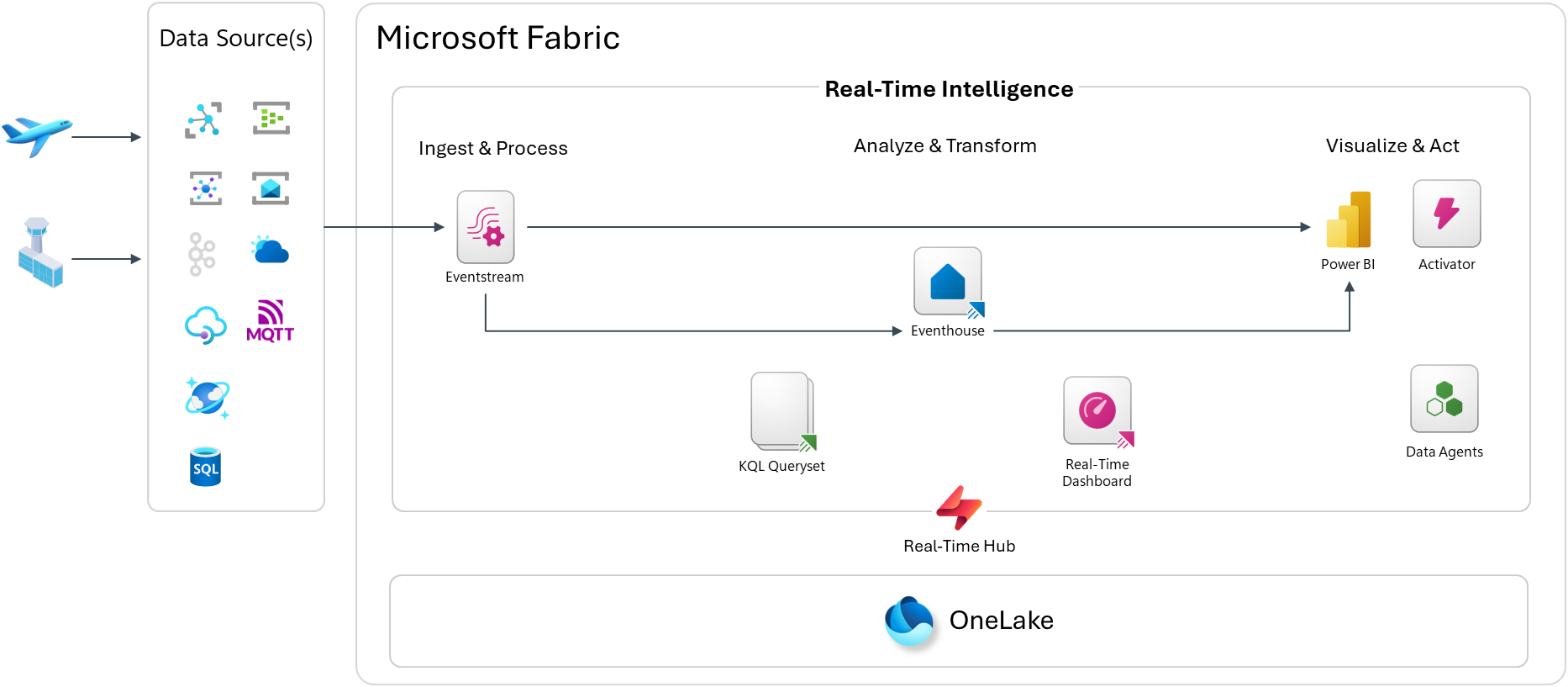
The pipeline follows a standard Ingest → Analyze → Act pattern inside Microsoft Fabric Real-Time Intelligence:
Ingest & Process
Events are published to Azure Event Hubs or directly to a Microsoft Fabric Eventstream endpoint as CloudEvents. The Real-Time Hub acts as the central discovery and governance point for all streaming sources in the workspace.
Eventstream picks up those events and routes them into the Eventhouse — Fabric’s purpose-built KQL database engine optimized for high-throughput, time-series, and log-style workloads.
Inside the Eventhouse, I use a classic Bronze / Silver / Gold medallion layering approach:
- Bronze — raw ingested events, exactly as received
- Silver — cleaned and enriched data via Update Policies (KQL-based transformation rules that fire automatically on ingest)
- Gold — aggregated and pre-computed views via Materialized Views for fast querying
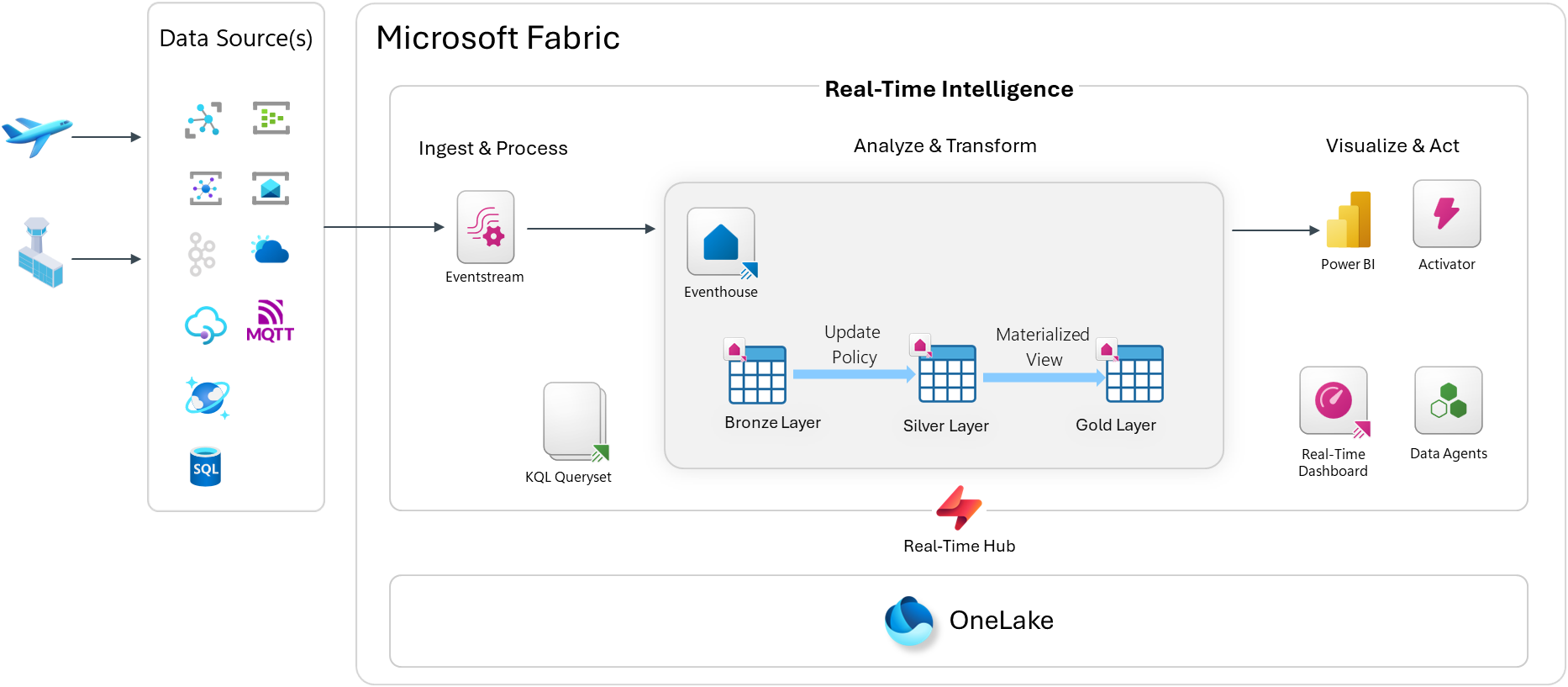
Analyze & Transform
KQL Querysets sit on top of the Eventhouse and let you write ad-hoc and saved queries in Kusto Query Language. KQL is incredibly expressive for time-series data — you can window events, calculate SLAs, detect anomalies, and join across streams with just a few lines.
Visualize & Act
From there, you have a few options:
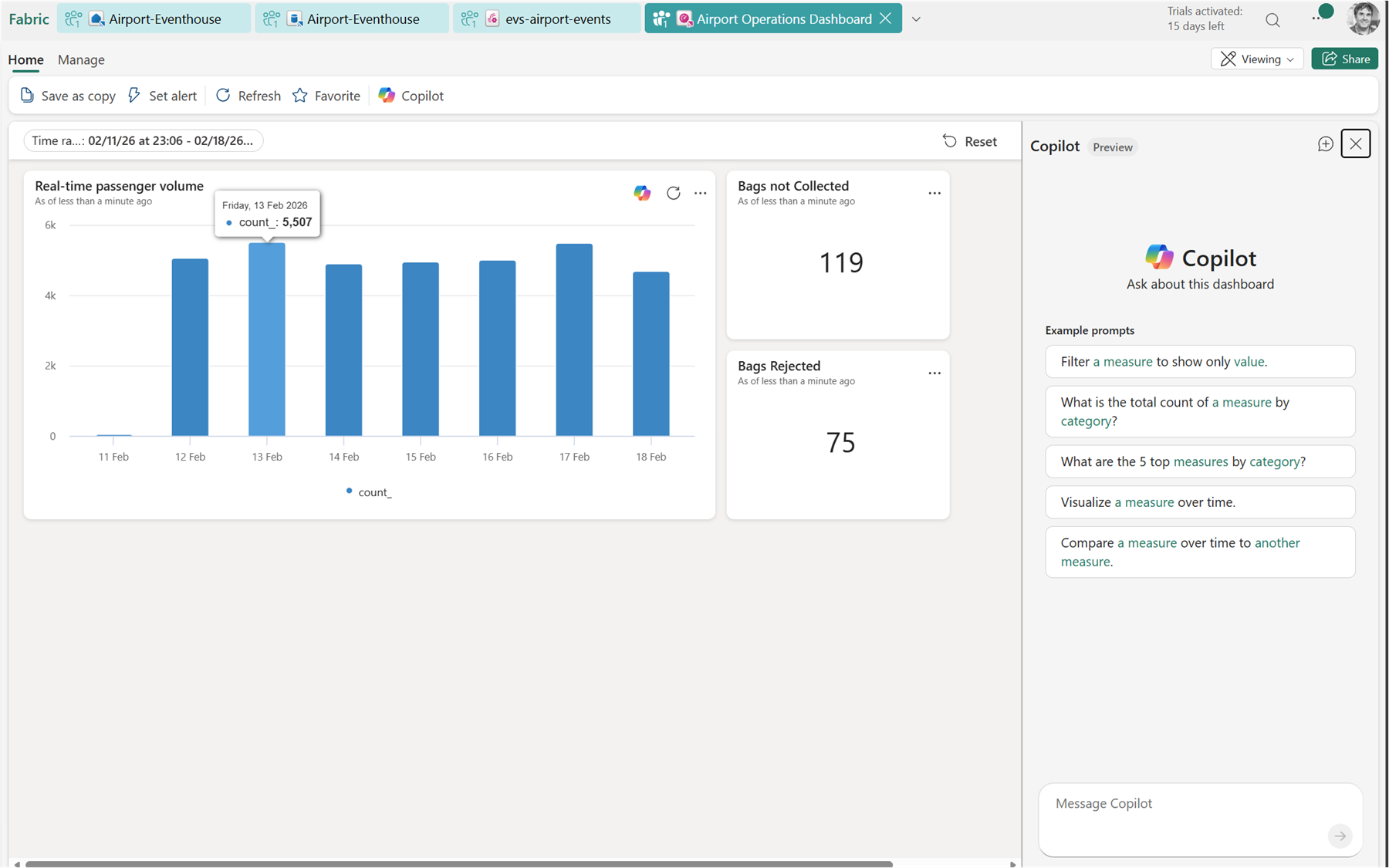
- Real-Time Dashboard — a native Fabric dashboard that auto-refreshes on a schedule or on data change, built directly from KQL queries
- Power BI — for richer semantic model-based reporting or executive dashboards
- Activator — Fabric’s alerting and automation engine; you can define rules like “if a bag hasn’t moved in 30 minutes, fire an alert”
- Data Agents — AI-powered agents that can answer natural language questions over your KQL data
Data can also land in OneLake, so it’s available for downstream batch analytics and data science workloads. This is not enabled by default, so it’s something you would need to turn on.
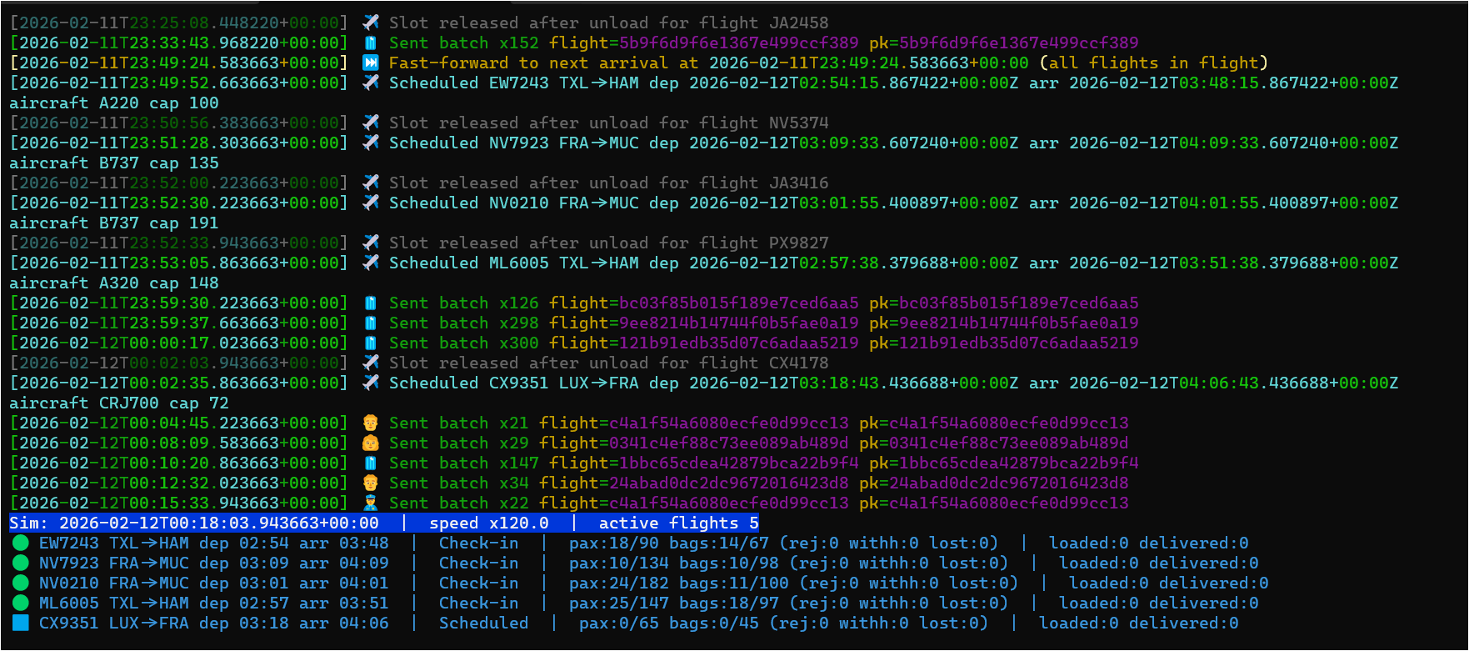
The Baggage Handling Simulator
To drive the demo, I used the Baggage Handling Simulator — a Python CLI built by Clemens Vasters that simulates realistic airport baggage operations. I forked the repository and then adjusted it for Type-B messaging. You can find my fork on GitHub: calloncampbell/BaggageHandling-TypeB-Simulator at feature/type-b-messages
The simulator generates:
- Baggage tracking events (check-in, screening, loading, unloading, delivery)
- Passenger events (check-in, boarding)
- Flight lifecycle events (scheduled, closed, departed, arrived)
Events are published as CloudEvents to either Azure Event Hubs or a Fabric Eventstream endpoint. Flight schedules are also persisted to SQL Server, which gives you a relational anchor to join against your streaming data if needed.
This is a great reference simulator if you want to explore real-time analytics without having to stand up your own IoT or event infrastructure.
Let’s look at the simulator…
Now let’s look at a basic Real-Time Dashboard:
What I Took Away
What I find compelling about this use case is how approachable it is. Most people have been through an airport. Most people have waited anxiously at a baggage belt. That shared experience makes the data model immediately intuitive — and that makes it a great teaching scenario for real-time streaming concepts.
From a Fabric RTI perspective, this use case demonstrates a few things I think are really powerful:
- The medallion pattern works in streaming too. Update Policies and Materialized Views give you that Bronze/Silver/Gold structure without a separate transformation job or orchestration layer.
- KQL is a first-class citizen. It’s not just a query language — it’s the transformation layer, the alerting layer, and the visualization layer.
- Activator closes the loop. Moving from insight to action inside the same platform — without building custom workflows — is genuinely useful.
If you’re interested in exploring Microsoft Fabric Real-Time Intelligence, this airport scenario is a solid and fun way to get started. In Part 2 of this post, I’ll dig into the Fabric Real-Time Intelligence setup.
Enjoy!
References
- Microsoft Fabric Real-Time Intelligence — Official documentation and getting started resources
- Next Real-Time Intelligence Adoption — Adoption guidance and resources
- aka.ms/realtimeintelligence
- aka.ms/nextrtiad
- Baggage Handling Simulator by Clemens Vasters — Python CLI for simulating airport baggage events as CloudEvents
- CloudEvents Specification — Vendor-neutral event format used by the simulator
- IATA Resolution 753 – Baggage Tracking — IATA’s mandate for end-to-end baggage tracking at four key touchpoints
- SITA – Aviation Messaging — Type-B messaging infrastructure for the aviation industry
- Here’s what happens to checked luggage at Pearson Airport | Pearson Airport
 The Flying Maverick