In my Running and Building Azure Functions with Modern .NET talk this week at the Mississauga .NET User Group, one of the topics that consistently gets a reaction from the audience is Central Package Management (CPM). Once I show people what it does, the reaction is almost always the same: “I didn’t know this existed — I need to go add this to all my solutions.”
This post is the written companion to that section of the talk. If you’ve ever dealt with the pain of keeping NuGet package versions in sync across a large solution, CPM is going to be immediately relevant to you.
What is Central Package Management?
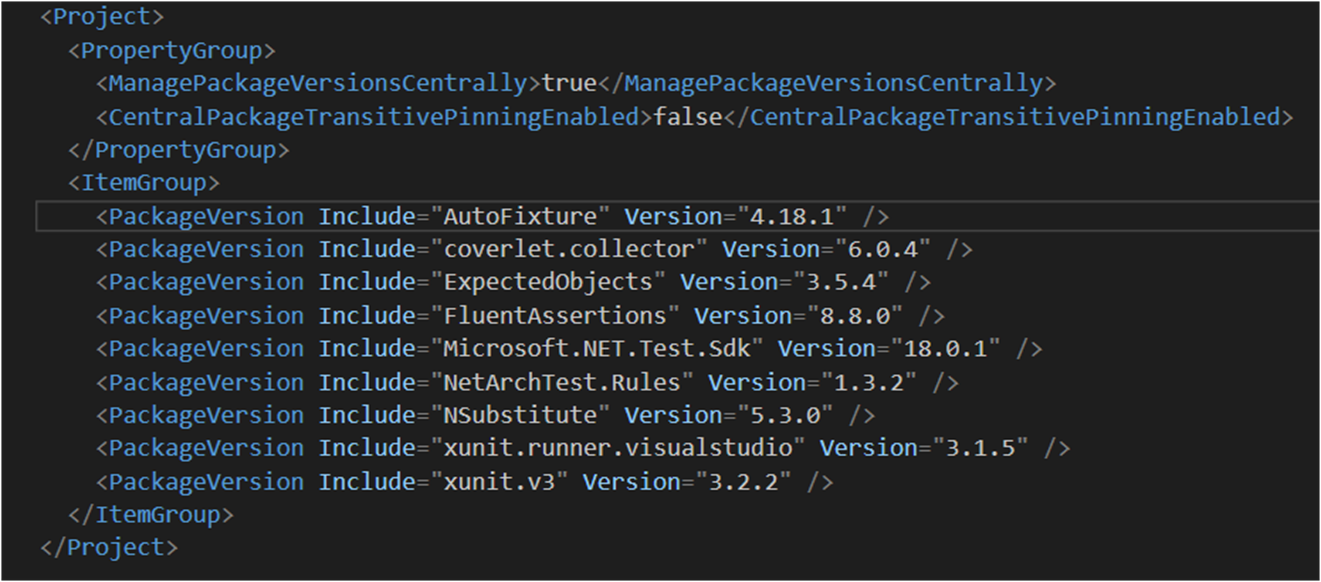
Central Package Management is a built-in .NET feature that lets you define all NuGet package versions in a single place — a Directory.Packages.props file at the solution root — rather than scattering Version attributes across individual .csproj files.
Here’s a simple example of what that file looks like:
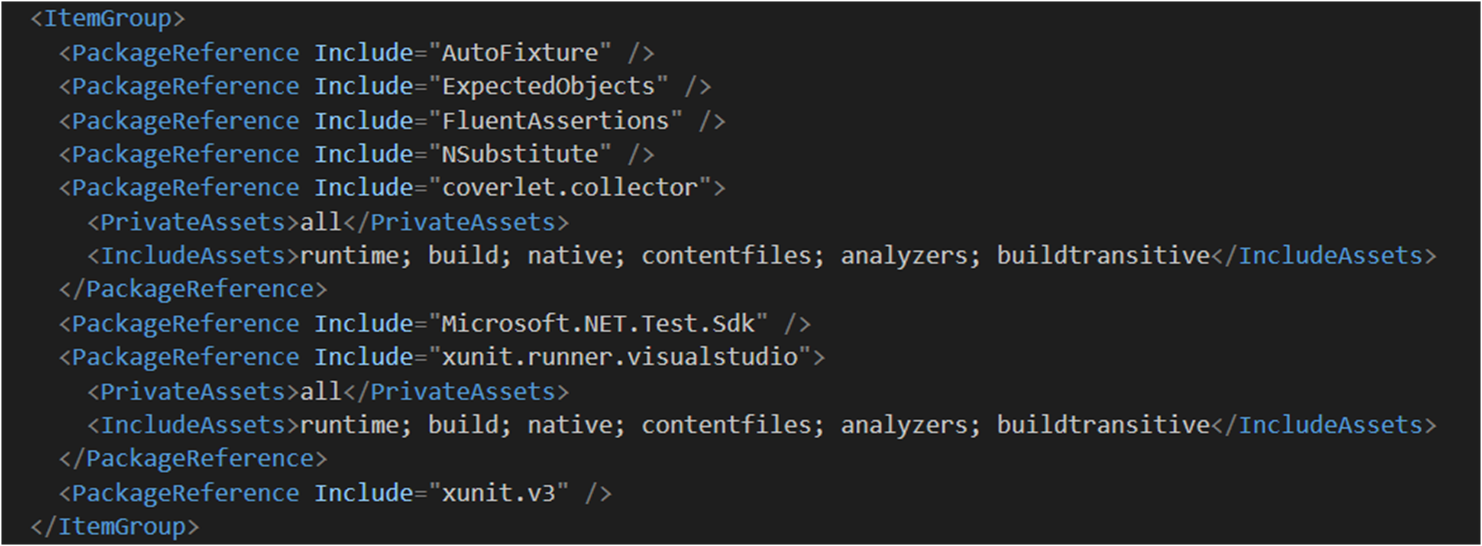
The version is automatically resolved from the central file. Clean, simple, and immediately obvious what version you’re on when you look at the central file.
Why This Matters
In a solution with many projects, keeping package versions in sync manually is error-prone. You end up with Project A on Newtonsoft.Json 13.0.1 and Project B on 13.0.3 without anyone really noticing until a subtle runtime difference bites you. CPM solves this by making version drift impossible — there’s one place to look and one place to change.
Benefits at a glance:
Single source of truth for all package versions in the solution
Eliminates version drift across projects
Cleaner .csproj files — no version attributes cluttering your package references
Supports both direct and transitive dependency version control
Manually Migrate an Existing Solution to CPM
If you already have a solution with a bunch of projects, migrating to CPM is straightforward but can be tedious to do by hand across many .csproj files. Here’s the approach:
Step 1: Create Directory.Packages.props
At the root of your solution, create a Directory.Packages.props file with ManagePackageVersionsCentrally set to true and consolidate all your package versions as <PackageVersion> entries:
Strip the Version attribute from every <PackageReference> in your .csproj files. If you have many projects, do this with the CentralisedPackageConverter CLI tool (covered below) — don’t do it by hand.
Step 3: Validate and Build
Build your solution and confirm everything resolves correctly. Pay attention to any packages that may have conflicting versions across projects — those will need a conscious decision about which version to standardize on.
This is great, but there must be a better way. Let’s take a look at a community tool that automates this process.
Using the CentralisedPackageConverter CLI Tool
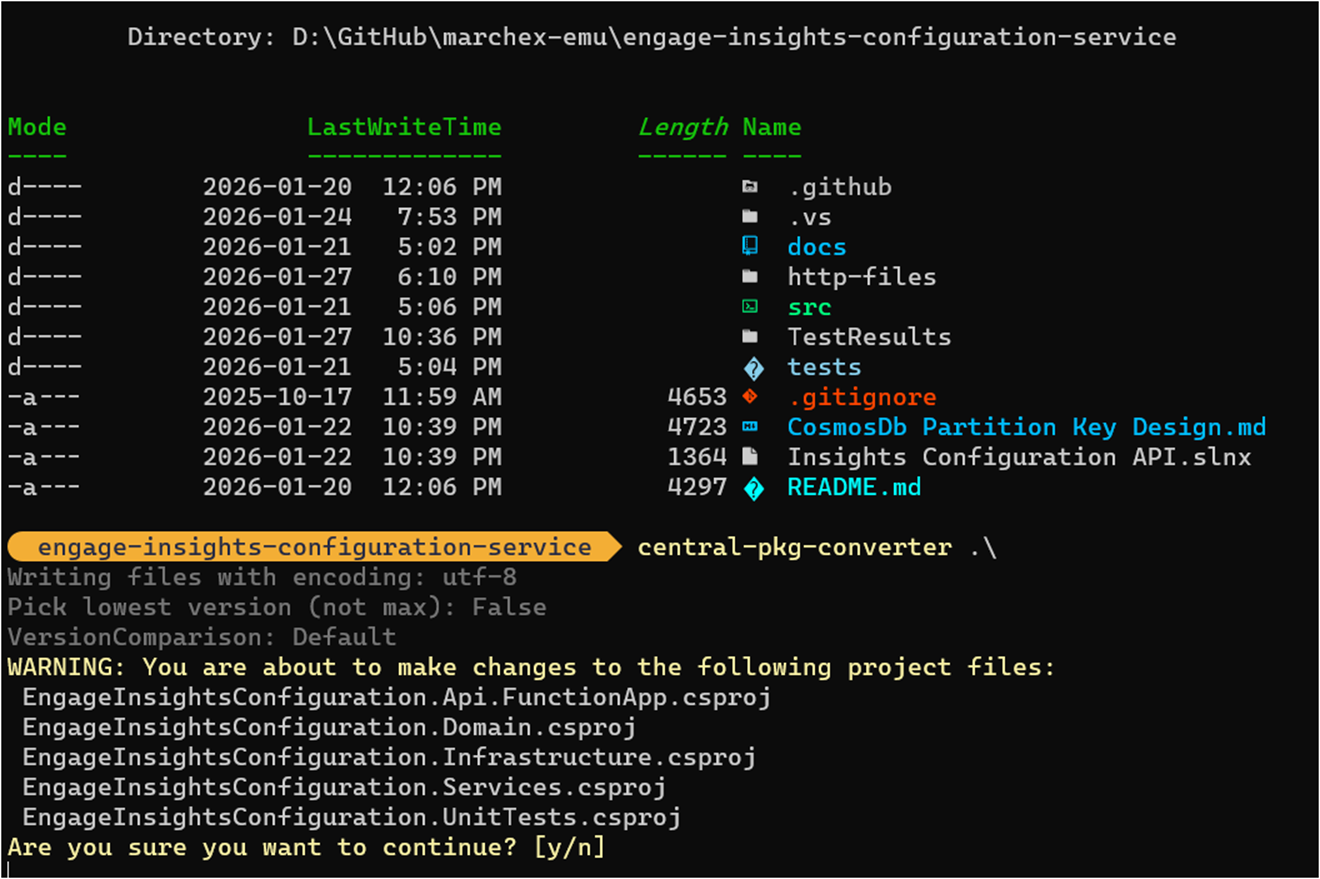
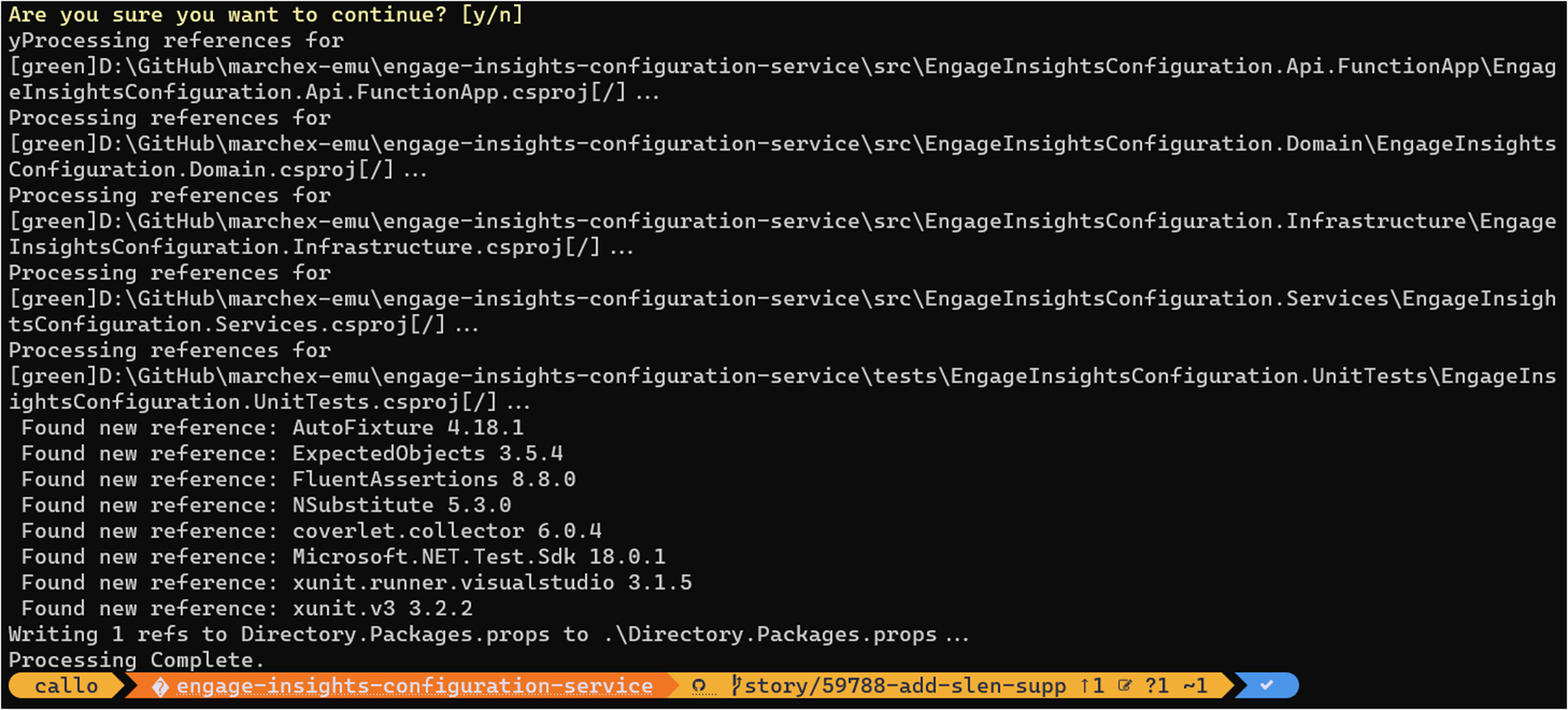
The best way to handle the migration for an existing solution is the CentralisedPackageConverter CLI tool, which automates the tedious parts:
Generate a Directory.Packages.props with all discovered versions
Remove version attributes from individual project files
I highly recommend using this over a manual migration. It’s fast and reduces the chance of missing something.
Let’s try this out.
We now have a Directory.Packages.props with all discovered versions:
And if we look in our project files, the versions are removed:
Advanced Features
Once you’re on CPM, there are a few additional capabilities worth knowing about.
Overriding Versions per Project
There are situations where a specific project needs a different version of a package than the rest of the solution — say, a legacy integration that can’t move to the latest version yet. CPM handles this with VersionOverride in the individual project file:
Use this sparingly. Its presence in a project file is a signal that something needs attention.
Different Versions per Target Framework
If you have a multi-targeted project, you can conditionally apply different versions by target framework using standard MSBuild conditions within Directory.Packages.props:
This one quietly solves a very real problem. Version drift caused by transitive dependencies — packages your packages depend on — is easy to miss and can cause subtle compatibility issues. CPM supports pinning transitive dependencies centrally, so you stay in control of the full dependency graph, not just the packages you reference directly.
Summary
Central Package Management is one of those features that makes you wonder how you managed without it once you adopt it. If you’re running a multi-project .NET solution, this is a straightforward improvement with immediate payoff — consistent package versions, cleaner project files, and a single place to make dependency updates.
In my Running and Building Azure Functions with Modern .NET talk this week at the Mississauga .NET User Group, I closed out the .NET tooling section with a quick look at the new .slnx solution file format. It’s one of those changes that doesn’t get a lot of attention but makes day-to-day .NET development noticeably more pleasant — especially if you’ve ever dealt with a gnarly merge conflict in a .sln file.
This post walks through what .slnx is, why it’s better than the traditional .sln format, and how to migrate.
What’s Wrong with .sln?
If you’ve worked with Visual Studio solutions for any length of time, you’ve almost certainly encountered the pain points with .sln files. They’ve been around since the early 2000s and they work — but they come with a set of frustrations that have never really been addressed:
They’re nearly unreadable — the format uses GUIDs and magic identifiers that aren’t intuitive at all
Merging is painful — a .sln file being touched by two developers at the same time is a merge conflict waiting to happen
Tooling struggles with them — custom scripts or CI tooling that needs to parse a .sln file often resorts to fragile string manipulation
Here’s a snippet of a traditional .sln to illustrate:
That’s it. No GUIDs. No magic identifiers. No indecipherable global sections. Just a clean XML file that clearly describes what’s in the solution.
Why It’s Better
Better readability — the XML structure is immediately understandable. Any developer can open a .slnx file and know exactly what’s in the solution without reverse-engineering the format.
Simplified merging — because it’s XML with simple, meaningful elements rather than a blob of GUIDs and platform strings, merge conflicts in .slnx files are much easier to resolve. In most cases, merging two developers’ changes to the solution file becomes a trivial diff.
Easier parsing — if you write build scripts, CI automation, or any tooling that needs to know what projects are in a solution, parsing a .slnx file is now just standard XML parsing. Reliable and straightforward.
Converting from .sln to .slnx
The .NET CLI makes the migration trivially easy. From your solution folder, run:
dotnet sln migrate
From Visual Studio 2022
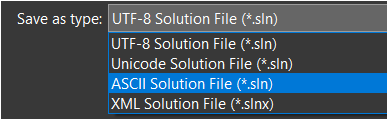
Go to File and save your solution file as…and select the XML Solution File format.
Before You Migrate
A few things to check before running the migration:
Commit your existing .sln file to source control before converting — gives you a clean rollback point if anything looks off.
Make sure your entire team is on a compatible toolchain — .NET SDK 9.0.200 or later, and a recent version of Visual Studio 2022 or Visual Studio 2026. Anyone still on an older setup won’t be able to open the solution until they update.
If you have CI/CD pipelines that parse or manipulate the .sln file directly (not uncommon in larger teams), update those to handle .slnx before you switch over.
Should You Migrate?
My honest take is yes, especially for new solutions. For existing solutions, there’s no urgency — your .sln files aren’t going anywhere — but if you’re already bumping into merge conflict pain or your solution file is getting unwieldy, the migration is trivially easy, and the payoff is immediate.
For new projects, I’d start with .slnx from day one. In fact if you’ve migrated over to Visual Studio 2026 it’s now the default options. It’s the better format, it’s supported by all current tooling, and you’ll thank yourself later.
Summary
The .slnx solution file format is a small change with a noticeably positive impact on day-to-day .NET development. XML-based, human-readable, merge-friendly, and trivially easy to adopt — there’s very little reason not to switch. Combined with Central Package Management and the new Azure Functions FunctionsApplication builder, these three improvements together represent a meaningfully cleaner modern .NET development experience.
In my Running and Building Azure Functions with Modern .NET talk last week at the Mississauga .NET User Group, the session covered a handful of topics that I think every .NET developer building on Azure Functions should know about — upgrading to .NET 10, centralizing package management, and the new solution file format. This is the first in a short series of posts walking through each of those topics. Let’s start with .NET 10 support in Azure Functions and what’s new.
.NET 10 is Now Supported in Azure Functions
Azure Functions now supports .NET 10 on runtime version 4.x, and it’s a big deal for anyone who cares about building modern, long-lived serverless applications. .NET 10 support runs until November 14, 2028, so you’ve got a solid runway once you’re on it.
A few things to keep in mind before you start your upgrade:
Only the isolated worker model supports .NET 10. The in-process model is not receiving a .NET 10 update and reaches end of support on November 10, 2026. If you haven’t started migrating off in-process, that date should be your motivation to get moving.
.NET 10 runs on Functions 4.x across most hosting plans. The one exception is Linux Consumption, which will not receive .NET 10 support. If that’s your current plan, Flex Consumption is the migration target.
The base container images have shifted from Debian to Ubuntu with .NET 10. If you have custom container builds, verify this against the official release notes before upgrading.
Minimum package versions required for .NET 10:
Package
Minimum Version
Microsoft.Azure.Functions.Worker
2.50.0
Microsoft.Azure.Functions.Worker.Sdk
2.0.5
Make sure you’re on at least these versions or the runtime will not load correctly.
Before You Upgrade — Quick Checklist
[ ] Confirm you’re on the isolated worker model (not in-process)
[ ] Confirm your hosting plan supports .NET 10 (see above)
[ ] Update Microsoft.Azure.Functions.Worker and Microsoft.Azure.Functions.Worker.Sdk to the minimum versions above
[ ] If migrating from in-process: swap Microsoft.NET.Sdk.Functions for Microsoft.Azure.Functions.Worker.Sdk, and replace Microsoft.Azure.WebJobs.* packages with Microsoft.Azure.Functions.Worker.Extensions.* equivalents
[ ] Verify your HTTP integration choice (see builder pattern section below)
[ ] Test locally with Azure Functions Core Tools v4
The New FunctionsApplication Builder Pattern
The biggest developer-facing change in .NET 10 (and technically available since .NET 8 with certain configurations) is the switch to the FunctionsApplication.CreateBuilder pattern. If you’ve been building with the older HostBuilder approach, this will feel familiar but noticeably cleaner.
Note:ConfigureFunctionsWebApplication() is for functions apps that use ASP.NET Core HTTP integration — it wires up the ASP.NET Core middleware pipeline. If your app is non-HTTP (queue triggers, timers, Service Bus, etc.) and you don’t need that integration, use ConfigureFunctionsWorkerDefaults() instead. Most starter templates will choose the right one, but it’s worth knowing what each does.
It’s a small surface area change but the intent is meaningful. Let me walk through why this matters.
Alignment with ASP.NET Core
ASP.NET Core has used WebApplication.CreateBuilder(args) since .NET 6. Azure Functions now mirrors this with FunctionsApplication.CreateBuilder(args). This consistency across .NET workloads is genuinely helpful — developers who work on both web APIs and Azure Functions no longer need to context-switch between two different initialization mental models.
Direct Access to the Services Collection
The old pattern required you to register services inside a ConfigureServices callback, which added an extra layer of nesting. With the new pattern, you access builder.Services directly — just like you would in an ASP.NET Core Program.cs. Cleaner, more readable, and easier to reason about.
Modern .NET Host Builder Infrastructure
Under the hood, the new pattern is built on HostApplicationBuilder, the modern hosting infrastructure introduced in .NET 6+. This brings with it better performance, improved configuration ordering, and enhanced hosting abstractions. It’s part of Microsoft’s broader effort to unify .NET across web apps, Azure Functions, Worker Services, and other application types — and honestly, it’s a move in the right direction.
If you’re migrating off Linux Consumption — or just evaluating where to run modern Azure Functions — Flex Consumption is where the platform is headed and worth understanding alongside your .NET 10 upgrade.
Flex Consumption is a Linux-based hosting plan built on a new backend internally called Legion. It keeps the serverless pay-for-what-you-use billing model you’re used to, but it adds a lot more control:
Scale to hundreds of instances in under a minute
Up to 1,000 scale-out instances (note: scale-out instances and per-instance concurrency are separate concepts — you configure concurrency independently)
Configurable per-instance concurrency
VNET integration with scale-to-zero still supported
Always-ready instances that reduce cold-start latency (optional; default is 0, so you pay only when you need them)
Multiple memory size options
Availability Zones support
If you’re building anything serious on Azure Functions right now, Flex Consumption paired with .NET 10 is where I’d be pointing you.
Summary
.NET 10 support in Azure Functions is a worthwhile upgrade. The migration from in-process to isolated worker model is no longer optional — with end of support coming November 2026 you need a plan. And once you’re on isolated worker with .NET 10, the new FunctionsApplication builder pattern makes initialization cleaner and more aligned with the rest of the .NET ecosystem. Pair that with a move to Flex Consumption and you’ve got a solid, modern foundation for your serverless workloads.
In the next posts in this series I’ll cover Central Package Management and the new SLNX solution file format — two more improvements that make the .NET developer experience noticeably better.
José Simões’ new book, Embedded Systems with nanoFramework, is a milestone for anyone who’s ever wanted to bring the power and comfort of C# into the world of microcontrollers. What I love about this work is how it breaks down the traditional barriers of embedded development—complex toolchains, steep learning curves, and hardware‑specific code—and replaces them with a modern, flexible, developer‑friendly approach.
At its core, the book shows how the .NET nanoFramework lets you build IoT and embedded solutions quickly, cleanly, and affordably. You can prototype in hours, adapt to customer needs on the fly, and move across ESP32.
José brings deep experience as the founder of the nanoFramework and a multi‑year Microsoft MVP, and it shows.
For a deeper dive on the book, checkout Sander’s post where he goes more in depth.
It’s that time of year for Microsoft Ignite and during this conference we usually see updates across a number of Azure services. If there’s one Azure service I always keep a close eye on, it’s Azure Functions. It sits squarely in my primary area of focus — Azure PaaS — and the Ignite 2025 announcements from the team were genuinely impressive. I won’t rehash the full product announcement here (the Azure Functions team blog post does that well), but I do want to call out the things that caught my attention and explain why they matter from where I sit.
Functions is Becoming the AI Execution Layer
Reading through the announcements, I like that Microsoft is positioning Azure Functions as a natural runtime for AI workloads — specifically MCP servers and agent-hosted tools. There are two distinct paths here worth separating:
GA: Author MCP tool servers using the familiar Functions triggers-and-bindings model — Functions handles the protocol mechanics and scaling.
Preview: Host existing official MCP SDK servers directly on Functions without rewriting them as triggers.
The GA path is the more practical entry point for most teams. It means you can build remote MCP servers using patterns you already know, and Functions handles all the protocol mechanics and scaling underneath.
There’s also built-in authentication via Entra ID and OpenID Connect for MCP servers, which addresses the main gap from the early preview. Worth noting: authorization currently secures access at the server level, not per individual tool, and fine-grained per-resource-management (PRM) authorization is still in preview. Good progress, but something to factor in before going all-in on this for production workloads.
Flex Consumption Keeps Getting Better
Azure Functions Flex Consumption is the new default hosting model and it’s the right hosting choice for most new Azure Functions workloads. The Ignite 2025 updates reinforce that view. A few highlights:
512 MB instance size is now GA — right-sizing lighter workloads without paying for more memory than you need
Availability Zones is now GA — the last real holdout for production-critical workloads is gone
Rolling updates hit public preview — zero-downtime deployments by setting a single property; in-flight executions drain naturally before instances are replaced
That last one is worth keeping an eye on, but it’s still public preview and not recommended for production yet. There are also real caveats to be aware of: deployments need to be backward-compatible (especially important with Durable Functions), and single-instance apps can still see brief downtime during rollover. Still, zero-downtime deployment of Azure Functions has been a frequent customer ask and the direction is right. Outside of the Flex Consumption, we could use Deployment Slots for zero downtime deployments.
Durable Functions + AI Agents
The durable task extension for Microsoft Agent Framework is something I’ll be watching closely. The idea is straightforward: bring Durable Functions’ proven crash-resilient, distributed execution model into the Agent Framework. That means AI agents that survive restarts, maintain session context, and support human-in-the-loop patterns — all without consuming compute while waiting.
Key features of the durable task extension include:
Serverless Hosting: Deploy agents on Azure Functions with auto-scaling from thousands of instances to zero, while retaining full control in a serverless architecture.
Automatic Session Management: Agents maintain persistent sessions with full conversation context that survives process crashes, restarts, and distributed execution across instances
Human-in-the-Loop with Serverless Cost Savings: Pause for human input without consuming compute resources or incurring costs
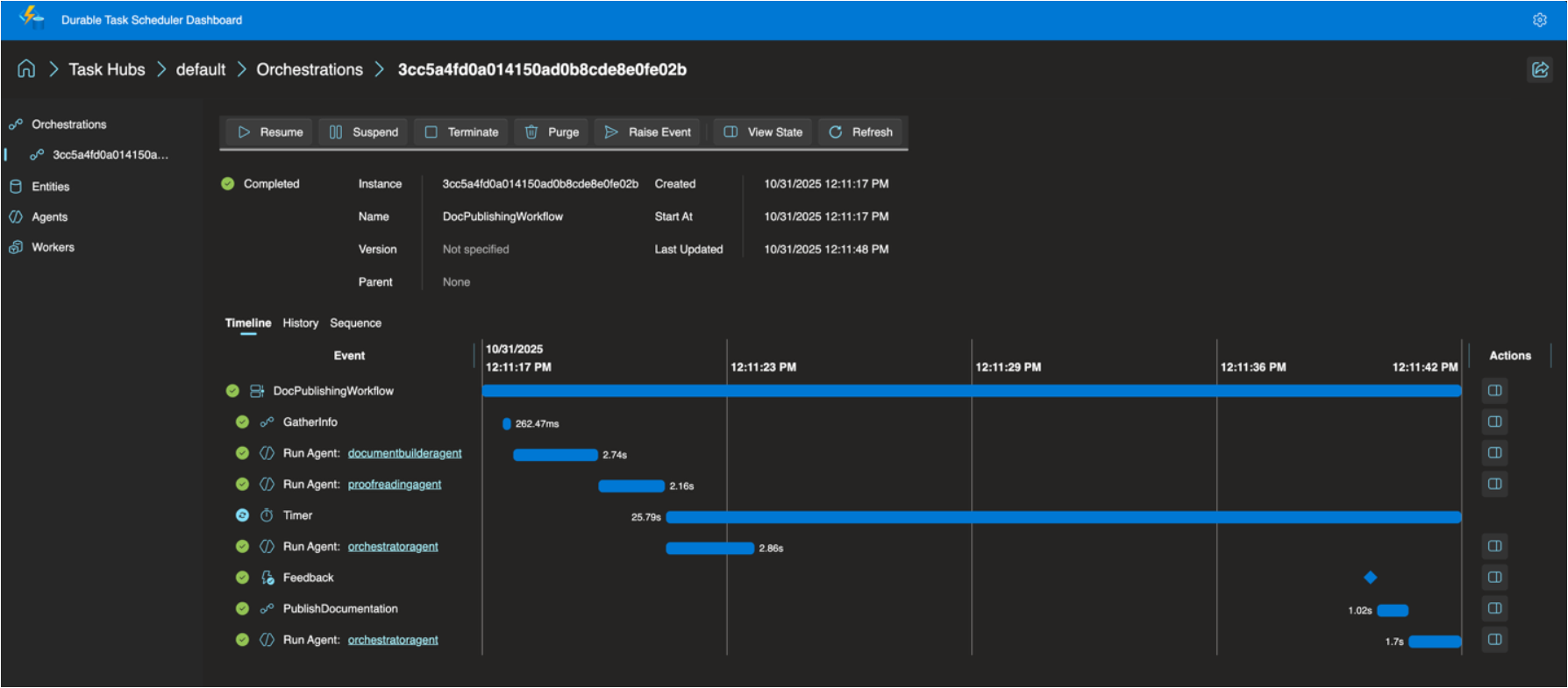
Built-in Observability with Durable Task Scheduler: Deep visibility into agent operations and orchestrations through the Durable Task Scheduler UI dashboard
For anyone building multi-step AI workflows where reliability and state management matter, this is worth understanding. The announcement post has more detail.
The Durable Task Scheduler Dedicated SKU also reached GA, which is good news for teams running complex, steady-state orchestrations that need predictable pricing and advanced monitoring. For context, the Durable Task Scheduler is the managed orchestration backend that powers Durable Functions execution — GA of the Dedicated SKU means production-grade support and SLAs for it. A serverless Consumption SKU for the scheduler is now in preview too.
OpenTelemetry GA
OpenTelemetry support for Azure Functions is now generally available. This one has been a long time coming. Logs, traces, and metrics through open standards — vendor-neutral, broadly supported, consistent with how the rest of your distributed system is already instrumented. Support spans .NET (isolated), Java, JavaScript, Python, PowerShell, and TypeScript. If your Functions apps are still relying on Application Insights SDK directly (I think that’s most of our apps), it’s worth looking at the OpenTelemetry migration docs. I’ll have to look at a follow-up post about this specifically.
A Few Other Things Worth Knowing
.NET 10 is now supported in the isolated worker model across all plans except Linux Consumption. The in-process model is not getting .NET 10 and reaches end of support November 10, 2026 — if you haven’t started that migration, now is the time.
Aspire 13 ships an updated preview of the Functions integration (acting as a release candidate), with GA expected in Aspire 13.1. It deploys directly to Azure Functions on Container Apps.
Java 25 and Node.js 24 were announced in preview at Ignite — check current docs for latest GA status.
There’s more in the full product update — including details on security improvements, new regions, Key Vault App Config references, and the self-hosting MCP SDK preview — than I’ve covered here. I’d recommend reading through the Azure Functions Ignite 2025 Update directly if you want the complete picture.
What is the Book of News? The Microsoft Build 2024 Book of News is your guide to the key news items announced at Build 2024.
As expected there is a lot of focus on Azure and AI, followed by Microsoft 365, Security, Windows, and Edge & Bing. This year the book of news is interactive instead of being a PDF.
Some of my favourite announcements
Azure Cloud Native and Application Platform
Azure Functions
Microsoft Azure Functions is launching several new features to provide more flexibility and extensibility to customers in this era of AI.
Features now in preview include:
A Flex Consumption plan that will give customers more flexibility and customization without compromising on available features to run serverless apps.
Extension for MicrosoftAzure OpenAIService that will enable customers to easily infuse AI in their apps. Customers will be able to use this extension to build new AI-led apps like retrieval-augmented generation, text completion and chat assistant.
Visual Studio Code for the Web will provide a browser-based developer experience to make it easier to get started with Azure Functions. This feature is available for Python, Node and PowerShell apps in the Flex Consumption hosting plan.
Features now generally available include:
Azure Functions on Azure Container Apps lets developers use the Azure Container Apps environment to deploy multitype services to a cloud-native solution designed for centralized management and serverless scale.
Dapr extension for Azure Functions enables developers to use Dapr’s powerful cloud native building block APIs and a large array of ecosystem components in the native and friendly Azure Functions triggers and bindings programming model. The extension is available to run on Azure Kubernetes Service and Azure Container Apps.
Azure Container Apps
Microsoft Azure Container Apps will include dynamic sessions, in preview, for AI app developers to instantly run large language model (LLM)-generated code or extend/customize software as a service (SaaS) apps in an on-demand, secure sandbox.
Customers will be able to mitigate risks to their security posture, leverage serverless scale for their apps and save months of development work, ongoing configurations and management of compute resources that reduce their cost overhead. Dynamic sessions will provide a fast, sandboxed, ephemeral compute suitable for running untrusted code at scale.
Additional new features, now in preview, include:
Support for Java: Java developers will be able to monitor the performance and health of apps with Java metrics such as garbage collection and memory usage.
Microsoft .NET Aspire dashboard: With dashboard support for .NET Aspire in Azure Container Apps, developers will be able to access live data about projects and containers in the cloud to evaluate the performance of .NET cloud-native apps and debug errors.
Azure App Service
Microsoft Azure App Service is a cloud platform to quickly build, deploy and run web apps, APIs and other components. These capabilities are now in preview:
Sidecar patterns is a way to add extra features to the main app, such as logging, monitoring and caching, without changing the app code. Users will be able to run these features alongside the app and it is supported for both source code and container-based deployments.
WebJobs will be integrated with Azure App Service, which means they will share the same compute resources as the web app to help save costs and ensure consistent performance. WebJobs are background tasks that run on the same server as the web app and can perform various functions, such as sending emails, executing bash scripts and running scheduled jobs.
GitHub Copilot skills for Azure Migrate will enable users to ask questions like, “Can I migrate this app to Azure?” or “What changes do I need to make to this code?” to get answers and recommendations from Azure Migrate. GitHub Copilot licenses are sold separately.
These capabilities are now generally available:
Automatic scaling continuously adjusts the number of servers that run apps based on a combination of demand and server utilization, without any code or complex scaling configurations. This helps users handle dynamically changing site traffic without over-provisioning or under-provisioning the app’s server resources.
Availability zones are isolated locations within an Azure region that provide high availability and fault tolerance. Enabling availability zones lets users take advantage of the increased service level agreement (SLA) of 99.99%. For more information, reference the SLA for App Service.
TLS 1.3 encryption, the latest version of the protocol that secures communication between apps and the clients, offers faster and more secure connections, as well as better compatibility with modern browsers and devices.
Azure Static Web Apps
To help customers deliver more advanced capabilities, Microsoft Azure Static Web Apps will offer a dedicated pricing plan, now in preview, that supports enterprise-grade features for enhanced networking and data storage. The dedicated plan for Azure Static Web Apps will utilize dedicated compute capacity and will enable:
Network isolation to enhance security.
Data residency to help customers comply with data management policies and requirements.
Enhanced quotas to allow for more custom domains within an app service plan.
“Always-on” functionality for Azure Static Web Apps managed functions, which provide built-in API endpoints to connect to backend services.
Azure Logic Apps
Microsoft Azure Logic Apps is a cloud platform where users can create and run automated workflows with little to no code. Updates to the platform include:
An enhanced developer experience:
Improved onboarding experience in Microsoft Visual Studio Code: A simplified extension installation experience and improvements on project start and debugging are now generally available.
Logic Apps Standard deployment scripting toolsin Visual Studio Code: This feature will simplify the process of setting up a continuous integration/continuous delivery (CI/CD) process for Logic Apps Standard by providing support in the tooling to generalize common metadata files and automate the creation of infrastructure scripts to streamline the task of preparing code for automated deployments. This feature is in preview.
Support for Zero Downtime deployment scenarios: This will enable Zero Downtime deployment scenarios for Logic Apps Standard by providing support for deployment slots in the portal. This update is in preview.
Expanded functionality and compatibility with Logic Apps Standard:
.NET Custom Code Support: Users will be able to extend low-code workflows with the power of .NET 8 by authoring a custom function and calling from a built-in action within the workflow. This feature is in preview.
Logic Apps connectors for IBM mainframe and midranges: These connectors allow customers to preserve the value of their workloads running on mainframes and midranges by allowing them to extend to the Azure Cloud without investing more resources in the mainframe or midrange environments using Azure Logic Apps. This update is generally available.
Other updates, in preview, include Azure Integration account enhancements and Logic Apps monitoring dashboard.
Azure API Center
Microsoft Azure API Center, now generally available, provides a centralized solution to manage the challenges of API sprawl, which is exacerbated by the rapid proliferation of APIs and AI solutions. The Azure API Center offers a unified inventory for seamless discovery, consumption and governance of APIs, regardless of their type, lifecycle stage or deployment location. This enables organizations to maintain a complete and current API inventory, streamline governance and accelerate consumption by simplifying discovery.
Azure API Management
Azure API Management has introduced new capabilities to enhance the scalability and security of generative AI deployments. These include the Microsoft Azure OpenAI Service token limit policy for fair usage and optimized resource allocation, one-click import of Azure OpenAI Service endpoints as APIs, a Load Balancer for efficient traffic distribution and a Circuit breaker to protect backend services.
Other updates, now generally available, include first-class support for OData API type, allowing easier publication and security of OData APIs, and full support for gRPC API type in self-hosted gateways, facilitating the management of gRPC services as APIs.
Azure Event Grid
Microsoft Azure Event Grid has new features that are tailored to customers who are looking for a pub-sub message broker that can enable Internet of Things (IoT) solutions using MQTT protocol and can help build event-driven apps. These capabilities enhance Event Grid’s MQTT broker capability, make it easier to transition to Event Grid namespaces for push and pull delivery of messages, and integrate new sources. Features now generally available include:
Use the Last Will Testament feature, in compliance with MQTT v5 and MQTT v.3.1.1 specifications, so apps receive notifications when clients get disconnected, enabling management of downstream tasks to prevent performance degradation.
Create data pipelines that utilize both Event Grid Basic resources and Event Grid Namespace Topics (supported in Event Grid Standard). This means customers can utilize Event Grid namespace capabilities, such as MQTT broker, without needing to reconstruct existing workflows.
Support new event sources, such as Microsoft Entra ID and Microsoft Outlook, leveraging Event Grid’s support for the Microsoft Graph API. This means customers can use Event Grid for new use cases, like when a new employee is hired or a new email is received, to process that information and send to other apps for more action.
Azure Data Platform
Real-Time Intelligence in Microsoft Fabric
The new Real-Time Intelligence within Microsoft Fabric will provide an end-to-end software as a service (SaaS) solution that will empower customers to act on high volume, time-sensitive and highly granular data in a proactive and timely fashion to make faster and more-informed business decisions. Real-Time Intelligence, now in preview, will empower user roles such as everyday analysts with simple low-code/no-code experiences, as well as pro developers with code-rich user interfaces.
Features of Real-Time Intelligence will include:
Real-Time hub, a single place to ingest, process and route events in Fabric as a central point for managing events from diverse sources across the organization. All events that flow through Real-Time hub will be easily transformed and routed to any Fabric data stores.
Event streams that will provide out-of-the-box streaming connectors to cross cloud sources and content-based routing that helps remove the complexity of ingesting streaming data from external sources.
Event house and real-time dashboards with improved data exploration to assist business users looking to gain insights from terabytes of streaming data without writing code.
Data Activator that will integrate with the Real-Time hub, event streams, real-time dashboards and KQL query sets, to make it seamless to trigger on any patterns or changes in real-time data.
AI-powered insights, now with an integrated Microsoft Copilot in Fabric experience for generating queries, in preview, and a one-click anomaly detection experience, allowing users to detect unknown conditions beyond human scale with high granularity in high-volume data, in private preview.
Event-Driven Fabric will allow users to respond to system events that happen within Fabric and trigger Fabric actions, such as running data pipelines.
New capabilities and updates to Microsoft Fabric
Microsoft Fabric, the unified data platform for analytics in the era of AI, is a powerful solution designed to elevate apps, whether a user is a developer, part of an organization or an independent software vendor (ISV). Updates to Fabric include:
Fabric Workload Development Kit: When building an app, it must be flexible, customizable and efficient. Fabric Workload Development Kit will make this possible by enabling ISVs and developers to extend apps within Fabric, creating a unified user experience.This feature is now in preview.
Fabric Data Sharingfeature: Enables real-time data sharing across users and apps. The shortcut feature API allows seamless access to data stored in external sources to perform analytics without the traditional heavy integration tax. The new Automation feature now streamlines repetitive tasks resulting in less manual work, fewer errors and more time to focus on the growth of the business. These features are now in preview.
GraphQL APIanduser data functions in Fabric: GraphQL API in Fabric is a savvy personal assistant for data. It’s a RESTful API that will let developers access data from multiple sources within Fabric, using a single query. User data functions will enhance data processing efficiency, enabling data-centric experiences and apps using Fabric data sources like lakehouses, data warehouses and mirrored databases using native code ability, custom logic and seamless integration.These features are now in preview.
AI skills in Fabric: AI skills in Fabric is designed to weave generative AI into data specific work happening in Fabric. With this feature, analysts, creators, developers and even those with minimal technical expertise will be empowered to build intuitive AI experiences with data to unlock insights. Users will be able to ask questions and receive insights as if they were asking an expert colleague while honoring user security permissions.This feature is now in preview.
Copilot in Fabric: Microsoft is infusing Fabric with Microsoft Azure OpenAI Service at every layer to help customers unlock the full potential of their data to find insights. Customers can use conversational language to create dataflows and data pipelines, generate code and entire functions, build machine learning models or visualize results. Copilot in Fabric is generally available in Power BI and available in preview in the other Fabric workloads.
Azure Cosmos DB
Microsoft Azure Cosmos DB, the database designed for AI that allows creators to build responsive and intelligent apps with real-time data ingested and processed at any scale, has several key updates and new features that include:
Built-in vector database capabilities: Azure Cosmos DB for NoSQL will feature built-in vector indexing and vector similarity search, enabling data and vectors to be stored together and to stay in sync. This will eliminate the need to use and maintain a separate vector database. Powered by DiskANN, available in June, Azure Cosmos DB for NoSQL will provide highly performant and highly accurate vector search at any scale. This feature is now in preview.
Serverless to provisioned account migration: Users will be able to transition their serverless Azure Cosmos DB accounts to provisioned capacity mode. With this new feature, transition can be accomplished seamlessly through the Azure portal or Azure command-line interface (CLI). During this migration process, the account will undergo changes in-place and users will retain full access to Azure Cosmos DB containers for data read and write operations.This feature is now in preview.
Cross-region disaster recovery: With disaster recovery in vCore-based Azure Cosmos DB for MongoDB a cluster replica can be created in another region. This cluster replica will be continuously updated with the data written in the primary region. In a rare case of outage in the primary region and primary cluster unavailability, this replica can be promoted to become the new read-write cluster in another region. Connection string is preserved after such a promotion, so that apps can continue to read and write to the database in another region using the same connection string. This feature is now in preview.
Azure Cosmos DB Vercel integration: Developers building apps using Vercel can now connect easily to an existing Azure Cosmos DB database or create new Azure Try Cosmos DB accounts on the fly and integrate them to their Vercel projects. This integration improves productivity by creating apps easily with a backend database already configured. This also helps developers onboard to Azure Cosmos DB faster. This feature is now generally available.
Go SDK for Azure Cosmos DB: The Go SDK allows customers to connect to an Azure Cosmos DB for NoSQL account and perform operations on databases, containers and items. This release brings critical Azure Cosmos DB features for multi-region support and high availability to Go, such as the ability to set preferred regions, cross-region retries and improved request diagnostics. This feature is now generally available.
In previous articles, we have covered various basic aspects of Blazor WebAssembly application. In this article, we are going to demonstrate how the Blazor WebAssembly app can be deployed in an Azure App Service. What are various options for deploying Blazor Apps ? There are two different types of Blazor applications – Blazor Server Apps…
MAUI finally had its day in the limelight at .NETConf with a dedicated “focused” event. There was a lot of good content shared in a roughly 8 hours long live stream. In addition to live stream, there are recorded sessions that are also available at .NET YouTube channel. Here are some of the highlights from the event that I am excited about.