The Durable Task Scheduler Consumption SKU has reached General Availability. If you’ve been waiting for a production-ready, pay-per-use orchestration backend for your durable workflows and AI agents on Azure — this is it. For anyone building on Azure Functions or Container Apps, this is worth paying attention to.
What is the Durable Task Scheduler?
The Durable Task Scheduler is a fully managed orchestration backend for durable execution on Azure. It handles task scheduling, state persistence, fault tolerance, and monitoring — so your workflows and agent sessions can reliably resume and run to completion through process failures, restarts, and scaling events, without you managing your own execution engine or storage backend.
It works across Azure compute environments:
Azure Functions — via the Durable Functions extension, across all plan types including Flex Consumption
Azure Container Apps — using Durable Functions or Durable Task SDKs with built-in workflow support and auto-scaling
Any compute — AKS, App Service, or any environment running the Durable Task SDKs (.NET, Python, Java, JavaScript)
Why the Consumption SKU Matters
Until this GA, the pay-per-use Consumption SKU was in public preview (since November 2025), while the Dedicated SKU was already the GA option for reserved capacity and higher-scale workloads. The Consumption SKU flips the model for lower-scale and variable-usage scenarios: you’re charged only for actions dispatched — with no idle costs, no minimum commitments, and no throughput to pre-size. You still pay separately for the Azure compute hosting your workflows; what the Consumption SKU removes is preprovisioned scheduler capacity and its associated idle cost.
This makes it a natural fit for workloads with spiky or unpredictable usage:
AI agent orchestration — multi-step agent workflows calling LLMs, retrieving data, and taking actions on demand
Event-driven pipelines — processing queues, webhooks, or streams with reliable checkpointing
API-triggered workflows — user signups, payment flows, and other request-driven processing
Distributed transactions — retry and compensation logic across microservices using durable sagas
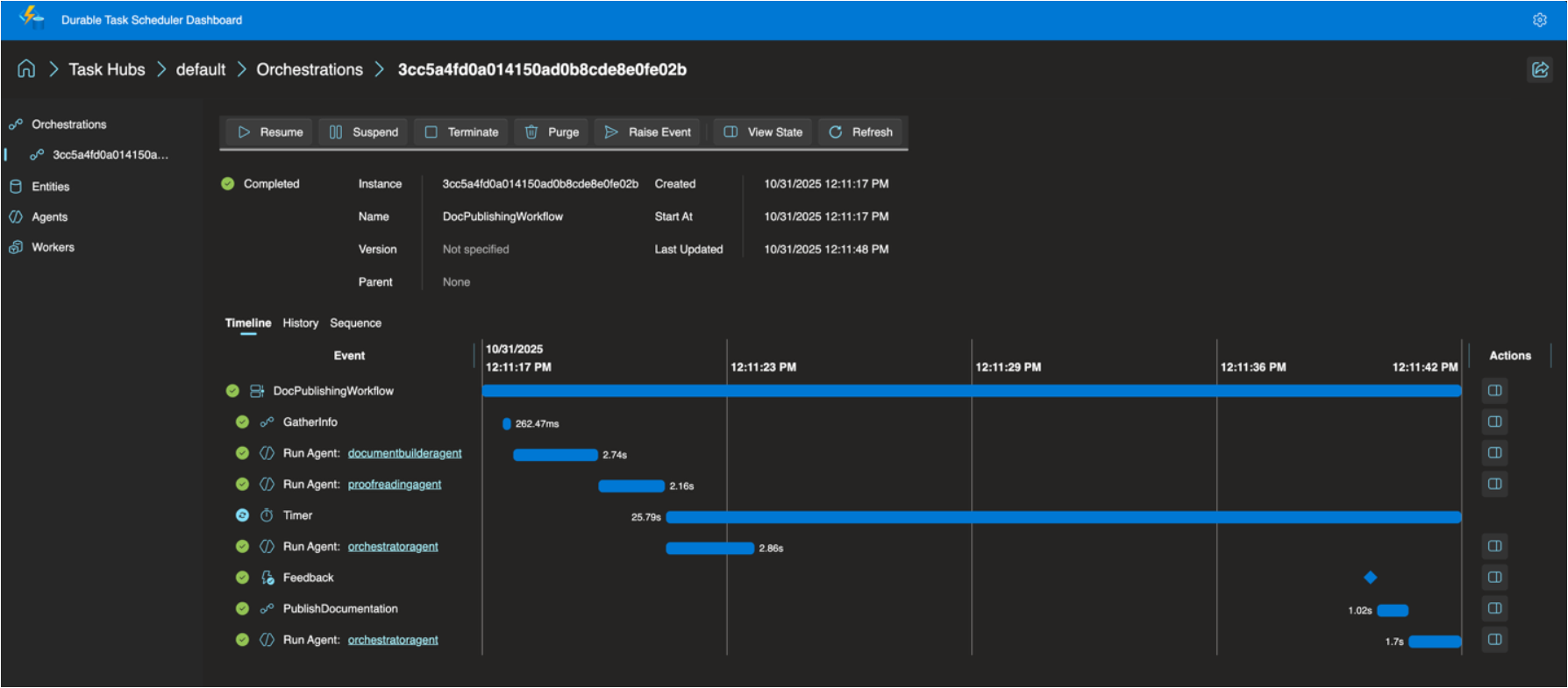
The Consumption SKU supports up to 500 actions per second and 30 days of data retention, with a built-in dashboard for filtering orchestrations, drilling into execution history, viewing visual Gantt and sequence charts, and managing instances (pause, resume, terminate, raise events) — all secured with Entra ID and RBAC. No SAS tokens or access keys. If you need more throughput or longer retention, Dedicated remains the better fit.
Read the Full Announcement
For the complete details — including billing specifics, GA hardening changes from the preview, and links to getting started — read the full announcement:
In my Running and Building Azure Functions with Modern .NET talk last week at the Mississauga .NET User Group, the session covered a handful of topics that I think every .NET developer building on Azure Functions should know about — upgrading to .NET 10, centralizing package management, and the new solution file format. This is the first in a short series of posts walking through each of those topics. Let’s start with .NET 10 support in Azure Functions and what’s new.
.NET 10 is Now Supported in Azure Functions
Azure Functions now supports .NET 10 on runtime version 4.x, and it’s a big deal for anyone who cares about building modern, long-lived serverless applications. .NET 10 support runs until November 14, 2028, so you’ve got a solid runway once you’re on it.
A few things to keep in mind before you start your upgrade:
Only the isolated worker model supports .NET 10. The in-process model is not receiving a .NET 10 update and reaches end of support on November 10, 2026. If you haven’t started migrating off in-process, that date should be your motivation to get moving.
.NET 10 runs on Functions 4.x across most hosting plans. The one exception is Linux Consumption, which will not receive .NET 10 support. If that’s your current plan, Flex Consumption is the migration target.
The base container images have shifted from Debian to Ubuntu with .NET 10. If you have custom container builds, verify this against the official release notes before upgrading.
Minimum package versions required for .NET 10:
Package
Minimum Version
Microsoft.Azure.Functions.Worker
2.50.0
Microsoft.Azure.Functions.Worker.Sdk
2.0.5
Make sure you’re on at least these versions or the runtime will not load correctly.
Before You Upgrade — Quick Checklist
[ ] Confirm you’re on the isolated worker model (not in-process)
[ ] Confirm your hosting plan supports .NET 10 (see above)
[ ] Update Microsoft.Azure.Functions.Worker and Microsoft.Azure.Functions.Worker.Sdk to the minimum versions above
[ ] If migrating from in-process: swap Microsoft.NET.Sdk.Functions for Microsoft.Azure.Functions.Worker.Sdk, and replace Microsoft.Azure.WebJobs.* packages with Microsoft.Azure.Functions.Worker.Extensions.* equivalents
[ ] Verify your HTTP integration choice (see builder pattern section below)
[ ] Test locally with Azure Functions Core Tools v4
The New FunctionsApplication Builder Pattern
The biggest developer-facing change in .NET 10 (and technically available since .NET 8 with certain configurations) is the switch to the FunctionsApplication.CreateBuilder pattern. If you’ve been building with the older HostBuilder approach, this will feel familiar but noticeably cleaner.
Note:ConfigureFunctionsWebApplication() is for functions apps that use ASP.NET Core HTTP integration — it wires up the ASP.NET Core middleware pipeline. If your app is non-HTTP (queue triggers, timers, Service Bus, etc.) and you don’t need that integration, use ConfigureFunctionsWorkerDefaults() instead. Most starter templates will choose the right one, but it’s worth knowing what each does.
It’s a small surface area change but the intent is meaningful. Let me walk through why this matters.
Alignment with ASP.NET Core
ASP.NET Core has used WebApplication.CreateBuilder(args) since .NET 6. Azure Functions now mirrors this with FunctionsApplication.CreateBuilder(args). This consistency across .NET workloads is genuinely helpful — developers who work on both web APIs and Azure Functions no longer need to context-switch between two different initialization mental models.
Direct Access to the Services Collection
The old pattern required you to register services inside a ConfigureServices callback, which added an extra layer of nesting. With the new pattern, you access builder.Services directly — just like you would in an ASP.NET Core Program.cs. Cleaner, more readable, and easier to reason about.
Modern .NET Host Builder Infrastructure
Under the hood, the new pattern is built on HostApplicationBuilder, the modern hosting infrastructure introduced in .NET 6+. This brings with it better performance, improved configuration ordering, and enhanced hosting abstractions. It’s part of Microsoft’s broader effort to unify .NET across web apps, Azure Functions, Worker Services, and other application types — and honestly, it’s a move in the right direction.
If you’re migrating off Linux Consumption — or just evaluating where to run modern Azure Functions — Flex Consumption is where the platform is headed and worth understanding alongside your .NET 10 upgrade.
Flex Consumption is a Linux-based hosting plan built on a new backend internally called Legion. It keeps the serverless pay-for-what-you-use billing model you’re used to, but it adds a lot more control:
Scale to hundreds of instances in under a minute
Up to 1,000 scale-out instances (note: scale-out instances and per-instance concurrency are separate concepts — you configure concurrency independently)
Configurable per-instance concurrency
VNET integration with scale-to-zero still supported
Always-ready instances that reduce cold-start latency (optional; default is 0, so you pay only when you need them)
Multiple memory size options
Availability Zones support
If you’re building anything serious on Azure Functions right now, Flex Consumption paired with .NET 10 is where I’d be pointing you.
Summary
.NET 10 support in Azure Functions is a worthwhile upgrade. The migration from in-process to isolated worker model is no longer optional — with end of support coming November 2026 you need a plan. And once you’re on isolated worker with .NET 10, the new FunctionsApplication builder pattern makes initialization cleaner and more aligned with the rest of the .NET ecosystem. Pair that with a move to Flex Consumption and you’ve got a solid, modern foundation for your serverless workloads.
In the next posts in this series I’ll cover Central Package Management and the new SLNX solution file format — two more improvements that make the .NET developer experience noticeably better.
It’s that time of year for Microsoft Ignite and during this conference we usually see updates across a number of Azure services. If there’s one Azure service I always keep a close eye on, it’s Azure Functions. It sits squarely in my primary area of focus — Azure PaaS — and the Ignite 2025 announcements from the team were genuinely impressive. I won’t rehash the full product announcement here (the Azure Functions team blog post does that well), but I do want to call out the things that caught my attention and explain why they matter from where I sit.
Functions is Becoming the AI Execution Layer
Reading through the announcements, I like that Microsoft is positioning Azure Functions as a natural runtime for AI workloads — specifically MCP servers and agent-hosted tools. There are two distinct paths here worth separating:
GA: Author MCP tool servers using the familiar Functions triggers-and-bindings model — Functions handles the protocol mechanics and scaling.
Preview: Host existing official MCP SDK servers directly on Functions without rewriting them as triggers.
The GA path is the more practical entry point for most teams. It means you can build remote MCP servers using patterns you already know, and Functions handles all the protocol mechanics and scaling underneath.
There’s also built-in authentication via Entra ID and OpenID Connect for MCP servers, which addresses the main gap from the early preview. Worth noting: authorization currently secures access at the server level, not per individual tool, and fine-grained per-resource-management (PRM) authorization is still in preview. Good progress, but something to factor in before going all-in on this for production workloads.
Flex Consumption Keeps Getting Better
Azure Functions Flex Consumption is the new default hosting model and it’s the right hosting choice for most new Azure Functions workloads. The Ignite 2025 updates reinforce that view. A few highlights:
512 MB instance size is now GA — right-sizing lighter workloads without paying for more memory than you need
Availability Zones is now GA — the last real holdout for production-critical workloads is gone
Rolling updates hit public preview — zero-downtime deployments by setting a single property; in-flight executions drain naturally before instances are replaced
That last one is worth keeping an eye on, but it’s still public preview and not recommended for production yet. There are also real caveats to be aware of: deployments need to be backward-compatible (especially important with Durable Functions), and single-instance apps can still see brief downtime during rollover. Still, zero-downtime deployment of Azure Functions has been a frequent customer ask and the direction is right. Outside of the Flex Consumption, we could use Deployment Slots for zero downtime deployments.
Durable Functions + AI Agents
The durable task extension for Microsoft Agent Framework is something I’ll be watching closely. The idea is straightforward: bring Durable Functions’ proven crash-resilient, distributed execution model into the Agent Framework. That means AI agents that survive restarts, maintain session context, and support human-in-the-loop patterns — all without consuming compute while waiting.
Key features of the durable task extension include:
Serverless Hosting: Deploy agents on Azure Functions with auto-scaling from thousands of instances to zero, while retaining full control in a serverless architecture.
Automatic Session Management: Agents maintain persistent sessions with full conversation context that survives process crashes, restarts, and distributed execution across instances
Human-in-the-Loop with Serverless Cost Savings: Pause for human input without consuming compute resources or incurring costs
Built-in Observability with Durable Task Scheduler: Deep visibility into agent operations and orchestrations through the Durable Task Scheduler UI dashboard
For anyone building multi-step AI workflows where reliability and state management matter, this is worth understanding. The announcement post has more detail.
The Durable Task Scheduler Dedicated SKU also reached GA, which is good news for teams running complex, steady-state orchestrations that need predictable pricing and advanced monitoring. For context, the Durable Task Scheduler is the managed orchestration backend that powers Durable Functions execution — GA of the Dedicated SKU means production-grade support and SLAs for it. A serverless Consumption SKU for the scheduler is now in preview too.
OpenTelemetry GA
OpenTelemetry support for Azure Functions is now generally available. This one has been a long time coming. Logs, traces, and metrics through open standards — vendor-neutral, broadly supported, consistent with how the rest of your distributed system is already instrumented. Support spans .NET (isolated), Java, JavaScript, Python, PowerShell, and TypeScript. If your Functions apps are still relying on Application Insights SDK directly (I think that’s most of our apps), it’s worth looking at the OpenTelemetry migration docs. I’ll have to look at a follow-up post about this specifically.
A Few Other Things Worth Knowing
.NET 10 is now supported in the isolated worker model across all plans except Linux Consumption. The in-process model is not getting .NET 10 and reaches end of support November 10, 2026 — if you haven’t started that migration, now is the time.
Aspire 13 ships an updated preview of the Functions integration (acting as a release candidate), with GA expected in Aspire 13.1. It deploys directly to Azure Functions on Container Apps.
Java 25 and Node.js 24 were announced in preview at Ignite — check current docs for latest GA status.
There’s more in the full product update — including details on security improvements, new regions, Key Vault App Config references, and the self-hosting MCP SDK preview — than I’ve covered here. I’d recommend reading through the Azure Functions Ignite 2025 Update directly if you want the complete picture.
In this episode of Azure Friday, Annina Keller joins Scott Hanselman to show how Azure Static Web Apps provides built-in serverless API endpoints via integration with Azure services, including Azure App Service, Azure API Management, Azure Container Apps, and Azure Functions.
After installing Visual Studio 2022 and working with Azure Functions I noticed that a new storage emulator is being used called Azurite.
Azurite is an open source Azure Storage API compatible server (emulator). Based on Node.js, Azurite provides cross platform experiences for customers wanting to try Azure Storage easily in a local environment. Azurite simulates most of the commands supported by Azure Storage with minimal dependencies.
This seemed to replace the old Azure Storage Emulator you would run previously when doing local development. I quickly came across an issue where the Azurite emulator cannot be started because port 10000 is already in use. This is also applied to ports 10001 and 10002 which it uses. Here are the contents of the Service Dependencies from the Visual Studio 2022 Output pane:
Ensuring Azure Functions Core Tools are up to date. This may take a few minutes...
Azure Functions Core Tools are up to date.
DotNetCore31-FunctionApp: Azurite emulator cannot be started because port 10000 is already in use. Another instance of the Azurite emulator or Azure Storage emulator might be already running on your machine.
DotNetCore31-FunctionApp: We detected that Azure Storage emulator is running on your machine. The Azure Storage emulator is now deprecated. Microsoft recommends that you use the Azurite emulator for local development with Azure Storage. Follow the directions in the link 'https://go.microsoft.com/fwlink/?LinkID=2167087' to install and run Azurite emulator.
Unable to start dependency 'functions.storage1'.
Ensuring Azure Functions Core Tools are up to date. This may take a few minutes...
Azure Functions Core Tools are up to date.
Ensuring Azure Functions Core Tools are up to date. This may take a few minutes...
Azure Functions Core Tools are up to date.
DotNetCore31-FunctionApp: Azurite emulator cannot be started because port 10000 is already in use. Another instance of the Azurite emulator or Azure Storage emulator might be already running on your machine.
DotNetCore31-FunctionApp: We detected that Azure Storage emulator is running on your machine. The Azure Storage emulator is now deprecated. Microsoft recommends that you use the Azurite emulator for local development with Azure Storage. Follow the directions in the link 'https://go.microsoft.com/fwlink/?LinkID=2167087' to install and run Azurite emulator.
Unable to start dependency 'storage1'.
DotNetCore31-FunctionApp: Azurite emulator cannot be started because port 10000 is already in use. Another instance of the Azurite emulator or Azure Storage emulator might be already running on your machine.
DotNetCore31-FunctionApp: We detected that Azure Storage emulator is running on your machine. The Azure Storage emulator is now deprecated. Microsoft recommends that you use the Azurite emulator for local development with Azure Storage. Follow the directions in the link 'https://go.microsoft.com/fwlink/?LinkID=2167087' to install and run Azurite emulator.
Unable to start dependency 'storage1'.
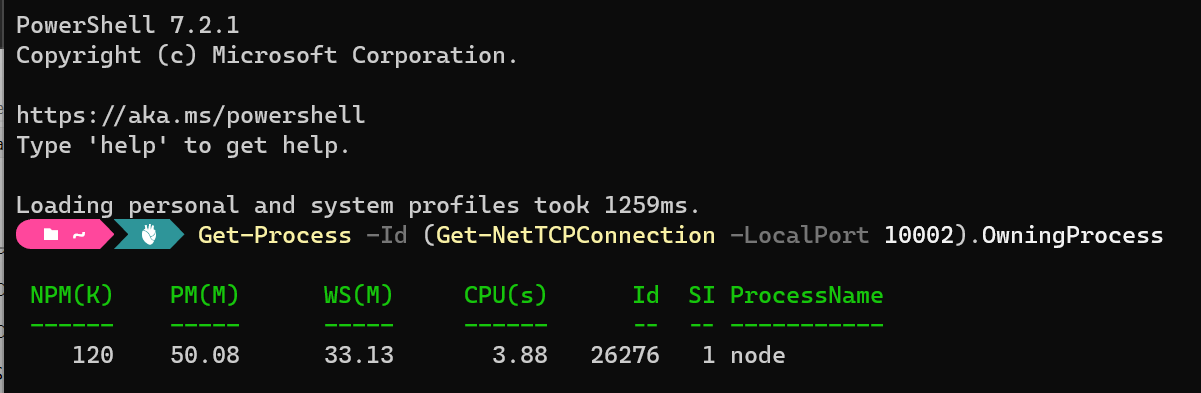
Let’s drop into Windows Terminal and take a look at what process is using that port:
After stopping the Node process and re-running Azurite (I restarted Visual Studio) we can see everything starts up as expected:
Ensuring Azure Functions Core Tools are up to date. This may take a few minutes...
Azure Functions Core Tools are up to date.
DotNetCore31-FunctionApp: azurite.cmd --location "C:\Users\ccampbell\AppData\Local\Temp\Azurite" --debug "C:\Users\ccampbell\AppData\Local\Temp\Azurite\debug.log"
DotNetCore31-FunctionApp: Azurite Blob service is starting at http://127.0.0.1:10000
DotNetCore31-FunctionApp: Azurite Blob service is successfully listening at http://127.0.0.1:10000
DotNetCore31-FunctionApp: Azurite Queue service is starting at http://127.0.0.1:10001
DotNetCore31-FunctionApp: Azurite Queue service is successfully listening at http://127.0.0.1:10001
DotNetCore31-FunctionApp: Azurite Table service is starting at http://127.0.0.1:10002
DotNetCore31-FunctionApp: Azurite Table service is successfully listening at http://127.0.0.1:10002
This was not a great experience on the first day I started to use Visual Studio 2022 with Azure Functions as I had to go off and figure out why the Azure emulator could not be started instead of just working on my application. You can go and change the default ports ft you like which is mentioned in the documentation. For more information on Azurite check out the docs on their GitHub repository.
I hope this helps with anyone new to the Azurite emulator in Visual Studio 2022.
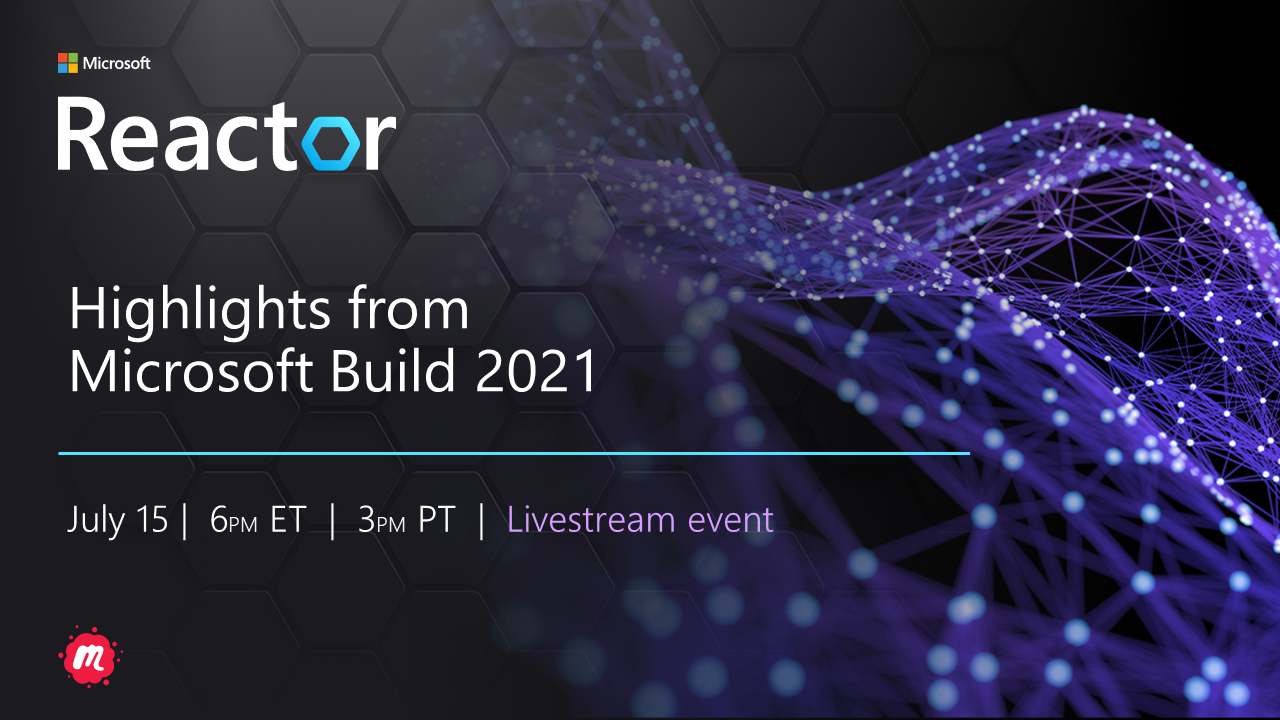
I’m happy to announce a Highlights from Microsoft Build 2021 digital event next Thursday, July 15. Please join me and other local experts as we look to provide key insights from the event that will help you expand your skillset, find technical solutions, and innovate for the challenges of tomorrow.
During my Global Azure Virtual 2020 live stream on Bringing serverless into the Enterprise, I had a few demo glitches. An inside joke for those that do presentations and demos is that the demo gods are either with you or against you. Some might say I didn’t offer up a satisfying sacrifice to the demo gods. I would argue and say I did but I feel it’s important to reflect and learn what went wrong and how I can be better prepared for the future by learning from our mistakes.
Prelude
So knowing that I presented on this topic for the Global Azure 2020 Virtual event and had some failed demos, I wanted to explain what happned and why and how to be better prepared for a future talk and hopefully it’s a lesson that you can learn from for your own talks, presentations or just development efforts.
Back in February 2020 I had submitted a few topics for the Global Azure 2020 event. At this point in time COVID-19 was going on but the world hadn’t shut down like it is today and the Global Azure 2020 event was still going to happen. In March I was notified that my topic was selected and I had about 6 weeks to prepare. Fast forward to mid March and everything was starting to be cancelled or made virtual. In the case of our local Global Azure 2020 event it was cancelled, so I didn’t work on my presentation. I was invited to participate in another Global Azure 2020 Virtual Community event in UK and Ireland so I focused on that content.
About 2 weeks prior to the Global Azure 2020 event, I was notified we would be making our local event virtual and I had to confirm if I still wanted to participate. At this point I was not prepared and my wife ended up signing up for a course over the weekend prior to the event – which left me with 3 kids (10 months, 4 yrs and 7 yrs) to manage for 10 hours each day over a 3 day weekend. My initial thought was to excuse myself from the event, but I really wanted to participate and with COVID-19 and everything halted, I found it was important to maintain that community connection even if it was a virtual event.
So this took me back to my college days of doing school, working and squeezing in a project over a tight deadline – not fun but with coffee as my partner, I got the kids to bed and started putting in a couple late nights to get it all done…or so I thought.
With my talk this year being on bringing serverless into the Enterprise, I focused on Azure Functions and my demos were on the following topics to illustrate common enterprise use cases:
Using PowerShell in a Azure Function for automation tasks
Deploy code to Azure using GitHub Actions
Avoiding cold start and latency with Premium Functions
Monitoring logs for your Functions
My PowerShell Azure Function Failure
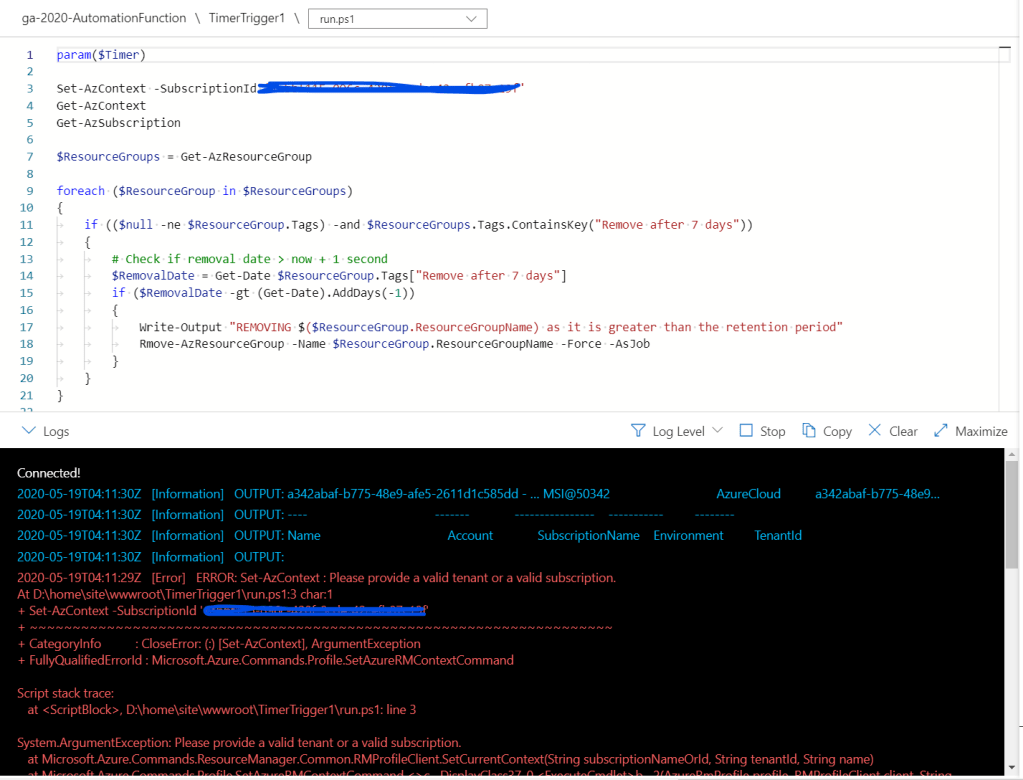
My first failed demo was something I knew was being problematic going into the talk but I felt it was important to still talk about and I had screenshots of a working state from previous attempts so felt good to proceed. The demo was creating an Azure Function with PowerShell. The issue was that no matter what PowerShell command I tried to run, I kept getting errors that it could not be run successful as shown below and no matter what I did I kept getting an error that the subscription could not be set.
Because you never know if something will go off the edge during a demo, you should always be prepared to go ‘offline’. By that I mean show screenshots of what you were trying to do and the expected outcome. You could even go so far as recording your demo and then switching to that during your talk. I’ve never done this but I’ve heard some people have and it worked perfectly. The audience had no idea the demo was broken and they were able to convey their message.
That might be a bit extreme, but I usually do take some screenshots of the Azure portal as part of my notes I use to prepare the presentation, so I know I can always fall back to that if necessary and in this case that is what I did. It’s unfortunate I could not show the feature working as I intended, but I let the audience know and continue to roll along.
My Premium Function Failure
This was my favorite demo I prepared for the talk and it involved creating an Azure Function and hosting it on the Premium plan and then comparing that to the Consumption plan to show scale, latency and that there is no more cold start in Azure Functions with the Premium plan.
When I prepared this demo it was before I worked on the GitHub Actions demo – which would have come prior to this in my presentation. The order of the demos plays an important role in why this failed so I’ll come back to this later.
In order to show the cold start and latency issues with the Azure Functions Consumption plan and how the Premium plan avoids this I was using a load testing site called Loader.io. This tool required that the host URL be verified with a special token that had to be returned from the site. In order to map my Azure Function result to the expected URL that loader.io wanted I needed to configure and Azure Function Proxy.
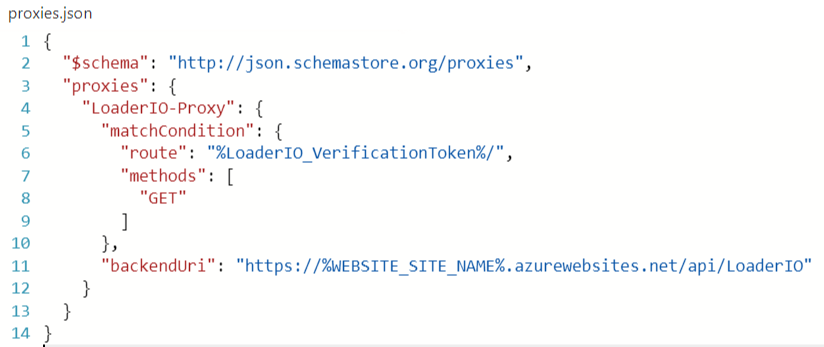
When I was setting up the demo I first setup the proxy in the portal, and then I moved it so a proxies.json file in the Visual Studio solution as shown here
When I was testing this demo I was able to verify the token and use loader.io to load test my consumption and premium functions without issue. After getting this demo done I moved on to the GitHub Action demo and took a copy of the code and used that for the CI/CD to push it up into Azure and that demo worked without issue. When I tested the automated deployment, I just tested the function and not the load testing.
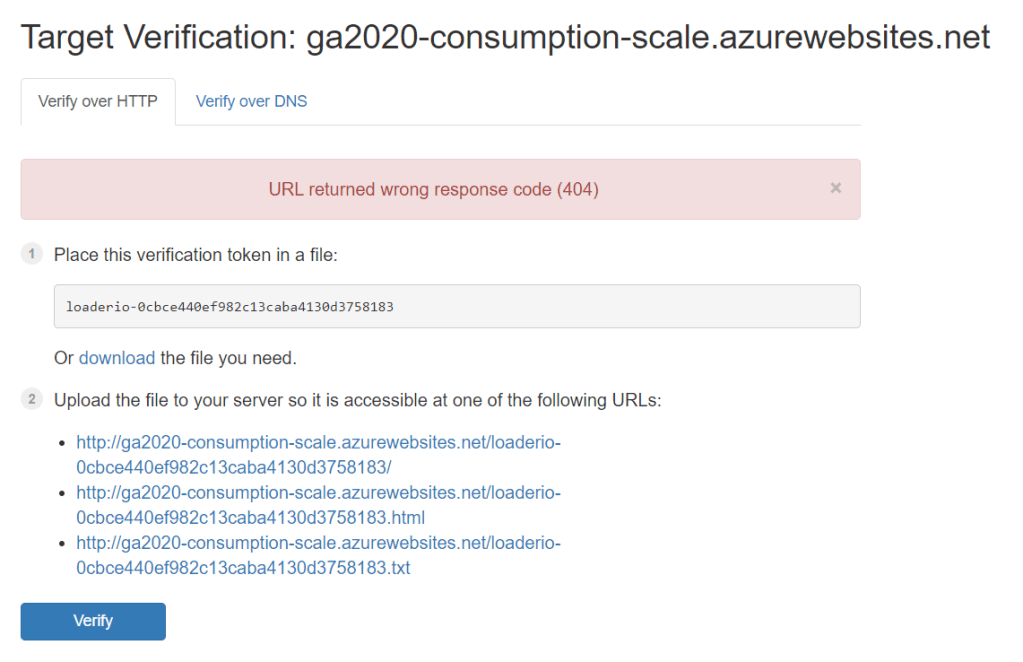
You may have an idea of what caused the failed demo, but if not it’s related to the proxies.json file. When I copied the file into my solution I forgot to go to the properties and mark it as content to be deployed. So in the GitHub Actions demo that took place prior to the load testing demo, it would have deployed a fresh copy and removed the Proxy I had originally setup in the portal. This meant that if I needed to validate the token from loader.io, I wouldn’t be able to and thus I saw the following error in my demo and was a bit surprised.
I didn’t have or want to take the time to live debug to find out what was wrong as I feared I would go down a rabbit hole and totally derail my talk. So I moved on and explained as best as I could what would have happened…again I have screenshots but it wasn’t as cool as showing it live.
Testing, rehearse and what went wrong
When I look back at that presentation, I had under 2 weeks to prepare and I was still working on the talk the morning of to finish up a few areas. I would not have left things to the last minute as I did but things were very fluid in Feb/Mar with COVID-19 and I wanted to put my best effort in for the community and felt I could still manage it but under not so ideal circumstances.
I worked on each demo individually as they weren’t really related except for the GitHub Action demo. I should have done that first because I would have caught the token verification issue right away due to the missing proxy.
Speaking of token verification, it would seem its valid for 24 hours and as I got close to the talk I didn’t want to warm up my functions as I wanted them in a cold state. So not testing them right before my talk I missed out on seeing that the token just expired, which would have shown me that the proxy was missing.
Due to the time crunch when I rehearsed I didn’t do my demos inline with the presentation, I did them separately. Again had I done the demos with the presentation I would have potentially caught the expired token and missing proxy. It’s important to do an end to end test and walk through of the presentation material regardless how comfortable you feel you are.
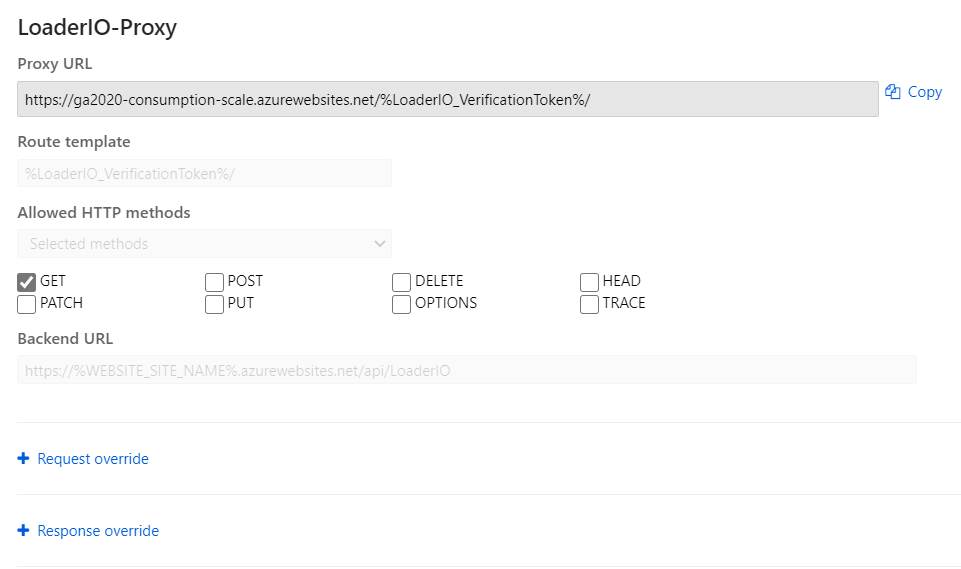
In retrospect I should have gone back and tried to troubleshoot this issue at the end of my talk. As soon as I looked at the function I noticed the proxy was missing and I was able to add it quickly which would have looked like this…
This would have only taken me 5 minutes to troubleshoot and fix which would have allowed me to show the real demo. All in all the talk went well and I got some really good feedback. No one complained about the broken demos and I mentioned that I would follow up with the blog post to show what was wrong and how I fixed it. I was a bit disappointed that I couldn’t show this demo live as its pretty awesome to see, so look for a future blog post where I’ll setup a Premium function and throw some load at it – maybe I’ll even record it and post to YouTube.
I hope you enjoyed this post and found something useful. I find it’s important to acknowledge when we do run into issues and how we solve them.
In this episode of Azure Friday, Frank Boucher joins Scott Hanselman to talk about AzUrlShortener – an open source, budget-friendly URL shortener you can deploy directly from GitHub with one click into your Azure subscription. Frank explains how to get it, why it’s inexpensive, and explores the source code.
The Global Azure event has expanded to cover 3 days, April 23-25 and will be an online virtual event due to the Covid-19.
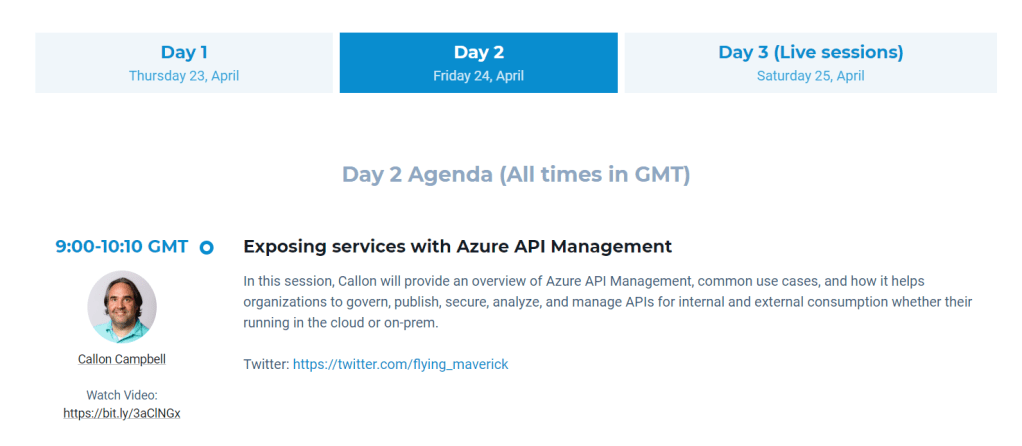
This year I will be speaking at 2 Global Azure Virtual events. The first is with the Global Azure Virtual 2020 UK & Ireland, where I will be contributing a recorded session on Exposing services with Azure API Management. This virtual event will have 50+ sessions with 20 live sessions over the course of the 3 days. The second is with Azure Virtual Community Day – Canada Edition where I will be doing a live stream on Bringing serverless into the Enterprise. This event will have 2 live tracks on Apps + Infrastructure and Data + AI and will have 12 sessions and 2 keynotes.
My first session on Exposing services with Azure API Management is happening on Friday April 24 09:00-10:00 UTC and the link to watch it is https://bit.ly/3aClNGx/.
My second session on Bringing serverless into the Enterprise is happening on Saturday April 25 15:00-16:00 EDT (UTC -4) and the link to watch the live stream is https://aka.ms/AzureCan2020-Track1-Afternoon.
I’m very excited to be speaking at these awesome community events and I really appreciate the opportunity to be part of this global community and share my passion for Azure. So
I hope you will join us on these days these to learn all about Azure from your world community.




 The Flying Maverick