Earlier this week, Microsoft released TypeScript 6.0. This is a major milestone for the language, not because of what it adds, but instead, this release is significant because it represents the final major version built on the existing JavaScript-based codebase. Starting with TypeScript 7.0, the language is heading into a new era.
A Release Designed for Transition
According to Microsoft’s announcement, TypeScript 6.0 is primarily focused on preparing developers for the upcoming architectural shift. Beginning with version 7.0, the TypeScript team will:
Rewrite the compiler and language tooling in Go
Deliver native performance improvements
Introduce shared-memory multithreading
Move away from the legacy JavaScript implementation entirely
This makes 6.0 less of a feature-driven release and more of a bridge to the future.
What’s New in TypeScript 6.0
While transitional in nature, the release still includes several meaningful updates:
Updated DOM types to align with the latest web standards
Improved inference for contextually sensitive functions
Support for subpath imports, enabling cleaner module resolution
A new migration-assist flag to help developers prepare for the 6.0 to 7.0 upgrade path
These improvements aim to smooth the road ahead as the ecosystem prepares for the Go-based compiler.
Deprecations
Microsoft notes that several features are now deprecated in 6.0 and will be fully removed in TypeScript 7.0. These changes reflect the evolving JavaScript ecosystem and the need to modernize the language’s foundations. Developers can still use deprecated features in 6.0, but they should expect migration work before adopting 7.0.
Last weekend, I had the privilege of presenting at Global Fabric Day 2025 in Toronto, and I wanted to get a write-up out while everything is still fresh. The session I put together was called Motorsport Insights and Real-Time Medallion Architecture with Fabric Real-Time Intelligence — and honestly, it was one of the more fun demos I’ve built in a while. Motorsport data, real-time pipelines, and medallion architecture all wrapped up in one talk? That’s my kind of Saturday.
In this post, I’ll walk through the key concepts from the session: Formula 1 telemetry, what a real-time medallion architecture looks like in Microsoft Fabric, and how I used Forza Motorsport as a live data source to drive a real-time dashboard.
Why Motorsport?
Formula 1 is one of the most data-intensive sports on the planet. Every car on the grid is bristling with 300+ sensors, generating roughly 1.1 million data points per second. That telemetry is transmitted continuously to the pit wall — engineers are watching fuel loads, tyre temperatures, brake ducts, water pressure, and dozens of other channels in real time.
With 20 cars on the circuit over a race weekend, you’re looking at approximately 160 terabytes of data generated per event. And every tenth of a second genuinely matters. That’s not a figure of speech — a tenth of a second is the difference between the podium and P4.
The key telemetry use cases are:
Visualize driver feedback — race engineers can see graphically what the driver is feeling through the wheel and pedals, not just rely on radio calls
Performance comparison — drivers compare their own lap traces against teammates and rivals to find where time is being lost
Reliability monitoring — teams watch critical channels like oil pressure, water temperature, and brake wear to make real-time decisions (brake duct inspection at pit stop? shut down the engine before a catastrophic failure?)
When I look at that problem space through the lens of a data engineer, the throughput requirements are staggering — and exactly the kind of scenario that Microsoft Fabric Real-Time Intelligence was built for.
The Architecture
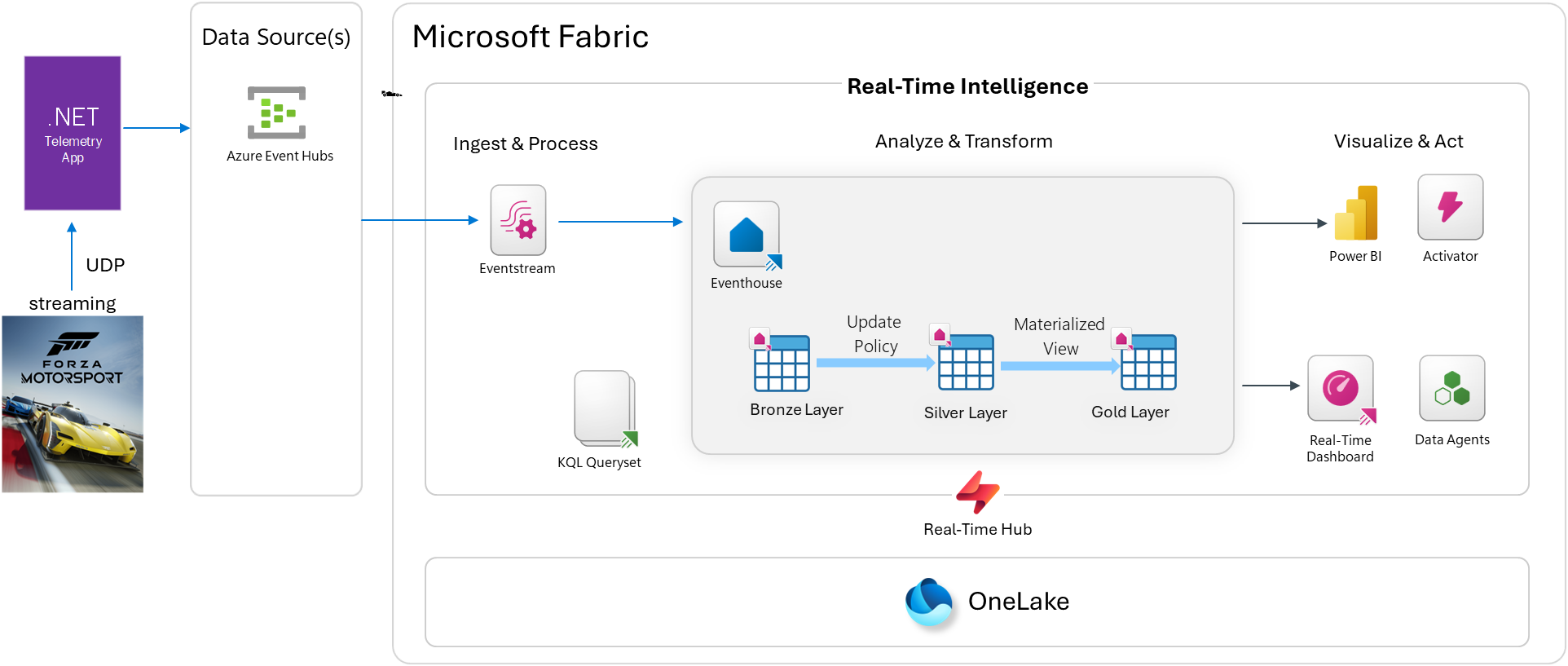
For this demo, I didn’t have an actual F1 telemetry feed, so I used Forza Motorsport as the data source. Forza exposes a “Data Out” UDP telemetry feature that streams live car metrics during a race — engine RPM, speed, gear, tyre slip, G-forces, and much more — all at high frequency. It’s a legitimately compelling substitute.
Before jumping into the demo architecture, it’s worth grounding the medallion architecture pattern for anyone who hasn’t encountered it before.
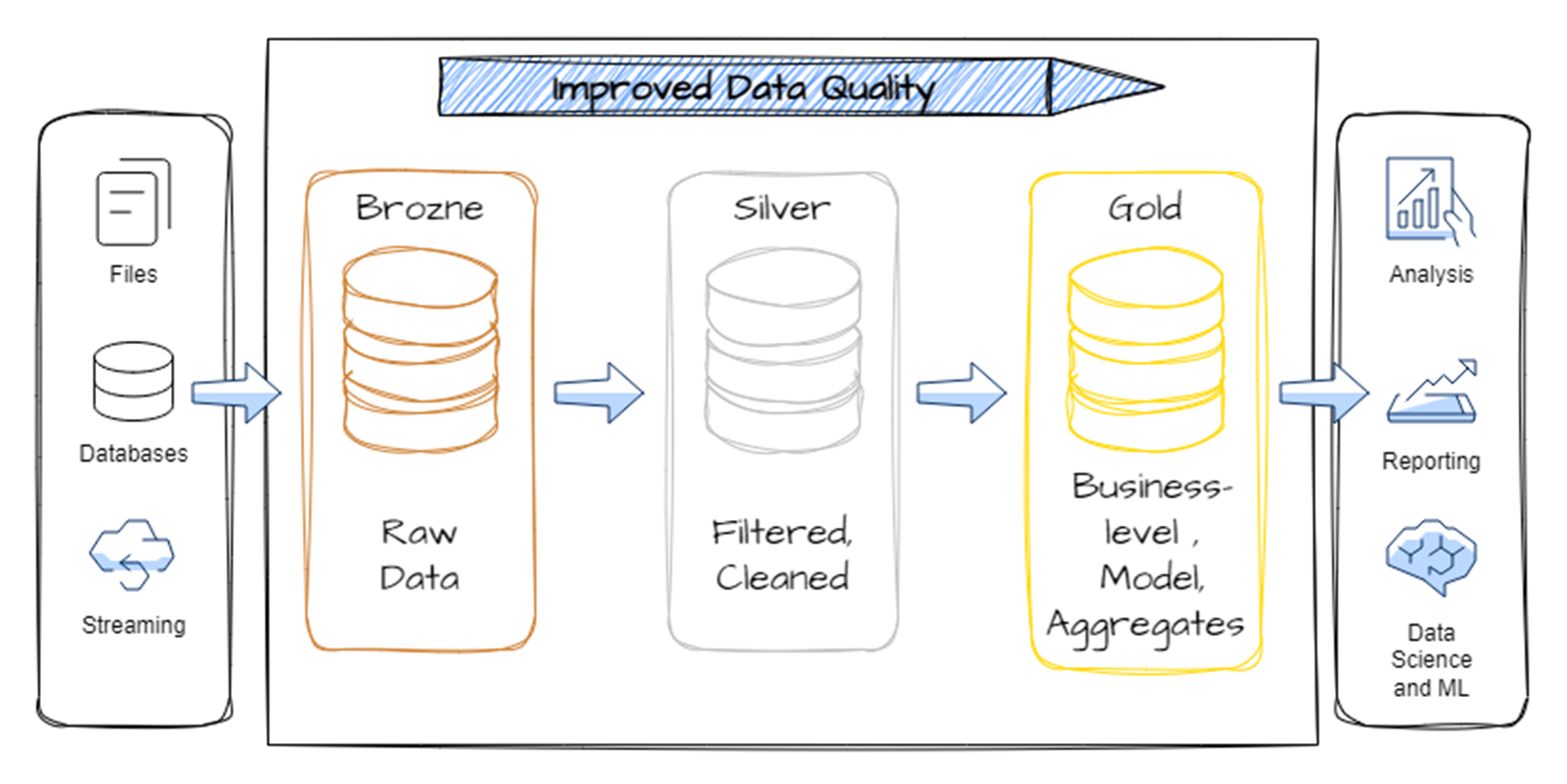
A medallion architecture (sometimes called a multi-hop architecture) is a data design pattern that organizes data into distinct layers, each one progressively cleaner and more structured than the last:
Raw, unvalidated data as it arrived — the system of record
Silver
Cleansed, validated, deduplicated data ready for analysis
Gold
Curated, aggregated, business-ready data optimized for consumption
The key insight is that raw data is never thrown away — you keep the bronze layer intact and let each subsequent layer refine and enrich it. This gives you a full audit trail and the ability to reprocess data if your transformation logic changes.
In a traditional lakehouse context, this pattern lives in Delta tables. In Fabric Real-Time Intelligence, it lives natively inside an Eventhouse using KQL tables and Update Policies — which makes it incredibly powerful for high-frequency streaming scenarios.
Configure Telemetry
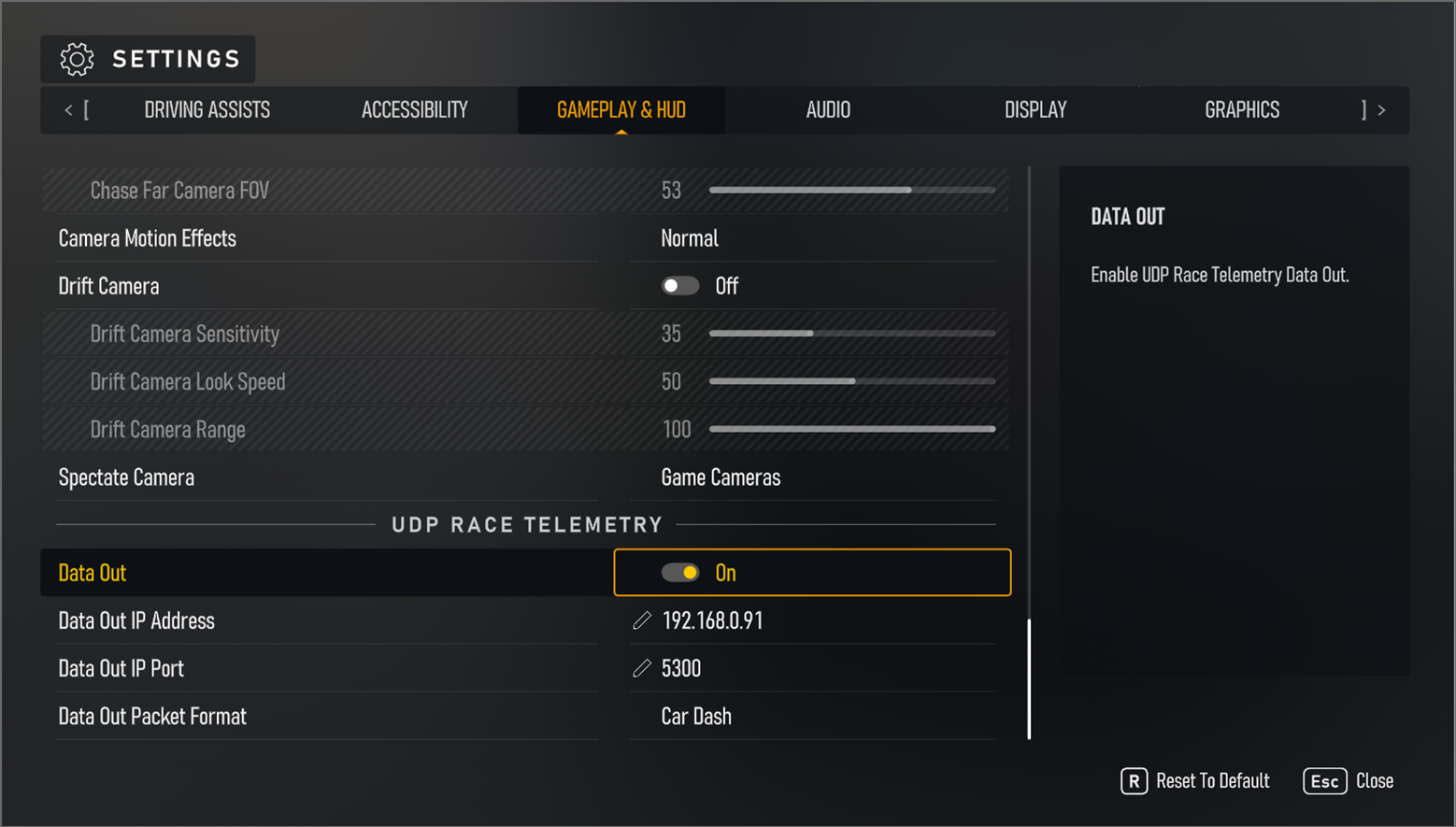
This solution will work with either Forza Motorsport or Forza Horizon. Go to the game settings -> gameplay & hud and scroll down to UDP Race Telemetry. Turn on Data Out, set the Data out Packet to Car Dash, and set your IP accordingly:
Edge Compute: The Telemetry Bridge
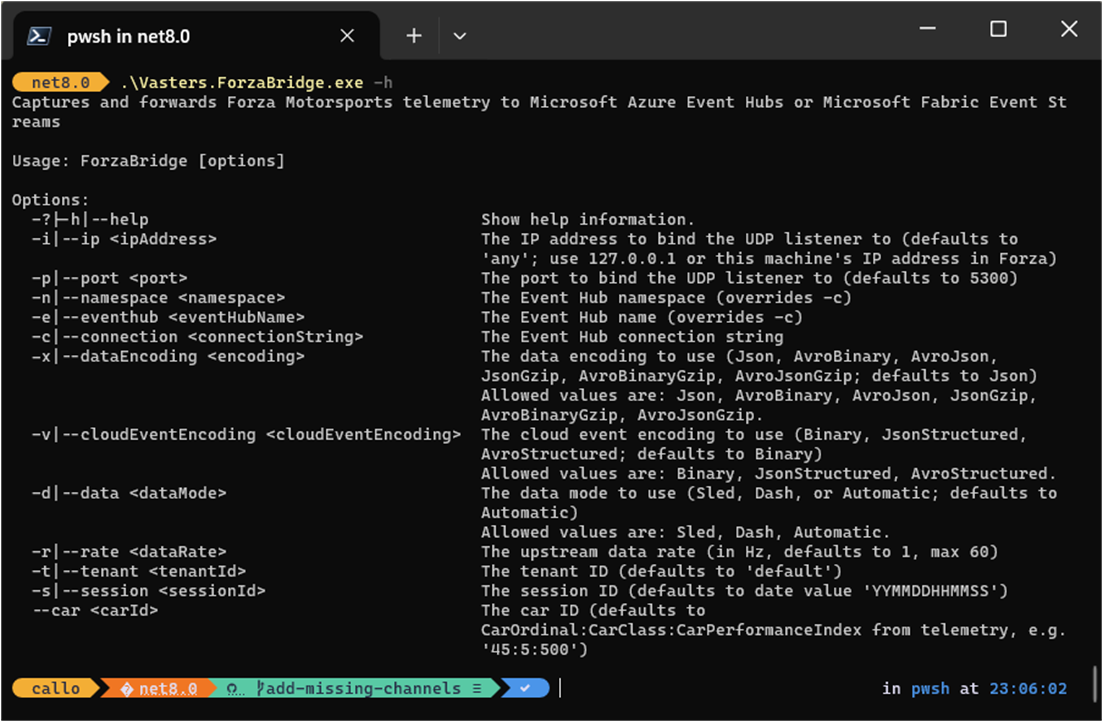
The bridge between Forza and Azure is a .NET console app based on Clemens Vasters’ excellent forza-telemetry-bridge project. It listens on a UDP port for the Forza data stream and forwards the events to an Azure Event Hubs namespace. This works from your Xbox and/or PC.
This sets up the edge compute layer — a lightweight local app converting game telemetry into cloud-bound events.
Event Design for High-Throughput Telemetry
One design challenge worth calling out: Forza telemetry runs at up to 1000Hz for some channels, with most metrics captured at 100Hz. At that rate, sending one event per sensor reading per car is completely impractical — you’d be generating millions of tiny messages per second.
The solution is event bundling: package multiple sensor readings into a single event, sharing common metadata (source, type, timestamp) while the payload carries an array of values covering a short time window.
{
"type": "motorsport.channel.data",
"source": "car71",
"subject": "oilpressure",
"time": "2025-02-25T17:21:00.100000",
"data": {
"startTS": "2025-02-25T17:21:00.000000",
"endTS": "2025-02-25T17:21:00.100000",
"rate": 1000,
"values": [4.122, 4.122, 4.122, ...]
}
}
Each event carries 100 readings covering 0.1 seconds — efficient to transmit and store, while preserving full fidelity.
Once events land in Azure Event Hubs, Fabric Eventstream picks them up and routes the data into an Eventhouse. This is where the medallion layers come to life.
Bronze layer — raw ingestion
The raw events land in two bronze tables:
Bronze_RaceTelemetry — all sensor channel data as received
Bronze_LapSignal — lap crossing events (start/end of each lap)
No transformations happen here. This is the source of truth.
Silver layer — refined with Update Policies
This is where Update Policies shine. An update policy in KQL is essentially an inner ETL trigger — it fires automatically whenever new data is ingested into the source (bronze) table, running a KQL function against the newly ingested batch and writing the results to the silver table.
The gold layer uses materialized views to maintain always-fresh aggregations and deduplicated records:
Gold_RaceTelemetry_Deduped
Gold_LapSignal_Deduped
These are the tables that power the real-time dashboard. Because materialized views are continuously maintained by the Eventhouse engine, dashboard queries hit pre-aggregated data — low latency, no repeated heavy computation.
Update Policies — Worth a Deeper Look
I want to spend a moment on update policies because they’re one of the most powerful and underused features in Real-Time Intelligence. They give you a clean mechanism to implement medallion-style transformations inside the Eventhouse without needing an external orchestration layer.
Key characteristics:
Scoped to new ingestions only — the policy function sees only the newly arrived batch, not the full table history
Runs synchronously with ingestion — bronze data triggers silver transforms as part of the same ingestion pipeline
Supports complex KQL — joins against dimension tables, calculated columns, schema changes, filtering, deduplication — all fair game
Flexible retention policies — each layer can have its own retention window (keep bronze for 7 days, silver for 30, gold for 90)
This is the real-time equivalent of what Delta Lake triggers or streaming pipeline stages do in batch-oriented architectures — except it’s running natively in the query engine at ingest time.
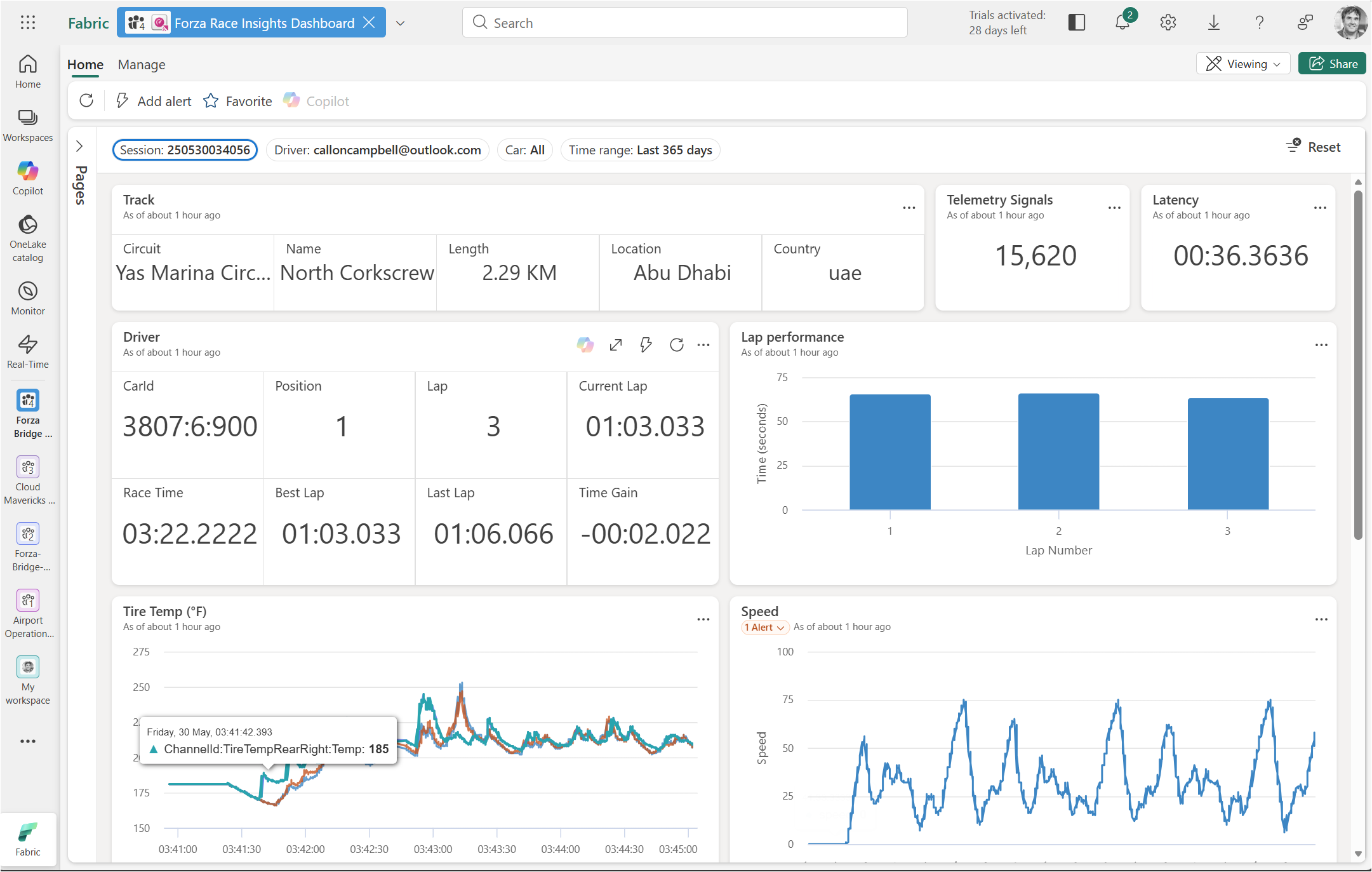
The Real-Time Dashboard
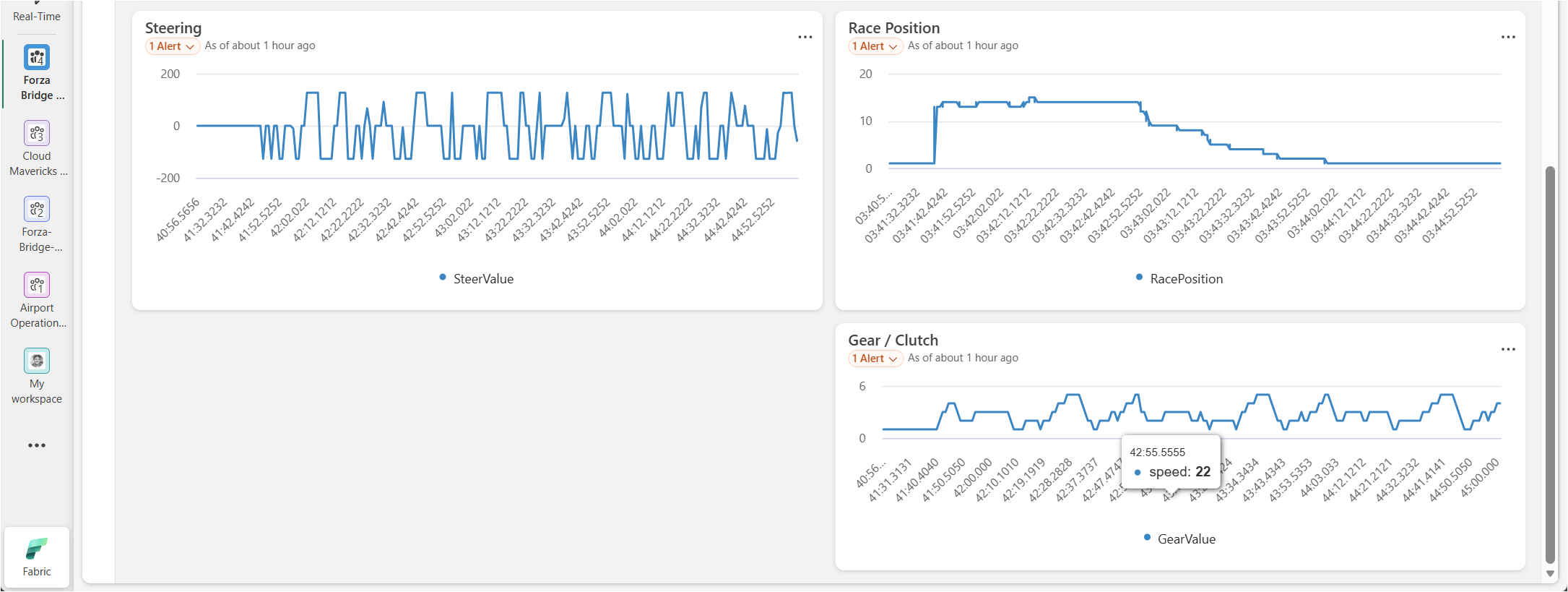
With data flowing through all three layers, I connected a Fabric Real-Time Dashboard to the gold-layer tables. The result is a live view of:
Current speed, RPM, and gear
Tyre temperatures and tyre slip per corner
G-force traces through each sector
Lap-over-lap performance comparison
Watching the dashboard update live during a race in Forza was genuinely satisfying. The latency from game → Event Hubs → Eventhouse → dashboard tile is low enough that you see sensor data update in near real time as you drive.
Wrap-Up
The core takeaways from this session:
Real-time medallion architecture is a natural fit for Fabric RTI — the Eventhouse, update policies, and materialized views map directly to bronze/silver/gold layers without any external orchestration.
Update policies are your inner ETL — use them to clean, filter, deduplicate, and enrich data at ingest time; they’re one of the most powerful patterns in the platform.
High-frequency telemetry needs thoughtful event design — bundle readings sensibly, share metadata across payloads, and choose the right ingestion pattern to keep throughput manageable.
Forza Motorsport makes for a surprisingly legit F1 telemetry simulator — the UDP data out feature is well-documented and the telemetry bridge .NET app makes getting data into Azure Event Hubs dead simple.
If you want to explore further, Microsoft has a great reference implementation for Medallion Lakehouse architecture in Fabric, linked in the references below.
In this episode of Azure Friday, John Downs joins Scott Hanselman to discuss how to design, architect, and build multitenant Software-as-a-Service (SaaS) solutions on Azure. If you’re building a SaaS product or another multitenant service, there’s a lot to consider when you want to ensure high performance, tenant isolation, and managing deployments. They walk through some example SaaS architectures and see how Microsoft provides guidance to help you to build a multitenant solution on top of Azure.
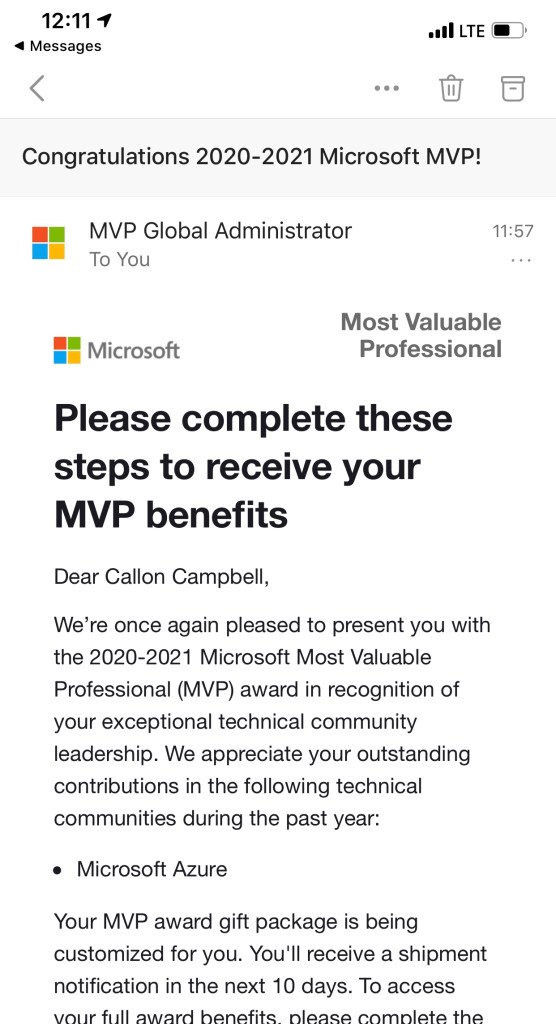
This week I received an exciting email from Microsoft that I was re-awarded for a third year now for the 2020 – 2021 Microsoft Most Valuable (MVP) award in Azure. Receiving the Microsoft MVP award is both a humbling and an exciting experience. It means you’re a member of a select group of experts of just over 2,000 MVPs from around the world, but I like to think of it as doing something I’m passionate about with other like minded individuals, having fun and always having something new to learn and share with the community.
The Microsoft MVP Award is an annual award that recognizes exceptional technology community leaders worldwide who actively share their high quality, real world expertise with users and Microsoft. All of us at Microsoft recognize and appreciate Callon’s extraordinary contributions and want to take this opportunity to share our appreciation with you.
The Microsoft Most Valuable Professional (MVP) Award Team Microsoft Corporation
Since becoming a Microsoft MVP, I’ve learned a lot about the community and continued to share my passion, knowledge and experience within the community around Architecture and Development in Azure, DevOps and Serverless technologies. I also keep a keen eye on what’s happening on the data technologies like Cosmos DB and Azure SQL.
I was really looking forward to attending the MVP Summit back in March, but COVID-19 threw a wrench in that plan. Thankfully Microsoft moved the event online and it was still an amazing experience to connect with the product teams and MVPs from around the world – even if it was virtually.
If you’re interested in learning about the Microsoft MVP program and seeing what it takes to become a Microsoft MVP, or how to get awarded, I encourage you to take a look at the Microsoft MVP website and also the following article on “How to become a Microsoft MVP” where they explain some of the details of the program.
To wrap up this post I would like to congratulate all the other newly awarded, or renewed Microsoft MVP’s all over the world! You truly are an amazing community and I’m truly humbled and honored to be part of this group.
In this episode of Azure Friday, Azure MVP Barry “Azure Barry” Luijbregts joins Scott Hanselman to outline how you can choose the right services for working with messages and events in your application.