![Callon Campbell [MVP]'s avatar](https://2.gravatar.com/avatar/82c29cf129567e07ca12d1473a42f0f372048d964211a01e8df4a6b11d340b55?s=44&d=identicon&r=G)
In my Running and Building Azure Functions with Modern .NET talk this week at the Mississauga .NET User Group, I closed out the .NET tooling section with a quick look at the new .slnx solution file format. It’s one of those changes that doesn’t get a lot of attention but makes day-to-day .NET development noticeably more pleasant — especially if you’ve ever dealt with a gnarly merge conflict in a .sln file.
This post walks through what .slnx is, why it’s better than the traditional .sln format, and how to migrate.
What’s Wrong with .sln?
If you’ve worked with Visual Studio solutions for any length of time, you’ve almost certainly encountered the pain points with .sln files. They’ve been around since the early 2000s and they work — but they come with a set of frustrations that have never really been addressed:
- They’re nearly unreadable — the format uses GUIDs and magic identifiers that aren’t intuitive at all
- Merging is painful — a
.slnfile being touched by two developers at the same time is a merge conflict waiting to happen - Tooling struggles with them — custom scripts or CI tooling that needs to parse a
.slnfile often resorts to fragile string manipulation
Here’s a snippet of a traditional .sln to illustrate:
Project("{FAE04EC0-301F-11D3-BF4B-00C04F79EFBC}") = "MyFunctions", "src\MyFunctions\MyFunctions.csproj", "{A1B2C3D4-E5F6-1234-ABCD-EF0123456789}"EndProjectGlobal GlobalSection(SolutionConfigurationPlatforms) = preSolution Debug|Any CPU = Debug|Any CPU Release|Any CPU = Release|Any CPU EndGlobalSectionEndGlobal
Not exactly something you want to review in a pull request.
Introducing .slnx
The .slnx format is a new, XML-based solution file format introduced in the .NET 9.0.200 SDK. It addresses all of the above problems:
<Solution> <Project Path="src/MyFunctions/MyFunctions.csproj" /> <Project Path="src/MyFunctions.Tests/MyFunctions.Tests.csproj" /></Solution>
That’s it. No GUIDs. No magic identifiers. No indecipherable global sections. Just a clean XML file that clearly describes what’s in the solution.
Why It’s Better
Better readability — the XML structure is immediately understandable. Any developer can open a .slnx file and know exactly what’s in the solution without reverse-engineering the format.
Simplified merging — because it’s XML with simple, meaningful elements rather than a blob of GUIDs and platform strings, merge conflicts in .slnx files are much easier to resolve. In most cases, merging two developers’ changes to the solution file becomes a trivial diff.
Easier parsing — if you write build scripts, CI automation, or any tooling that needs to know what projects are in a solution, parsing a .slnx file is now just standard XML parsing. Reliable and straightforward.
Converting from .sln to .slnx
The .NET CLI makes the migration trivially easy. From your solution folder, run:
dotnet sln migrate
From Visual Studio 2022
Go to File and save your solution file as…and select the XML Solution File format.
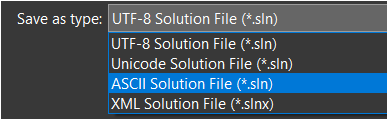
Before You Migrate
A few things to check before running the migration:
Commit your existing .sln file to source control before converting — gives you a clean rollback point if anything looks off.
Make sure your entire team is on a compatible toolchain — .NET SDK 9.0.200 or later, and a recent version of Visual Studio 2022 or Visual Studio 2026. Anyone still on an older setup won’t be able to open the solution until they update.
If you have CI/CD pipelines that parse or manipulate the .sln file directly (not uncommon in larger teams), update those to handle .slnx before you switch over.
Should You Migrate?
My honest take is yes, especially for new solutions. For existing solutions, there’s no urgency — your .sln files aren’t going anywhere — but if you’re already bumping into merge conflict pain or your solution file is getting unwieldy, the migration is trivially easy, and the payoff is immediate.
For new projects, I’d start with .slnx from day one. In fact if you’ve migrated over to Visual Studio 2026 it’s now the default options. It’s the better format, it’s supported by all current tooling, and you’ll thank yourself later.
Summary
The .slnx solution file format is a small change with a noticeably positive impact on day-to-day .NET development. XML-based, human-readable, merge-friendly, and trivially easy to adopt — there’s very little reason not to switch. Combined with Central Package Management and the new Azure Functions FunctionsApplication builder, these three improvements together represent a meaningfully cleaner modern .NET development experience.
Enjoy!
References
dotnet slnCLI reference — Includes themigratecommand documentation- .NET SDK 9.0.200 release notes — Where
.slnxwas introduced - What’s new in Visual Studio 2022 — Visual Studio support for
.slnx - Mississauga .NET User Group — Meetup group where this was presented


