Category: Azure

ArchitectureAzure

Planning Azure Services by Location

Roy Kim (MVP)'s avatarRoy Kim on Azure and AI

When planning and designing a cloud solution, the location of the service and its data is of great consideration in terms of data sovereignty
.PlanningAzure Services by Location 1

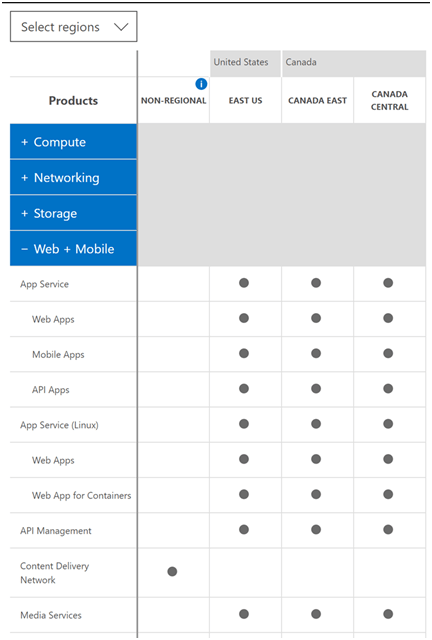
In my experiences when discussing cloud design, I may bring up an Azure service for consideration that is beyond the standard VM, storage account, app service but something complements or supplements the solution like azure app insights, power bi premium/embedded, backups, CDN, logging or an azure ad tenant. Now, can we simply assume they will be available in the desired region? No necessarily. To check we can go to an online tool Products available by region

An example looks as follows:
PlanningAzure Services by Location 2

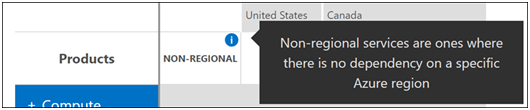
One thing to point out and be aware are services that are located in Non-regional.
Non-regional is defined as “where there is no dependency on a specific Azure region”

PlanningAzure Services by Location 3

Some examples are CDN, Azure AD, Azure MFA, Traffic manager, Power BI Embedded…

View original post 326 more words

ArchitectureAzure

Microsoft Azure Symbol / Icon Set Download – Visio stencil, PNG, and SVG

Updated Aug. 28, 2019 – The latest version of this download is v5.6.2019 and was updated May 15, 2019. If you already have these templates you should update to the latest.

The Microsoft Azure, Cloud and Enterprise Symbol / Icon Set is a free download from Microsoft which provides a set of resources to represent features of and systems that use Microsoft Azure and related cloud and on-premises technologies.

The download comes with Visio stencils, along with PNG and SVG images.

sshot-293

You can download the icon set here.

Install Instructions

  1. Download the ZIP file by clicking the Download button and saving the file to your hard disk.
  2. Remove any previous versions of the symbol set so you can avoid duplicate and deprecated symbols.
  3. Extract the contents of the ZIP file to a separate directory. If you intend to use the Visio stencils, we suggest the My Shapes directory.
  4. Open the instructions and read it to get started.
  5. Open the .vss, vsd or .svg files with Microsoft Visio. Open the PNG directory by extracting the contents to a folder and browsing the contents of the folder. Drag and drop or open a PNG file in your drawing application. Load SVGs into any app that accepts them. Visio will open SVGs.

Note: The website for the download mentions support for PowerPoint. Their originally was a PowerPoint file that came with the file download but that has since been deprecated as it’s just as easy to add images to PowerPoint

Enjoy!

References

Download Microsoft Azure, Cloud and Enterprise Symbol / Icon Set – Visio stencil, PowerPoint, PNG, SVG

AzureDevelopmentPresentationsTechnology

An Introduction to Serverless Compute with Azure Functions–My presentation at CTTDNUG

AzureFunctions-e1491294484596

Last week I did a presentation on Azure Functions at Canada’s Technology Triangle .NET User Group (CTTDNUG) in Kitchener, Ontario. One of the audience members was kind enough to film the presentation and post it on YouTube.

Here is a link to my presentation on An Introduction to Serverless Compute with Azure Functions.

Enjoy!

References

https://www.youtube.com/watch?v=bPMzW10pECQ&feature=youtu.be

Azure

How to return JSON from an Azure Function

In this post I’m going to answer a question someone asked me recently when I presented an Introduction to Azure Functions – can we return JSON from the HttpTrigger function? The answer is yes and it’s not limited to the Http trigger function and I’ll walk you through one of many ways to do this.

First let’s start off by taking a look at the output that shows up by default from the HttpTrigger Function I had created in the Azure portal. As you can see the default output is XML as shown here:

image

The same goes for the response when the require “name” parameter is missing in the query string or the body of the request:

image

You might think that there is a simple property in the Azure Function properties to configure the output, but there isn’t, at least at this point in time with version 1 runtime.

Creating a C# Http Trigger Function

Let’s quickly create an Azure Function in the portal and I can show you one of many ways to return JSON from your Azure Function.

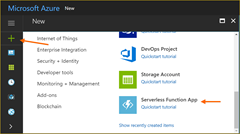
1. Create a new Serverless Function App:
image

image

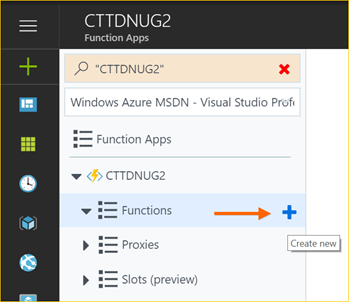
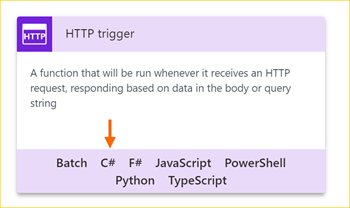
2. Once your Azure Function app is running, create a new C# Http trigger function and then provide it a name and authentication model:
image

image

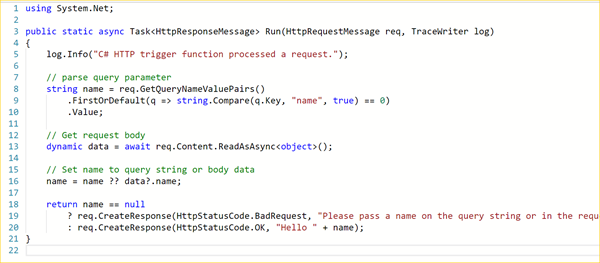
3. Now that your function is created you will see the following code in the run.csx file. If you run it you will get XML as your response, so let’s go ahead and update this function to return JSON.
image

Changing the return type to JSON

For this example I’ll import Newtonsoft.Json package and then serialize a simple object to return back when the function is called.

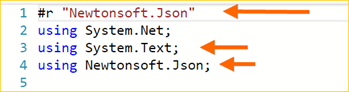
1. Add Newtonsoft.Json package and other using references:
image

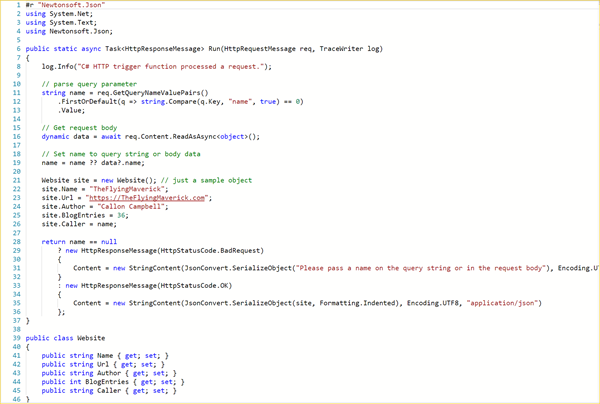
2. Update function code to use Newtonsoft.Json. Looking at the following code you will see that I’ve created a simple POCO object which is what I’ll be returning from the function. I then changed the response to return a serialized string in UTF8 encoding and application/response:
image

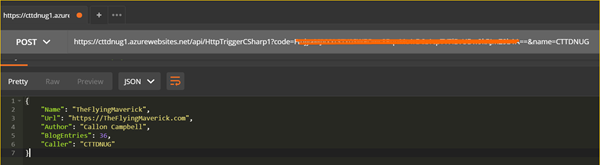
3. Now when we run the function through either the browser or Postman we’ll see the response in JSON format. Here is what we would see in Postman:
image

and then in a browser we would see this:
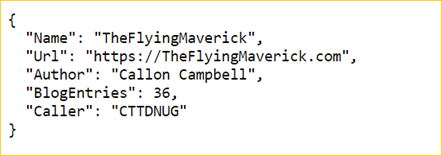
image

Azure Functions is a powerful component in Azure serverless offering and as you can see your not limited to XML as the only response format.

Let me know if you have any questions and I’d be happy to investigate and follow up.

Enjoy!

Azure

Microsoft Azure Roadmap and Updates

Azure has three areas online where you can go to keep up to date with Azure updates and what the roadmap is for certain products within Azure.

Microsoft Cloud Platform Roadmap

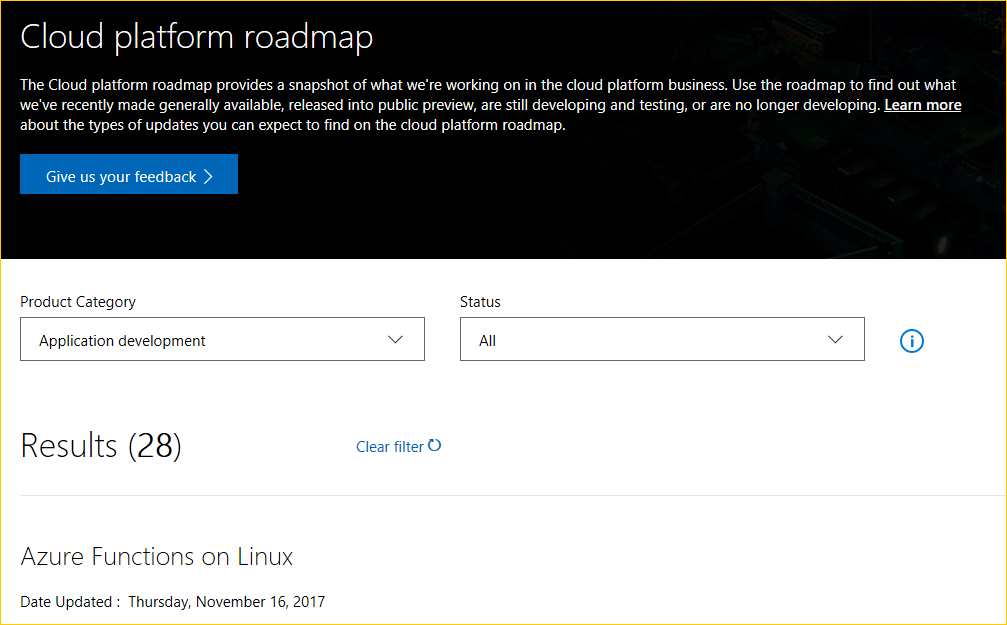
The Microsoft Cloud Platform Roadmap provides a snapshot of what Microsoft is working on in their cloud platform business. From here you can use the roadmap to find out what they’re recently made generally available, released to public preview, are still developing and testing, or what’s no longer being developed. You can search by Product Category and/or Status.

For Product Category you have the following categories:

  • Application development
  • Cloud infrastructure
  • Data management and analytics
  • Enterprise Mobility + Security
  • Internet of Things

For Status type you can search by the following types:

  • All
  • In Development
  • In Preview
  • Now Available

image

For each result there is a date of when it was last updated and then a status of either In Development, In Preview, and Now Available.

image

Finally you can can click the Learn more link for further details about this update.

Azure Roadmap

The Azure Roadmap page shows you where they’re heading and any upcoming changes to Azure products. This is the place to find out what’s new

image

Azure Updates

The Azure Updates page allows you to see all the updates in one place. You can filter by product, update type and even platform.

image

Enjoy!

References

https://azure.microsoft.com/en-us/updates/

https://azure.microsoft.com/en-us/roadmap/

https://www.microsoft.com/en-us/cloud-platform/roadmap/

AzureCloud

Essential tool for blurring Azure secrets for presentations and screen recordings

azure-mask

For those that do Azure presentations / screen recordings you know that you often find yourself scrubbing out your sensitive and personal information such as subscription keys, email addresses, keys and connection strings. What if you could have this magically done for you?

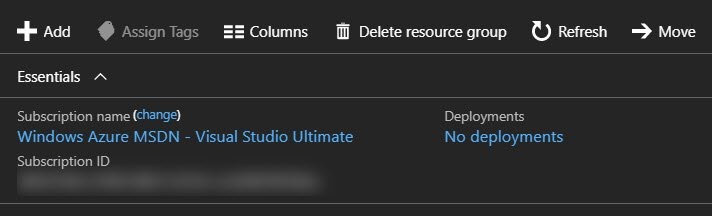
Well let me introduce to you a handy Chrome extension called Azure Mask that will mask GUIDs (such as Subscription IDs), email addresses, keys, and connection strings with a blur. The intention of the extension is to make it easier to do screen recordings without revealing sensitive, personal, account information that may show up on screen.

NOTE: This extension will only run and apply against Azure portal URLs.

Features

  • Blurs GUIDs (such as Subscription IDs)
  • Blurs your account email
  • Hides the "Report a Bug" button (if found)
  • Toggle the mask on/off and store this state
  • Apply the mask (if enabled) after Document Object Model (DOM) mutations

Installing the Extension

As mentioned on the Azure Mask GitHub repository readme, you can install this extension in Chrome from either a package or from source. Let’s take a look at how we can install from source.

  1. Download or clone the repository: git clone git@github.com:clarkio/azure-mask.git
  2. Open up Chrome and bring up the extensions settings by typing in the address bar: chrome://extensions/
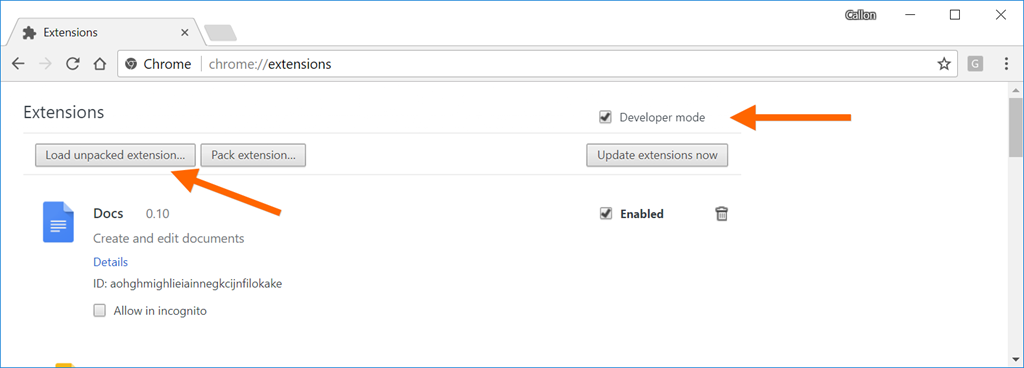
  3. Check the “Develop mode” option and click on Load unpacked extension button:image
  4. Navigate to where you cloned this repository and then choose path: /azure-mask/src
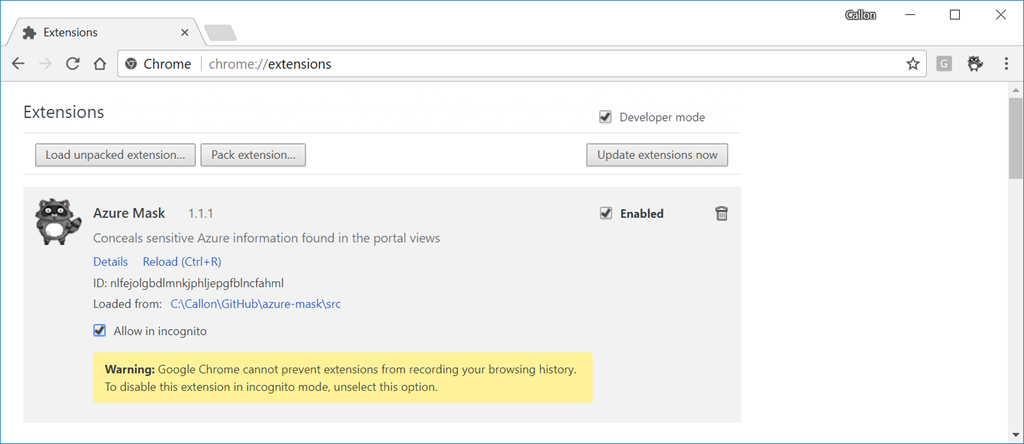
  5. Follow the prompts and then the extension will be available in Chrome:sshot-116

Using Azure Mask

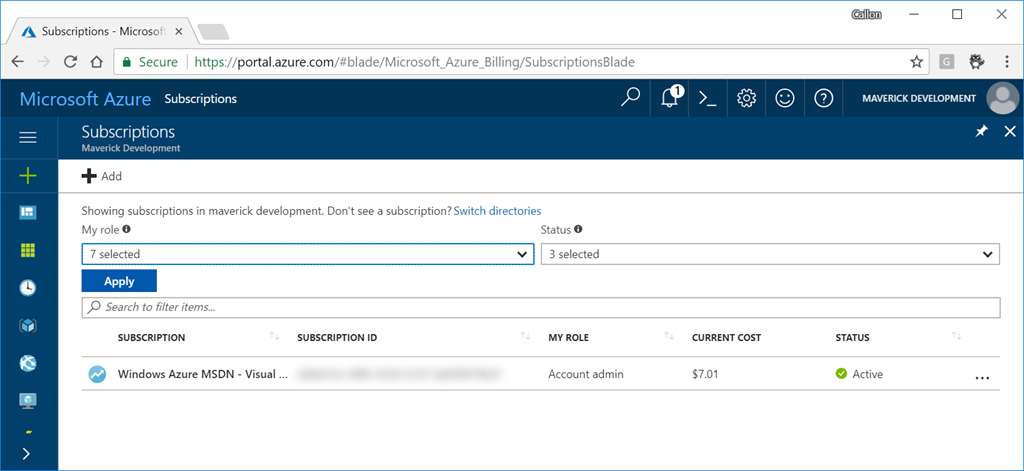
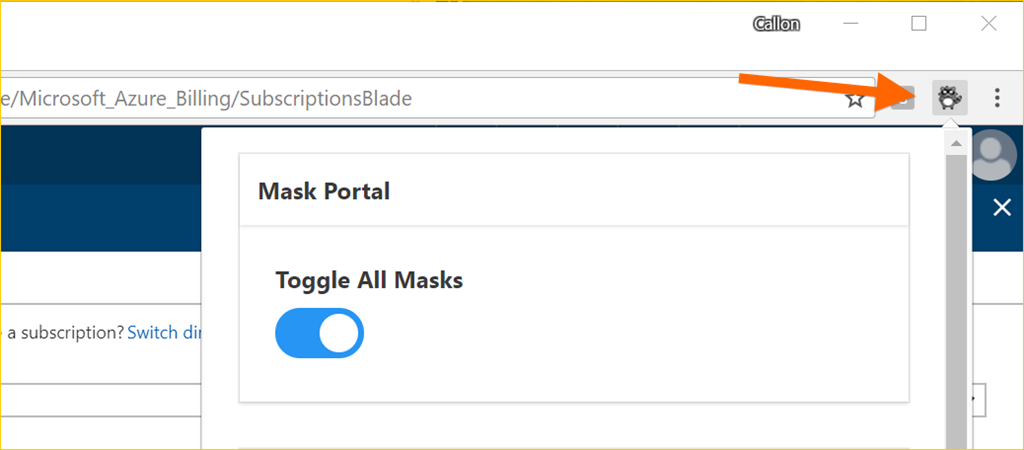
After installing the Azure Mask extension in Chrome, navigate to your Azure portal and after signing in you will see all your Azure secrets magically blurred:

image

If you want to turn off this extension, click on the Azure Mask extension button in Chrome to bring up the options:

image

Enjoy!

References

Azure-Mask on GitHub

Azure

Introduction to Azure File Sync

azure-file-sync

Azure File Sync is meant to provide customers a secure and centralized file share management in the cloud. Once installed you will be able to store less frequently accessed files on the cloud and then keep more frequently accessed files on your local file shares, all while delivering a consistent file share performance with no configuration or code changes required. Azure File Sync could also lower IT support requirements for remote or branch locations.

Azure File Sync was released as a preview on September 25, 2017. Currently the public preview availability is limited to the US regions and works with Windows Server.

For more details on Azure File Sync checkout the announcement blog post and the following is a quick overview video…

image 

Enjoy!

References

Announcing the public preview for Azure File Sync

Azure File Sync Overview

Azure Storage

Docs – Introduction to Azure Files

Azure

Get Azure API Management Git Credentials using PowerShell

Daniel Scott-Raynsford [MSFT]'s avatarArchive: PowerShell, Programming and DevOps

One of the many great features of Azure API Management is the fact that it has a built in Git repository for storing the current configuration as well as publishing new configurations.

ss_apim_gitrepository

This allows you to push updated Azure API Management configurations to this internal Git repository as a new branch and then Deploy the configuration to API Management.

The internal Git repository in Azure API Management is not intended to be used for a normal development workflow. You’ll still want to develop and store your Azure API management configuration in an external Git repository such as GitHub or TFS/VSTS and then copy configuration updates to the internal Git repository in Azure API Management using some sort of automated process (e.g. Continuous Integration/Continuous Delivery could be adopted for this).

The Internal Git Repository

To access the Internal Git Repository requires short lived (30 days maximum) Git credentials to…

View original post 588 more words

AzureCloud

Microsoft Tech Summit

MicrosoftTechSummit2017

Microsoft is hosting their Tech Summit conference in Toronto from December 13-14, 2017.  You can build your skills with the latest in cloud technologies at a free, technical learning event for IT professional and developers.

This is a great event to build your cloud skills, connect with experts and get inspired. What’s great is that you can customize your learning – there is something for everyone.

Click here to register.

Reference

Microsoft Tech Summit 2017-18

Azure

FAQ: Azure App Service Domain and Custom Domains

I came across an excellent blog post from the Azure App Service Team BlogFAQ: App Service Domain (preview) and Custom Domains. Lots of great of questions and answers relating to Azure DNS and your custom domains.

If you have any questions or have run into issues with your custom domain and Azure this is a great resource, so check it out!

Reference

Azure App Service Team Blog