
Everybody loves Azure Functions. My team recently deployed a production service using Azure Functions as the back end backbone. I’d like to share some lessons and tips we learned along the way. We’re using Azure functions in consumption plan – which basically means the platform scales in and out as required without our intervention. But […]
Tag: Azure
Azure Serverless: Azure Functions and Logic Apps that are ready to deploy!

If you’re new to Azure Functions and/or Logic Apps there is a great open source library for you to browse that contains set of common use cases that are ready to deploy!
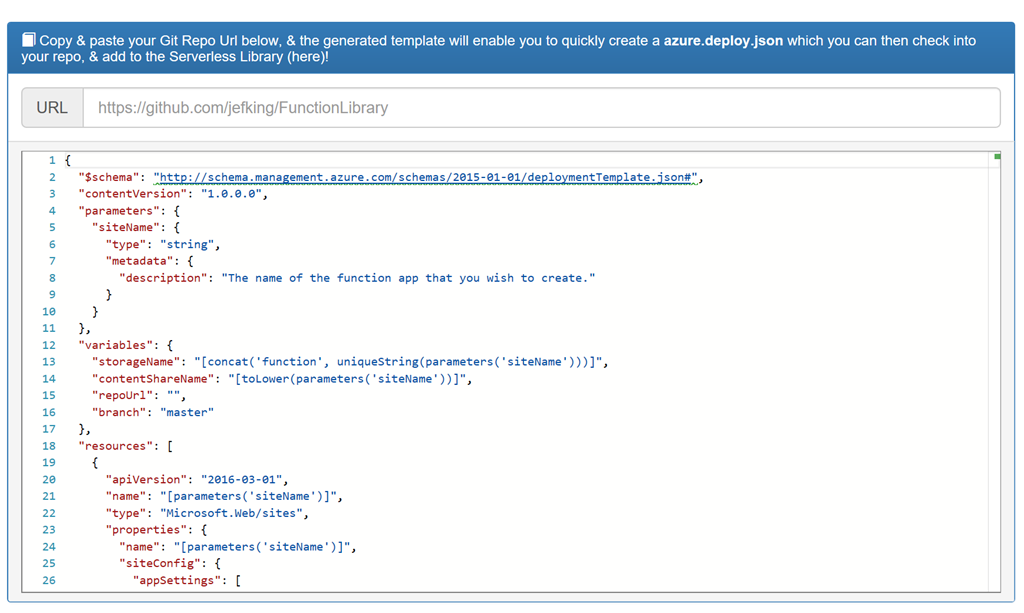
If you want to create an Azure Resource Manager (ARM) template that deploys Functions or Logic Apps, you can build your own as shown here. Just provide your GitHub repository URL and it will quickly create an azure.deploy.json file for you to include with your repos.
Summary
These samples are available in a either C# or NodeJS and can be deployed to your Azure subscription with a click of a button. The samples cover a number of useful tasks that can easily be incorporated into your application or simply used for learning purposes. If you’re interested in contributing to this project or browsing through the code please take a look at the GitHub repository.
Enjoy!
References
Try Azure Functions for Free
In my previous post “Introduction to Azure serverless with Azure Functions, Logic Apps and Azure Event Grid” I briefly introduced each of those services from Azure. In this post I’ll show you how you can try Azure Functions for free without signing up for an Azure subscription. Let’s get started.
Microsoft has setup a free sandbox environment for trying out Azure Functions for free. Navigate to the free trial link and select the function you want to create:
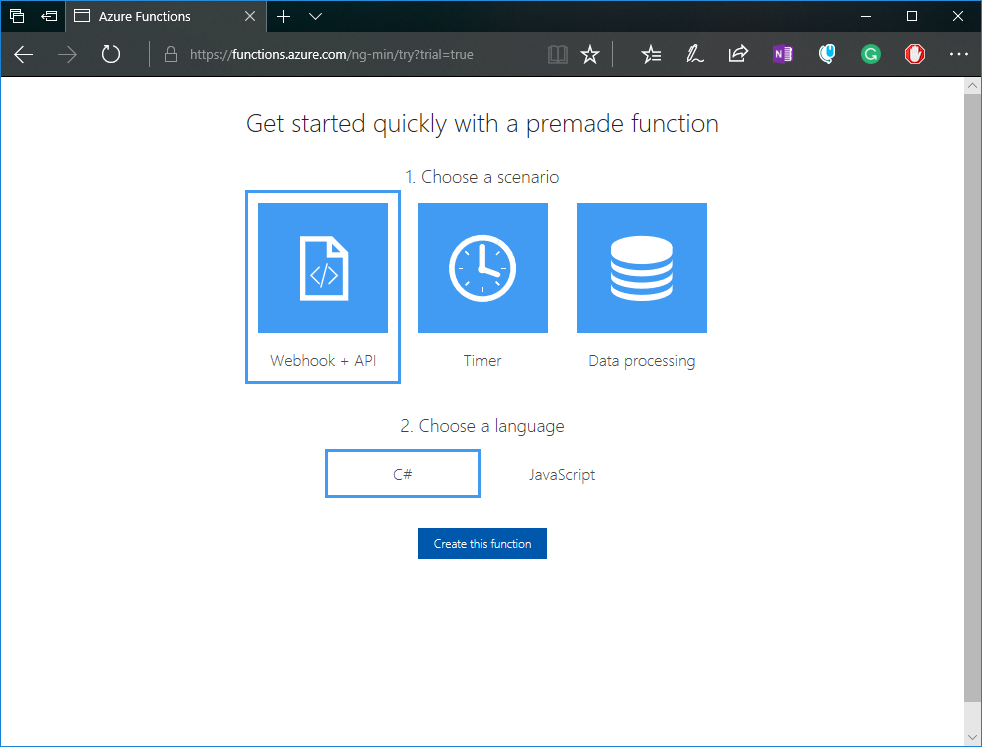
After clicking on the Create this function button you will be asked to choose an auth provider. Any will do and it’s just needed to get some basic information for the trial. No credit card information is required:

After a few seconds you should see your new HttpTrigger C# function (based on the selection from the previous screen). Click on the Run button to see your function run. From this portal you can edit your function code and save the changes, run the function and view the logs from the, test your function with different input, and see the output and status.

Your function also has a URL you can use to run your function outside of this portal. Go to the top right corner and click on Get function URL:
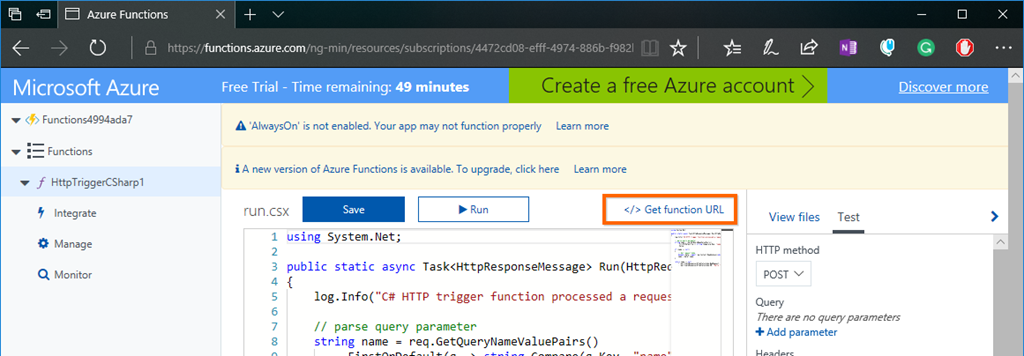
You will then see the get function URL modal with the key and URL. Click on the copy link and then open up another browser tab or use it within Postman:

Paste your function link and then add the required query string parameter Name with a value. You should then see the output of your function like so:

This environment is limited in what you can do. So although you can change your function code and the integrations it works with, you are prevented from managing your function app. You also only have only 59 minutes to try it out.
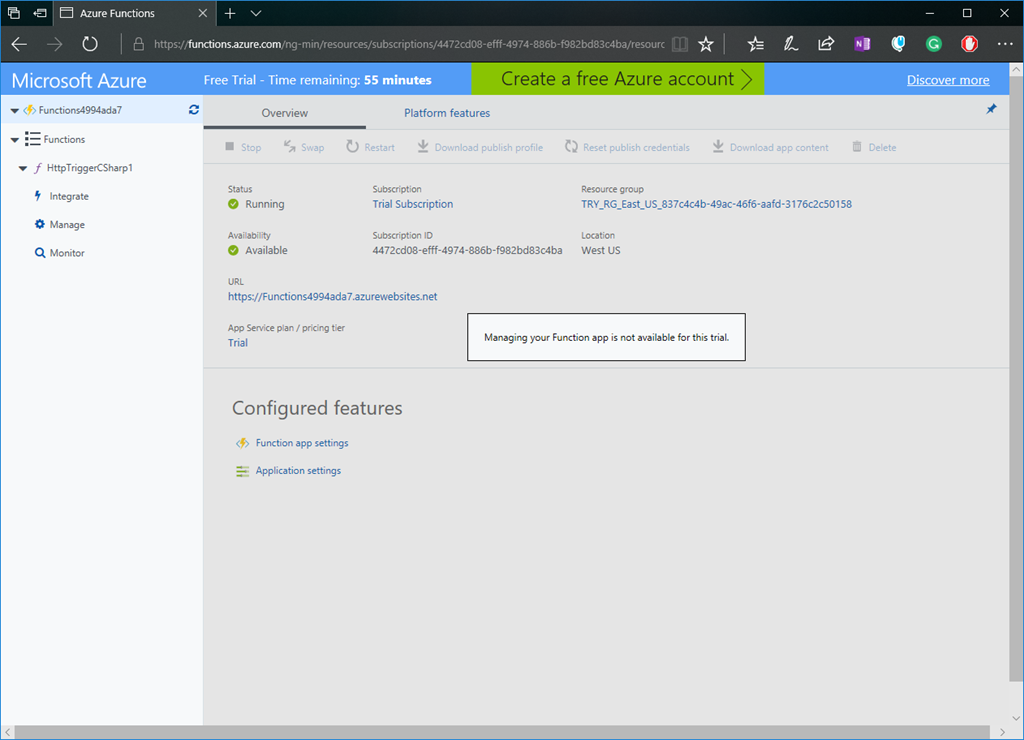
As you can see you can quickly try out Azure Functions in a sandbox environment. If and when you’re ready you can move to an Azure subscription where you can fully manage your Azure Function and get access to a world of other resources to use with your function app. It’s worth mentioning that with your Azure subscription you get access to a number of Azure resources for free within certain limits…including Azure Functions. So take a look and give Azure Functions a try.
Enjoy!
Resources
Introduction to Azure serverless with Azure Functions, Logic Apps and Azure Event Grid

In this blog post I’ll introduce you to what is serverless and then what services in Azure provide serverless capabilities. First let’s define what is serverless.
What is the definition of Serverless
- It’s an abstraction of servers. This doesn’t mean there are no servers, there are still servers behind the scenes but this means you don’t need to worry about optimizing which OS to run, about OS patching, etc. You also don’t need to worry about optimizing utilization and scaling up and down for demand. Think of it as less server more code.
- It’s an event driven process. You simple tell Azure how or when to run your code. This could be based on a schedule or when a new customer is added to Salesforce, or when items are added to a queue, to a table storage, etc.
- It’s micro-billing. This means you’re only charged for your usage.
The benefits of serverless
- Reduced DevOps – You can dynamically and elastically scale to meet demand.
- Focus on Business Logic – Allows you as the developer to focus on your business logic and everything else is taken cared of for you. No need to provision resources and wait on ITOPS. In some cases you can design and develop your serverless code offline.
- Faster Time to Market – By focusing on your business logic and features, you’re able to drastically increase time to market.
Let’s now look at three Azure services that provide serverless capabilities.
1. Azure Functions

Azure Functions is an event driven, compute-on-demand experience. You can easily and quickly build the apps you need using simple serverless functions that scale and meet demand and you only pay for your usage.
You can use the programming language of your choice like C#, F#, JavaScript, PHP, Python, Java or using scripting tools like Bash or PowerShell. You can develop on Windows, Linux or Mac. You can deploy on Windows or Linux. You can choose from using either the full .NET Framework or the .NET Core runtimes.
Azure Functions allows you to bind into services. This means you can integrate Azure Functions into Cosmos DB, Logic Apps, queues, table storage, on premise and so much more.
With Azure Functions you simply provide your code and then let Azure take care of the rest…meaning that when an event happens, Azure will automatically take care of everything to run that code at scale.
2. Logic App Service
Azure Logic Apps are built around the idea of events, triggers and workflows. When you think about building microservices, there are a lot of moving parts to manage. Azure Logic Apps lets you stitch them all together much more easily and provides you with a central place to build and manage all of your event-driven services.
Logic Apps are a fully managed iPaaS (integration Platform as a Service) that provide serverless workflows that allow developers to easily integrate data with their apps instead of writing complex glue code between disparate systems. This allows you to orchestrate and connect the serverless functions and APIs of your applications.
Benefits of Logic Apps
1. You can quickly tap into the power of the cloud and fire events from other services.

2. You can orchestrate almost anything:
- Run mission-critical, complex integration scenarios with ease
- Connect on-premises, hybrid and cloud applications
- Position for future with API centric connectivity
- Easily connect custom on-premises applications to the cloud

Connectors
At the time of this post there are over 200 connectors available out of the box. Connectors reduce integration challenges and enable you to quickly and easily connect apps, data and devices anywhere.
Creating a Logic App
The following is a sample Logic App. As you can see you simply string together Connectors, Triggers, Conditions and Actions to form the basis of your Logic App. When your Logic App is running you can monitor and inspect each run iteration and see what data came in and the path it took through the Logic App.
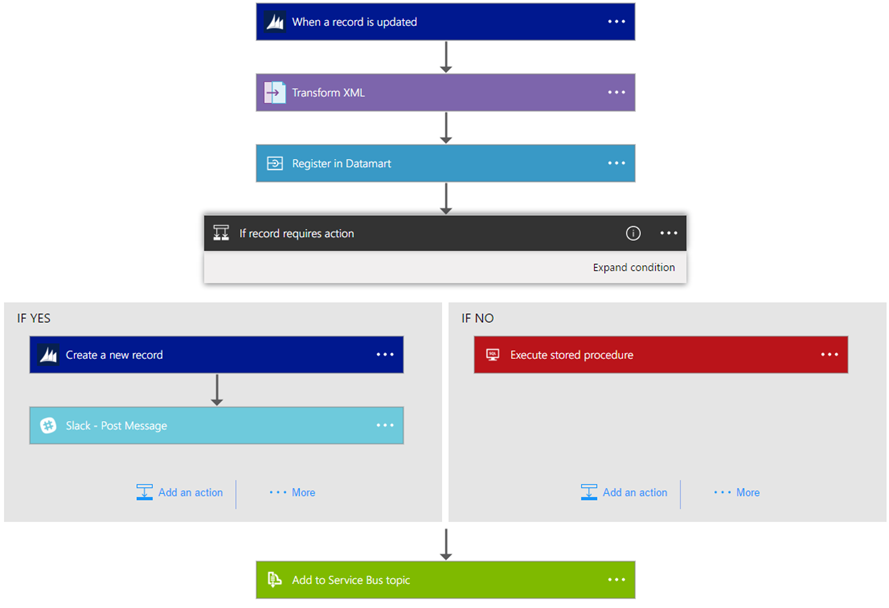
In summary Logic Apps is the workflow engine built for the cloud with cloud scale, massive compute and high availability built in.
3. Azure Event Grid
Finally there is Azure Event Grid which is a messaging service built to easily build application with event-based architectures. You simply select the Azure resource you would like to subscribe to, and give the event handler or webhook endpoint to send the event to. Event Grid also has built-in support for events coming from other Azure services, like resource groups, subscriptions, storage blobs, and event hubs.

Topics and Subscriptions
Event Grid is similar to Azure Service Bus in that a Topic is an endpoint that receives messages, and a Subscription is used to receive messages through the Topic that will be handled by a message listener. These concepts are basically the same, but there are some differences in how they work. Event Grid it uses a concept of events instead of messages since it’s an event-based messaging system, and because Event Grid is based on events, it lends itself nicely to microservice architectures using serverless compute options like Azure Functions and Logic Apps in addition to other implementations.
There are also more differences between Azure Event Grid and other message queue services. The capabilities of Azure Event Grid are centered around speed, scale, breadth, and low cost. Rather than being a general / generic messaging service, Azure Event Grid is built specifically for Serverless architectures.
Event Publishers
Currently Azure Event Grid has built in support for the following event publishers:
- Event Hubs
- IoT Hubs
- Storage
- Blog Storage
- Custom Topics
- Azure Subscriptions (management operations)
- Resource Groups (management operations)
Event Handlers
Currently the following Azure services have built-in handler support for Event Grid:
- Azure Functions
- Logic Apps
- Event Hubs
- Webhooks
- Azure Automation
- Microsoft Flow
If using Azure Functions as your handler, use the Event Grid trigger over the generic HTTP trigger as it automatically validates Event Grid Function triggers.
Azure Event Grid is built specifically for Serverless architectures.
Event Grid Architectures
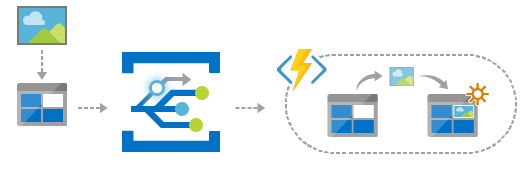
Azure Event Grid is designed to be used in microservices and event based architectures. It can be used in a serverless application to connect data sources and event handlers. In an ops automation scenario you can notify Azure Automation when virtual machines are created, or when a SQL database is spun up. Finally you can use Event grid to connect your application with other services. The possibilities are really limited by your imagination.
Summary
As you can see all three services provide a different component to the serverless story and each of them integrate nicely with each other. They each allow you to think less about the server and more about your code and you only pay for your usage. The best way to learn about these Azure serverless offerings is to create a free Azure account and try it out yourself.
Enjoy!
References
Docs: An introduction to Azure Functions
Docs: An introduction to Logic App
Docs: An introduction to Azure Event Grid
Webinar: Go serverless. Build apps faster and stop worrying about infrastructure.
Report: Economics of Serverless Cloud Computing
Attribution: This post uses one or more graphics from the official Azure Event Grid documentation, such as diagrams.
An Introduction to Serverless Compute with Azure Functions–My presentation at CTTDNUG
Last week I did a presentation on Azure Functions at Canada’s Technology Triangle .NET User Group (CTTDNUG) in Kitchener, Ontario. One of the audience members was kind enough to film the presentation and post it on YouTube.
Here is a link to my presentation on An Introduction to Serverless Compute with Azure Functions.
Enjoy!
References
https://www.youtube.com/watch?v=bPMzW10pECQ&feature=youtu.be
How to return JSON from an Azure Function
In this post I’m going to answer a question someone asked me recently when I presented an Introduction to Azure Functions – can we return JSON from the HttpTrigger function? The answer is yes and it’s not limited to the Http trigger function and I’ll walk you through one of many ways to do this.
First let’s start off by taking a look at the output that shows up by default from the HttpTrigger Function I had created in the Azure portal. As you can see the default output is XML as shown here:

The same goes for the response when the require “name” parameter is missing in the query string or the body of the request:

You might think that there is a simple property in the Azure Function properties to configure the output, but there isn’t, at least at this point in time with version 1 runtime.
Creating a C# Http Trigger Function
Let’s quickly create an Azure Function in the portal and I can show you one of many ways to return JSON from your Azure Function.
1. Create a new Serverless Function App:


2. Once your Azure Function app is running, create a new C# Http trigger function and then provide it a name and authentication model:
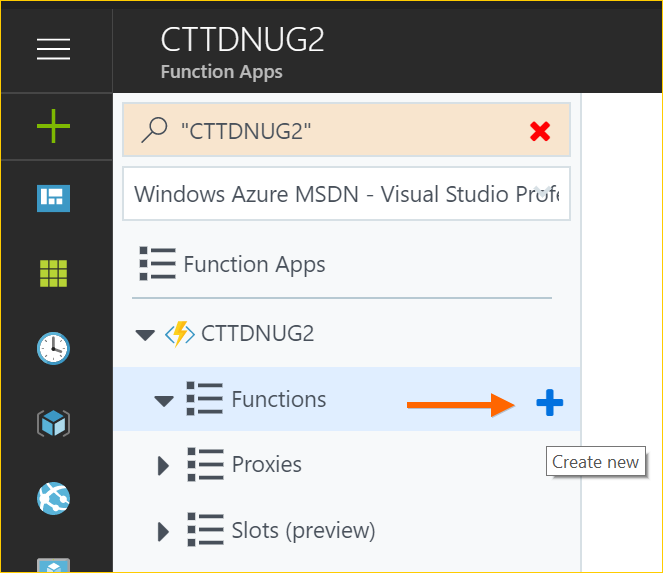

3. Now that your function is created you will see the following code in the run.csx file. If you run it you will get XML as your response, so let’s go ahead and update this function to return JSON.

Changing the return type to JSON
For this example I’ll import Newtonsoft.Json package and then serialize a simple object to return back when the function is called.
1. Add Newtonsoft.Json package and other using references:

2. Update function code to use Newtonsoft.Json. Looking at the following code you will see that I’ve created a simple POCO object which is what I’ll be returning from the function. I then changed the response to return a serialized string in UTF8 encoding and application/response:

3. Now when we run the function through either the browser or Postman we’ll see the response in JSON format. Here is what we would see in Postman:

and then in a browser we would see this:

Azure Functions is a powerful component in Azure serverless offering and as you can see your not limited to XML as the only response format.
Let me know if you have any questions and I’d be happy to investigate and follow up.
Enjoy!
Downloading Microsoft Docs as PDF
Did you know you can download a specific set of docs as a PDF without it taking gigabytes of space, enabling you to take it anywhere with you on your desktop or mobile device.
Simply go to the particular docs you’re interested in, for example the Azure Application Architecture Guide and then below table of contents on the left side you will see a Download PDF button.

Clicking the Download PDF button will open up the latest version of the docs for this topic in a browser and from here you can click to save.
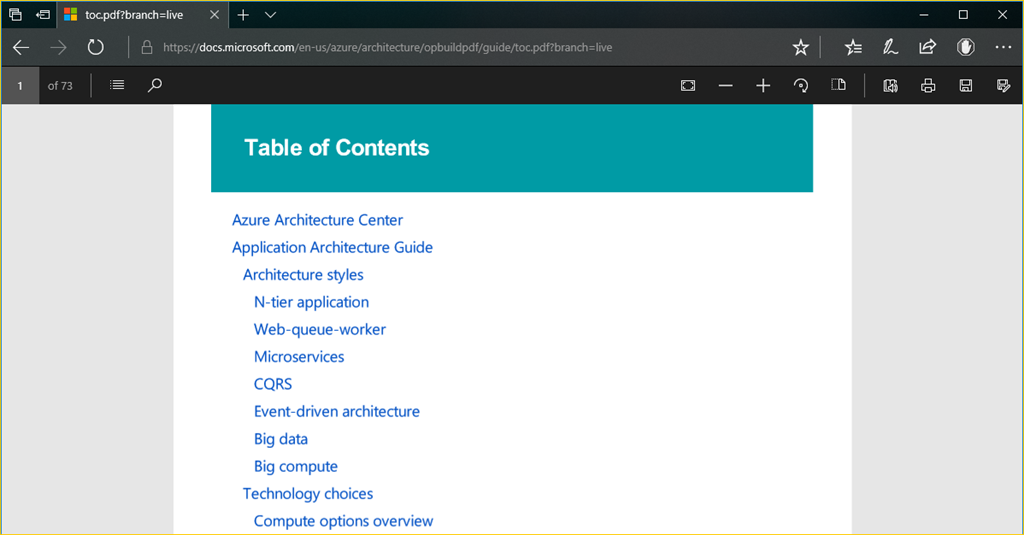
As you can see it downloaded a 73 page PDF document with all the content found online.
As content is changed online, clicking the Download PDF will result in getting the latest version of this document.
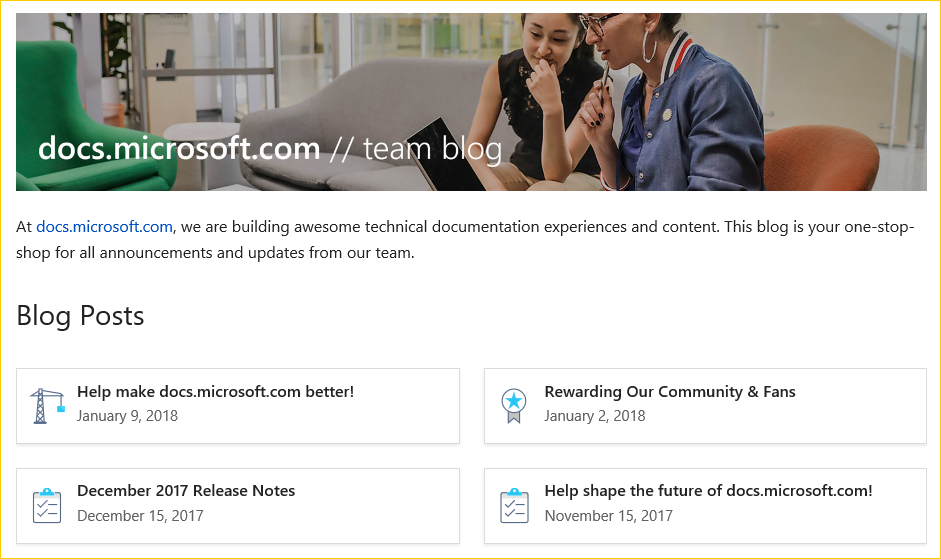
To follow up and learn about other updates to the Microsoft Docs site, follow their blog at https://docs.microsoft.com/en-us/teamblog/.
Enjoy!
References
https://docs.microsoft.com/en-us/teamblog/docs-november-update
Microsoft Azure Roadmap and Updates
Azure has three areas online where you can go to keep up to date with Azure updates and what the roadmap is for certain products within Azure.
Microsoft Cloud Platform Roadmap
The Microsoft Cloud Platform Roadmap provides a snapshot of what Microsoft is working on in their cloud platform business. From here you can use the roadmap to find out what they’re recently made generally available, released to public preview, are still developing and testing, or what’s no longer being developed. You can search by Product Category and/or Status.
For Product Category you have the following categories:
- Application development
- Cloud infrastructure
- Data management and analytics
- Enterprise Mobility + Security
- Internet of Things
For Status type you can search by the following types:
- All
- In Development
- In Preview
- Now Available
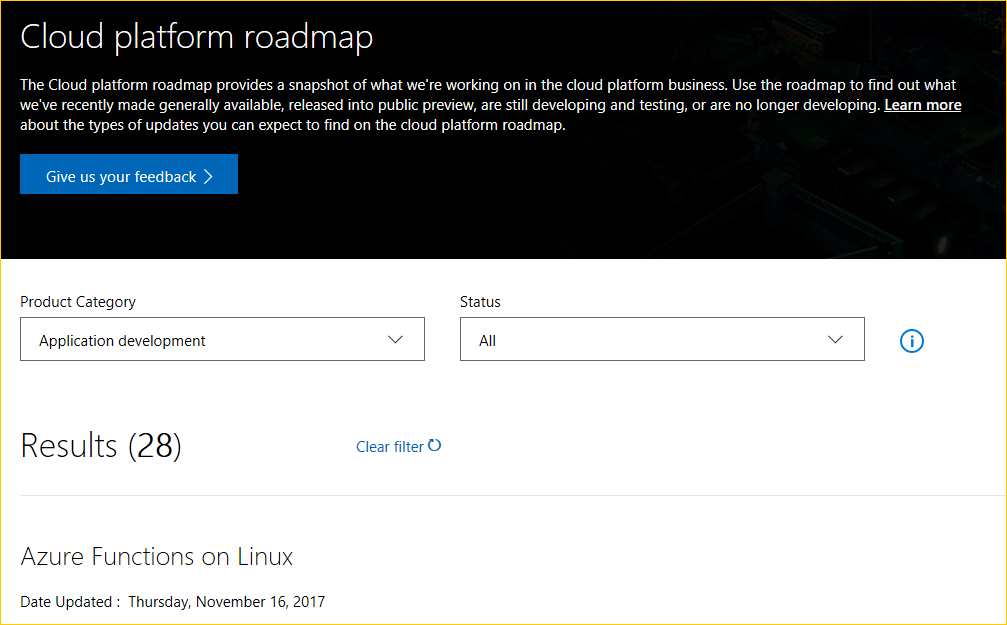
For each result there is a date of when it was last updated and then a status of either In Development, In Preview, and Now Available.

Finally you can can click the Learn more link for further details about this update.
Azure Roadmap
The Azure Roadmap page shows you where they’re heading and any upcoming changes to Azure products. This is the place to find out what’s new

Azure Updates
The Azure Updates page allows you to see all the updates in one place. You can filter by product, update type and even platform.

Enjoy!
References
https://azure.microsoft.com/en-us/updates/
Essential tool for blurring Azure secrets for presentations and screen recordings
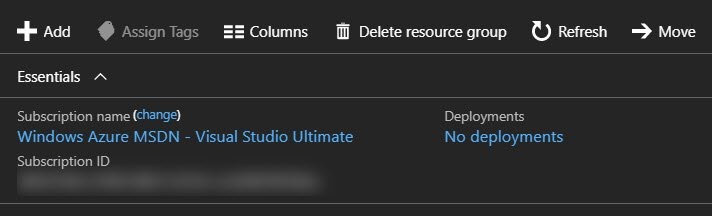
For those that do Azure presentations / screen recordings you know that you often find yourself scrubbing out your sensitive and personal information such as subscription keys, email addresses, keys and connection strings. What if you could have this magically done for you?
Well let me introduce to you a handy Chrome extension called Azure Mask that will mask GUIDs (such as Subscription IDs), email addresses, keys, and connection strings with a blur. The intention of the extension is to make it easier to do screen recordings without revealing sensitive, personal, account information that may show up on screen.
NOTE: This extension will only run and apply against Azure portal URLs.
Features
- Blurs GUIDs (such as Subscription IDs)
- Blurs your account email
- Hides the "Report a Bug" button (if found)
- Toggle the mask on/off and store this state
- Apply the mask (if enabled) after Document Object Model (DOM) mutations
Installing the Extension
As mentioned on the Azure Mask GitHub repository readme, you can install this extension in Chrome from either a package or from source. Let’s take a look at how we can install from source.
- Download or clone the repository: git clone git@github.com:clarkio/azure-mask.git
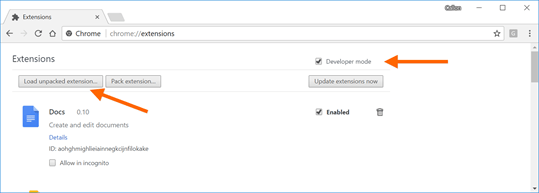
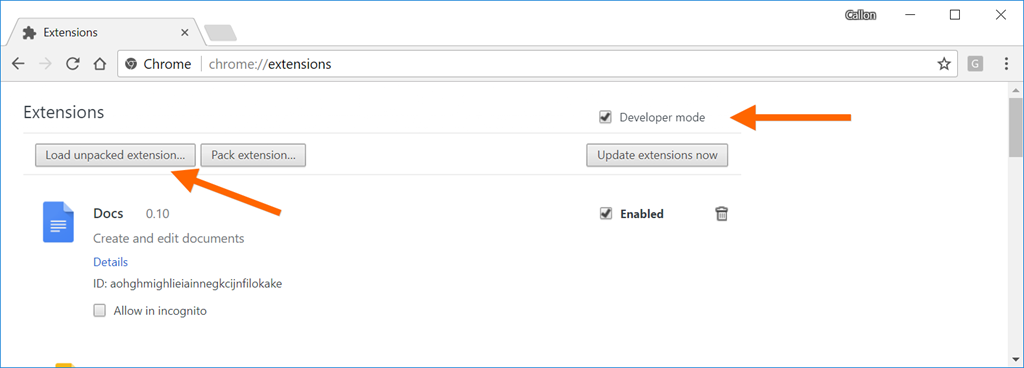
- Open up Chrome and bring up the extensions settings by typing in the address bar: chrome://extensions/
- Check the “Develop mode” option and click on Load unpacked extension button:
- Navigate to where you cloned this repository and then choose path: /azure-mask/src
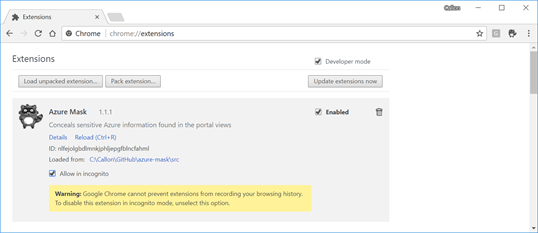
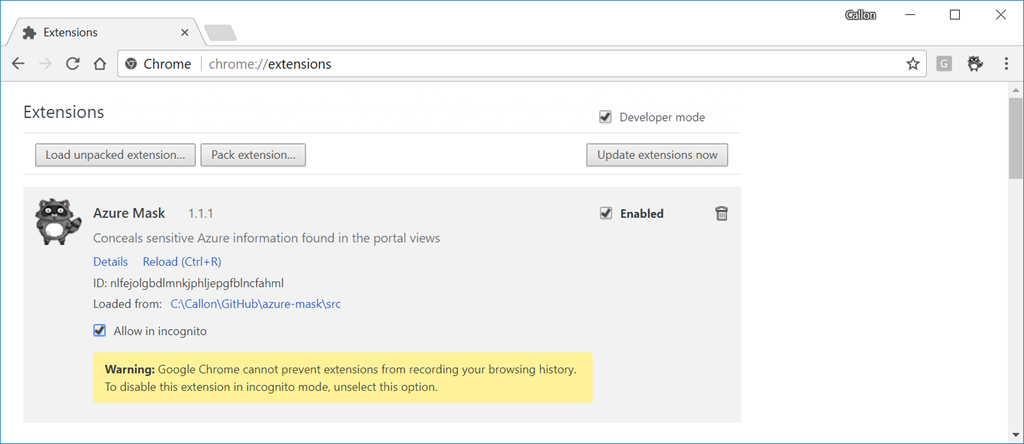
- Follow the prompts and then the extension will be available in Chrome:
Using Azure Mask
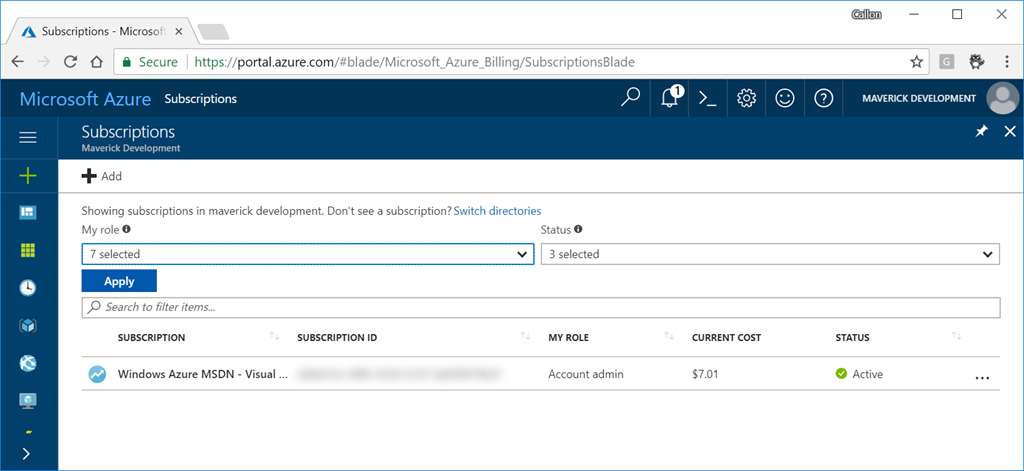
After installing the Azure Mask extension in Chrome, navigate to your Azure portal and after signing in you will see all your Azure secrets magically blurred:
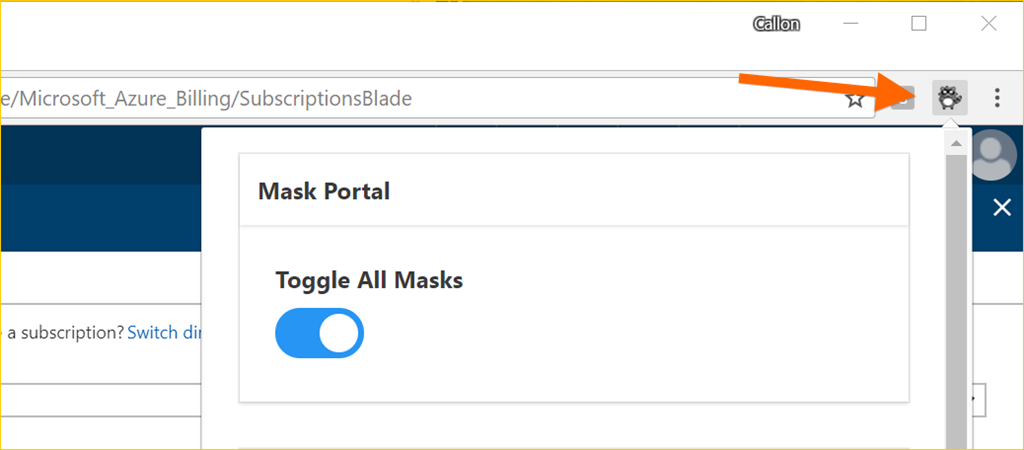
If you want to turn off this extension, click on the Azure Mask extension button in Chrome to bring up the options:
Enjoy!
References
Microsoft’s new Azure & AWS Cloud Service Map
Microsoft recently introduced a new Cloud Service Map to help customers and developers quickly compare the capabilities between Amazon Web Services and Microsoft’s Azure cloud platform across all categories. You can leverage this guide for planning multi-cloud solutions or simply to migrate from AWS to Azure.
The cloud service map (PDF available for download) is broken out into 13 sections to make navigation between each service simple:
- Marketplace – Cloud marketplace services bring together native and partner service offerings to a single place, making it easier for customers and partners to understand what they can do.
- Compute – Compute commonly refers to the collection of cloud computing resources that your application can run on.
- Storage – Storage services offer durable, highly-available, and massively-scalable cloud storage for your application, whether it runs in the cloud or not.
- Networking & Content Delivery – Allows you to easily provision private networks, connect your cloud application to your on-premises datacenters, and more.
- Database – Database services refers to options for storing data, whether it’s a managed relational SQL database that’s globally distributed or multi-model NoSQL databases designed for any scale.
- Analytics and big data – Make the most informed decision possible by analyzing all of the data you need in real time.
- Intelligence – Intelligence services enable natural and contextual interaction within your applications, using machine learning and artificial intelligence capabilities that include text, speech, vision, and search.
- Internet of Things (IoT) – Internet of Things (IoT) services connect your devices, assets, and sensors to collect and analyze untapped data.
- Management & monitoring – Management and monitoring services provide visibility into the health, performance, and utilization of your applications, workloads, and infrastructure.
- Mobile services – Mobile services enable you to reach and engage your customers everywhere, on every device. DevOps services make it easier to bring a higher quality app to market faster, and a number of engagement services make it easier to deliver performant experiences that feel tailored to each user.
- Security, identity, and access – A range of capabilities that protect your services and data in the cloud, while also enabling you to extend your existing user accounts and identities, or provisioning entirely new ones.
- Developer tools – Developer tools empower you to quickly build, debug, deploy, diagnose, and manage multi-platform, scalable apps and services.
- Enterprise integration – Enterprise integration makes it easier to build and manage B2B workflows that integrate with third-party software-as-a-service apps, on-premises apps, and custom apps.
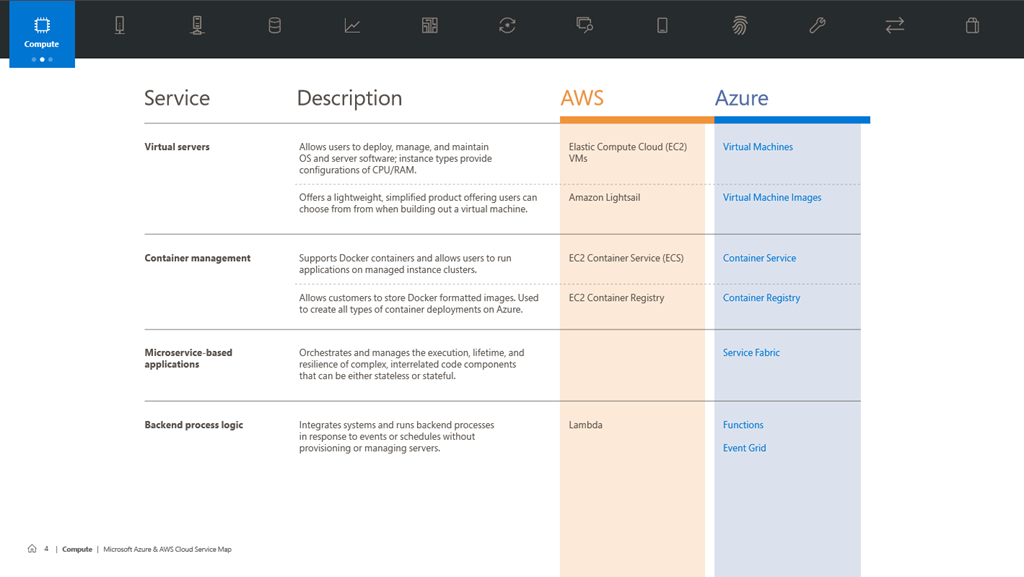
This guidance is laid out in a convenient table that lets you quickly find and learn more about each of the services you’re most interested in. In this instance, you can quickly see the service name, description and the name of the services in AWS and Azure. Links are also provided for each of the Azure services.
Enjoy!
 The Flying Maverick