Tag: Azure

AIAzureDevelopmentEventsProductivity

Microsoft Build 2018–Day 2 Highlights

Today’s keynote by Joe Belfiore was focused on Multi-sense + Multi-device for Microsoft 365, which is Windows, Office and EMS

Image showing how Microsoft 365 brings together Office 365, Windows 10, and Enterprise Mobility + Security (EMS), a complete, intelligent, and secure solution to empower employees.

Announcements

  • Fluent Design System updates.
  • UWP XAML Islands, which lets you incorporate UWP into WinForms, WPF and Win32 applications. This also means you can start to bring in the Fluent Design System into these UI frameworks.
  • Windows UI Library, which brings native platform controls as NuGet packages instead of being tied to the OS version. This will work from the Windows Anniversary Update and newer.
  • .NET Core 3.0, which will support side-by-side runtimes, along with support for WinForms, WPF and UWP.
  • MSIX, which is dubbed the best technology for installing applications on Windows. This inherits the Universal Windows Platform (UWP) features, works across Enterprise or Store distributions, and supports all Windows applications.
  • Windows SDK Insider Preview – https://aka.ms/winsdk
  • New developer revenue sharing model. Developers will get 85% when their app is found in the Microsoft store, and 95% when you provide your customers to your app in the Microsoft store.
  • Microsoft Launcher on Android will support Timeline for cross-device application launching. On iOS this will be supported through Microsoft Edge.
  • A new “Your Phone” experience coming soon to Windows 10 that enables you to see your connected phone text messages, photos and notifications and then interact with them without having to use your phone. Really neat experience – now if only they support Windows Mobile 10 Smile
  • Microsoft Sets was officially shown and demonstrated how it can be used for an easier way to organize your work and allow you to get back to work where you left off when ready. This means not having to have 25+ tabs open in Chrome or Edge. Nice!
  • Adaptive Cards is being added to Microsoft 365, which will enable developers to create rich interactive content within conversations. They demonstrated a GitHub Adaptive Card for Outlook (365) where you could comment and close an issue. Another example shown was paying for your invoice from an email.
  • There was a lot of buzz for Microsoft Graph, which is core to the Microsoft 365 platform. Microsoft Graph helps developers connect the dots between people, schedules, conversations, and content within the Microsoft cloud.
  • Cortana and Alexa start speaking to one another. Sometime in the future you will be able to access your Alexa device through Windows 10 and likewise on an Amazon Echo you will ne able to speak to Cortana.

Enjoy!

References

https://developer.microsoft.com/en-us/events/build

Modernizing applications for our multi-sense, multi-device world

Microsoft 365 empowers developers to build intelligent apps for where and how the world works

AIAzureDevelopmentEventsProductivity

Microsoft Build 2018 – Day 1 Highlights

This is my first attendance at the annual Microsoft Build conference taking place in Seattle, WA. I have to tell you that so far I’m not disappointed. Here are some of the highlights from today’s events:

  • Azure is becoming the world’s computer: Azure | Azure Stack | Azure IoT Edge | Azure Sphere.
  • Azure IoT Edge runtime which runs on Windows or Linux is now being open sourced.
  • Microsoft showed off Cortana and Alexa integration which was pretty cool.
  • New Azure AI infrastructure announced: Project Brainwave which is a real-time AI on cloud and edge devices.
  • Announced Project Kinect for Azure, an Azure AI-enabled edge device.
  • Visual Studio Live Share is now generally available. This provides real-time collaborative development, shared debugging, independent views and works across Visual Studio and Visual Studio Code (Windows, Mac and Linux).
  • Azure Event Grid is getting new improvements like dead lettering (DLQ) and custom retry policies. Event Grid is also adding new event publishers for Azure Media Services and Azure Container Registry, and new event handlers for Storage Queue and Relay Hybrid Connections. Finally Azure Event Grid is providing an alternative form of endpoint validation. Event Grid provides reliable event delivery at massive scale (millions of events per second), and it eliminates long polling and hammer polling, and the associated costs of latency.
  • Azure Cosmos had some interesting updates like the new multi-master write support. It also provides API support for MongoDB, SQL, Table Storage, Gremlin Graph, Spark, and Casandra.
  • Azure Search now integrates Azure Cognitive Services to provide built-in enrichment of content using AI models, and it enables immersive search experiences over any data.
  • The Fluent Design System which Microsoft first debuted at Build 2017, is expanding beyond Universal Windows Platform (UWP) apps and will be available for Windows Forms, WPF and native Win32 applications.
  • Windows Timeline is coming to iOS and Android.
  • Azure Functions updates: Durable Functions reaches general availability, and Azure Functions now leverages the App Service Diagnostics.
  • .NET Core 3.0 and .NET Framework 4.8 announced were announced, and .NET Core 3.0 is coming to desktop development (awesome!)
  • Visual Studio 2017 version 15.7 and the next update version 15.8 preview 1 were released.
  • Visual Studio App Center integration with GitHub.
    • Visual Studio IntelliCode announced, which brings you the next generation of developer productivity by providing AI-assisted development.

    This already feels like a lot but really it’s just scratching the surface. I’m looking forward to what is announced today in the keynote followed by more technical workshops and sessions.

    Enjoy!

    References

    https://developer.microsoft.com/en-us/events/build

    Azure

    Overview of Monitoring in Azure

    Monitoring, monitoring, monitoring! In my opinion as a Systems Architect and Developer for the last 20 years I’ve found that we don’t do enough application and resource logging. It’s only when you start working with DevOps and see how the operations team works with and troubleshoots your applications do you as a developer realize that maybe we should have added more logging to help diagnose and provide valuable insights to the state of your application.

    Luckily for us when you deploy your application to Azure there is a breadth of monitoring solutions for collecting, analyzing and acting on telemetry from your application and the Azure resources that support them. These services are categorized into the following four sections:

    • Deep Application Monitoring
    • Deep Infrastructure Monitoring    
    • Core Monitoring    
    • Shared Capabilities

    Monitoring overview

    Deep Application Monitoring

    Application Insights provides deep insights into your application performance, availability and usage, whether you have it hosted in the cloud or on-premises. Application Insights provides the capability to instrument your own applications, adding events to suit your own needs. Application Insights can be configured for new applications or you can start monitoring an existing application in production without any changes by using an agent.

    Application Insights provides you with the ability to quickly identify and diagnose issues in production and can also be used for local and/or QA testing.

    When leveraging Application Insights you can take advantage of Application Insights Analytics to detect trends, identify usage behaviors, and perform complex queries, and Application Insights is built upon core monitoring services found in Azure.

    Deep Infrastructure Monitoring

    On the infrastructure side we have Deep Infrastructure Monitoring is made up Log Analytics, Management Solutions, Service Map, and Network Monitoring which is made up by several tools that work together. These services also build upon core monitoring services in Azure that provide powerful analytics.

    Core Monitoring

    Core monitoring is standard across Azure resources and require only minimal configuration. Core monitoring provides the necessary telemetry that the premium monitoring services leverage. With Core monitoring we have access to Azure Monitor, Azure Advisor, Azure Service Health, and Activity Logs.

    Shared Capabilities

    Finally we have the shared monitoring capabilities that the core and deep monitoring services use to provide features like Alerts, Dashboards, and the Metrics Explorer.

    Summary

    Monitoring is an essential role in any application so that you can collect and analyze data to determine the performance, health and availability of your application and the resources that it depends on. Azure provides a very robust set of services from monitoring your application all the way down to the infrastructure it runs on.

    Enjoy!

    Resources

    Azure Monitoring Docs

    Overview of Monitoring in Azure 

    Explore Azure Monitor to get started with core monitoring metrics and alerts

    Explore Application Insights if you’re trying to diagnose problems in your App Service web app

    Explore Log Analytics for analyzing collected monitoring data and logs

    Azure

    Know your Azure Regions and Locations

    Microsoft is constantly expanding it’s Azure reach into new regions and locations. Recently Microsoft announced new regions in Europe, South Africa, and United Arab Emirates (UAE).

    Azure Regions

    Today Azure has a total of 50 regions worldwide that span 140 countries. That’s more than all other cloud providers combined – offering the scale needed to bring applications closer to your users around the world, preserving data residency, and offering comprehensive compliance and resiliency options.

    image

    With so many regions it’s important to know and select the appropriate region for your applications. This is where Azure locations comes in.

    Azure Locations

    When selecting an Azure Region you want to select the one that is closest to your users. For example if you have your application running in Toronto, Canada and you want to bring in some Azure resources you will want to select the Canadian region that is closest to Toronto, in this case you would choose Canada Central.

    If you look at the Azure Locations page you will see that Canada East is located in Quebec City, and Canada Central is in Toronto.

    Funny enough when I talk to new Azure users, more often than not they think Canada East is in Toronto and select the wrong region. If this case you can easily move the resources to another region, provided that region also offers those services. I say this because not all regions offer the same services.

    Enjoy!

    Resources

    Azure Regions

    Azure Locations

    AzureIoT

    Introducing Azure Sphere

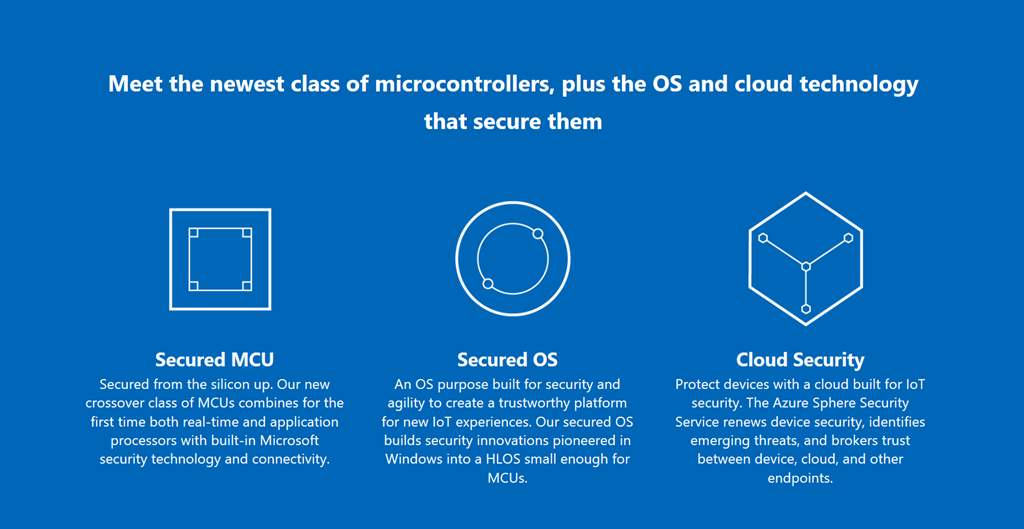
    Microsoft recently announced the introduction of Azure Sphere which is a low cost single chip computer that is described as a highly secured end-to-end solution for connected microcontroller powered devices. Azure Sphere includes three components working as one, a brand-new class of crossover microcontrollers running a secured operating system and supported by Azure cloud services. Along with advanced development tools, Azure Sphere is your opportunity to reimagine your business from the ground up.

    image

    What is surprising to know is that Azure Sphere is powered by Linux and not Windows.

    You can learn more about Azure Sphere here: https://www.microsoft.com/en-us/azure-sphere/

    Enjoy!

    Resources

    https://www.microsoft.com/en-us/azure-sphere/

    Learn About Azure Sphere

    Explore Details of Azure Sphere

    https://www.youtube.com/watch?v=iiDF26HNh-Y&feature=youtu.be

    Azure

    Azure Storage Explorer Reaches 1.0

    image

    Microsoft Azure Storage Explorer is a cross platform client tool built on Electron that allows you to easily work with Azure Storage data on Windows, macOS and Linux. This tool also provides preview support for Azure Cosmos DB and Azure Data Lake Store.

    I find this is a great tool to use when working with Azure Functions locally and you want to work with Azure Storage Accounts, both locally or in Azure.

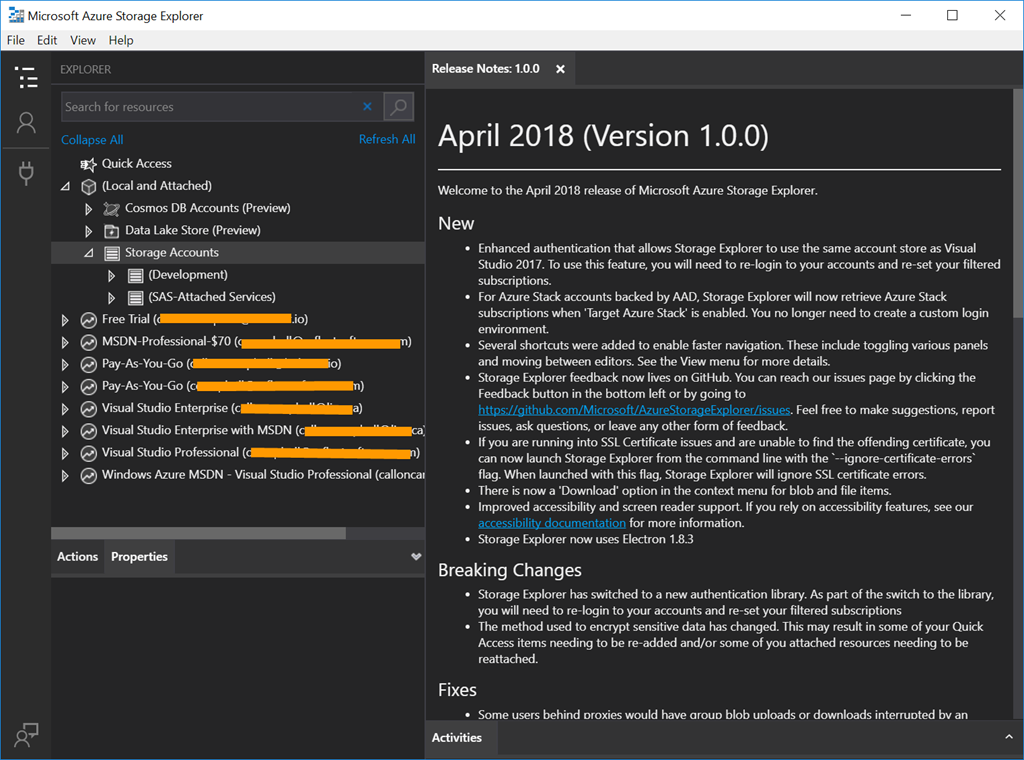
    Microsoft Azure Storage Explorer was updated on April 16 2018 to version 1.0 and is a big update with log of new features, bug fixes, and some breaking changes, so be sure to checkout the release notes on what is new and fixed.

    image

    Breaking Changes

    It’s worth pointing out the following breaking changes:

    • Storage Explorer has switched to a new authentication library. As part of the switch to the library, you will need to re-login to your accounts and re-set your filtered subscriptions
    • The method used to encrypt sensitive data has changed. This may result in some of your Quick Access items needing to be re-added and/or some of you attached resources needing to be reattached.

    Download Details

    Enjoy!

    References

    Azure Storage Explorer release notes

    Feedback can be submitted to the Azure Storage Explorer issues page on GitHub

    AzureEvents

    Global Azure Bootcamp 2018

    This coming weekend will be the 6th Global Azure Bootcamp, which is a worldwide series of one day technical learning events for Azure. This event is created and hosted by the leaders from the global cloud developer community.

    This will be my first year attending the event and I’m honored to be one of the presenters at not one but two events in Mississauga and Kitchener/Waterloo region in Ontario, Canada. I’ll be speaking about Azure Event Grid and how it can be used in a serverless architecture in the cloud.

    “The Global Azure Bootcamp is community at its finest. We are incredibly excited to see community leaders around the world rise up and help developers build the skills they need in today’s cloud-driven business environment. We’re here to help each of these community led events be a success and can’t wait to continue our decades-long commitment to the worldwide developer community,” says Jeff Sandquist, General Manager of the Azure Platform Experiences Group at Microsoft.

    Map

    I hope you’re able to attend one of the events happening this weekend around the world and learn something new about Azure.

    Enjoy!

    Resources

    https://global.azurebootcamp.net/

    https://azure.microsoft.com/en-ca/blog/globalazure-bootcamp-2018/

    Azure

    Comparing Azure Functions Runtime Versions

    image

    Azure Functions now have 2 different runtimes, version 1 which is what is currently in production and the only runtime supported for production use, and version 2 which is currently in preview. I’ll cover the difference in both runtimes and when to use which version.

    Overview or Version 1

    The version 1 runtime is what is currently used in production and is the only version supported for production use. This runtime is based on .NET Framework 4.6 and only support Windows for development and/or hosting in the portal. Version 1 also only supports the following languages: C#, JavaScript, and F#.

    What’s New in Version 2

    Version 2 runtime has been rebuilt from the ground up on .NET Core 2.0 and support cross platform (Windows and Linux) for deployment and for development you can use Windows, Linux, and macOS.

    Version 2 introduces language extension model that both JavaScript and Java are taking advantage of. There is also expanded language support for Java and more coming. We also have new bindings for Microsoft Graph and Durable Functions.

    Azure Functions is a great serverless offering and provides lots of functionality for almost any application. If you need to run code in production than version 1 is your only choice, but if you want to try out Azure Functions then definitely take a look at both runtimes. With Microsoft annual developer conference Build next month, I bet we will hear more information about version 2 runtime and a timeline for release.

    Enjoy!

    References

    Azure Functions runtime versions overview

    Install Azure Functions Core Tools

    Azure Functions Roadmap

    Azure

    Introduction to Durable Functions

    Durable Functions is a new extension of Azure Functions which manages state, checkpoints and restarts for you. Durable Functions provide the capability to code stateful functions in a serverless environment. This new extension enables a new type of function called an orchestrator. The primary use case for Durable Functions is to simplify complex, stateful coordination problems in serverless applications. Some advantages of an orchestrator function are:

    • Workflows are defined in code. This means no JSON schemas or designers are needed.
    • Other functions can be called synchronously or asynchronously. Output from functions can be saved to local variables.
    • Automatic checkpoint the progress of the function whenever it awaits. This means local state is never lost if the process recycles or the VM reboots.

    The following are 5 sample patterns where Durable Functions can help.

    Pattern #1: Function Chaining

    Function chaining is the execution of functions in sequence where the output of one function is the input to another function. With this pattern you typically use queues to pass state from function to function.

    Function chaining diagram

    Pattern #2: Fan-out/Fan-in

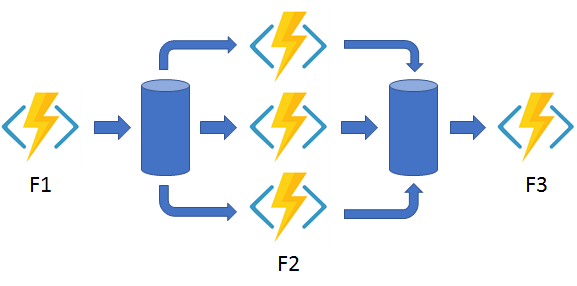
    Fan-out/Fan-in refers to the execution of multiple functions in parallel and then waiting for all of them to finish. This pattern also uses queues to manage state from start to end. Fanning back in is much more complicated as you would have to track the outputs of all the functions waiting for them to finish.

    Fan-out/fan-in diagram 

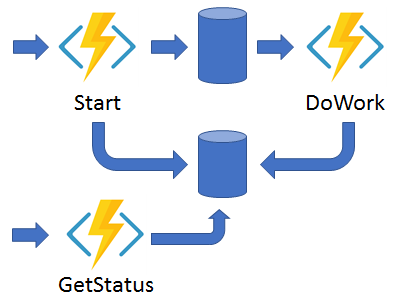
    Pattern #3: Async HTTP APIs

    Async HTTP APIs pattern is all about the problem of coordinating the state of long running operations with external APIs. With this pattern you often use another status endpoint for the client to check on the status of the long running operation.

    HTTP API diagram

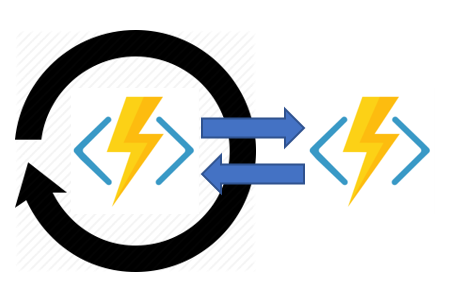
    Pattern #4: Monitoring

    The Monitoring pattern is a recurring process in a workflow where the function polls for a certain condition to be met. A simple timer trigger could address this but its interval is static and management of it is more complex.

    Monitor diagram

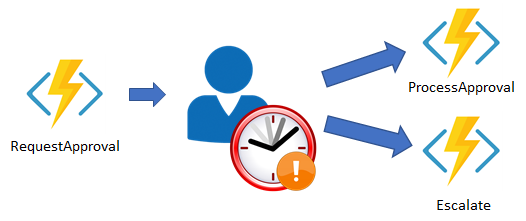
    Pattern #5: Human Interaction

    Finally we have the Human Interaction pattern. This pattern is where a function executes but its process is gated based on some sort of human interaction. People are not always available or respond in a timely manner which introduces complexity to your function process.

    Human interaction diagram

    In all five use cases, Durable Functions provides built-in support for easily handling these scenarios without the need extra resources likes queues, timers, etc for managing state and controlling the function flow. For more information on each of these patterns and code samples please see the Durable Functions documentation.

    Durable Functions is currently in preview and is an advanced extension for Azure Functions that is not appropriate for all scenarios. Next month is the annual Microsoft developer conference Build. I suspect we’ll see some new exciting details with Azure Functions and Durable Functions specifically. Hopefully they become generally available.

    Enjoy!

    References

    Overview of Azure Functions

    Durable Functions Documentation

    AIAzureDevelopment

    Using the Face API from Microsoft Cognitive Services (part 2)–Face Verification

    In part 1 of this series I showed you how to create a Face API subscription from Microsoft Cognitive Services and then use the Face API library to detect faces from an image. In this post we’ll expand on the previous to include Face Verification. Let’s get started.

    Picking up where we left off, we will want to detect the most prominent face from an image and then use the detected face and verify it to see if they belong to the same person.

    1. I refactored the code in the BrowsePhoto method to return an image that was selected. This method is then used by both the Identification and Verification images processes.

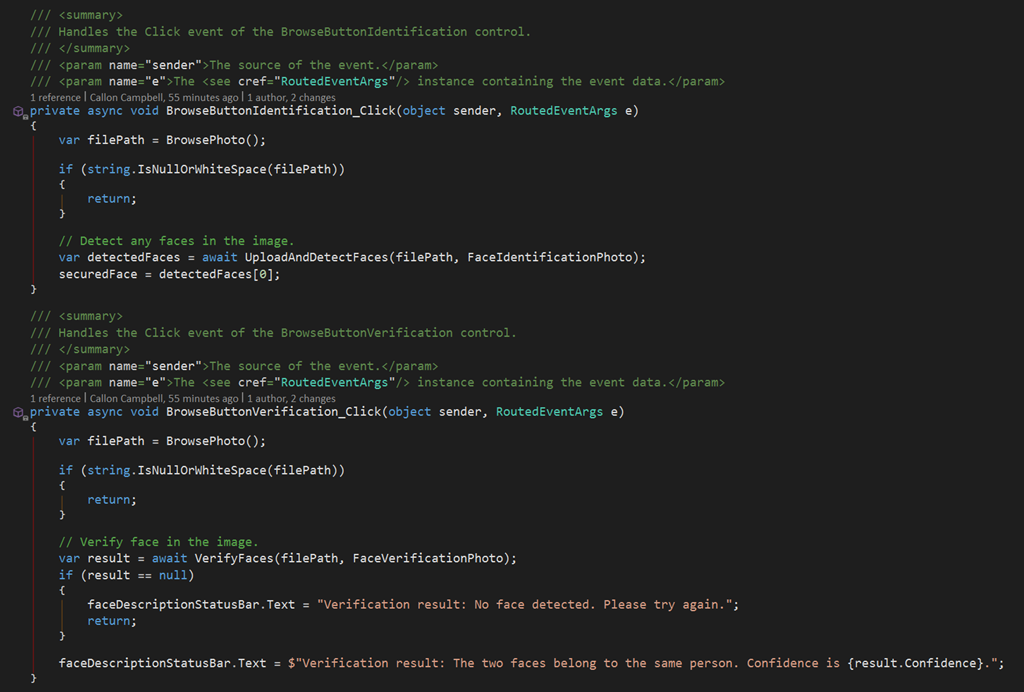
    2. I refactored the UI to show 2 different images files, so means there is now 2 click events to identify the person in the image and then use this identification to verify its the same person when we load up another image. Both of these events can be seen here:

    image

    3. Finally we will be using the Face API VerifyAsync method to check to faces and determine if they belong to the same person.

    image

    4. Now let’s run the application across a few images and see how well it performs with two images of me from different years. In the first result I have an image from 10+ years ago and the Face API has come back that its 66% certain it’s the same person.

    image

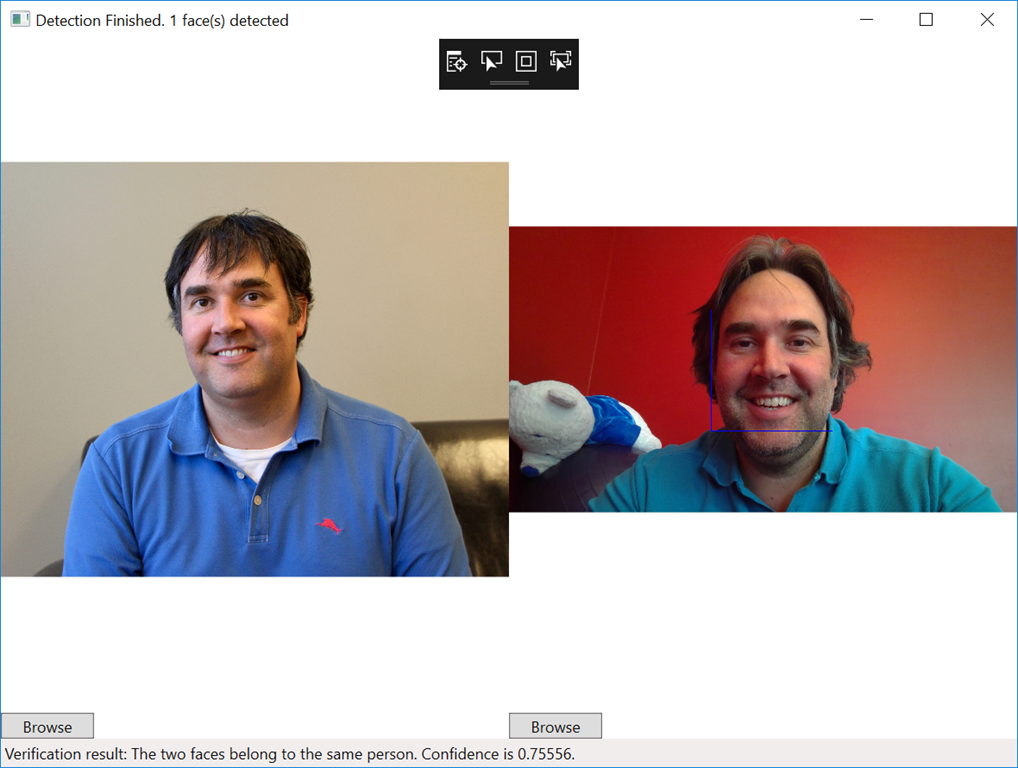
    How about using something more recent. In this next test run the Face API again detects its 75% certain its the same person.

    image

    Wrap up

    As you can see I’m able to use the Face API from Microsoft Cognitive Services to not only detect by also verify identity. The Face API provides other methods that can be used for grouping, people together and training it to recognize specific people with their identification method.The Face API has also recently been updated to support a large group of people (1,000 in the free tier and over 1,000,000 in the paid tier).

    Enjoy!

    References

    Sample Code

    Face API Documentation