
It’s that time of year for Microsoft Ignite and during this conference we usually see updates across a number of Azure services. If there’s one Azure service I always keep a close eye on, it’s Azure Functions. It sits squarely in my primary area of focus — Azure PaaS — and the Ignite 2025 announcements from the team were genuinely impressive. I won’t rehash the full product announcement here (the Azure Functions team blog post does that well), but I do want to call out the things that caught my attention and explain why they matter from where I sit.
Functions is Becoming the AI Execution Layer
Reading through the announcements, I like that Microsoft is positioning Azure Functions as a natural runtime for AI workloads — specifically MCP servers and agent-hosted tools. There are two distinct paths here worth separating:
- GA: Author MCP tool servers using the familiar Functions triggers-and-bindings model — Functions handles the protocol mechanics and scaling.
- Preview: Host existing official MCP SDK servers directly on Functions without rewriting them as triggers.
The GA path is the more practical entry point for most teams. It means you can build remote MCP servers using patterns you already know, and Functions handles all the protocol mechanics and scaling underneath.
There’s also built-in authentication via Entra ID and OpenID Connect for MCP servers, which addresses the main gap from the early preview. Worth noting: authorization currently secures access at the server level, not per individual tool, and fine-grained per-resource-management (PRM) authorization is still in preview. Good progress, but something to factor in before going all-in on this for production workloads.
Flex Consumption Keeps Getting Better
Azure Functions Flex Consumption is the new default hosting model and it’s the right hosting choice for most new Azure Functions workloads. The Ignite 2025 updates reinforce that view. A few highlights:
- 512 MB instance size is now GA — right-sizing lighter workloads without paying for more memory than you need
- Availability Zones is now GA — the last real holdout for production-critical workloads is gone
- Rolling updates hit public preview — zero-downtime deployments by setting a single property; in-flight executions drain naturally before instances are replaced
That last one is worth keeping an eye on, but it’s still public preview and not recommended for production yet. There are also real caveats to be aware of: deployments need to be backward-compatible (especially important with Durable Functions), and single-instance apps can still see brief downtime during rollover. Still, zero-downtime deployment of Azure Functions has been a frequent customer ask and the direction is right. Outside of the Flex Consumption, we could use Deployment Slots for zero downtime deployments.
Durable Functions + AI Agents
The durable task extension for Microsoft Agent Framework is something I’ll be watching closely. The idea is straightforward: bring Durable Functions’ proven crash-resilient, distributed execution model into the Agent Framework. That means AI agents that survive restarts, maintain session context, and support human-in-the-loop patterns — all without consuming compute while waiting.
Key features of the durable task extension include:
- Serverless Hosting: Deploy agents on Azure Functions with auto-scaling from thousands of instances to zero, while retaining full control in a serverless architecture.
- Automatic Session Management: Agents maintain persistent sessions with full conversation context that survives process crashes, restarts, and distributed execution across instances
- Deterministic Multi-Agent Orchestrations: Coordinate specialized durable agents with predictable, repeatable, code-driven execution patterns
- Human-in-the-Loop with Serverless Cost Savings: Pause for human input without consuming compute resources or incurring costs
- Built-in Observability with Durable Task Scheduler: Deep visibility into agent operations and orchestrations through the Durable Task Scheduler UI dashboard
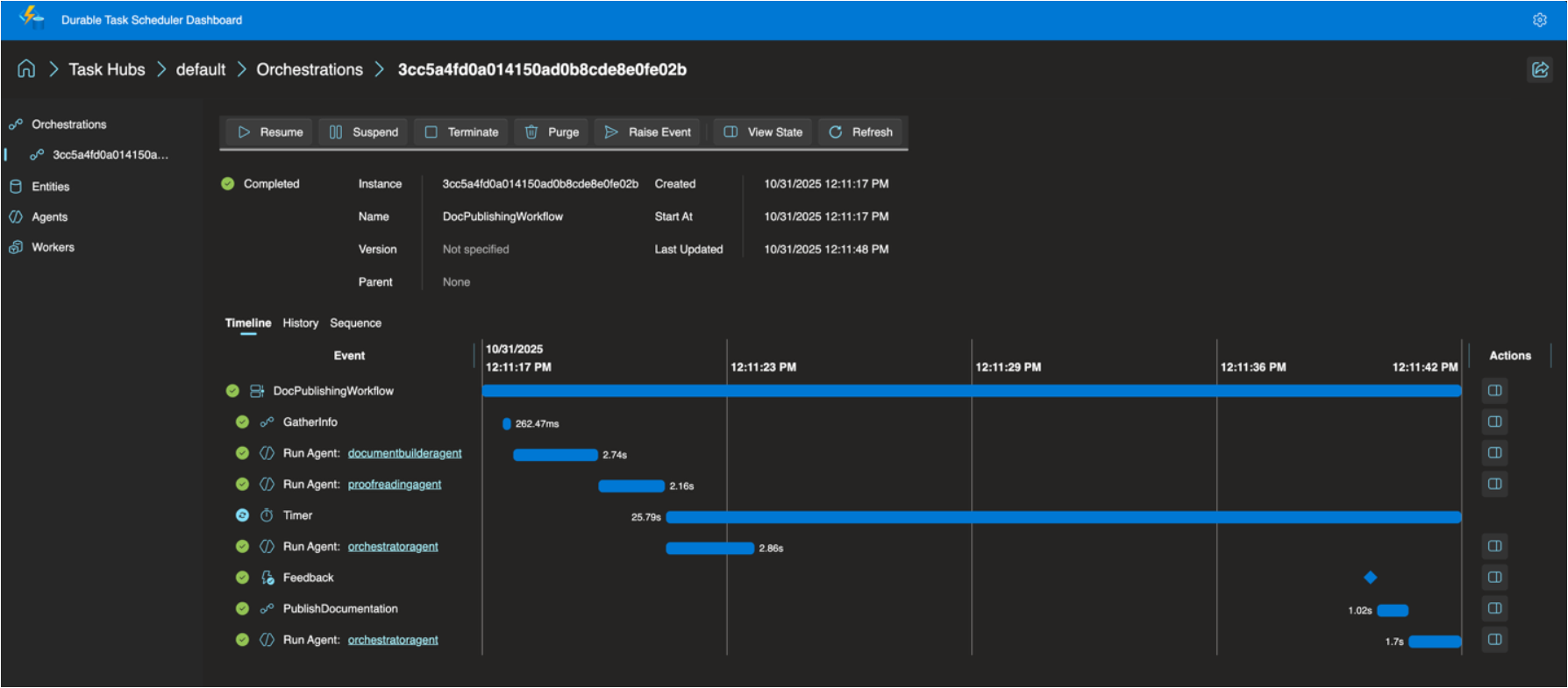
For anyone building multi-step AI workflows where reliability and state management matter, this is worth understanding. The announcement post has more detail.
The Durable Task Scheduler Dedicated SKU also reached GA, which is good news for teams running complex, steady-state orchestrations that need predictable pricing and advanced monitoring. For context, the Durable Task Scheduler is the managed orchestration backend that powers Durable Functions execution — GA of the Dedicated SKU means production-grade support and SLAs for it. A serverless Consumption SKU for the scheduler is now in preview too.
OpenTelemetry GA
OpenTelemetry support for Azure Functions is now generally available. This one has been a long time coming. Logs, traces, and metrics through open standards — vendor-neutral, broadly supported, consistent with how the rest of your distributed system is already instrumented. Support spans .NET (isolated), Java, JavaScript, Python, PowerShell, and TypeScript. If your Functions apps are still relying on Application Insights SDK directly (I think that’s most of our apps), it’s worth looking at the OpenTelemetry migration docs. I’ll have to look at a follow-up post about this specifically.
A Few Other Things Worth Knowing
- .NET 10 is now supported in the isolated worker model across all plans except Linux Consumption. The in-process model is not getting .NET 10 and reaches end of support November 10, 2026 — if you haven’t started that migration, now is the time.
- Aspire 13 ships an updated preview of the Functions integration (acting as a release candidate), with GA expected in Aspire 13.1. It deploys directly to Azure Functions on Container Apps.
- Java 25 and Node.js 24 were announced in preview at Ignite — check current docs for latest GA status.
- Linux Consumption is retiring on September 30, 2028 — the migration guide to Flex Consumption is your starting point.
Read the Full Announcement
There’s more in the full product update — including details on security improvements, new regions, Key Vault App Config references, and the self-hosting MCP SDK preview — than I’ve covered here. I’d recommend reading through the Azure Functions Ignite 2025 Update directly if you want the complete picture.
Enjoy!
References
- Azure Functions Ignite 2025 Update — Full announcement from the Azure Functions product team
- MCP server authorization with built-in auth — Entra ID and OAuth for MCP servers
- Foundry + Functions MCP tutorial — Connect Functions MCP tools to Foundry agents
- Durable task extension for Agent Framework — Announcement blog post
- Flex Consumption documentation — Plan overview and how-to guides
- Migrate to Flex Consumption — Step-by-step migration guide
- Rolling updates for Flex Consumption — Zero-downtime deployment documentation
- Durable Task Scheduler GA announcement — Dedicated and Consumption SKU details
- OpenTelemetry in Azure Functions — Setup and configuration guide
- Migrate to isolated worker model — .NET in-process to isolated migration guide


