AzureAzure Functions

What’s New with Azure Functions – Ignite 2025 Announcements

It’s that time of year for Microsoft Ignite and during this conference we usually see updates across a number of Azure services. If there’s one Azure service I always keep a close eye on, it’s Azure Functions. It sits squarely in my primary area of focus — Azure PaaS — and the Ignite 2025 announcements from the team were genuinely impressive. I won’t rehash the full product announcement here (the Azure Functions team blog post does that well), but I do want to call out the things that caught my attention and explain why they matter from where I sit.

Functions is Becoming the AI Execution Layer

Reading through the announcements, I like that Microsoft is positioning Azure Functions as a natural runtime for AI workloads — specifically MCP servers and agent-hosted tools. There are two distinct paths here worth separating:

  • GA: Author MCP tool servers using the familiar Functions triggers-and-bindings model — Functions handles the protocol mechanics and scaling.
  • Preview: Host existing official MCP SDK servers directly on Functions without rewriting them as triggers.

The GA path is the more practical entry point for most teams. It means you can build remote MCP servers using patterns you already know, and Functions handles all the protocol mechanics and scaling underneath.

There’s also built-in authentication via Entra ID and OpenID Connect for MCP servers, which addresses the main gap from the early preview. Worth noting: authorization currently secures access at the server level, not per individual tool, and fine-grained per-resource-management (PRM) authorization is still in preview. Good progress, but something to factor in before going all-in on this for production workloads.

Flex Consumption Keeps Getting Better

Azure Functions Flex Consumption is the new default hosting model and it’s the right hosting choice for most new Azure Functions workloads. The Ignite 2025 updates reinforce that view. A few highlights:

  • 512 MB instance size is now GA — right-sizing lighter workloads without paying for more memory than you need
  • Availability Zones is now GA — the last real holdout for production-critical workloads is gone
  • Rolling updates hit public preview — zero-downtime deployments by setting a single property; in-flight executions drain naturally before instances are replaced

That last one is worth keeping an eye on, but it’s still public preview and not recommended for production yet. There are also real caveats to be aware of: deployments need to be backward-compatible (especially important with Durable Functions), and single-instance apps can still see brief downtime during rollover. Still, zero-downtime deployment of Azure Functions has been a frequent customer ask and the direction is right. Outside of the Flex Consumption, we could use Deployment Slots for zero downtime deployments.

Durable Functions + AI Agents

The durable task extension for Microsoft Agent Framework is something I’ll be watching closely. The idea is straightforward: bring Durable Functions’ proven crash-resilient, distributed execution model into the Agent Framework. That means AI agents that survive restarts, maintain session context, and support human-in-the-loop patterns — all without consuming compute while waiting.

Key features of the durable task extension include:

  • Serverless Hosting: Deploy agents on Azure Functions with auto-scaling from thousands of instances to zero, while retaining full control in a serverless architecture.
  • Automatic Session Management: Agents maintain persistent sessions with full conversation context that survives process crashes, restarts, and distributed execution across instances
  • Deterministic Multi-Agent Orchestrations: Coordinate specialized durable agents with predictable, repeatable, code-driven execution patterns
  • Human-in-the-Loop with Serverless Cost Savings: Pause for human input without consuming compute resources or incurring costs
  • Built-in Observability with Durable Task Scheduler: Deep visibility into agent operations and orchestrations through the Durable Task Scheduler UI dashboard
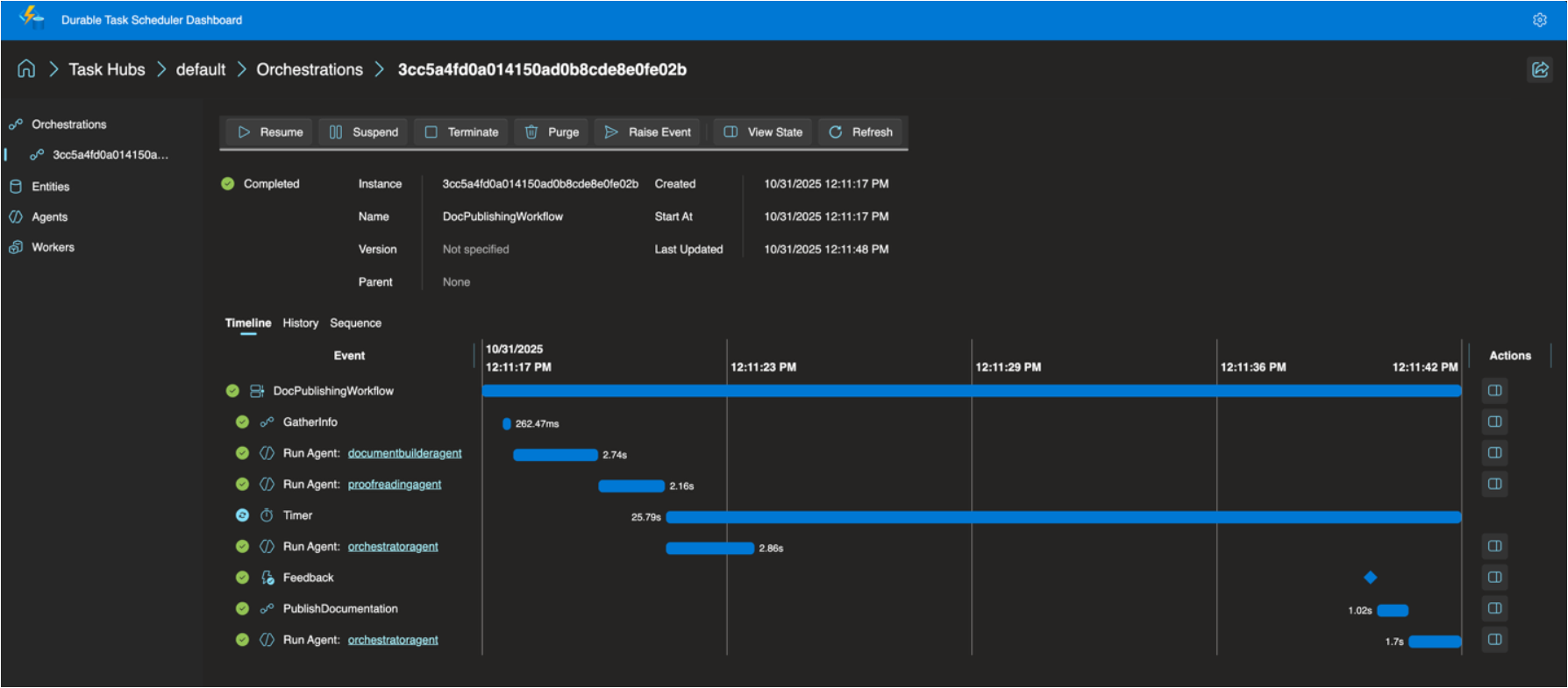
For anyone building multi-step AI workflows where reliability and state management matter, this is worth understanding. The announcement post has more detail.

The Durable Task Scheduler Dedicated SKU also reached GA, which is good news for teams running complex, steady-state orchestrations that need predictable pricing and advanced monitoring. For context, the Durable Task Scheduler is the managed orchestration backend that powers Durable Functions execution — GA of the Dedicated SKU means production-grade support and SLAs for it. A serverless Consumption SKU for the scheduler is now in preview too.

OpenTelemetry GA

OpenTelemetry support for Azure Functions is now generally available. This one has been a long time coming. Logs, traces, and metrics through open standards — vendor-neutral, broadly supported, consistent with how the rest of your distributed system is already instrumented. Support spans .NET (isolated), Java, JavaScript, Python, PowerShell, and TypeScript. If your Functions apps are still relying on Application Insights SDK directly (I think that’s most of our apps), it’s worth looking at the OpenTelemetry migration docs. I’ll have to look at a follow-up post about this specifically.

A Few Other Things Worth Knowing

  • .NET 10 is now supported in the isolated worker model across all plans except Linux Consumption. The in-process model is not getting .NET 10 and reaches end of support November 10, 2026 — if you haven’t started that migration, now is the time.
  • Aspire 13 ships an updated preview of the Functions integration (acting as a release candidate), with GA expected in Aspire 13.1. It deploys directly to Azure Functions on Container Apps.
  • Java 25 and Node.js 24 were announced in preview at Ignite — check current docs for latest GA status.
  • Linux Consumption is retiring on September 30, 2028 — the migration guide to Flex Consumption is your starting point.

Read the Full Announcement

There’s more in the full product update — including details on security improvements, new regions, Key Vault App Config references, and the self-hosting MCP SDK preview — than I’ve covered here. I’d recommend reading through the Azure Functions Ignite 2025 Update directly if you want the complete picture.

Enjoy!

References

Uncategorized

Motorsport Insights and Real-Time Medallion Architecture with Fabric Real-Time Intelligence

Last weekend, I had the privilege of presenting at Global Fabric Day 2025 in Toronto, and I wanted to get a write-up out while everything is still fresh. The session I put together was called Motorsport Insights and Real-Time Medallion Architecture with Fabric Real-Time Intelligence — and honestly, it was one of the more fun demos I’ve built in a while. Motorsport data, real-time pipelines, and medallion architecture all wrapped up in one talk? That’s my kind of Saturday.

In this post, I’ll walk through the key concepts from the session: Formula 1 telemetry, what a real-time medallion architecture looks like in Microsoft Fabric, and how I used Forza Motorsport as a live data source to drive a real-time dashboard.

Why Motorsport?

Formula 1 is one of the most data-intensive sports on the planet. Every car on the grid is bristling with 300+ sensors, generating roughly 1.1 million data points per second. That telemetry is transmitted continuously to the pit wall — engineers are watching fuel loads, tyre temperatures, brake ducts, water pressure, and dozens of other channels in real time.

With 20 cars on the circuit over a race weekend, you’re looking at approximately 160 terabytes of data generated per event. And every tenth of a second genuinely matters. That’s not a figure of speech — a tenth of a second is the difference between the podium and P4.

The key telemetry use cases are:

  • Visualize driver feedback — race engineers can see graphically what the driver is feeling through the wheel and pedals, not just rely on radio calls
  • Performance comparison — drivers compare their own lap traces against teammates and rivals to find where time is being lost
  • Reliability monitoring — teams watch critical channels like oil pressure, water temperature, and brake wear to make real-time decisions (brake duct inspection at pit stop? shut down the engine before a catastrophic failure?)

When I look at that problem space through the lens of a data engineer, the throughput requirements are staggering — and exactly the kind of scenario that Microsoft Fabric Real-Time Intelligence was built for.

The Architecture

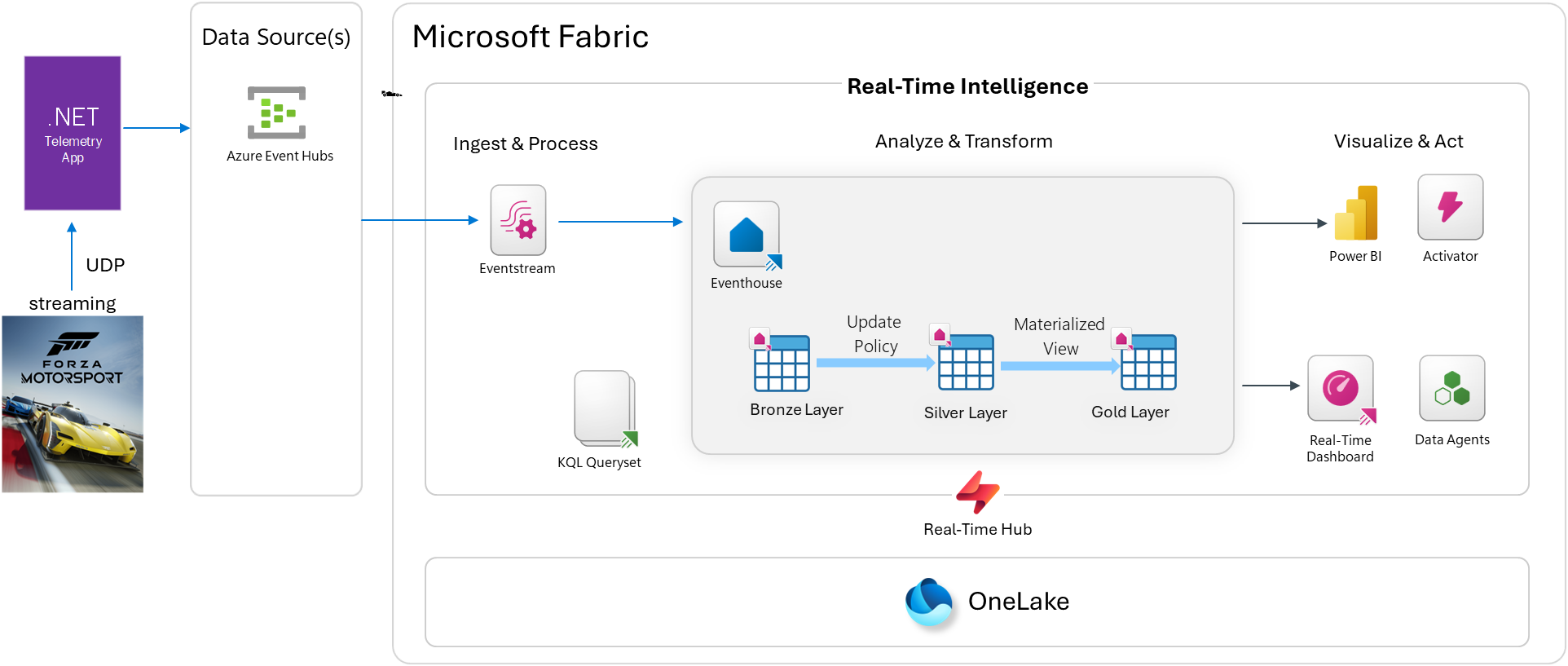
For this demo, I didn’t have an actual F1 telemetry feed, so I used Forza Motorsport as the data source. Forza exposes a “Data Out” UDP telemetry feature that streams live car metrics during a race — engine RPM, speed, gear, tyre slip, G-forces, and much more — all at high frequency. It’s a legitimately compelling substitute.

Here’s how the end-to-end pipeline flows:

[Forza Motorsport UDP]
→ [Edge compute / .NET Console App (forza-telemetry-bridge)]
→ [Azure Event Hubs]
→ [Fabric Eventstream]
→ [Eventhouse — Bronze / Silver / Gold layers]
→ [Real-Time Dashboard / Power BI]

What is the Medallion Architecture?

Before jumping into the demo architecture, it’s worth grounding the medallion architecture pattern for anyone who hasn’t encountered it before.

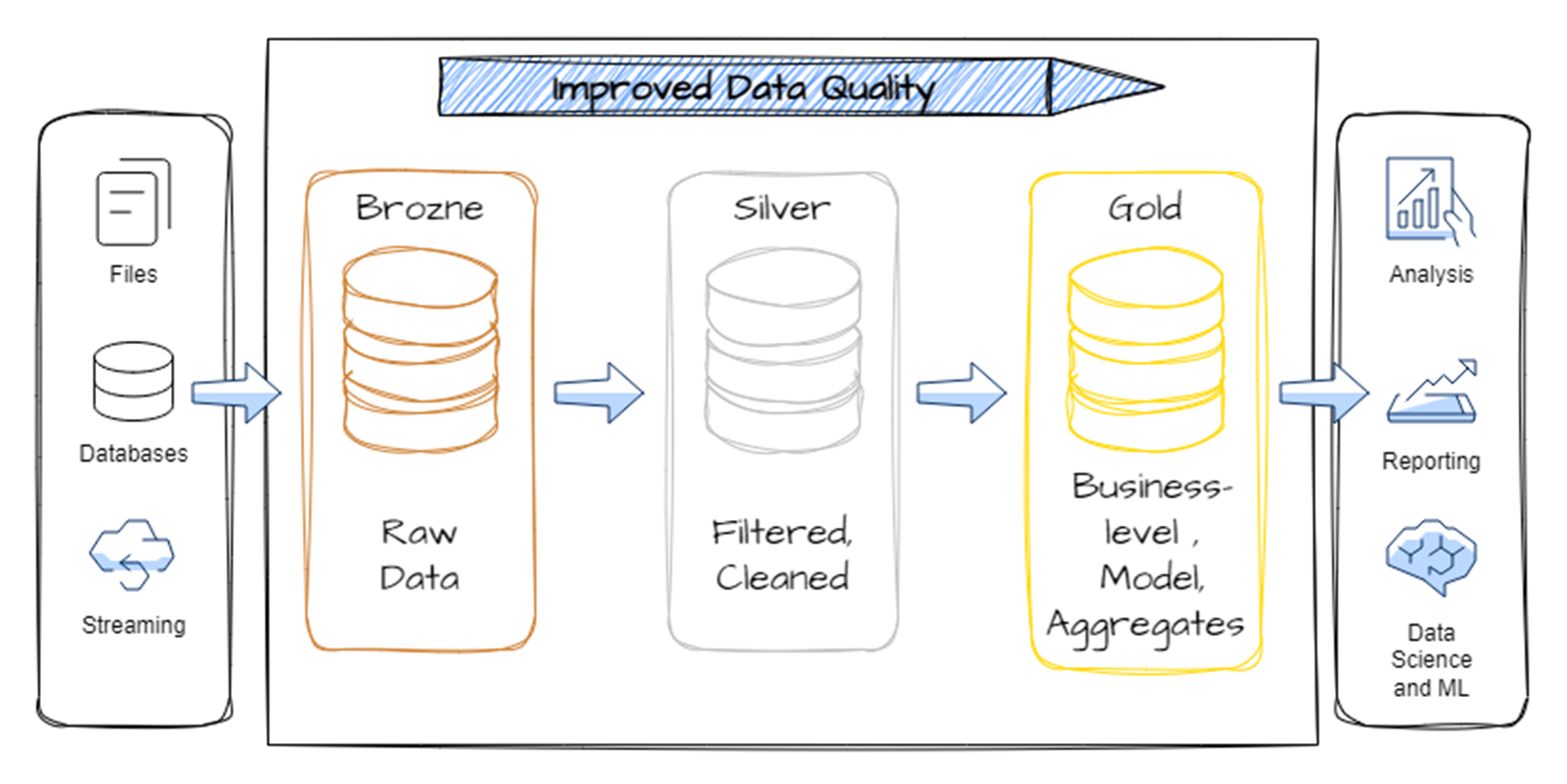
medallion architecture (sometimes called a multi-hop architecture) is a data design pattern that organizes data into distinct layers, each one progressively cleaner and more structured than the last:

Image from source

LayerPurpose
BronzeRaw, unvalidated data as it arrived — the system of record
SilverCleansed, validated, deduplicated data ready for analysis
GoldCurated, aggregated, business-ready data optimized for consumption

The key insight is that raw data is never thrown away — you keep the bronze layer intact and let each subsequent layer refine and enrich it. This gives you a full audit trail and the ability to reprocess data if your transformation logic changes.

In a traditional lakehouse context, this pattern lives in Delta tables. In Fabric Real-Time Intelligence, it lives natively inside an Eventhouse using KQL tables and Update Policies — which makes it incredibly powerful for high-frequency streaming scenarios.

Configure Telemetry

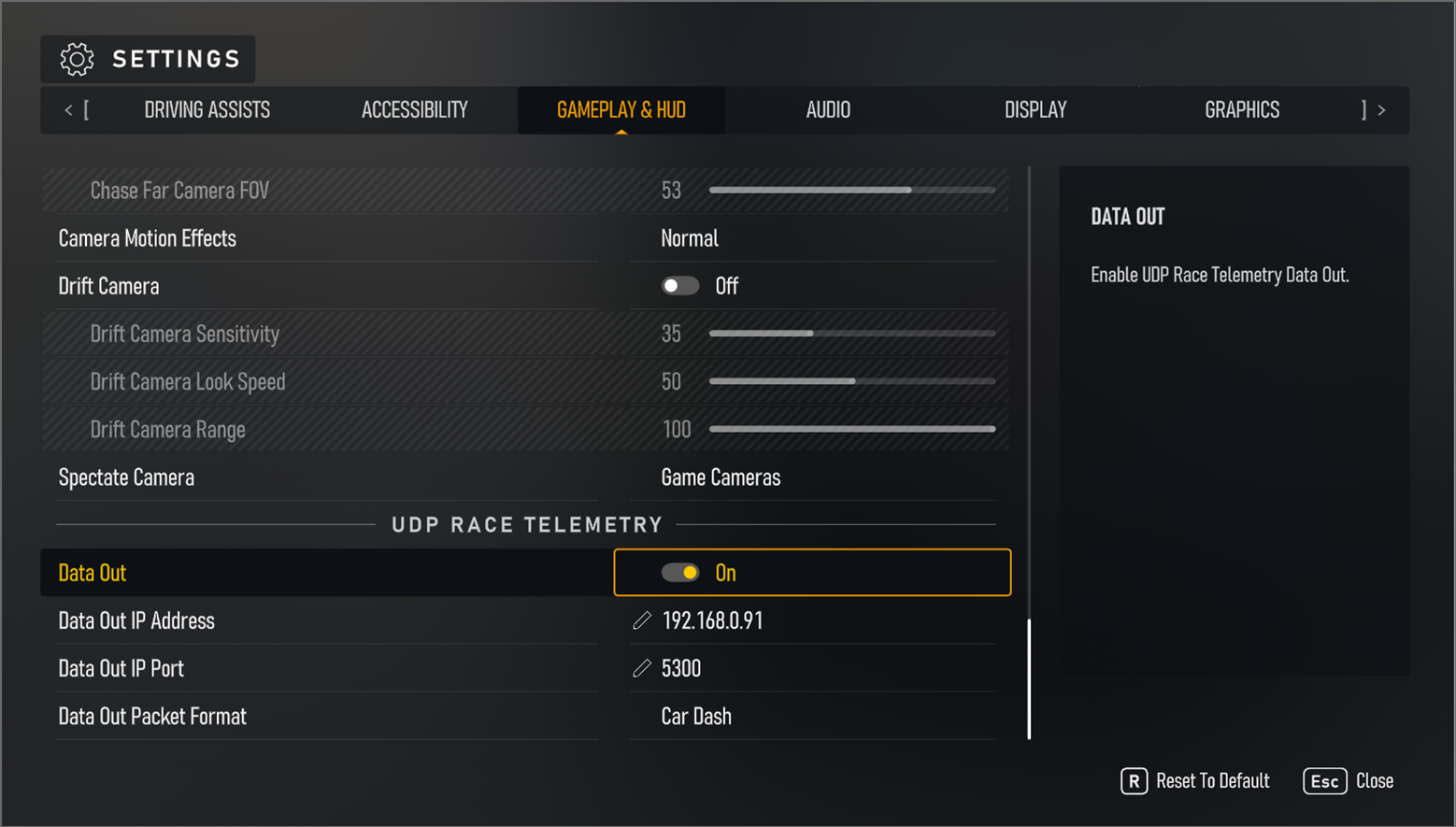
This solution will work with either Forza Motorsport or Forza Horizon. Go to the game settings -> gameplay & hud and scroll down to UDP Race Telemetry. Turn on Data Out, set the Data out Packet to Car Dash, and set your IP accordingly:

Edge Compute: The Telemetry Bridge

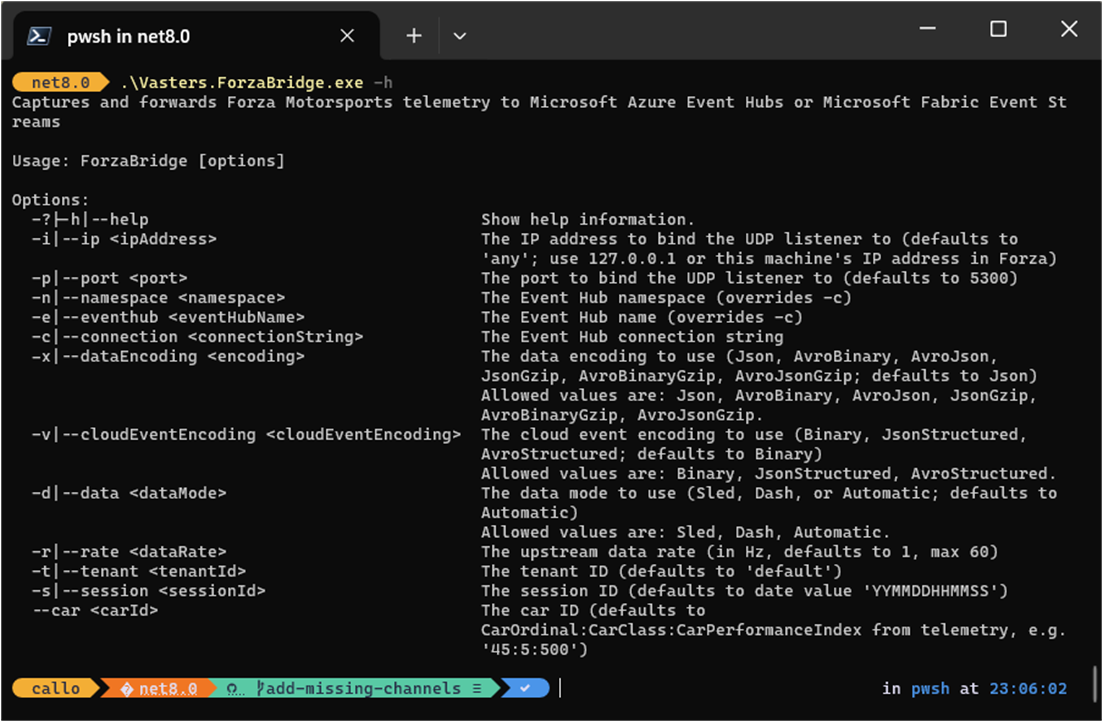
The bridge between Forza and Azure is a .NET console app based on Clemens Vasters’ excellent forza-telemetry-bridge project. It listens on a UDP port for the Forza data stream and forwards the events to an Azure Event Hubs namespace. This works from your Xbox and/or PC.

The application can send through 71 channels of data from Forza from the car during a race. More information on this type of data can be found here: https://support.forzamotorsport.net/hc/en-us/articles/21742934024211-FM-Data-Out-Documentation

.\Vasters.ForzaBridge.exe
-c "Endpoint=sb://demo-cac-eventhub-evhns.servicebus.windows.net/;SharedAccessKeyName=ForzaBridge;SharedAccessKey=******************************************=;EntityPath=statistics-like-evh"
-i 192.168.0.91
-d Dash
-r 1

This sets up the edge compute layer — a lightweight local app converting game telemetry into cloud-bound events.

Event Design for High-Throughput Telemetry

One design challenge worth calling out: Forza telemetry runs at up to 1000Hz for some channels, with most metrics captured at 100Hz. At that rate, sending one event per sensor reading per car is completely impractical — you’d be generating millions of tiny messages per second.

The solution is event bundling: package multiple sensor readings into a single event, sharing common metadata (source, type, timestamp) while the payload carries an array of values covering a short time window.

{
"type": "motorsport.channel.data",
"source": "car71",
"subject": "oilpressure",
"time": "2025-02-25T17:21:00.100000",
"data": {
"startTS": "2025-02-25T17:21:00.000000",
"endTS": "2025-02-25T17:21:00.100000",
"rate": 1000,
"values": [4.122, 4.122, 4.122, ...]
}
}

Each event carries 100 readings covering 0.1 seconds — efficient to transmit and store, while preserving full fidelity.

Fabric Real-Time Intelligence: Ingest, Transform, Analyze

Once events land in Azure Event Hubs, Fabric Eventstream picks them up and routes the data into an Eventhouse. This is where the medallion layers come to life.

Bronze layer — raw ingestion

The raw events land in two bronze tables:

  • Bronze_RaceTelemetry — all sensor channel data as received
  • Bronze_LapSignal — lap crossing events (start/end of each lap)

No transformations happen here. This is the source of truth.

Silver layer — refined with Update Policies

This is where Update Policies shine. An update policy in KQL is essentially an inner ETL trigger — it fires automatically whenever new data is ingested into the source (bronze) table, running a KQL function against the newly ingested batch and writing the results to the silver table.

.alter table Silver_RaceTelemetry policy update
@'[{"IsEnabled": true, "Source": "Bronze_RaceTelemetry",
"Query": "Bronze_RaceTelemetry | where isnotempty(ChannelValue)",
"IsTransactional": false, "PropagateIngestionProperties": false}]'

The silver layer applies filtering, deduplication, and schema normalization — arriving at:

  • Silver_RaceTelemetry — validated, filtered telemetry
  • Silver_LapSignal — cleansed lap events

Gold layer — curated, deduplicated

The gold layer uses materialized views to maintain always-fresh aggregations and deduplicated records:

  • Gold_RaceTelemetry_Deduped
  • Gold_LapSignal_Deduped

These are the tables that power the real-time dashboard. Because materialized views are continuously maintained by the Eventhouse engine, dashboard queries hit pre-aggregated data — low latency, no repeated heavy computation.

Update Policies — Worth a Deeper Look

I want to spend a moment on update policies because they’re one of the most powerful and underused features in Real-Time Intelligence. They give you a clean mechanism to implement medallion-style transformations inside the Eventhouse without needing an external orchestration layer.

Key characteristics:

  • Scoped to new ingestions only — the policy function sees only the newly arrived batch, not the full table history
  • Runs synchronously with ingestion — bronze data triggers silver transforms as part of the same ingestion pipeline
  • Supports complex KQL — joins against dimension tables, calculated columns, schema changes, filtering, deduplication — all fair game
  • Flexible retention policies — each layer can have its own retention window (keep bronze for 7 days, silver for 30, gold for 90)

This is the real-time equivalent of what Delta Lake triggers or streaming pipeline stages do in batch-oriented architectures — except it’s running natively in the query engine at ingest time.

The Real-Time Dashboard

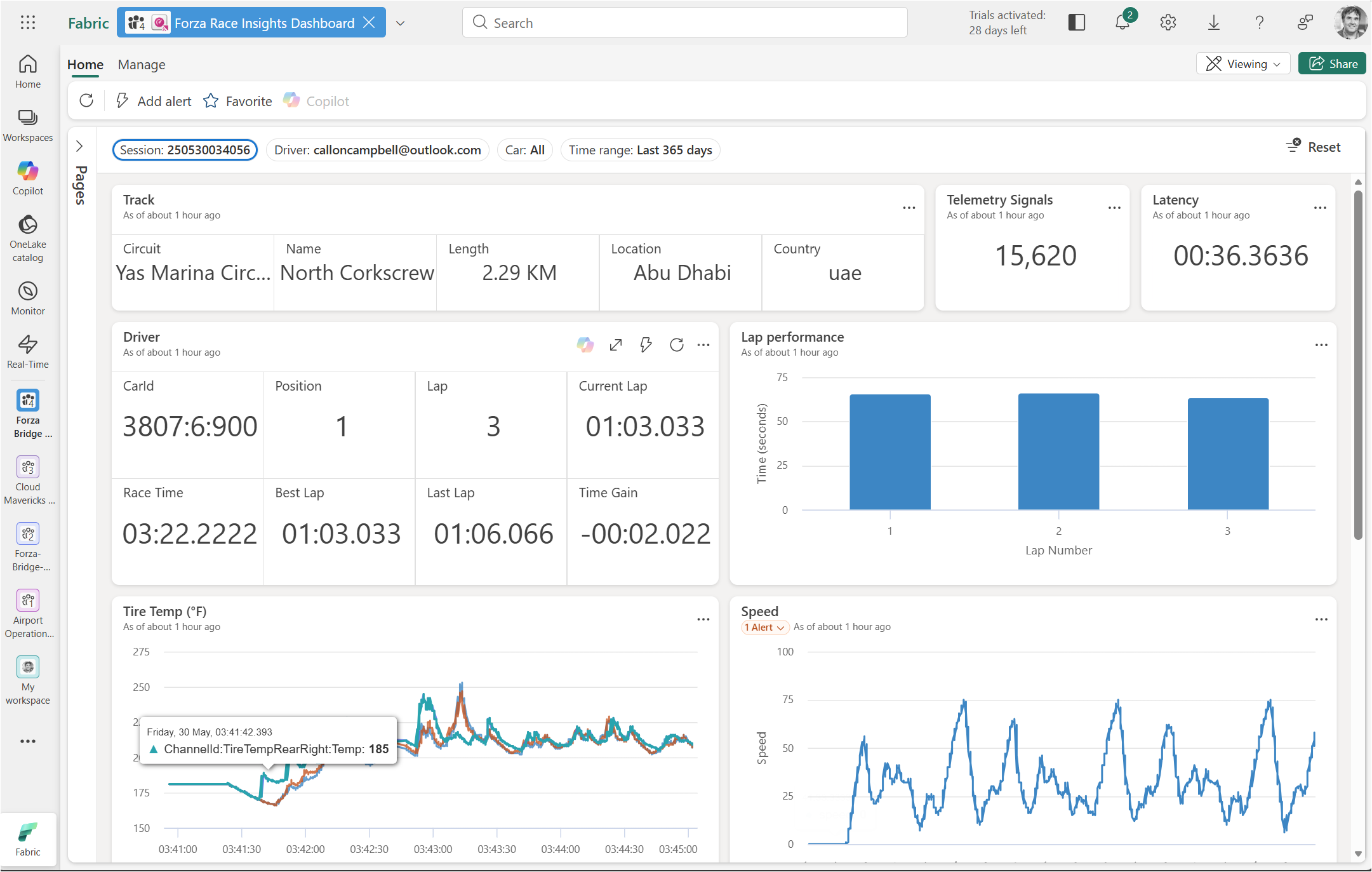
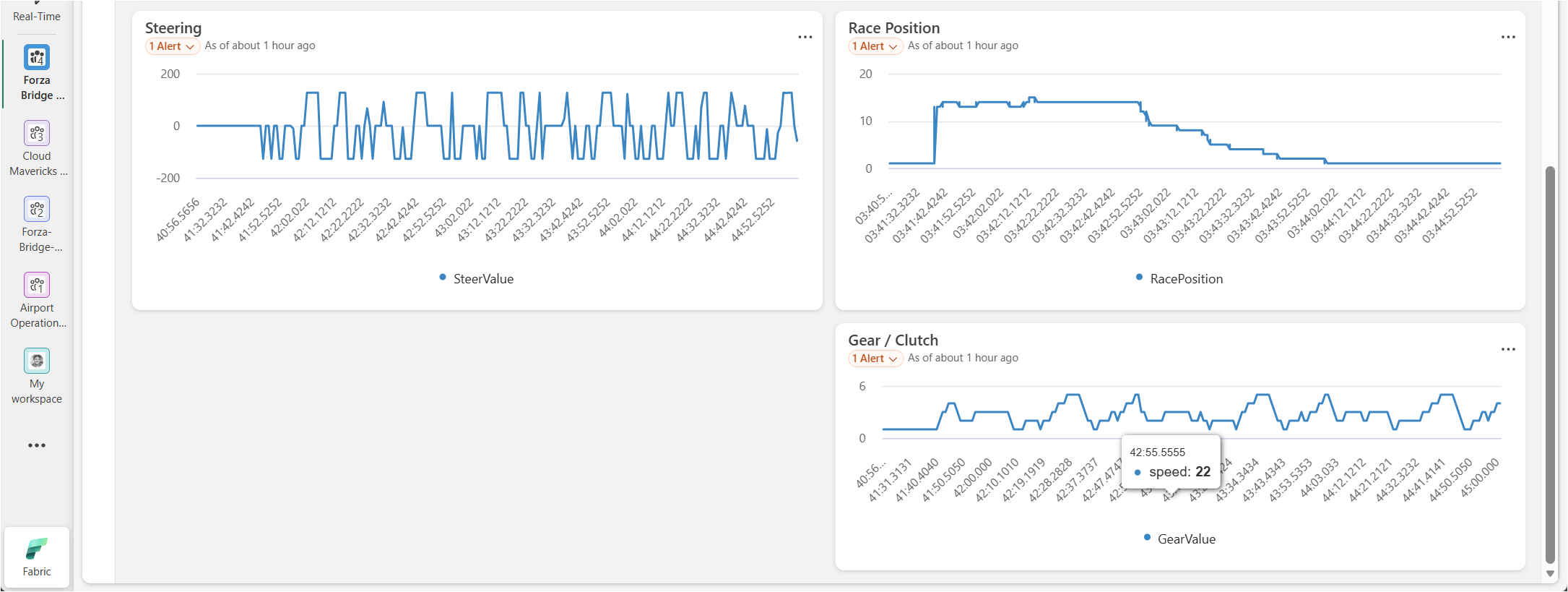
With data flowing through all three layers, I connected a Fabric Real-Time Dashboard to the gold-layer tables. The result is a live view of:

  • Current speed, RPM, and gear
  • Tyre temperatures and tyre slip per corner
  • G-force traces through each sector
  • Lap-over-lap performance comparison

Watching the dashboard update live during a race in Forza was genuinely satisfying. The latency from game → Event Hubs → Eventhouse → dashboard tile is low enough that you see sensor data update in near real time as you drive.

Wrap-Up

The core takeaways from this session:

  1. Real-time medallion architecture is a natural fit for Fabric RTI — the Eventhouse, update policies, and materialized views map directly to bronze/silver/gold layers without any external orchestration.
  2. Update policies are your inner ETL — use them to clean, filter, deduplicate, and enrich data at ingest time; they’re one of the most powerful patterns in the platform.
  3. High-frequency telemetry needs thoughtful event design — bundle readings sensibly, share metadata across payloads, and choose the right ingestion pattern to keep throughput manageable.
  4. Forza Motorsport makes for a surprisingly legit F1 telemetry simulator — the UDP data out feature is well-documented and the telemetry bridge .NET app makes getting data into Azure Event Hubs dead simple.

If you want to explore further, Microsoft has a great reference implementation for Medallion Lakehouse architecture in Fabric, linked in the references below.

Enjoy!

References

AnalyticsMicrosoft Fabric

Data Agent conversations with real-time telemetry with Microsoft Fabric RTI

AI

Microsoft AI Skills Fest

The Microsoft AI Skills Fest is a 50-day learning event, running from April 8 until May 28, 2025. It’s all about leveling up AI skills with tailored content for tech pros, business managers, students, and public sector workers.

  • AI Agents for Tech Pros – Dive into Azure AI Foundry & GitHub Copilot to create and fine-tune AI-driven tools.
  • AI for Business Managers – Learn practical AI strategies that boost workplace efficiency. Leads to a pro certificate.
  • Students & AI LiteracyMinecraft Education’s Fantastic Fairgrounds introduces AI concepts in an engaging way.
  • AI in the Public Sector – Explore responsible AI, security, and decision-making tools to improve government services.
  • Skill Challenges – Compete with global learners in AI challenges.
  • Certification Discounts – Massive exam discounts & a chance to grab one of 50,000 free vouchers.
  • Training Sessions – Exclusive workshops from Microsoft Training Services Partners.
  • Festival Guide – A map to explore AI zones and experiences.

It’s worth checking out. Head over to https://aiskillsfest.event.microsoft.com/ and register.

Enjoy!

.NETAIAzureCloudCommunity

Festive Tech Calendar 2024 YouTube playlist

Enjoy!

Reference

https://festivetechcalendar.com/

CommunityMVPPersonal Development

Callon Campbell awarded 2024-2025 Microsoft MVP in Azure (Cloud Native)

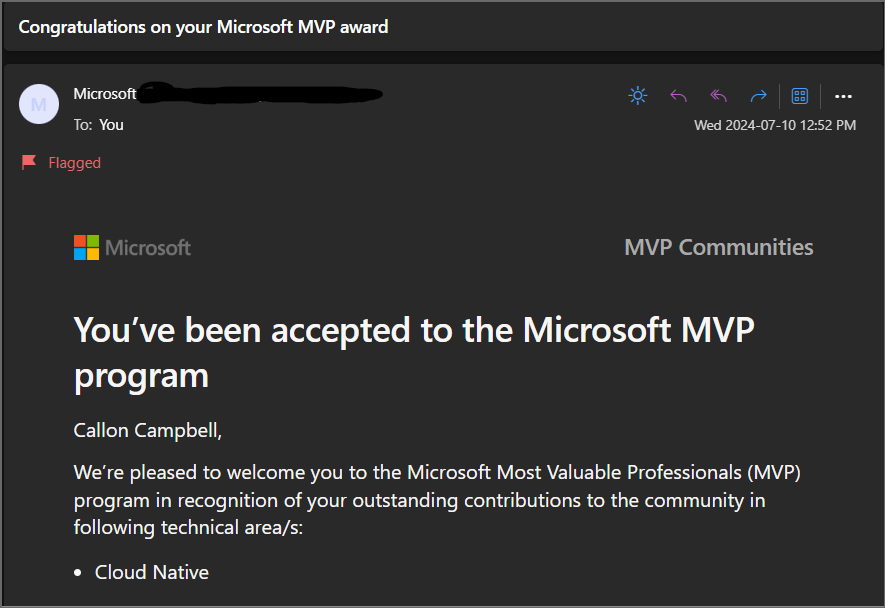
I received an exciting email from Microsoft this month that I was re-awarded for the 7th year for the 2024 – 2025 Microsoft Most Valuable (MVP) award in Azure (Cloud Native). Receiving the Microsoft MVP award is both a humbling and exciting experience. It means you’re a member of a select group of experts of just over 3,000 MVPs from around the world. Still, I like to think of it as doing something I’m passionate about with other like-minded individuals, having fun and always having something new to learn and share with the community.

The Microsoft MVP Award is an annual award that recognizes exceptional technology community leaders worldwide who actively share their high-quality, real-world expertise with users and Microsoft. All of us at Microsoft recognize and appreciate Callon’s extraordinary contributions and want to take this opportunity to share our appreciation with you.” – The Microsoft Most Valuable Professional (MVP) Award Team Microsoft Corporation

If you’re interested in learning about the Microsoft MVP program and seeing what it takes to become a Microsoft MVP, or how to get awarded, I encourage you to take a look at the Microsoft MVP website and also the following article on “How to become a Microsoft MVP” where they explain some of the details of the program.

To wrap up this post I would like to congratulate all the other newly awarded or renewed Microsoft MVPs all over the world! You truly are an amazing community and I’m truly humbled and honoured to be part of this group.

Enjoy!

References

Microsoft MVP Award

How to become a Microsoft MVP

Callon Campbell MVP Profile

AzureAzure Event Hubs

Boost Data Reliability with Geo-Replication for Azure Event Hubs

This week, Microsoft announced the public preview of geo-replication for Azure Event Hubs. Geo-replication enhances Microsoft Azure data availability and geo-disaster recovery capabilities by enabling the replication of Event Hubs data payloads across different Azure regions.

With geo-replication, your client applications continue to interact with the primary namespace. Customers can designate a secondary region, choose replication consistency (synchronous or asynchronous), and set replication lag for the data. The service handles the replication between primary and secondary regions. If a primary change is needed (for maintenance or failover), the secondary can be promoted to primary, seamlessly servicing all client requests without altering any configurations (connection strings, authentication, etc.). The former primary then becomes the secondary, ensuring synchronization between both regions.

In summary, geo-replication is designed to provide you with the following benefits:

  • High availability: You can ensure that your data is always accessible and durable, even in the event of a regional outage or disruption. You can also reduce the impact of planned maintenance events by switching to the secondary region before the primary region undergoes any updates or changes.
  • Disaster recovery: You can recover your data quickly and seamlessly in case of a disaster that affects your primary region. You can initiate a failover to the secondary region and resume your data streaming operations with minimal downtime and data loss.
  • Regional compliance: You can meet the regulatory and compliance requirements of your industry or region by replicating your data to a secondary region that complies with the same or similar standards as your primary region. You can also leverage the geo-redundancy of your data to support your business continuity and resilience plans.

How to get started with Azure Event Hubs Geo-replication?

If you want to try out Azure Event Hubs Geo-replication, please check out the official documentation over at Azure Event Hubs Geo-replication documentation and they also have a demo here.

I look forward to when this becomes GA and is available in more regions.

Enjoy!

References

https://techcommunity.microsoft.com/t5/messaging-on-azure-blog/announcing-public-preview-for-geo-replication-for-azure-event/ba-p/4164522

Azure Event Hubs Geo-replication documentation

AnalyticsAzure

Kusto’s 10-Year Evolution at Microsoft

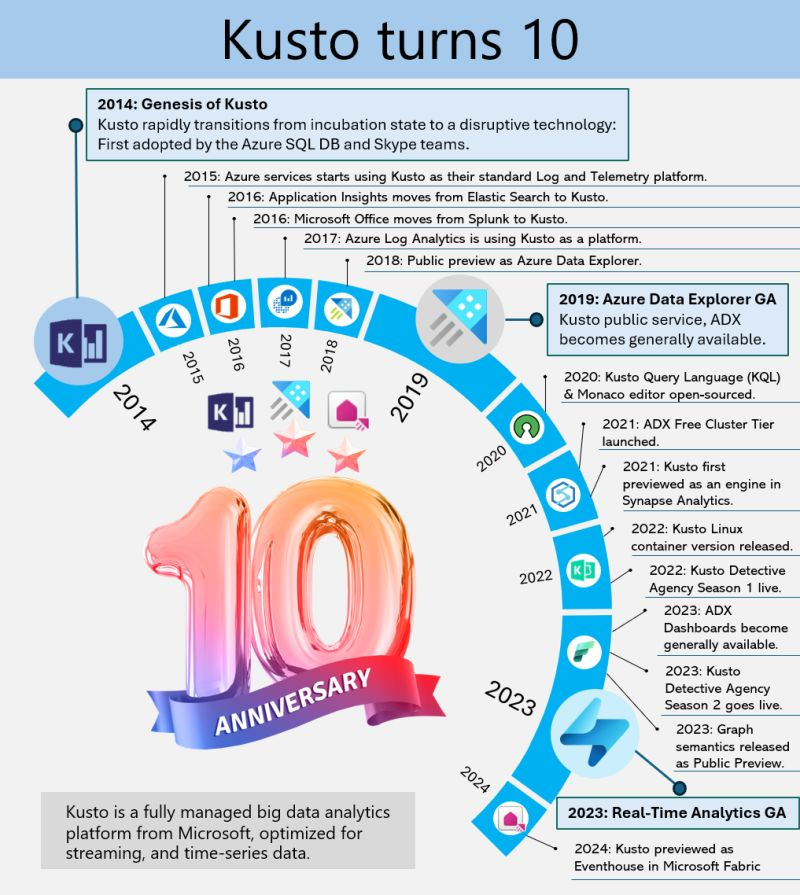
Kusto, the internal service driving Microsoft’s telemetry and several key services, recently marked its 10-year milestone. Over the decade, Kusto has evolved significantly, becoming the backbone for crucial applications such as Sentinel, Application Insights, Azure Data Explorer, and more recently, Eventhouse in Microsoft Fabric. This journey highlights its pivotal role in enhancing data processing, monitoring, and analytics across Microsoft’s ecosystem.

This powerful service has continually adapted to meet the growing demands of Microsoft’s internal and external data needs, underscoring its importance in the company’s broader strategy for data management and analysis.

A Dive into Azure Data Explorer’s Origins

Azure Data Explorer (ADX), initially code-named “Kusto,” has a fascinating backstory. In 2014, it began as a grassroots initiative at Microsoft’s Israel R&D center. The team wanted a name that resonated with their mission of exploring vast data oceans, drawing inspiration from oceanographer Jacques Cousteau. Kusto was designed to tackle the challenges of rapid and scalable log and telemetry analytics, much like Cousteau’s deep-sea explorations.

By 2018, ADX was officially unveiled at the Microsoft Ignite conference, evolving into a fully-managed big data analytics platform. It efficiently handles structured, semi-structured (like JSON), and unstructured data (like free-text). With its powerful querying capabilities and minimal latency, ADX allows users to swiftly explore and analyze data. Remembering its oceanic roots, ADX symbolizes a tribute to the spirit of discovery.

Enjoy!

References

Azure Data Explorer

Inserting data to Azure Data Explorer from C#

Here is a great post on inserting data into Azure Data Explorer using C# SDK.

Enjoy!

AzureAzure Event Hubs

Azure Event Hubs Unveils Large Message Support

This week Microsoft announced in public preview, support for large messages (up to 20 MB) in Azure Event Hubs in its self-service scalable dedicated clusters, enhancing its capabilities to handle a wide range of message sizes without additional costs.

This new feature allows for seamless streaming of large messages without requiring any client code changes, maintaining compatibility with existing Event Hubs SDKs and the Kafka API. This enhancement ensures uninterrupted business operations by accommodating instances where messages cannot be divided into smaller segments. The service continues to offer high throughput and low latency, making it a robust solution for data streaming needs.

What are some cases for large message support?

Here are some key use cases for the new large message support in Azure Event Hubs:

  • Multimedia Streaming: Handling large video, audio, or image files that cannot be split into smaller segments.
  • Data Aggregation: Transmitting aggregated data sets or logs that exceed typical message size limits.
  • IoT Applications: Streaming large sensor data or firmware updates from IoT devices.
  • Batch Processing: Sending large batches of data for processing without needing to break them down.

These enhancements ensure seamless and uninterrupted business operations across various scenarios.

How do you enable large message support?

To enable large message support in your existing Azure Event Hubs setup, follow these steps:

  1. Use Self-Serve Scalable Dedicated Clusters: Ensure your Event Hubs are built on the latest infrastructure that supports self-serve scalable dedicated clusters. If you are using Event Hubs, then you will need to create an Event Hub Cluster to take advantage of large message support.
  2. No Client Code Changes Needed: You can continue using your existing Event Hubs SDK or Kafka API. The only change required is in the message or event size itself.

For more detailed instructions, visit the documentation at aka.ms/largemessagesupportforeh.

How do Azure Event Hubs differ from Azure Event Hub Clusters?

Azure Event Hubs and Event Hub Clusters serve different purposes within the Azure ecosystem:

  • Azure Event Hubs: This is a fully managed, real-time data ingestion service that can receive and process millions of events per second. It’s designed for high-throughput data streaming and is commonly used for big data and analytics.
  • Azure Event Hub Clusters: These are dedicated clusters that provide isolated resources for Event Hubs. They offer enhanced performance, scalability, and the ability to handle large messages (up to 20 MB). Clusters are ideal for scenarios requiring high throughput and low latency.

Enjoy!

References

https://techcommunity.microsoft.com/t5/messaging-on-azure-blog/announcing-large-message-support-for-azure-event-hubs-public/ba-p/4146455

https://learn.microsoft.com/en-us/azure/event-hubs/event-hubs-quickstart-stream-large-messages

https://learn.microsoft.com/en-us/azure/event-hubs/compare-tiers

Azure Event Hubs Overview