Category: Development

DesignDevelopment

An Introduction to PowerPoint Storyboarding (Visual Studio 2012 Features)

One of the new features introduced in Visual Studio 2012 is an add-in for PowerPoint that allows you to do Storyboarding.

PowerPoint Storyboarding allows you to quickly and easily put together an interface design, whether it be for a website, a mobile device, Windows 8, or a desktop application, and then get the necessary feedback from your stakeholders. And since it’s PowerPoint, then even your stakeholders can easily make changes and show you exactly what they want.

NOTE: This feature is only available for Visual Studio Premium and Ultimate users.

Let’s Get Started

Start by going to the Microsoft Visual Studio 2012 program folder and select PowerPoint Storyboarding as shown here:

image

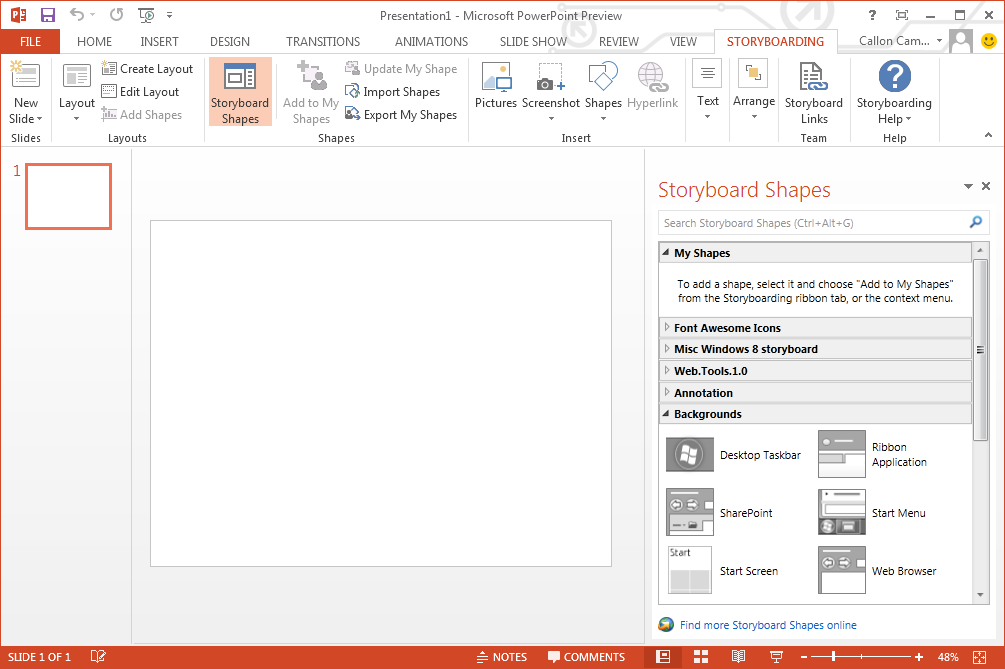
This will launch PowerPoint with a blank slide and take you to the Storyboarding tab. You will notice the Storyboard Shapes to the right of your slide and provide all kinds of shapes for your interface design. These shapes are also searchable via the search box.
image

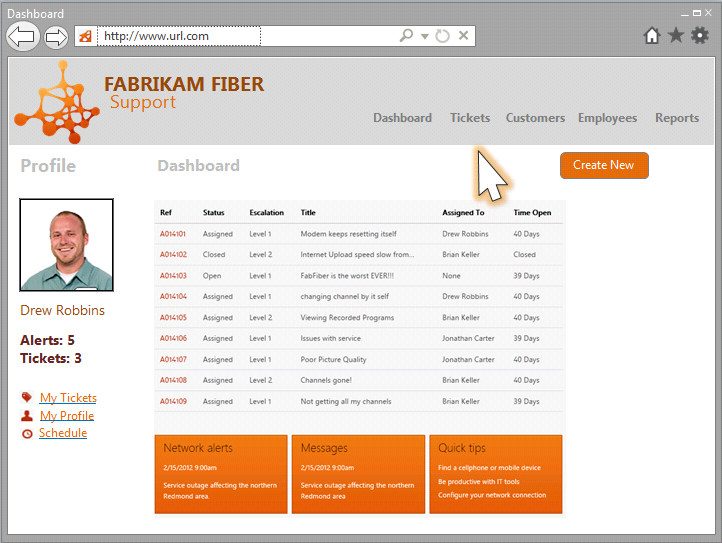
Here is a sample slide of what can be accomplished:
storyboading sample

Managing Shapes

One of the neat features found in PowerPoint Storyboarding is the ability to manage your custom shapes as well as export them for other team members to use.

Additionally you can also download community shapes by going to Visual Studio Gallery and downloading any of the available shapes. Most are free, but at the time of this post…there was 1 paid set of shapes.

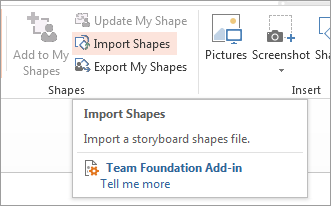
Once you’ve downloaded a set of shapes, you can import them from the Import Shapes button found in the Shapes section:
image

Team Integration

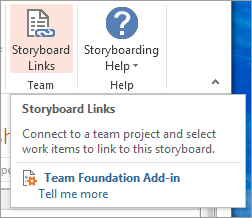
If you’re using Team Foundation Server, then you can link your storyboard to one or more requirements/user stories with the Storyboard Links button:
image

NOTE: If you’re not using Team Foundation Server, then there is now a free Team Foundation Server Express 2012 edition, which can be used by up to 5 developers. You can download it from Visual Studio Download page.
product_ex_tfs-tile

So there is no reason not to be using Team Foundation Server .Smile

Further Reading (Documentation)

I found the following links pretty good at documenting Storyboards and providing greater details:

http://msdn.microsoft.com/en-us/library/hh409276(VS.110).aspx

http://msdn.microsoft.com/en-us/library/hh301773(VS.110).aspx
DatabaseDevelopment

SQL Server Data Tools – September 2012 update is now available!

New updates are now available for SQL Server Data Tools (SSDT). The latest update is called SQL Server Data Tools – September 2012. You can get the update from here:

SSDT for Visual Studio 2012: http://msdn.microsoft.com/en-us/jj650015

SSDT for Visual Studio 2010: http://msdn.microsoft.com/en-us/jj650014

As posted on the following blog post, here is a recap of what’s new:

“What’s New?

Visual Studio 2012

In keeping with our goal of supporting the most recent version of Visual Studio, this release of SSDT supports the Visual Studio 2012 shell. SSDT – September 2012 contains several bug fixes to the SSDT version that shipped in Visual Studio 2012 and this release can be applied as an update on top of Visual Studio 2012 Professional, Premium, and Ultimate Editions. If one of these SKUs is not present on the box, running the SSDT installer for Visual Studio 2012 will lay down a standalone version of SSDT for the Visual Studio 2012 Integrated Shell.

Keep in mind that the underlying engine and functionality for SSDT – September 2012 is the same for both Visual Studio 2010 and Visual Studio 2012, so you don’t need to upgrade to Visual Studio 2012 to use the latest version of SSDT. If you wish to have both shells of SSDT in your environment, they can exist side by side and SSDT projects will successfully round-trip between both shells.

LocalDB Configuration Improvements

We received feedback that SSDT’s policy of creating a new localdb instance for each SSDT solution was too verbose, so we created a single localdb instance called Projects to host all the project debug databases. We’ve also enhanced SQL Server Object Explorer by surfacing the default localdb instance and enabling the deletion of localdb instances.

Support for ANSI_NULLS and QUOTED_IDENIFIER Properties

In previous releases, SSDT didn’t support database objects with non-standard ANSI_NULLS or QUOTED_IDENTIFIER properties. SSDT – September 2012 has enabled this scenario by adding support for ANSI_NULLS and QUOTED_IDENTIFIER properties on project and script files.

Updated Data-Tier Application Framework

SSDT – September 2012 includes the latest redist of SQL Server Data-Tier Application Framework (DACFx), which contains several feature enhancements and bug fixes. Most notably, the updated DACFx version enables packaging and deploying data using SqlPackage.exe. You can learn more about the new DACFx release here.

Updated SSDT Power Tools

The September 2012 update is compatible with updated Power Tools that include new features and support for both Visual Studio 2012 and Visual Studio 2010 shells.

SSDT Power Tools for Visual Studio 2012

SSDT Power Tools for Visual Studio 2010

Bug fixes to customer-reported issues

This release includes many bug fixes for issues reported by customers using SSDT RTW or Visual Studio 2012 RTM. Here are some of the most impactful bugs that this release addresses:

· Unable to override Publish Profile properties when using the msbuild command line

· Slow performance on "Add New Item" from SSDT project

· Absence of debugger functionality due to errors in assembly registration

· Publish fails with no message when "extended verification" is disabled

· SSDT overwrites Visual Studio shortcut on Windows8

· Steps to edit and save a Publish Profile editor aren’t intuitive”

CloudDatabaseDesignDevelopment

Top 12 of Visual Studio 2012

I’ve been using Visual Studio 2012 for just over a week now and I’m really liking all the new features and functionality that comes with it. However I’m still not a huge fan of the new light/dark themes. I would like to use the Dark theme, but find it’s just too dark. It would be nice if they made it a few shades lighter.

Anyway I came across the following blog post on Jason Zander’s blog about the Top 12 of Visual Studio 2012 and I thought I would share it.

In summary, with Visual Studio 2012 you can:

  1. Develop for Windows 8
  2. Develop for the Web
  3. Developer for Windows Phone 8
  4. Develop for Windows Azure
  5. Develop Business Applications
  6. Develop Games and other 3D Applications
  7. Take advantage of the latest language enhancements
  8. Performance, Reliability and Compatibility Improvements
  9. New IDE Productivity Features
  10. Improve your code quality with enhanced testing tools
  11. Reduce cycle times using tools for agile practices
  12. Deliver Cloud-Based Services with Smoother Collaboration between Operations and Engineering

Checkout Jason Zander’s blog post for the full article the Top 12 of Visual Studio 2012.

If you have access to Visual Studio 2012, I highly recommend you give it a try. You can always work in both Visual Studio 2010 and 2012 as they are backwards compatible with one another.

Happy Coding!

Development

Visual Studio 2012 Now Available

IC611657

Today Microsoft has made Visual Studio 2012 and all it’s related products available to download. You should note that with the 2012 edition, Team Foundation Server Express is available. Sweet!

Download and try it today

Attend the launch event on September 12

Development

Visual Studio 2012 Completed! Launches Sept 12!

vs2012Logo
Today Microsoft signed off on the final version of Visual Studio 2012 and the .NET Framework 4.5. In a blog post on the official Visual Studio blog, Microsoft said Visual Studio 2012 will be made available to MSDN subscriptions on August 15 and that it comes with a free one year developer account for the Windows Store in Windows 8.

Microsoft plans to launch Visual Studio 2012 in a virtual event on September 12. Details are to come, so mark your calendars and check the website for further details.

MS_VS2012LaunchBanner

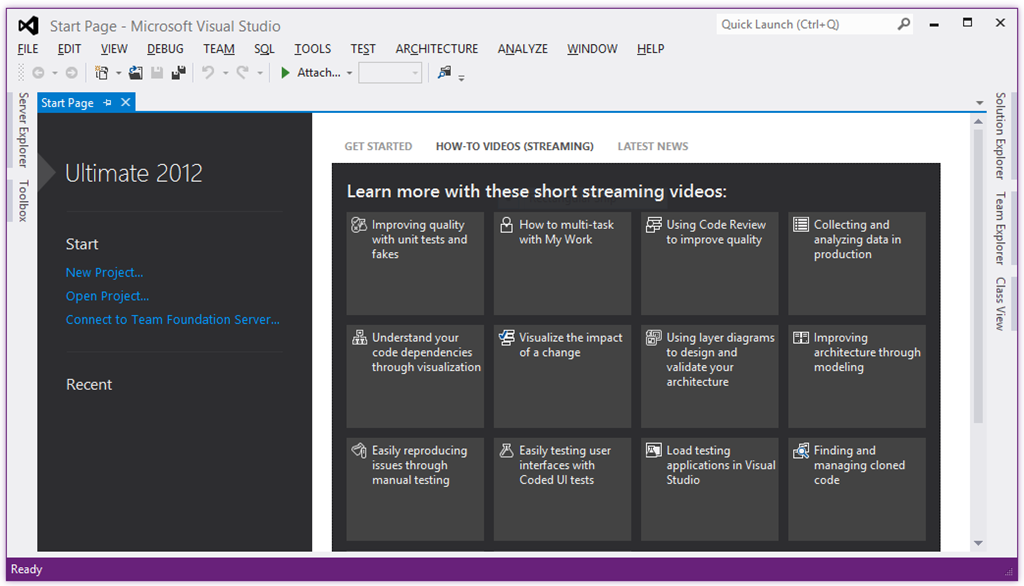
Here is a sample screenshot of the final build of Visual Studio 2012. Notice that the menu bar text is still in uppercase. I read somewhere that there is supposed to be an option to configure this and use mixed case instead. Either way I’m happy. I firmly believe in the Metro design, so will be leaving it as is. I may however use the dark theme.

vs2012 RTM

I’m looking forward to getting the bits on August 15th and turning my ideas into software.

Development

Clean Project–Cleans Visual Studio Solutions

How many times have you tried to upload or email your Visual Studio solution, only to find out that your zip file contains files and folders that you didn’t mean to include, like the bin, obj and other folders. What about source control bindings? Yes that too will get included.

Well I came across a great utility called Clean Project from Ron Jacobs that cleans your Visual Studio solutions so you can quickly upload or email.

This functionality is available inside Visual Studio and also from the Windows Shell.

Getting Started

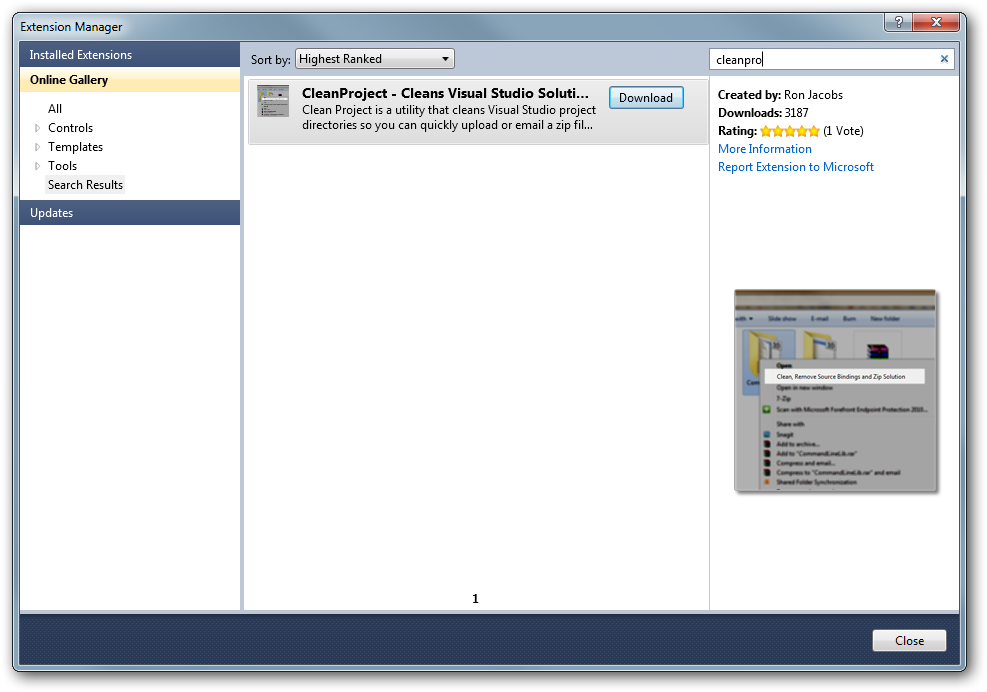
You can install CleanProject from Tools –> Extensions Manager in Visual Studio. Then search for CleanProject. In the References section below I listed links to other locations you can download the project from.

sshot-278

Emailing A Solution

If you want to email your solution:

  1. Select Tools –> Clean, Remove Source Bindings and Zip Solution
  2. Attach the zip file to your email and send

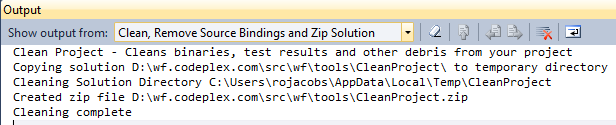
CleanProjVS

Windows Shell Folder Command

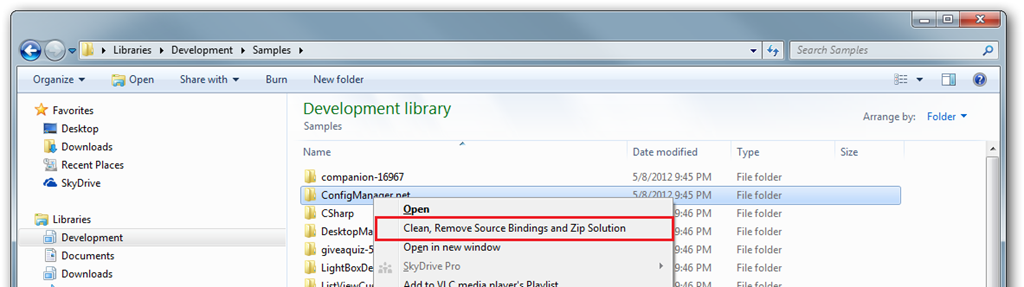
You can also run CleanProject from the Windows Shell. Just right click the folder you want to clean and select Clean, Remove Source Binding and Zip Solution from the context menu.

sshot-279

Resources


Thanks Ron Jacobs for your hard work on this utility. I look forward to further enhancements and/or other tools in the future.

DesignDevelopmentTechnology

Capturing User Feedback with UserVoice

twitter_avatar_UserVoice_normal

Recently I setup a UserVoice Feedback and Help Desktop account for one of my software products. This is a fantastic service that allows your users to submit feedback and improvement suggestions on your product. Your users can then rate the importance of the feedback and you get to interact with them by accepting it, etc.

“Surveys are great, but your audience has ideas and feedback that don’t fit a multiple-choice form. UserVoice Feedback™ makes it easy to collect this feedback – prioritized by votes – from your customers via a simple feedback forum.” 

They have different plans to choose from and also offer a completely free plan that you can get started with in seconds.

They also offer a feedback widget which you can easily add to your website, which allows your users to submit feedback directly from your website without having to leave your site or login to another system.

sshot-229

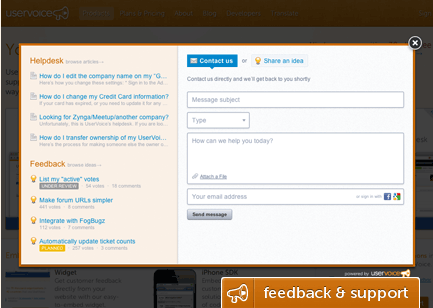
Clicking on this widget brings up the feedback UI as shown here:

image

Your users can then start submitting feedback and as they type, matching content will be displayed so they can see what’s already submitting and won’t submit something that already exists.

If you’re interested in your users feedback and ideas to improve your products, then you should consider using UserVoice’s Feedback Management Software.

CloudDatabaseDevelopment

WebsiteSpark Members Now Have Access To Windows Azure Benefits

Microsoft’s WebsiteSpark program has been updated to now include Windows Azure benefits. If you’re a member of this program then you should have or will be receiving an email to update your account.

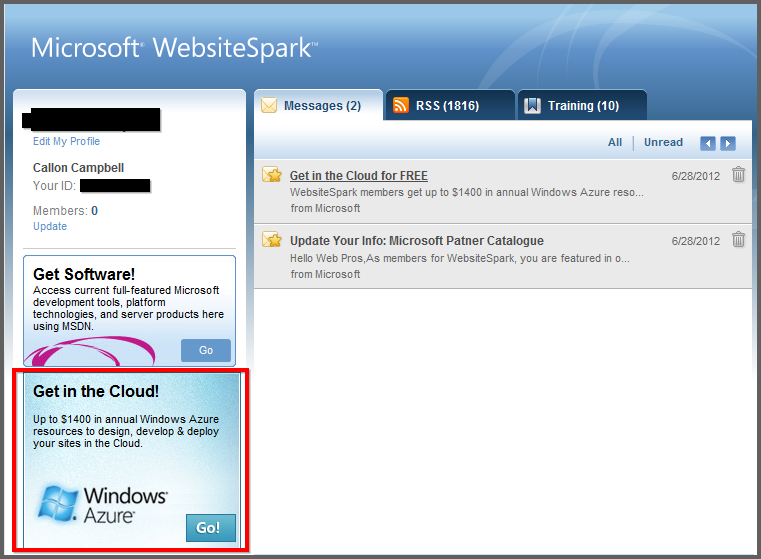
You will need to login to your WebsiteSpark account and then click to update your account to include the new Windows Azure benefits.

sshot-239

Here is what is included…

WebsiteSpark members can now get up to $1400 in annual Windows Azure resources to design, develop and deploy their site in the cloud. You will also get to keep at no charge, an Expression Web license upon completion of the 3 year program.

Here is additional information about the WebsiteSpark Azure Offer Details:

sshot-235

In order to take advantage of these additional program benefits, you will need to do this prior to 12/18/2012.

sshot-238

CloudDatabaseDevelopment

Exploring Windows Azure

image

If you don’t already know what Windows Azure is, then it’s Microsoft’s public cloud.

Microsoft’s Windows Azure is flexible, open and rock solid. Windows Azure allows you to quickly build, deploy and manage applications across a global network of Microsoft-managed datacenters. You can build applications using any OS, Language, Database or Tool and it has a 99.95% monthly SLA.

One of the new features I noticed is FREE Web Sites. It allows you to start for free and scale as you go.

When they say open, they have greatly expanded the development languages, framework and tools available, all of which are open source and available on github. Cool!

There are also changes in what servers you can use. Apart from Windows, you can now also install Linux as well in virtual machines.

Azure is really transforming into a cloud that isn’t just limited to the Microsoft technology stack, not that there is nothing wrong with that. I love Microsoft technologies, but I think Microsoft make a smart decision to open up and allows Linux, mySql and other languages to be used.

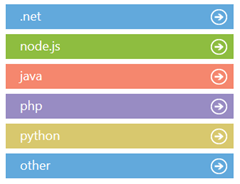
Speaking of languages, there is now support for 5 major languages and then some.

Languages

image

Developer Features

Data Storage

  • Blob Service
  • Table Service
  • SQL Database
  • SQL Reporting
  • Hadoop

Messaging and Integration

  • Service Bus Queues
  • Service Bus Topics
  • Queue Service
  • Service Bus Relay

Additional Features

  • Caching (AppFabric)
  • Access Control
  • Diagnostics
  • Autoscaling
  • Media Services
  • SendGrid Email Service
  • Twilio

Free Trial

With the free trial you can…

  • Quickly deploy websites to a highly scalable cloud environment
  • Easily deploy and manage virtual machines running Windows Server and Linux
  • Create highly scalable applications in a rich PaaS environment
  • Create, manage and distribute media in the cloud

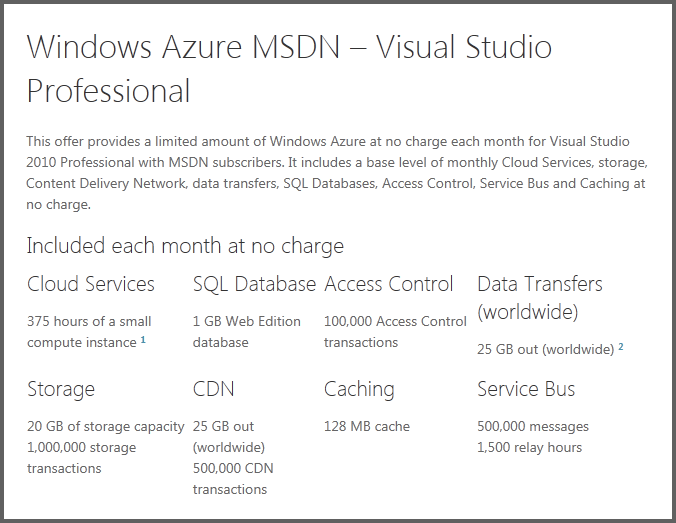
The free trial contains:

compute 750 small compute hours per month
web sites 10 shared web sites
relational database 1 GB SQL database instance
storage 20 GB with 1,000,000 storage transactions
bandwidth unlimited inbound and 20 GB outbound

There is a lot that can be done with Windows Azure and the only way to know if it’s right for you and your organization is to give it a try and see what you think.

Get started now:

image

Development

First Look at Visual Studio 2012 RC

First you will notice that Visual Studio 2012 gets an updated logo. Falls in line with the Metro theme that is being applied to just about every product these days.

VS2012 Logo

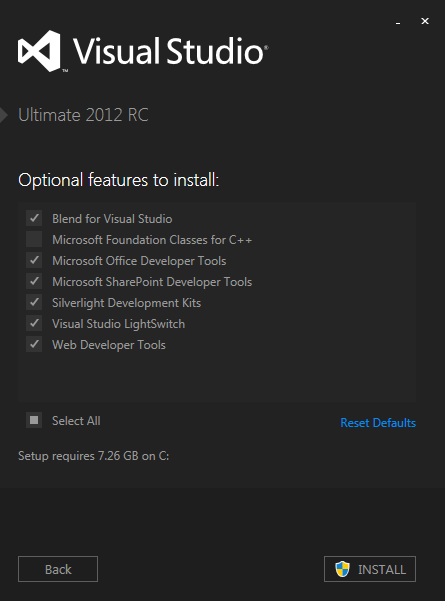
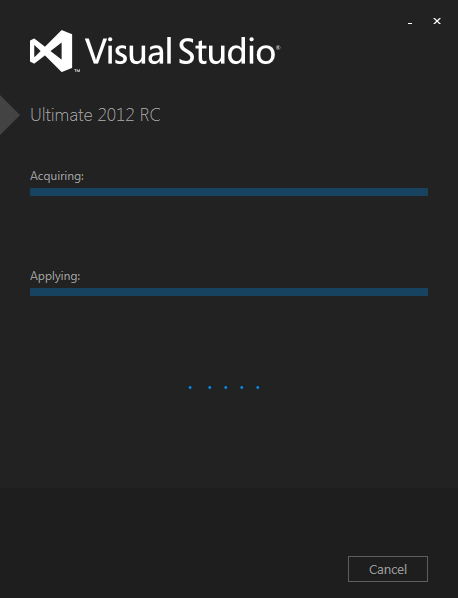
Visual Studio 2012 sports a new installer UI. It clearly embraces the Metro style.

VS2012Install

VS2012InstallStep2

VS2012Installing

VS2012StartPage

These UI changes are not final. It’s already been posted on the Visual Studio Team Blog that further changes to the Visual Studio themes are coming but just didn’t make the release candidate.

Please see my blog post about these theme changes:
Permalink to Visual Studio 11 Gets a Dark Theme