Category: Azure

AzureEvents

Azure Developer Tour is Coming!

azure developer tour

The latest in compute, serverless and more – hosted by the Azure Advocates.

This is a a FREE event where you’ll learn about compute, serverless, storage, big data, artificial intelligence, machine learning and so much more…plus lunch is included (every developer loves a free lunch).

Cities

Toronto, On – April 3, 2018

Vancouver, BC – April 5, 2018

Washington, D.C. – April 6, 2018

Los Angeles, CA – April 9, 2018

Austin, TX – April 10, 2018

San Francisco, CA – April 12, 2018

Seattle, WA – April 12, 2018

In addition there will be University Tours for students and faculty.

Register at a city near you to learn how to build great cloud apps!

Enjoy!

References

https://www.microsoftevents.com/profile/web/index.cfm?PKwebID=0x752173abcd&wt.mc_id=AID688794_owned_CESocial_Copy

AzureEducation

Introducing Azure for Students

Today Microsoft has announced that they will be offering a free $100 annual credit + 25+ free products to eligible students to help encourage them to build cloud apps for Azure and you pay nothing.

Today’s students are the developers of tomorrow

For students seeking the skills leading to the most opportunity for cloud based careers, Azure offers students and educators across the world the resources they need.

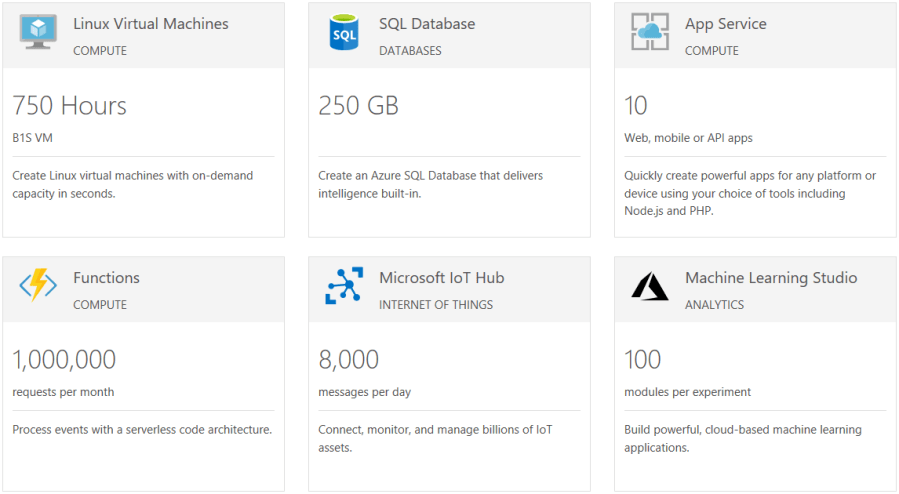
This offer is different compared to the current free Azure Credits offers in that no credit card is required, students simply verify their student status to take advantage of this offer. In addition to this free credit, students can also get 750 Hours of Linux Virtual Machines, 250GB of SQL Database, 10 mobile or web apps, 1 million Azure Function requests and so much more.

sshot-390

Get started today and activate your credits at https://azure.microsoft.com/en-us/free/students/#free-products-section

Enjoy!

References

https://azure.microsoft.com/en-us/free/students/

https://azure.microsoft.com/en-ca/education/

Azure

Introduction to Application Insights

Application Insights gives you the deep diagnostics and performance information you need to take control of your web apps, and bring sanity back to your life. Get actionable insights through application performance management and instant analytics.

image

What can you do with Application Insights ?

  • Detect and diagnose exceptions and application performance issues
  • Get answers to your tough questions, and take your applications to the next level
  • Detect trends in application performance and behavior, identify usage patterns, and get fast answers to probing questions about your website performance
  • Monitor Azure websites, including those hosted in containers, plus websites on-premises and with other cloud providers
  • Seamlessly integrate with your DevOps pipeline using Visual Studio Team Services (VSTS), GitHub, and webhooks
  • Quickly get started from within Visual Studio, or monitor existing applications without redeploying

Azure Application Insights is included with Visual Studio. You get automatic instrumentation for ASP.NET applications and application telemetry data right out of the box—including usage, exceptions, requests, performance, and logs.

Pricing Models

There are two offerings for Application Insights – Basic, and Enterprise.

With Basic, you pay based on the volume of telemetry your application sends, with a 1 GB free allowance per month. This free data allowance gives you a great way to try out Application Insights as you get started, and it also allows you to use Application Insights for free on an ongoing basis for debugging and low-volume applications.

In the Enterprise pricing option, you pay for the number of nodes that host your application, and you get a daily allowance of data per node. Additional data beyond the daily allowance is charged per GB. A “node” is a server, or Platform-as-a-Service instance that runs your application, and from which we receive telemetry.

The Enterprise option also provides unlimited, continuous export of data at no extra charge.

Summary

With Application Insights there is no upfront cost, no termination fees, and you only pay for what you need.

In my next post I’ll show you how easy it is to setup Application Insights with your application.

Enjoy!

References

https://channel9.msdn.com/Blogs/Azure/Application-Insights-Animated-Introduction

https://azure.microsoft.com/en-us/pricing/details/application-insights/

http://aka.ms/getapplicationinsights

Documentation

AzureInfographicsMobile

Resources for Mobile apps using Xamarin + Azure

Earlier this week the Mobile apps using Xamarin + Azure poster was released. It serves as your essential guide to the most relevant cloud services provided by Azure for you as a mobile developer using Xamarin with Visual Studio and Azure.

You can download your poster here.

Enjoy!

References

https://blogs.msdn.microsoft.com/visualstudio/2018/02/21/your-guide-to-azure-services-for-apps-built-with-xamarin/?utm_source=vs_developer_news&utm_medium=referral

AzureCloudProductivity

Build your cloud skills at Microsoft Tech Summit

image

Microsoft is hosting another Microsoft Tech Summit this March and April 2018 across additional Canadian cities. 

The cloud is changing expectations – and transforming the way we live and work. At the Microsoft Tech Summit you will learn how Microsoft’s cloud platform can help you lead your organization through real digital transformation – and shape your future. This one-day event is a free technical learning event focused on Azure and Microsoft 365. Whether you’re developing innovative apps or delivering optimized solutions, Microsoft Tech Summit can help evolve your skills, deepen your expertise, and grow your career.

The day will kick off with a keynote and following the keynote, you will have a number of sessions to choose from including Cloud Infrastructure, Cloud Apps Innovation, Data + AI or the Modern Workplace. Each session offers a learning opportunity to be hands on with Microsoft technology.

Whether you’re developing innovative apps or delivering optimized solutions, Microsoft Tech Summit can help you evolve your skills, deepen your expertise, and grow your career.

  • Connect with experts from Microsoft and the community, and learn how to get the most from the cloud. Ask your toughest questions, learn best practices, and share strategies.
  • Choose from a variety of learning opportunities to deepen your cloud expertise, from keynotes and breakout sessions, to hands-on labs.
  • Customize your learning – whether you’re already cloud-savvy or just getting started – Microsoft Tech Summit has something for everyone.
  • Discover the latest trends, tools, and product roadmaps through 4 unique sessions covering a range of topics across multiple tracks.

I was fortunate to attend the Microsoft Tech Summit in Toronto in December 2017 and it was a great 2-day event – I highly recommend attending if you can.This is a great event to build your cloud skills, connect with experts and get inspired.

Here is a listing of the Canadian cities and date. Click on the city closet to you to learn more and register:

CALGARY – 20 MARCH 2018

VANCOUVER – 5 APRIL 2018

OTTAWA – 17 APRIL 2018

MONTREAL – 25 APRIL 2018

Enjoy!

AnalyticsAzure

Monitoring and Scaling your Azure Functions

Everybody loves Azure Functions. My team recently deployed a production service using Azure Functions as the back end backbone. I’d like to share some lessons and tips we learned along the way. We’re using Azure functions in consumption plan – which basically means the platform scales in and out as required without our intervention. But […]

via Monitoring and Scaling Azure Functions — 4pp1n51ght5

Azure

How to cleanup your Azure Functions URL and remove /api from the route

We looked at Azure Functions. We also looked at security around Azure Function used to implement APIs. Something people will quickly notice when implementing an Webhook / API function is that its URL or route is always prepended by /api. For instance, if we create a webhook function in C# and we setup the route […]

via How to get rid of /api in Azure Function’s route? — Vincent-Philippe Lauzon’s

Azure

Azure Serverless: Azure Functions and Logic Apps that are ready to deploy!

image

If you’re new to Azure Functions and/or Logic Apps there is a great open source library for you to browse that contains set of common use cases that are ready to deploy!

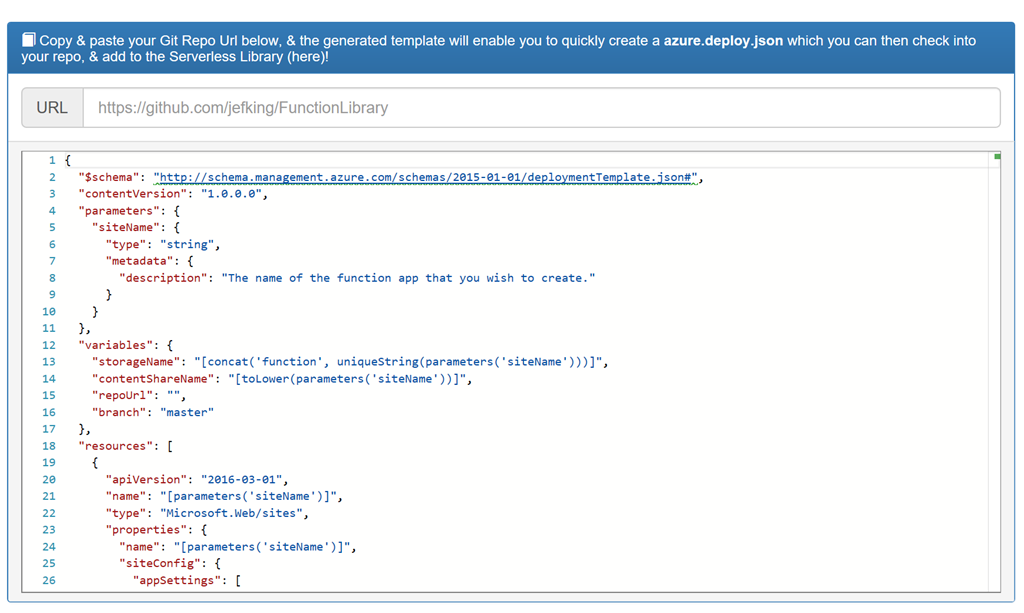
If you want to create an Azure Resource Manager (ARM) template that deploys Functions or Logic Apps, you can build your own as shown here. Just provide your GitHub repository URL and it will quickly create an azure.deploy.json file for you to include with your repos.

image

Summary

These samples are available in a either C# or NodeJS and can be deployed to your Azure subscription with a click of a button. The samples cover a number of useful tasks that can easily be incorporated into your application or simply used for learning purposes. If you’re interested in contributing to this project or browsing through the code please take a look at the GitHub repository.

Enjoy!

    References

    http://functionlibrary.azurewebsites.net/

    https://github.com/jefking/FunctionLibrary

    Azure

    Try Azure Functions for Free

    In my previous post “Introduction to Azure serverless with Azure Functions, Logic Apps and Azure Event Grid” I briefly introduced each of those services from Azure. In this post I’ll show you how you can try Azure Functions for free without signing up for an Azure subscription. Let’s get started.

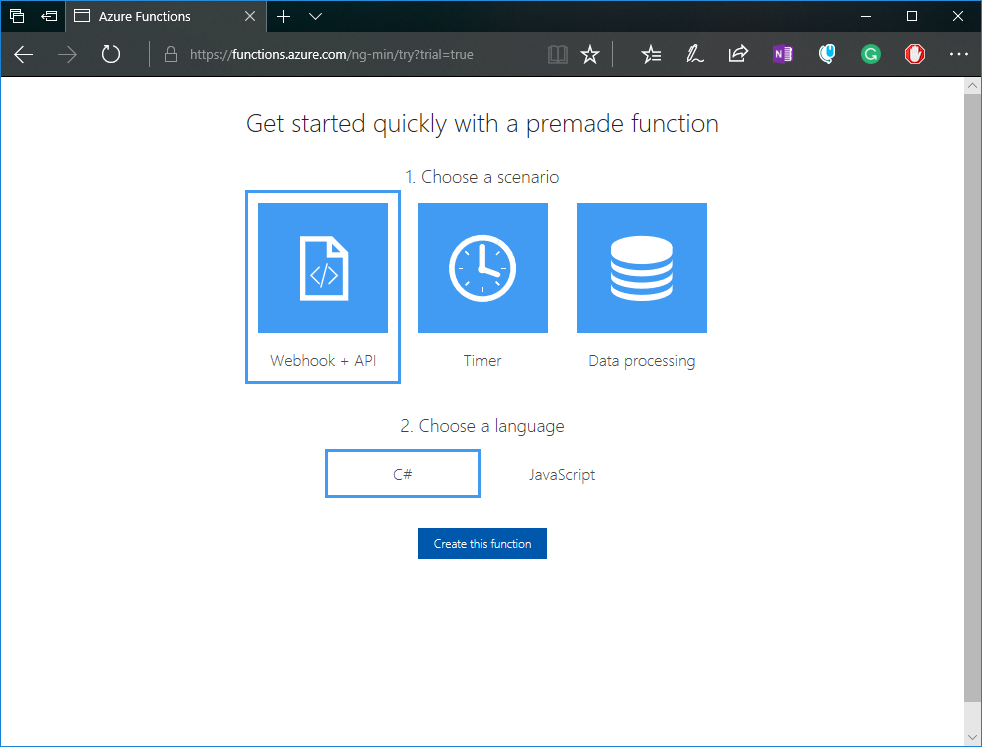
    Microsoft has setup a free sandbox environment for trying out Azure Functions for free. Navigate to the free trial link and select the function you want to create:

    image

    After clicking on the Create this function button you will be asked to choose an auth provider. Any will do and it’s just needed to get some basic information for the trial. No credit card information is required:

    image

    After a few seconds you should see your new HttpTrigger C# function (based on the selection from the previous screen). Click on the Run button to see your function run. From this portal you can edit your function code and save the changes, run the function and view the logs from the, test your function with different input, and see the output and status.

    image

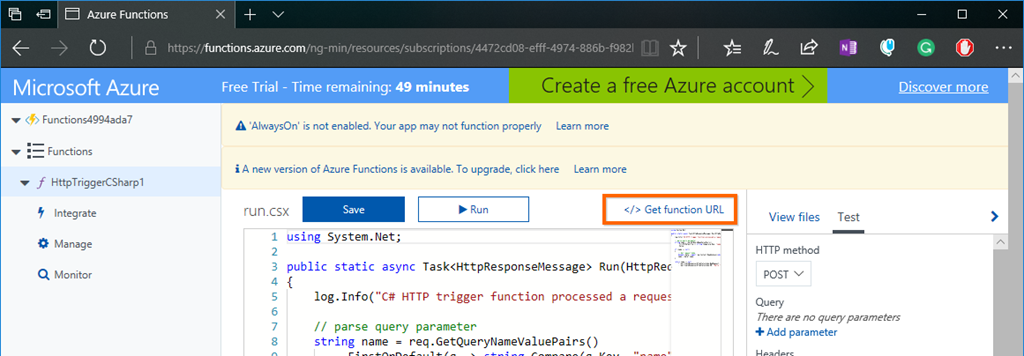
    Your function also has a URL you can use to run your function outside of this portal. Go to the top right corner and click on Get function URL:

    image

    You will then see the get function URL modal with the key and URL. Click on the copy link and then open up another browser tab or use it within Postman:

    image

    Paste your function link and then add the required query string parameter Name with a value. You should then see the output of your function like so:

    image

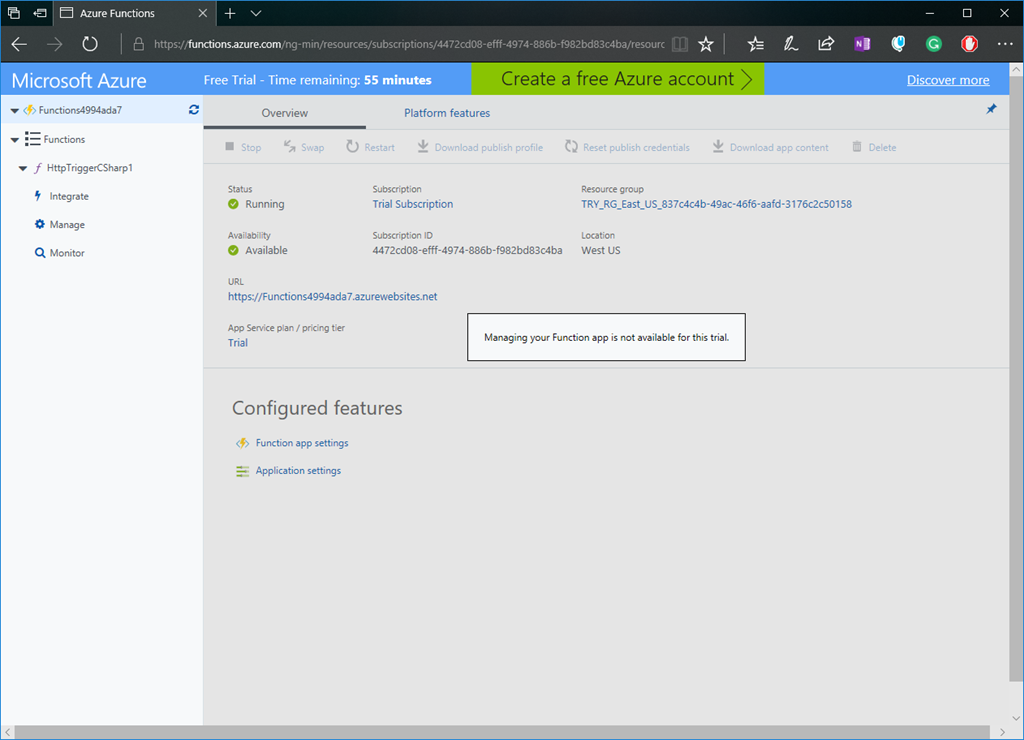
    This environment is limited in what you can do. So although you can change your function code and the integrations it works with, you are prevented from managing your function app. You also only have only 59 minutes to try it out.

    image

    As you can see you can quickly try out Azure Functions in a sandbox environment. If and when you’re ready you can move to an Azure subscription where you can fully manage your Azure Function and get access to a world of other resources to use with your function app. It’s worth mentioning that with your Azure subscription you get access to a number of Azure resources for free within certain limits…including Azure Functions. So take a look and give Azure Functions a try.

    Enjoy!

    Resources

    Try Azure Functions for Free

    Azure Functions

    Azure

    Introduction to Azure serverless with Azure Functions, Logic Apps and Azure Event Grid

    image

    In this blog post I’ll introduce you to what is serverless and then what services in Azure provide serverless capabilities. First let’s define what is serverless.

    What is the definition of Serverless

    • It’s an abstraction of servers. This doesn’t mean there are no servers, there are still servers behind the scenes but this means you don’t need to worry about optimizing which OS to run, about OS patching, etc. You also don’t need to worry about optimizing utilization and scaling up and down for demand. Think of it as less server more code.
    • It’s an event driven process. You simple tell Azure how or when to run your code. This could be based on a schedule or when a new customer is added to Salesforce, or when items are added to a queue, to a table storage, etc.
    • It’s micro-billing. This means you’re only charged for your usage.

    The benefits of serverless

    • Reduced DevOps – You can dynamically and elastically scale to meet demand.
    • Focus on Business Logic – Allows you as the developer to focus on your business logic and everything else is taken cared of for you. No need to provision resources and wait on ITOPS. In some cases you can design and develop your serverless code offline.
    • Faster Time to Market – By focusing on your business logic and features, you’re able to drastically increase time to market.

    Let’s now look at three Azure services that provide serverless capabilities.

    1. Azure Functions
    image

    Azure Functions is an event driven, compute-on-demand experience. You can easily and quickly build the apps you need using simple serverless functions that scale and meet demand and you only pay for your usage.

    You can use the programming language of your choice like C#, F#, JavaScript, PHP, Python, Java or using scripting tools like Bash or PowerShell. You can develop on Windows, Linux or Mac. You can deploy on Windows or Linux. You can choose from using either the full .NET Framework or the .NET Core runtimes.

    Azure Functions allows you to bind into services. This means you can integrate Azure Functions into Cosmos DB, Logic Apps, queues, table storage, on premise and so much more.

    With Azure Functions you simply provide your code and then let Azure take care of the rest…meaning that when an event happens, Azure will automatically take care of everything to run that code at scale.


    2. Logic App Service

    Azure Logic Apps are built around the idea of events, triggers and workflows. When you think about building microservices, there are a lot of moving parts to manage. Azure Logic Apps lets you stitch them all together much more easily and provides you with a central place to build and manage all of your event-driven services.

    Logic Apps are a fully managed iPaaS (integration Platform as a Service) that provide serverless workflows that allow developers to easily integrate data with their apps instead of writing complex glue code between disparate systems. This allows you to orchestrate and connect the serverless functions and APIs of your applications.

    Benefits of Logic Apps

    1. You can quickly tap into the power of the cloud and fire events from other services.

    image

    2. You can orchestrate almost anything:

    • Run mission-critical, complex integration scenarios with ease
    • Connect on-premises, hybrid and cloud applications
    • Position for future with API centric connectivity
    • Easily connect custom on-premises applications to the cloud

    image

    Connectors

    At the time of this post there are over 200 connectors available out of the box. Connectors reduce integration challenges and enable you to quickly and easily connect apps, data and devices anywhere.

    Creating a Logic App

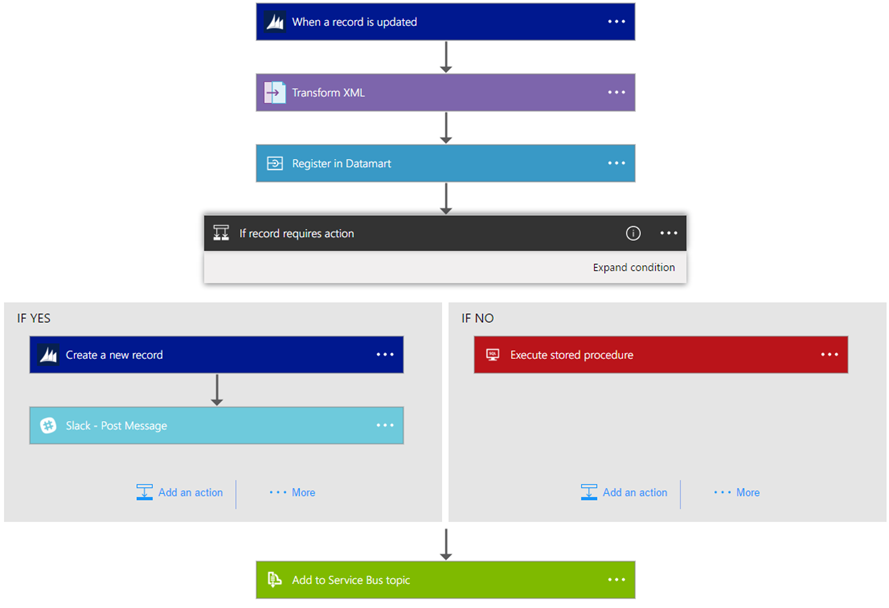
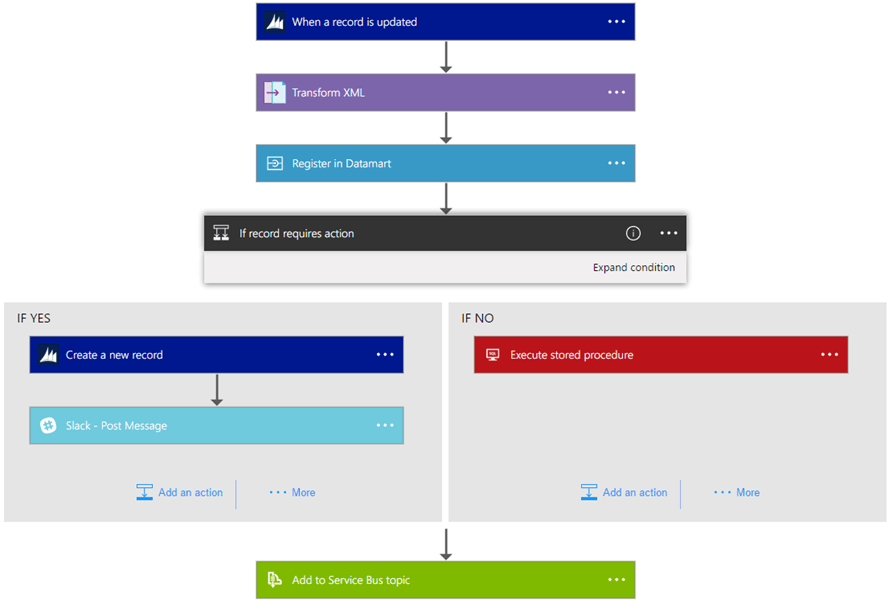
    The following is a sample Logic App. As you can see you simply string together Connectors, Triggers, Conditions and Actions to form the basis of your Logic App. When your Logic App is running you can monitor and inspect each run iteration and see what data came in and the path it took through the Logic App.
    image

    In summary Logic Apps is the workflow engine built for the cloud with cloud scale, massive compute and high availability built in.

    3. Azure Event Grid

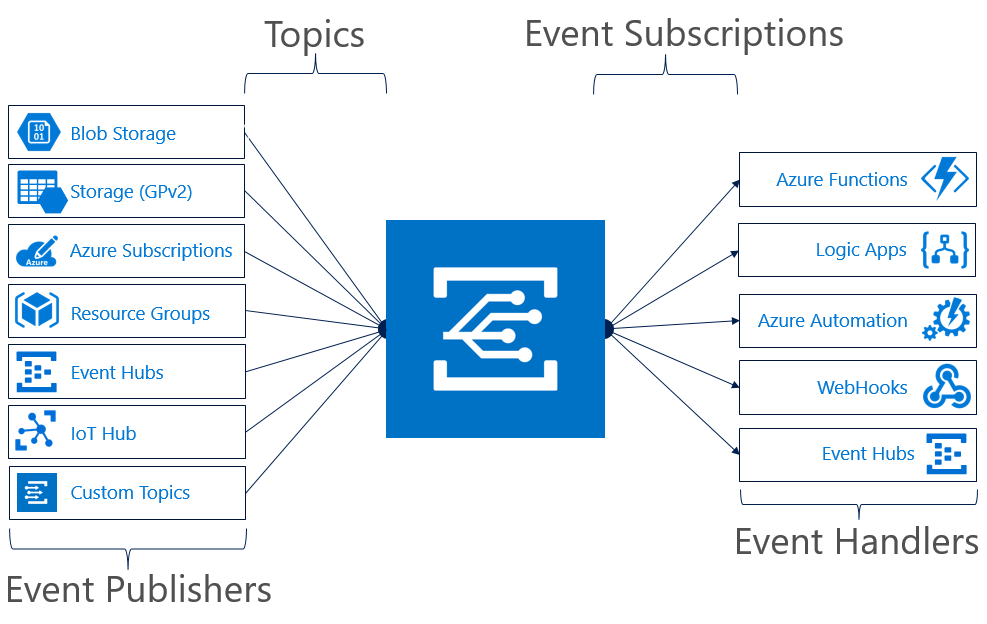
    Finally there is Azure Event Grid which is a messaging service built to easily build application with event-based architectures. You simply select the Azure resource you would like to subscribe to, and give the event handler or webhook endpoint to send the event to. Event Grid also has built-in support for events coming from other Azure services, like resource groups, subscriptions, storage blobs, and event hubs.
    functional-model

    Topics and Subscriptions

    Event Grid is similar to Azure Service Bus in that a Topic is an endpoint that receives messages, and a Subscription is used to receive messages through the Topic that will be handled by a message listener. These concepts are basically the same, but there are some differences in how they work. Event Grid it uses a concept of events instead of messages since it’s an event-based messaging system, and because Event Grid is based on events, it lends itself nicely to microservice architectures using serverless compute options like Azure Functions and Logic Apps in addition to other implementations.

    There are also more differences between Azure Event Grid and other message queue services. The capabilities of Azure Event Grid are centered around speed, scale, breadth, and low cost. Rather than being a general / generic messaging service, Azure Event Grid is built specifically for Serverless architectures.

    Event Publishers

    Currently Azure Event Grid has built in support for the following event publishers:

    • Event Hubs
    • IoT Hubs
    • Storage
    • Blog Storage
    • Custom Topics
    • Azure Subscriptions (management operations)
    • Resource Groups (management operations)

    Event Handlers

    Currently the following Azure services have built-in handler support for Event Grid:

    • Azure Functions
    • Logic Apps
    • Event Hubs
    • Webhooks
    • Azure Automation
    • Microsoft Flow

    If using Azure Functions as your handler, use the Event Grid trigger over the generic HTTP trigger as it automatically validates Event Grid Function triggers.

    Azure Event Grid is built specifically for Serverless architectures.

    Event Grid Architectures

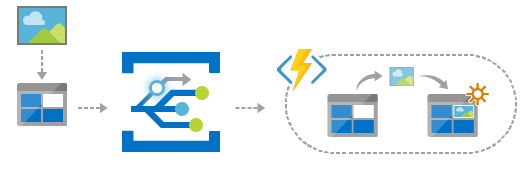
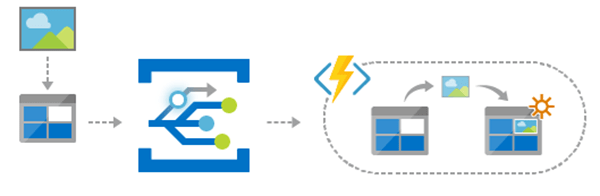
    Azure Event Grid is designed to be used in microservices and event based architectures. It can be used in a serverless application to connect data sources and event handlers. In an ops automation scenario you can notify Azure Automation when virtual machines are created, or when a SQL database is spun up. Finally you can use Event grid to connect your application with other services. The possibilities are really limited by your imagination.
    EventGridArchitecture1

    Summary

    As you can see all three services provide a different component to the serverless story and each of them integrate nicely with each other. They each allow you to think less about the server and more about your code and you only pay for your usage. The best way to learn about these Azure serverless offerings is to create a free Azure account and try it out yourself.

    Enjoy!

    References

    Azure Functions

    Docs: An introduction to Azure Functions

    Logic App Service

    Docs: An introduction to Logic App

    Azure Event Grid

    Docs: An introduction to Azure Event Grid

    Webinar: Go serverless. Build apps faster and stop worrying about infrastructure.

    Report: Economics of Serverless Cloud Computing

    Attribution: This post uses one or more graphics from the official Azure Event Grid documentation, such as diagrams.