Unknown's avatar

All posts by Callon Campbell [MVP]

Uncategorized

Serverless On-Demand Scaling : Pushing the pedal when you need it…

kvaes's avatarKarim Vaes

Introduction

A lot of workloads are driven by peak consumption. From my experience, there aren’t the amount of workloads that have a constant performance need are in the minority. Now here comes the interesting opportunity when leveraging serverless architectures… Here you only pay for your actual consumption. So if you tweak your architecture to leverage this, then you can get huge gains!

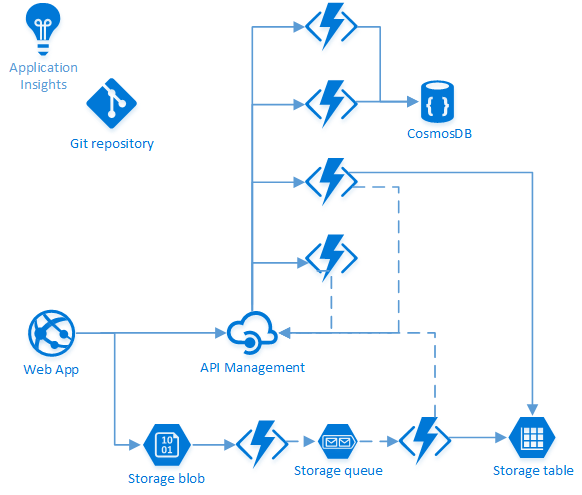
For today’s post, I’ll be using VMchooser once again as an example. A lot has changed since the last post on the anatomy of this application. Here is an updated drawing of the high level architecture ;

Underneath you can see the flow that’ll be used when doing a “Bulk Mapping” (aka “CSV Upload”). The webapp (“frontend”) will store the CSV as a blob on the storage account. Once a new blob arrives, a function will be triggered that will examine the CSV file and put every entry…

View original post 953 more words

Uncategorized

How to Configure Git in Visual Studio to Prune Branches during a Fetch

If you’ve been using Git from within Visual Studio 2017 you might be aware of the fact that when performing a fetch it would not automatically prune your local list of branches that no longer exist on the server. Typically you would have to open up a Command Prompt and run the following command to cleanup your list of branches that exist on the remote:

> git remote prune origin

image

Well now with Visual Studio 2017 Update 5 you can now configure your global and repository settings to prune your local list of branches on every fetch. Let’s take a look at how you can configure this.

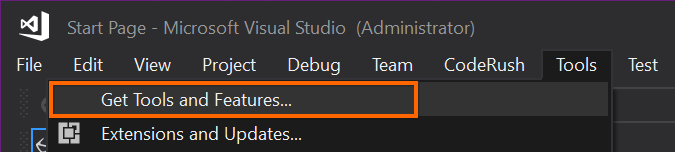
First download and install Visual Studio 2017 Update 5. You can do this from within Visual Studio under the Tools menu:

image

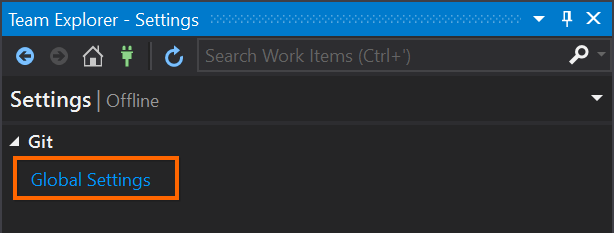
Once you have Visual Studio 2017 Update 5 installed, go to the Team Explorer pane and click on Settings where you can configure your default behavior for your Global and/or Repository Settings:

image

image

Now you can change the setting to prune remote branches on every fetch. In my opinion this should be the default value.

image

Another nice addition to the Git settings in Visual Studio 2017 Update 5 is the ability to Rebase your changes when you pull. I’ll explore that in a future post.

In summary when enabling the prune on every fetch, this means your local list of branches is always up-to-date with the remote. Pruning will cleanup and remove your local tracking branches that no longer exist on the server.

Enjoy!

References

Git Configuration: Configure your default behavior

Software

Windows Insiders Flight Hub Dashboard

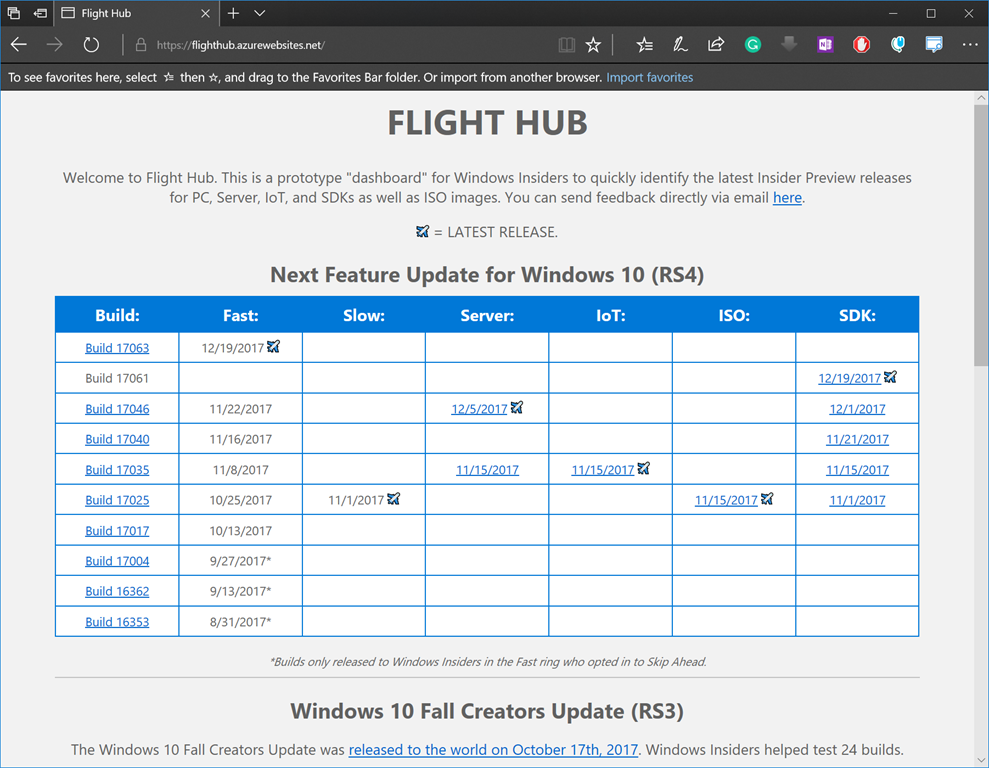
Back in the fall of 2017, Microsoft released the Windows Flight Hub. This is a quick dashboard to reference when trying to sort out the many different Windows Insiders build numbers and what is the latest preview release in the Fast, Slow, Server, IoT, ISO and SDK rings.

Each build is called a flight and is associated to one or more editions of Windows 10.

Enjoy!

image

References

https://flighthub.azurewebsites.net/

Database

Free ebook – SQL Server Internals: In-Memory OLTP, Inside the SQL Server 2016 Hekaton Engine

SQL Server Internals: In-Memory OLTP eBook cover

A new free ebook by Kalen Delaney on the internals of SQL Server 2016 In-Memory OLTP has been published by Simple Talk (redgate), which introduces and explains how SQL Server 2016 In-Memory OLTP engine (a.k.a. Hekaton) works. This book goes into detail about the in-memory engine and will help you with migrate existing databases and tables over to Hekaton for beyond imaginable performance.

“The SQL Server 2016 In-Memory OLTP engine (a.k.a. Hekaton) is designed to exploit terabytes of available memory and high numbers of processing cores. It allows us to work with memory-optimized tables and indexes, and natively compiled stored procedures, in addition to the disk-based tables and indexes, and T-SQL stored procedures, that SQL Server has always provided.”

Working with Hekaton in-memory data is very accessible using T-SQL and SSMS. However there are some limitations and this book goes into detail about what’s possible and what’s not and how to get around the issues.

Download your the free ebook here.

Enjoy!

References

https://www.red-gate.com/simple-talk/books/sql-books/sql-server-internals-in-memory-oltp/

https://www.microsoft.com/en-us/sql-server/sql-server-2016

AzureCloud

Essential tool for blurring Azure secrets for presentations and screen recordings

azure-mask

For those that do Azure presentations / screen recordings you know that you often find yourself scrubbing out your sensitive and personal information such as subscription keys, email addresses, keys and connection strings. What if you could have this magically done for you?

Well let me introduce to you a handy Chrome extension called Azure Mask that will mask GUIDs (such as Subscription IDs), email addresses, keys, and connection strings with a blur. The intention of the extension is to make it easier to do screen recordings without revealing sensitive, personal, account information that may show up on screen.

NOTE: This extension will only run and apply against Azure portal URLs.

Features

  • Blurs GUIDs (such as Subscription IDs)
  • Blurs your account email
  • Hides the "Report a Bug" button (if found)
  • Toggle the mask on/off and store this state
  • Apply the mask (if enabled) after Document Object Model (DOM) mutations

Installing the Extension

As mentioned on the Azure Mask GitHub repository readme, you can install this extension in Chrome from either a package or from source. Let’s take a look at how we can install from source.

  1. Download or clone the repository: git clone git@github.com:clarkio/azure-mask.git
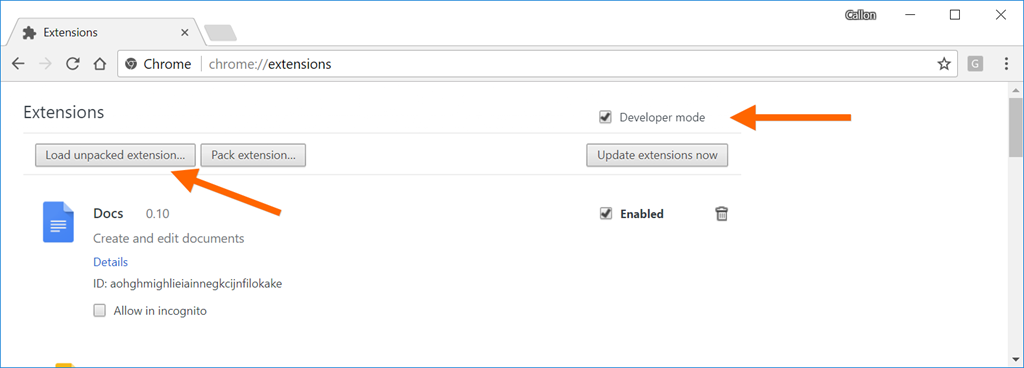
  2. Open up Chrome and bring up the extensions settings by typing in the address bar: chrome://extensions/
  3. Check the “Develop mode” option and click on Load unpacked extension button:image
  4. Navigate to where you cloned this repository and then choose path: /azure-mask/src
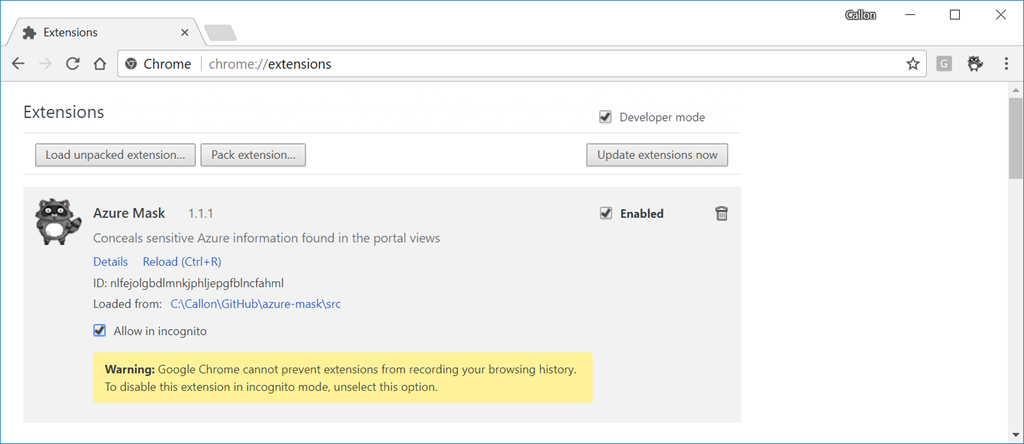
  5. Follow the prompts and then the extension will be available in Chrome:sshot-116

Using Azure Mask

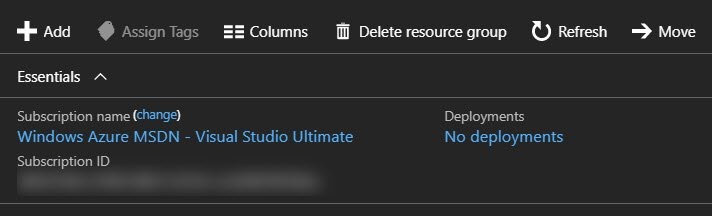
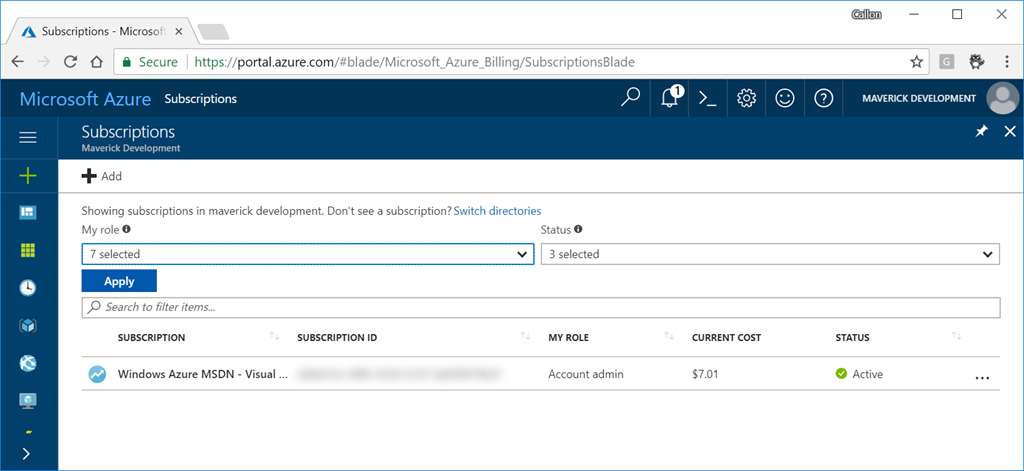
After installing the Azure Mask extension in Chrome, navigate to your Azure portal and after signing in you will see all your Azure secrets magically blurred:

image

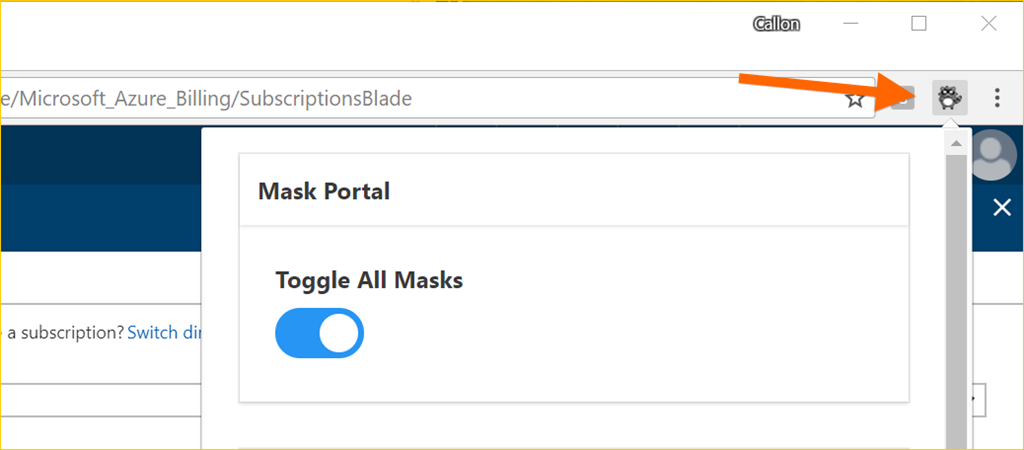
If you want to turn off this extension, click on the Azure Mask extension button in Chrome to bring up the options:

image

Enjoy!

References

Azure-Mask on GitHub

Development

The Windows 10 Fall Creators Update SDK is now available to download

windows-10-fall-creators-update-sdk

The Windows 10 Fall Creators Update SDK is now available to download.

Want to catch up on what’s included in the Windows 10 Fall Creators Update, take a look at the Windows Developer Day keynote or dive deeper with 18 additional videos. The Windows Developer Day videos are now available to view here.

Enjoy!

References

Download the Windows 10 Fall Creators Update SDK

Watch the Windows Developer Day – Fall Creators Update keynote and other sessions

Cloud

Microsoft’s new Azure & AWS Cloud Service Map

image

Microsoft recently introduced a new Cloud Service Map to help customers and developers quickly compare the capabilities between Amazon Web Services and Microsoft’s Azure cloud platform across all categories. You can leverage this guide for planning multi-cloud solutions or simply to migrate from AWS to Azure.

The cloud service map (PDF available for download) is broken out into 13 sections to make navigation between each service simple:

  1. Marketplace – Cloud marketplace services bring together native and partner service offerings to a single place, making it easier for customers and partners to understand what they can do.
  2. Compute – Compute commonly refers to the collection of cloud computing resources that your application can run on.
  3. Storage – Storage services offer durable, highly-available, and massively-scalable cloud storage for your application, whether it runs in the cloud or not.
  4. Networking & Content Delivery – Allows you to easily provision private networks, connect your cloud application to your on-premises datacenters, and more.
  5. Database – Database services refers to options for storing data, whether it’s a managed relational SQL database that’s globally distributed or multi-model NoSQL databases designed for any scale.
  6. Analytics and big data – Make the most informed decision possible by analyzing all of the data you need in real time.
  7. Intelligence – Intelligence services enable natural and contextual interaction within your applications, using machine learning and artificial intelligence capabilities that include text, speech, vision, and search.
  8. Internet of Things (IoT) – Internet of Things (IoT) services connect your devices, assets, and sensors to collect and analyze untapped data.
  9. Management & monitoring – Management and monitoring services provide visibility into the health, performance, and utilization of your applications, workloads, and infrastructure.
  10. Mobile services – Mobile services enable you to reach and engage your customers everywhere, on every device. DevOps services make it easier to bring a higher quality app to market faster, and a number of engagement services make it easier to deliver performant experiences that feel tailored to each user.
  11. Security, identity, and access – A range of capabilities that protect your services and data in the cloud, while also enabling you to extend your existing user accounts and identities, or provisioning entirely new ones.
  12. Developer tools – Developer tools empower you to quickly build, debug, deploy, diagnose, and manage multi-platform, scalable apps and services.
  13. Enterprise integration – Enterprise integration makes it easier to build and manage B2B workflows that integrate with third-party software-as-a-service apps, on-premises apps, and custom apps.

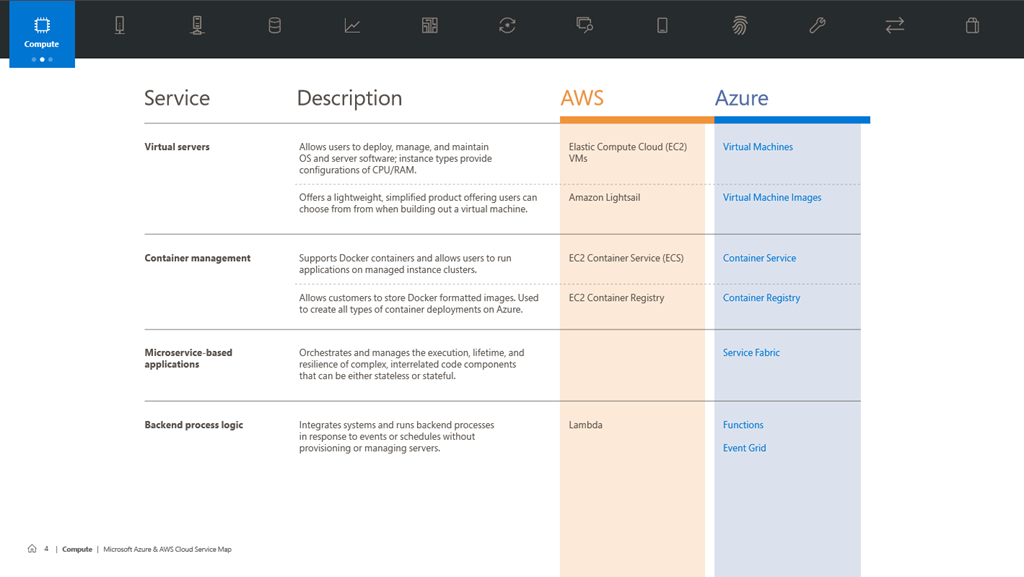
This guidance is laid out in a convenient table that lets you quickly find and learn more about each of the services you’re most interested in. In this instance, you can quickly see the service name, description and the name of the services in AWS and Azure. Links are also provided for each of the Azure services.

image

Enjoy!     

Additional Resources

Cloud Service Map for AWS and Azure Available Now

Downloadable PDF of the Cloud Service Map for AWS and Azure

Azure

Introduction to Azure File Sync

azure-file-sync

Azure File Sync is meant to provide customers a secure and centralized file share management in the cloud. Once installed you will be able to store less frequently accessed files on the cloud and then keep more frequently accessed files on your local file shares, all while delivering a consistent file share performance with no configuration or code changes required. Azure File Sync could also lower IT support requirements for remote or branch locations.

Azure File Sync was released as a preview on September 25, 2017. Currently the public preview availability is limited to the US regions and works with Windows Server.

For more details on Azure File Sync checkout the announcement blog post and the following is a quick overview video…

image 

Enjoy!

References

Announcing the public preview for Azure File Sync

Azure File Sync Overview

Azure Storage

Docs – Introduction to Azure Files

Development

GitHub for Visual Studio now allows Pull Request Comments from IDE

0917vsm_github_vs

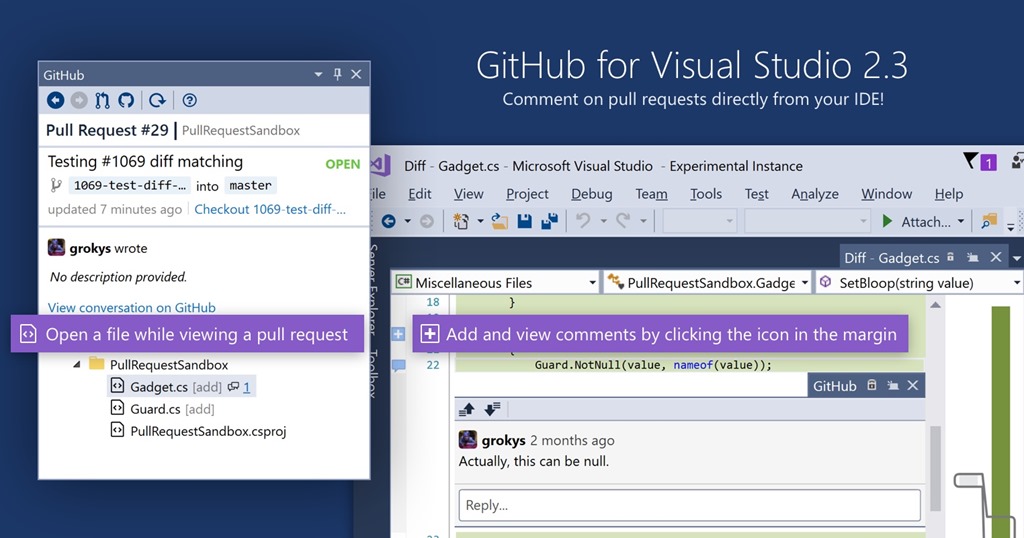
GitHub for Visual Studio 2.3 was recently released and it brought new functionality that now allows you to add pull request comments directly from the IDE.

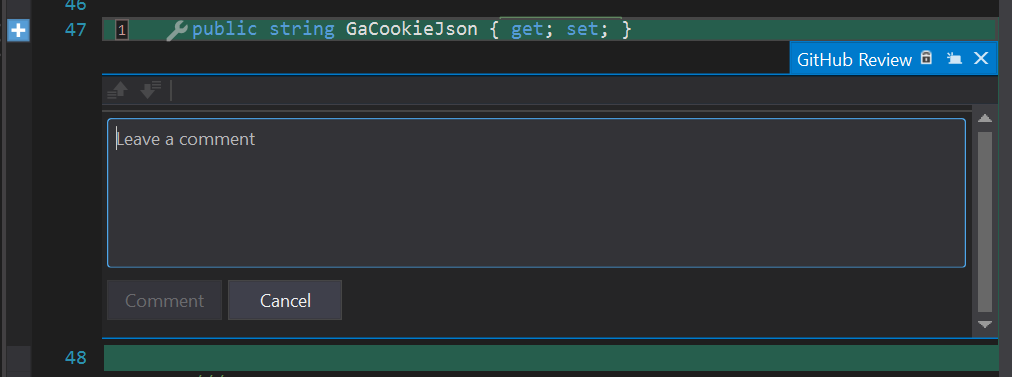
To get started you  will need the latest version of GitHub Extension for Visual Studio. Next open up a pull request from the GitHub pane and while viewing a file you can click on the left gutter (see blue plus button) to add your feedback, all without leaving Visual Studio.

image

This functionality is still pretty limited but its a step in the right direction. I look forward to more GitHub online functionality making it’s way to this great extension.

Enjoy!

References

Inline comments in GitHub for Visual Studio

Uncategorized

Enforcing Ordered Delivery using Azure Logic Apps and Service Bus