Unknown's avatar

All posts by Callon Campbell [MVP]

Azure

Introduction to Azure serverless with Azure Functions, Logic Apps and Azure Event Grid

image

In this blog post I’ll introduce you to what is serverless and then what services in Azure provide serverless capabilities. First let’s define what is serverless.

What is the definition of Serverless

  • It’s an abstraction of servers. This doesn’t mean there are no servers, there are still servers behind the scenes but this means you don’t need to worry about optimizing which OS to run, about OS patching, etc. You also don’t need to worry about optimizing utilization and scaling up and down for demand. Think of it as less server more code.
  • It’s an event driven process. You simple tell Azure how or when to run your code. This could be based on a schedule or when a new customer is added to Salesforce, or when items are added to a queue, to a table storage, etc.
  • It’s micro-billing. This means you’re only charged for your usage.

The benefits of serverless

  • Reduced DevOps – You can dynamically and elastically scale to meet demand.
  • Focus on Business Logic – Allows you as the developer to focus on your business logic and everything else is taken cared of for you. No need to provision resources and wait on ITOPS. In some cases you can design and develop your serverless code offline.
  • Faster Time to Market – By focusing on your business logic and features, you’re able to drastically increase time to market.

Let’s now look at three Azure services that provide serverless capabilities.

1. Azure Functions

image

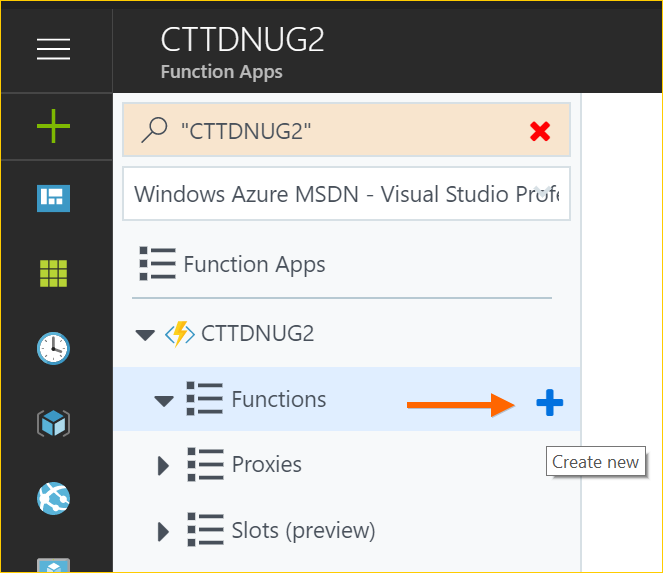
Azure Functions is an event driven, compute-on-demand experience. You can easily and quickly build the apps you need using simple serverless functions that scale and meet demand and you only pay for your usage.

You can use the programming language of your choice like C#, F#, JavaScript, PHP, Python, Java or using scripting tools like Bash or PowerShell. You can develop on Windows, Linux or Mac. You can deploy on Windows or Linux. You can choose from using either the full .NET Framework or the .NET Core runtimes.

Azure Functions allows you to bind into services. This means you can integrate Azure Functions into Cosmos DB, Logic Apps, queues, table storage, on premise and so much more.

With Azure Functions you simply provide your code and then let Azure take care of the rest…meaning that when an event happens, Azure will automatically take care of everything to run that code at scale.


2. Logic App Service

Azure Logic Apps are built around the idea of events, triggers and workflows. When you think about building microservices, there are a lot of moving parts to manage. Azure Logic Apps lets you stitch them all together much more easily and provides you with a central place to build and manage all of your event-driven services.

Logic Apps are a fully managed iPaaS (integration Platform as a Service) that provide serverless workflows that allow developers to easily integrate data with their apps instead of writing complex glue code between disparate systems. This allows you to orchestrate and connect the serverless functions and APIs of your applications.

Benefits of Logic Apps

1. You can quickly tap into the power of the cloud and fire events from other services.

image

2. You can orchestrate almost anything:

  • Run mission-critical, complex integration scenarios with ease
  • Connect on-premises, hybrid and cloud applications
  • Position for future with API centric connectivity
  • Easily connect custom on-premises applications to the cloud

image

Connectors

At the time of this post there are over 200 connectors available out of the box. Connectors reduce integration challenges and enable you to quickly and easily connect apps, data and devices anywhere.

Creating a Logic App

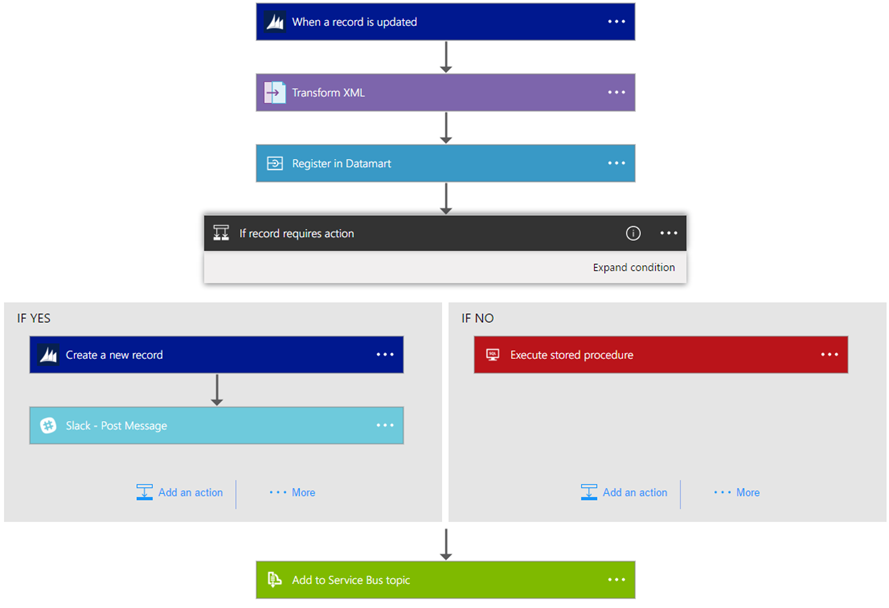
The following is a sample Logic App. As you can see you simply string together Connectors, Triggers, Conditions and Actions to form the basis of your Logic App. When your Logic App is running you can monitor and inspect each run iteration and see what data came in and the path it took through the Logic App.
image

In summary Logic Apps is the workflow engine built for the cloud with cloud scale, massive compute and high availability built in.

3. Azure Event Grid

Finally there is Azure Event Grid which is a messaging service built to easily build application with event-based architectures. You simply select the Azure resource you would like to subscribe to, and give the event handler or webhook endpoint to send the event to. Event Grid also has built-in support for events coming from other Azure services, like resource groups, subscriptions, storage blobs, and event hubs.

functional-model

Topics and Subscriptions

Event Grid is similar to Azure Service Bus in that a Topic is an endpoint that receives messages, and a Subscription is used to receive messages through the Topic that will be handled by a message listener. These concepts are basically the same, but there are some differences in how they work. Event Grid it uses a concept of events instead of messages since it’s an event-based messaging system, and because Event Grid is based on events, it lends itself nicely to microservice architectures using serverless compute options like Azure Functions and Logic Apps in addition to other implementations.

There are also more differences between Azure Event Grid and other message queue services. The capabilities of Azure Event Grid are centered around speed, scale, breadth, and low cost. Rather than being a general / generic messaging service, Azure Event Grid is built specifically for Serverless architectures.

Event Publishers

Currently Azure Event Grid has built in support for the following event publishers:

  • Event Hubs
  • IoT Hubs
  • Storage
  • Blog Storage
  • Custom Topics
  • Azure Subscriptions (management operations)
  • Resource Groups (management operations)

Event Handlers

Currently the following Azure services have built-in handler support for Event Grid:

  • Azure Functions
  • Logic Apps
  • Event Hubs
  • Webhooks
  • Azure Automation
  • Microsoft Flow

If using Azure Functions as your handler, use the Event Grid trigger over the generic HTTP trigger as it automatically validates Event Grid Function triggers.

Azure Event Grid is built specifically for Serverless architectures.

Event Grid Architectures

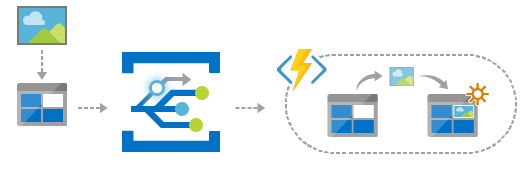
Azure Event Grid is designed to be used in microservices and event based architectures. It can be used in a serverless application to connect data sources and event handlers. In an ops automation scenario you can notify Azure Automation when virtual machines are created, or when a SQL database is spun up. Finally you can use Event grid to connect your application with other services. The possibilities are really limited by your imagination.
EventGridArchitecture1

Summary

As you can see all three services provide a different component to the serverless story and each of them integrate nicely with each other. They each allow you to think less about the server and more about your code and you only pay for your usage. The best way to learn about these Azure serverless offerings is to create a free Azure account and try it out yourself.

Enjoy!

References

Azure Functions

Docs: An introduction to Azure Functions

Logic App Service

Docs: An introduction to Logic App

Azure Event Grid

Docs: An introduction to Azure Event Grid

Webinar: Go serverless. Build apps faster and stop worrying about infrastructure.

Report: Economics of Serverless Cloud Computing

Attribution: This post uses one or more graphics from the official Azure Event Grid documentation, such as diagrams.

ArchitectureAzure

Planning Azure Services by Location

Roy Kim (MVP)'s avatarRoy Kim on Azure and AI

When planning and designing a cloud solution, the location of the service and its data is of great consideration in terms of data sovereignty
.PlanningAzure Services by Location 1

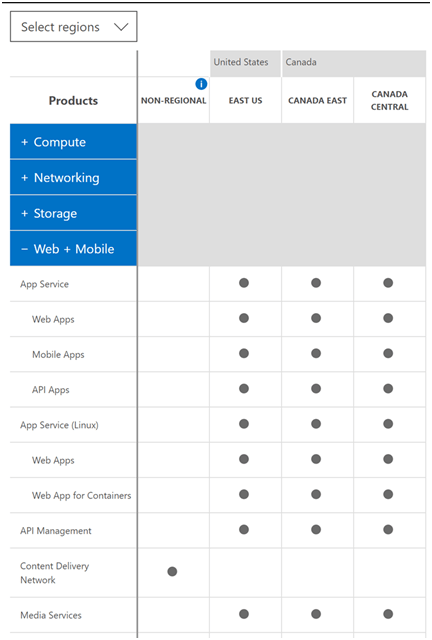
In my experiences when discussing cloud design, I may bring up an Azure service for consideration that is beyond the standard VM, storage account, app service but something complements or supplements the solution like azure app insights, power bi premium/embedded, backups, CDN, logging or an azure ad tenant. Now, can we simply assume they will be available in the desired region? No necessarily. To check we can go to an online tool Products available by region

An example looks as follows:
PlanningAzure Services by Location 2

One thing to point out and be aware are services that are located in Non-regional.
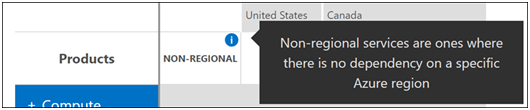
Non-regional is defined as “where there is no dependency on a specific Azure region”

PlanningAzure Services by Location 3

Some examples are CDN, Azure AD, Azure MFA, Traffic manager, Power BI Embedded…

View original post 326 more words

ArchitectureAzure

Microsoft Azure Symbol / Icon Set Download – Visio stencil, PNG, and SVG

Updated Aug. 28, 2019 – The latest version of this download is v5.6.2019 and was updated May 15, 2019. If you already have these templates you should update to the latest.

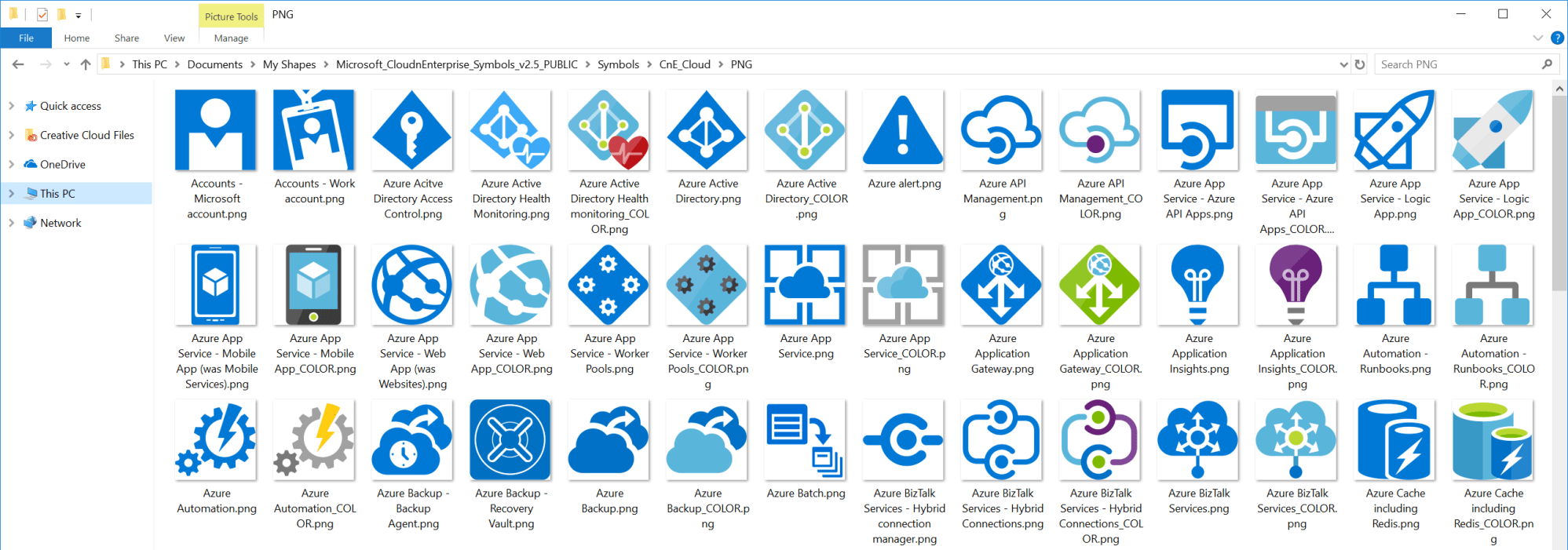
The Microsoft Azure, Cloud and Enterprise Symbol / Icon Set is a free download from Microsoft which provides a set of resources to represent features of and systems that use Microsoft Azure and related cloud and on-premises technologies.

The download comes with Visio stencils, along with PNG and SVG images.

sshot-293

You can download the icon set here.

Install Instructions

  1. Download the ZIP file by clicking the Download button and saving the file to your hard disk.
  2. Remove any previous versions of the symbol set so you can avoid duplicate and deprecated symbols.
  3. Extract the contents of the ZIP file to a separate directory. If you intend to use the Visio stencils, we suggest the My Shapes directory.
  4. Open the instructions and read it to get started.
  5. Open the .vss, vsd or .svg files with Microsoft Visio. Open the PNG directory by extracting the contents to a folder and browsing the contents of the folder. Drag and drop or open a PNG file in your drawing application. Load SVGs into any app that accepts them. Visio will open SVGs.

Note: The website for the download mentions support for PowerPoint. Their originally was a PowerPoint file that came with the file download but that has since been deprecated as it’s just as easy to add images to PowerPoint

Enjoy!

References

Download Microsoft Azure, Cloud and Enterprise Symbol / Icon Set – Visio stencil, PowerPoint, PNG, SVG

AzureDevelopmentPresentationsTechnology

An Introduction to Serverless Compute with Azure Functions–My presentation at CTTDNUG

AzureFunctions-e1491294484596

Last week I did a presentation on Azure Functions at Canada’s Technology Triangle .NET User Group (CTTDNUG) in Kitchener, Ontario. One of the audience members was kind enough to film the presentation and post it on YouTube.

Here is a link to my presentation on An Introduction to Serverless Compute with Azure Functions.

Enjoy!

References

https://www.youtube.com/watch?v=bPMzW10pECQ&feature=youtu.be

Development

Building a Better Napkin/Whiteboard, Go from Ink to Code

image

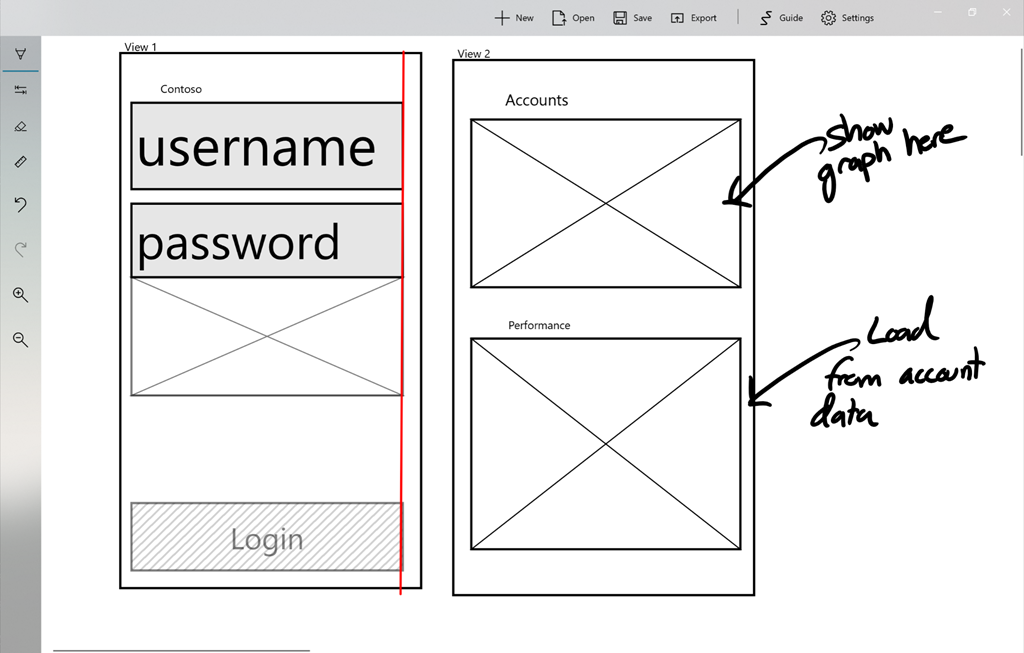
Microsoft’s Garage lab has announced a new Ink to Code app that will take your digital ink sketches and turn them into an actual application. Ink to Code is a UWP app that enables developers to draw a wire frame sketch and then export that sketch into source code for use in Visual Studio.

Urban legend has it that some of the greatest ideas in history started with a napkin. The Gettysburg Address, the poem that gave way to the U.S. National Anthem, and the premise of the Harry Potter series—each were reportedly born into the world through the medium of sketches on scrap paper—and when app creators put pen to paper for their ideas, this is often a canvas of choice. While rapid prototyping with the napkin and the whiteboard holds its charms, less charming is the prospect of translating quick sketches into working code. – Lainie Huston

Ink to Code is supposed to use artificial intelligence and automation to create the code from the wire frame sketches and at this time only supports basic visual elements like labels, text fields, images and buttons. This visual element recognition is similar to what you can find in the Microsoft Whiteboard (Preview) app, which you can download from the Microsoft Store.

This app currently supports Android and Windows UWP apps. At this time the app doesn’t seem to be available on the Microsoft Store, so keep an eye out for it.

Enjoy

References

https://www.microsoft.com/en-us/garage/blog/2018/01/napkin-disrupted-meet-ink-code-microsoft-garage-project/

https://www.microsoft.com/en-us/garage/profiles/ink-to-code/?group=newest

https://www.thurrott.com/windows/windows-10/150989/microsofts-new-app-turns-basic-sketches-code

Development

We Can’t Do That In One Sprint

I came across a great software development post on Hackernoon called We Can’t Do That In One Sprint. This is basically where Product comes to the development team with an idea of a new feature or product and they want to know how long it will take to develop and get to production as quickly as possible.

1_siePcBn2yZOKxF6bnDyp1g@2x

Too often have I experienced what is outlined in this article. I agree that it’s best to do small chunks of work and get it out to production and then iterate on the feature. What I find is that this fails when Product doesn’t give Development enough time to iterate and cuts the timeline short and moves on. Maybe this is what the business wants/needs but sometimes it leads to features being half baked, released to production, rarely iterated on and then future features are built on this feature.

As the author says, “There is NO silver bullet. Get SOMETHING out there in one sprint.”

Enjoy!

References

https://hackernoon.com/we-cant-do-that-in-one-sprint-a6780d67480

Web

New year, new website theme!

For some time now I’ve been looking to refresh my website with a more modern theme from WordPress. I’m using WordPress.com so I’m somewhat limited by the themes they provide online but there are many themes to choose from – both free and premium that you pay for.

After what seemed like a long journey of reviewing theme after theme after theme, I finally settled on a premium theme called Periodical. It provides some awesome customizations, like a nice menu bar at the top for anything. I choose to highlight my pages and then custom links to my social and coding accounts like Twitter, LinkedIn, Facebook, GitHub and YouTube.

I also liked the layout and font used for the content. There are many other customizations I’m playing with but so far I love this theme and highly recommend it to any other technical blogger.

Let me know what you think.

Cheers


Uncategorized

Microsoft Redefines Leadership in Top 100 Global Technology Leader list by Thomson Reuters — Build Azure

Thomson Reuters has released their first Top 100 Global Technology Leaders list to define new criteria for determining leadership in the 21st century. They’ve already been tracking tons of metrics on companies all around the world for their clients, and have decided to combine it all to create this new list. Thomson Reuters feels they’ve…

via Microsoft Redefines Leadership in Top 100 Global Technology Leader list by Thomson Reuters — Build Azure


Productivity

You can now install Office 365 desktop apps from the Microsoft Store

image

Office 365 is now available for purchase and installation from the Microsoft Store. It was first available only for Windows 10 S but has now expanded to support Windows 10.

If you want to install from the Microsoft Store, you first need to uninstall your current installation.

Once Office 365 is installed from the Microsoft Store it will automatically be updated like the rest of the store apps.

From the looks of it you can install the following:

  • Office 365 Personal
  • Office 365 Home

I currently install Office 365 Home from https://Office.com but I’m going to try this option out.

Enjoy!

Azure

How to return JSON from an Azure Function

In this post I’m going to answer a question someone asked me recently when I presented an Introduction to Azure Functions – can we return JSON from the HttpTrigger function? The answer is yes and it’s not limited to the Http trigger function and I’ll walk you through one of many ways to do this.

First let’s start off by taking a look at the output that shows up by default from the HttpTrigger Function I had created in the Azure portal. As you can see the default output is XML as shown here:

image

The same goes for the response when the require “name” parameter is missing in the query string or the body of the request:

image

You might think that there is a simple property in the Azure Function properties to configure the output, but there isn’t, at least at this point in time with version 1 runtime.

Creating a C# Http Trigger Function

Let’s quickly create an Azure Function in the portal and I can show you one of many ways to return JSON from your Azure Function.

1. Create a new Serverless Function App:

image

image

2. Once your Azure Function app is running, create a new C# Http trigger function and then provide it a name and authentication model:

image

image

3. Now that your function is created you will see the following code in the run.csx file. If you run it you will get XML as your response, so let’s go ahead and update this function to return JSON.

image

Changing the return type to JSON

For this example I’ll import Newtonsoft.Json package and then serialize a simple object to return back when the function is called.

1. Add Newtonsoft.Json package and other using references:

image

2. Update function code to use Newtonsoft.Json. Looking at the following code you will see that I’ve created a simple POCO object which is what I’ll be returning from the function. I then changed the response to return a serialized string in UTF8 encoding and application/response:

image

3. Now when we run the function through either the browser or Postman we’ll see the response in JSON format. Here is what we would see in Postman:

image

and then in a browser we would see this:

image

Azure Functions is a powerful component in Azure serverless offering and as you can see your not limited to XML as the only response format.

Let me know if you have any questions and I’d be happy to investigate and follow up.

Enjoy!