Uncategorized

Azure Logic Apps for Document Content Approval

Roy Kim (MVP)'s avatarRoy Kim on Azure and AI

Logic Apps is an Azure service for enterprise integration. It comes with many connectors including from outside of the Microsoft ecosystem. In this blog post, I will show an implementation and key implementation points that will facilitate an approval process for approving a document in SharePoint Online.

Business Scenario

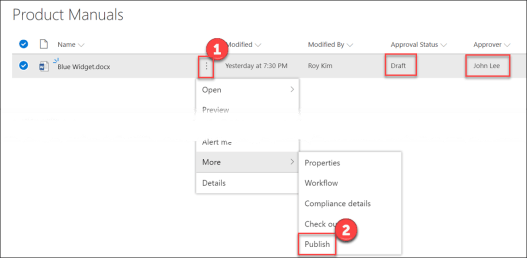
  1. User publishes a document for approval.
    LogicAppContentApproval3LogicAppContentApproval1
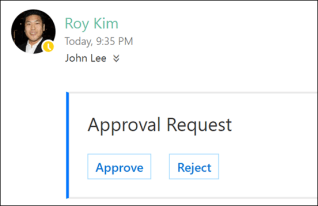
  2. Assigned approver gets an email to either approve or reject
    LogicAppContentApproval2
  3. Document is set as approved or rejected.
    LogicAppContentApproval3

The business process will be integrating the following three Office 365 services.

  • SharePoint Online – Document Library
  • Office 365 User Profile with Email
  • Outlook

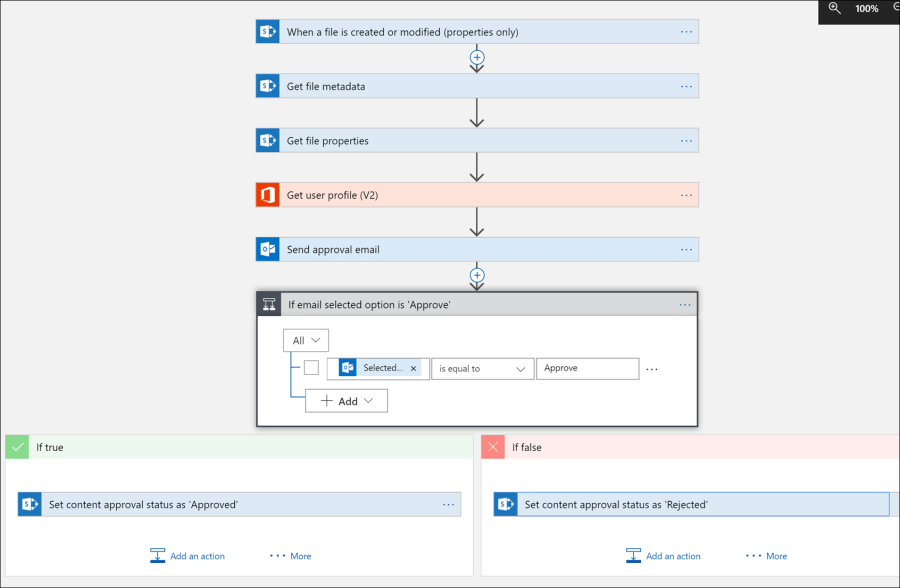
The Logic App Design
LogicAppContentApproval4

Implementation Details

  1. To trigger this Logic App, it done through any modification of the document item properties such as the user action of publishing.
  2. We must get the file metadata of the document specifically the ETag which represents the file version. This is for future use. Note this is not…

View original post 345 more words

Database

Installing Extensions in SQL Operations Studio

Just like VS Code, extensions provide more functionality to SQL Operations Studio. These extensions can come from Microsoft or the community.

Adding Extensions to SQL Operations Studio

1. Open the Extensions manager by going to the View menu and selecting Extensions. After clicking on the Extensions menu item, the Extensions navigation icon shows up on the left side. I’m not sure why this isn’t always available like it is in VS Code.

image

2. Browse and select an available extension. At this time there are 9 extensions available to choose from. 

image

3. Click on the green button to install the desired extension. In my case I’m trying to install RedGate SQL Search which is a tool I use in SQL Server Management Studio. This will download the extension but if you try to double click and run it, the installation will fail. Instead you need to install it from SQL Operations Studio.

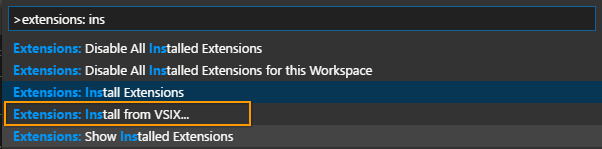
4. From SQL Operations Studio, press Ctrl/Cmd+Shift+p, and type Extensions: Install from VSIX and then press enter.

image

5. You should then see a notification in the bottom right corner of SQL Operations Studio indicating the extension has successfully been installed.

image

Enjoy!

References

What is Microsoft SQL Operations Studio

Installing SQL Operations Studio

Extending the functionality of SQL Operations Studio

CommunityMVP

Callon Campbell Awarded Microsoft MVP – Azure

mvp_logo_horizontal_preferred_cyan300_rgb_300ppi

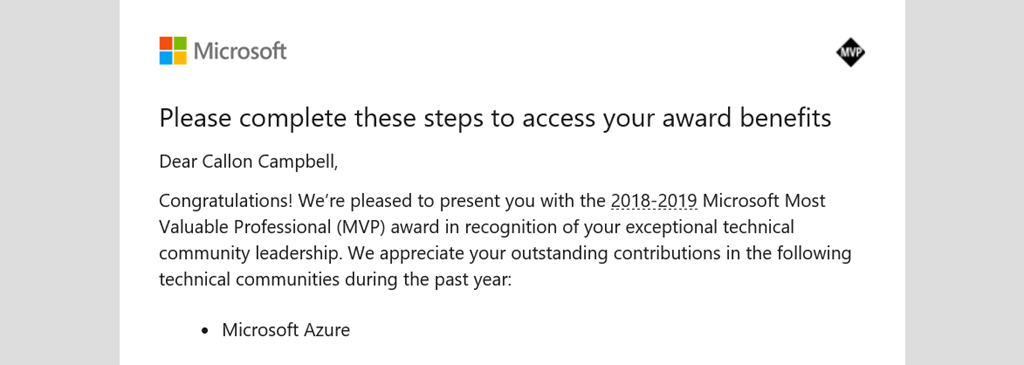
On June 1, 2018 I received notification from Microsoft that I was awarded the Microsoft Most Valuable Professional (MVP) award in the category of Azure for 2018-2019. This is my first MVP award and I feel truly honored, excited and thankful. I could not have got here without all the support from the community, so thank you! I look forward to continuing my work with the community and working towards my renewal next year.

image

In case the above image doesn’t load, here is what the letter states…

Dear Callon Campbell,

Congratulations! We’re pleased to present you with the 2018-2019 Microsoft Most Valuable Professional (MVP) award in recognition of your exceptional technical community leadership. We appreciate your outstanding contributions in the following technical communities during the past year:

· Microsoft Azure


Congratulations to all the other newly awarded, or renewed Microsoft MVP’s all over the world! You truly are an amazing community

Enjoy!

References

Microsoft MVP Award

Callon Campbell MVP Profile

Events

Power of the Cloud Conference

The Power of the Cloud conference is being held on June 22, 2018 at the Microsoft Canada office in Mississauga, Ontario

This conference is targeted towards power users of Microsoft Office 365 and Azure cloud.

Register now for free at https://www.eventbrite.co.uk/e/the-power-of-the-cloud-ms-power-user-conference-registration-44538764644?aff=ws .

Enjoy!

References

https://powerofthecloud.net/

DevelopmentEvents

Insider Dev Tour coming to Toronto and a city near you

Insider Dev Tour Banner

The Insider Dev Tour is coming to Toronto on June 25, 2018 and will be held at the Microsoft Canada office in Mississauga, Ontario. This is a full day event where you can come and learn about Machine Learning (ML), Modern Desktop Apps, Fluent Design, Artificial Intelligence, Progressive Web Apps (PWA), Microsoft Graph, Teams, Mixed Reality, Extending Office 365, and so much more! For the Toronto event register for free at https://www.insiderdevtour.com/Toronto?ocid2=spark . For other locations see this link http://aka.ms/idevtour .

The Insider Dev Tour is for developers interested in building Microsoft 365 experiences today, using the latest developer technologies, as well as for those who want a peek into the future. If you can read code, this is for you, regardless if you are a beginner, expert, student, or hobbyist developer.

The tour is a great opportunity to connect directly with leads and engineers from Microsoft (Redmond), as well as regional industry leads and Microsoft Developer MVPs. If you missed out on attending the Microsoft Build 2018 conference then this is a great opportunity to follow up on some of that same content.

Register today for free at https://www.insiderdevtour.com/Toronto?ocid2=spark .

Enjoy and I hope to see you there.

References

https://insiderdevtour.com/

AIAzureDevelopmentEventsProductivity

Microsoft Build 2018–Day 2 Highlights

Today’s keynote by Joe Belfiore was focused on Multi-sense + Multi-device for Microsoft 365, which is Windows, Office and EMS

Image showing how Microsoft 365 brings together Office 365, Windows 10, and Enterprise Mobility + Security (EMS), a complete, intelligent, and secure solution to empower employees.

Announcements

  • Fluent Design System updates.
  • UWP XAML Islands, which lets you incorporate UWP into WinForms, WPF and Win32 applications. This also means you can start to bring in the Fluent Design System into these UI frameworks.
  • Windows UI Library, which brings native platform controls as NuGet packages instead of being tied to the OS version. This will work from the Windows Anniversary Update and newer.
  • .NET Core 3.0, which will support side-by-side runtimes, along with support for WinForms, WPF and UWP.
  • MSIX, which is dubbed the best technology for installing applications on Windows. This inherits the Universal Windows Platform (UWP) features, works across Enterprise or Store distributions, and supports all Windows applications.
  • Windows SDK Insider Preview – https://aka.ms/winsdk
  • New developer revenue sharing model. Developers will get 85% when their app is found in the Microsoft store, and 95% when you provide your customers to your app in the Microsoft store.
  • Microsoft Launcher on Android will support Timeline for cross-device application launching. On iOS this will be supported through Microsoft Edge.
  • A new “Your Phone” experience coming soon to Windows 10 that enables you to see your connected phone text messages, photos and notifications and then interact with them without having to use your phone. Really neat experience – now if only they support Windows Mobile 10 Smile
  • Microsoft Sets was officially shown and demonstrated how it can be used for an easier way to organize your work and allow you to get back to work where you left off when ready. This means not having to have 25+ tabs open in Chrome or Edge. Nice!
  • Adaptive Cards is being added to Microsoft 365, which will enable developers to create rich interactive content within conversations. They demonstrated a GitHub Adaptive Card for Outlook (365) where you could comment and close an issue. Another example shown was paying for your invoice from an email.
  • There was a lot of buzz for Microsoft Graph, which is core to the Microsoft 365 platform. Microsoft Graph helps developers connect the dots between people, schedules, conversations, and content within the Microsoft cloud.
  • Cortana and Alexa start speaking to one another. Sometime in the future you will be able to access your Alexa device through Windows 10 and likewise on an Amazon Echo you will ne able to speak to Cortana.

Enjoy!

References

https://developer.microsoft.com/en-us/events/build

Modernizing applications for our multi-sense, multi-device world

Microsoft 365 empowers developers to build intelligent apps for where and how the world works

AIAzureDevelopmentEventsProductivity

Microsoft Build 2018 – Day 1 Highlights

This is my first attendance at the annual Microsoft Build conference taking place in Seattle, WA. I have to tell you that so far I’m not disappointed. Here are some of the highlights from today’s events:

  • Azure is becoming the world’s computer: Azure | Azure Stack | Azure IoT Edge | Azure Sphere.
  • Azure IoT Edge runtime which runs on Windows or Linux is now being open sourced.
  • Microsoft showed off Cortana and Alexa integration which was pretty cool.
  • New Azure AI infrastructure announced: Project Brainwave which is a real-time AI on cloud and edge devices.
  • Announced Project Kinect for Azure, an Azure AI-enabled edge device.
  • Visual Studio Live Share is now generally available. This provides real-time collaborative development, shared debugging, independent views and works across Visual Studio and Visual Studio Code (Windows, Mac and Linux).
  • Azure Event Grid is getting new improvements like dead lettering (DLQ) and custom retry policies. Event Grid is also adding new event publishers for Azure Media Services and Azure Container Registry, and new event handlers for Storage Queue and Relay Hybrid Connections. Finally Azure Event Grid is providing an alternative form of endpoint validation. Event Grid provides reliable event delivery at massive scale (millions of events per second), and it eliminates long polling and hammer polling, and the associated costs of latency.
  • Azure Cosmos had some interesting updates like the new multi-master write support. It also provides API support for MongoDB, SQL, Table Storage, Gremlin Graph, Spark, and Casandra.
  • Azure Search now integrates Azure Cognitive Services to provide built-in enrichment of content using AI models, and it enables immersive search experiences over any data.
  • The Fluent Design System which Microsoft first debuted at Build 2017, is expanding beyond Universal Windows Platform (UWP) apps and will be available for Windows Forms, WPF and native Win32 applications.
  • Windows Timeline is coming to iOS and Android.
  • Azure Functions updates: Durable Functions reaches general availability, and Azure Functions now leverages the App Service Diagnostics.
  • .NET Core 3.0 and .NET Framework 4.8 announced were announced, and .NET Core 3.0 is coming to desktop development (awesome!)
  • Visual Studio 2017 version 15.7 and the next update version 15.8 preview 1 were released.
  • Visual Studio App Center integration with GitHub.
    • Visual Studio IntelliCode announced, which brings you the next generation of developer productivity by providing AI-assisted development.

    This already feels like a lot but really it’s just scratching the surface. I’m looking forward to what is announced today in the keynote followed by more technical workshops and sessions.

    Enjoy!

    References

    https://developer.microsoft.com/en-us/events/build

    Azure

    Overview of Monitoring in Azure

    Monitoring, monitoring, monitoring! In my opinion as a Systems Architect and Developer for the last 20 years I’ve found that we don’t do enough application and resource logging. It’s only when you start working with DevOps and see how the operations team works with and troubleshoots your applications do you as a developer realize that maybe we should have added more logging to help diagnose and provide valuable insights to the state of your application.

    Luckily for us when you deploy your application to Azure there is a breadth of monitoring solutions for collecting, analyzing and acting on telemetry from your application and the Azure resources that support them. These services are categorized into the following four sections:

    • Deep Application Monitoring
    • Deep Infrastructure Monitoring    
    • Core Monitoring    
    • Shared Capabilities

    Monitoring overview

    Deep Application Monitoring

    Application Insights provides deep insights into your application performance, availability and usage, whether you have it hosted in the cloud or on-premises. Application Insights provides the capability to instrument your own applications, adding events to suit your own needs. Application Insights can be configured for new applications or you can start monitoring an existing application in production without any changes by using an agent.

    Application Insights provides you with the ability to quickly identify and diagnose issues in production and can also be used for local and/or QA testing.

    When leveraging Application Insights you can take advantage of Application Insights Analytics to detect trends, identify usage behaviors, and perform complex queries, and Application Insights is built upon core monitoring services found in Azure.

    Deep Infrastructure Monitoring

    On the infrastructure side we have Deep Infrastructure Monitoring is made up Log Analytics, Management Solutions, Service Map, and Network Monitoring which is made up by several tools that work together. These services also build upon core monitoring services in Azure that provide powerful analytics.

    Core Monitoring

    Core monitoring is standard across Azure resources and require only minimal configuration. Core monitoring provides the necessary telemetry that the premium monitoring services leverage. With Core monitoring we have access to Azure Monitor, Azure Advisor, Azure Service Health, and Activity Logs.

    Shared Capabilities

    Finally we have the shared monitoring capabilities that the core and deep monitoring services use to provide features like Alerts, Dashboards, and the Metrics Explorer.

    Summary

    Monitoring is an essential role in any application so that you can collect and analyze data to determine the performance, health and availability of your application and the resources that it depends on. Azure provides a very robust set of services from monitoring your application all the way down to the infrastructure it runs on.

    Enjoy!

    Resources

    Azure Monitoring Docs

    Overview of Monitoring in Azure 

    Explore Azure Monitor to get started with core monitoring metrics and alerts

    Explore Application Insights if you’re trying to diagnose problems in your App Service web app

    Explore Log Analytics for analyzing collected monitoring data and logs

    Azure

    Know your Azure Regions and Locations

    Microsoft is constantly expanding it’s Azure reach into new regions and locations. Recently Microsoft announced new regions in Europe, South Africa, and United Arab Emirates (UAE).

    Azure Regions

    Today Azure has a total of 50 regions worldwide that span 140 countries. That’s more than all other cloud providers combined – offering the scale needed to bring applications closer to your users around the world, preserving data residency, and offering comprehensive compliance and resiliency options.

    image

    With so many regions it’s important to know and select the appropriate region for your applications. This is where Azure locations comes in.

    Azure Locations

    When selecting an Azure Region you want to select the one that is closest to your users. For example if you have your application running in Toronto, Canada and you want to bring in some Azure resources you will want to select the Canadian region that is closest to Toronto, in this case you would choose Canada Central.

    If you look at the Azure Locations page you will see that Canada East is located in Quebec City, and Canada Central is in Toronto.

    Funny enough when I talk to new Azure users, more often than not they think Canada East is in Toronto and select the wrong region. If this case you can easily move the resources to another region, provided that region also offers those services. I say this because not all regions offer the same services.

    Enjoy!

    Resources

    Azure Regions

    Azure Locations

    AzureIoT

    Introducing Azure Sphere

    Microsoft recently announced the introduction of Azure Sphere which is a low cost single chip computer that is described as a highly secured end-to-end solution for connected microcontroller powered devices. Azure Sphere includes three components working as one, a brand-new class of crossover microcontrollers running a secured operating system and supported by Azure cloud services. Along with advanced development tools, Azure Sphere is your opportunity to reimagine your business from the ground up.

    image

    What is surprising to know is that Azure Sphere is powered by Linux and not Windows.

    You can learn more about Azure Sphere here: https://www.microsoft.com/en-us/azure-sphere/

    Enjoy!

    Resources

    https://www.microsoft.com/en-us/azure-sphere/

    Learn About Azure Sphere

    Explore Details of Azure Sphere

    https://www.youtube.com/watch?v=iiDF26HNh-Y&feature=youtu.be