Category: Development

Development

Microsoft launches Visual Studio 2013 and .NET 4.5.1

Today Microsoft announced the release of Visual Studio 2013 and .NET Framework 4.5.1. You can checkout what’s new with Visual Studio 2013 page for more information.

Visual Studio 2013 is the best tool for developers and teams to build and deliver modern, connected applications on all of Microsoft’s platforms.  From Windows Azure and SQL Server to Windows 8.1 and Windows Phone 8, Visual Studio 2013 supports the breadth of Microsoft’s developer platforms.

As part of the Cloud OS vision, Visual Studio 2013 enables developers to build modern business applications that take advantage of the cloud and target a variety of devices and end-user experiences, all delivered within today’s rapid and dynamic application lifecycles.

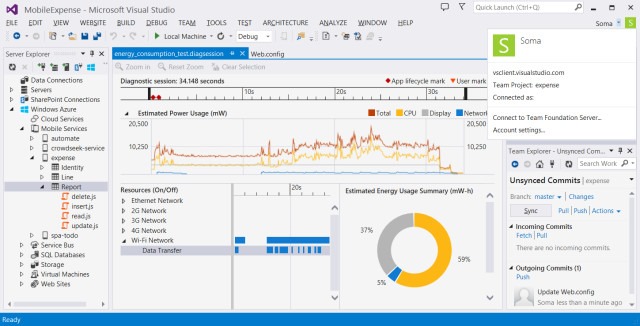
There are great new features and capabilities in Visual Studio 2013 for every developer, including innovative editor enhancements such as Peek and CodeLens, diagnostics tools for UI responsiveness and energy consumption, major updates for ASP.NET web development, expanded ALM capabilities with Git support and agile portfolio management, and much, much more.
vs2013

You can download these tools now and start using them today. They’re also available to download through MSDN Subscriber Downloads page.

Enjoy!

References

http://blogs.msdn.com/b/somasegar/archive/2013/10/17/visual-studio-2013-available-for-download.aspx
DevelopmentWeb

Using the new F12 Developer tools in IE11

With the introduction of Internet Explorer 11, Microsoft completely overhauled the F12 Developer Tools.

We rebuilt the F12 tools from the ground up in IE11. They have a brand new UI and new functionality to make your developing and debugging faster and easier.

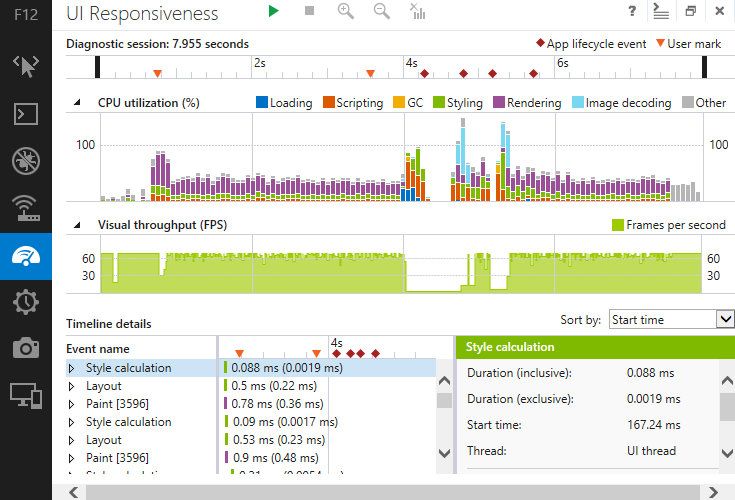
With the new F12 Developer tools, you can debug, test, profile, update the CSS layout, find a memory leak, emulate and checkout UI responsiveness, plus a lot more.

There is a great article on the Internet Explorer Dev Center for Using the F12 developer tools. I recommend you take a look at the article as it goes in depth for how to use the new tool.

UIResponsivenessTool

Internet Explorer 11 comes with Windows 8.1 and will be made available for Windows 7 at around the same time that Windows 8.1 is released or shortly there after I would imagine. There is a IE11 RC available for Windows 7 now.

These updated developer tools are a welcome breath of fresh air and should provide to be very useful for every developers needs.

Enjoy!

References

http://msdn.microsoft.com/en-US/library/ie/bg182326(v=vs.85).aspx

DatabaseDevelopment

Including Data in a SQL Server Database Project

The other day I found myself looking at how I can include reference data in a new database as part of my SQL Server Database Project. Typically for my existing databases, I’ve just create post-deployment scripts to add/update/delete reference data as needed with each release. However with my new database, I have a number of tables and rows in each that I’ll need to deploy the first time.

The first option that comes to mind would be that I can do this as per usual and create a v1.0 script to populate the data, but I thought there should be a better way to maintain and deploy this data. What if it ever changes and I need it updated? I’ll then have to script specific post-deployment scripts. Not ideal.

I did a little searching and came across this old post on the SQL Server Data Tools Team Blog for Including Data in SQL Server Database Projects. This seems like a great option, but I already see there are a number of people complaining that this isn’t good enough and I would agree. I also have the added annoyance that I’m still stuck using SQL Server 2005, so the MERGE option isn’t even an option for me.

Further research shows another post on how to Mimic MERGE with the OUTPUT statement in SQL Server 2005. This looks like it will work for SQL Server 2005, but makes things more complex in my opinion. I really just want to declare in my database project the values the table should have on deployment and then let the build and deployment process determine what needs to be done.

I think for now I’ll stick with my first option and create an initial v1.0 post-deployment script. I’ll then take a look at what comes in Visual Studio 2013 later this year and if there are new options for addressing this issue.

We are moving to SQL Server 2012 by year end, so I can at least migrate to doing the MERGE approach at that time if there is nothing else available.

I hope this helps others in the same situation.

Enjoy!

CloudDevelopmentWeb

Windows Azure Web Sites: How Application Strings and Connection Strings Work

Great article on how Windows Azure Web Sites: How Application Strings and Connection Strings Work.

Windows Azure Web Sites has a handy capability whereby developers can store key-value string pairs in Azure as part of the configuration information associated with a website.  At runtime, Windows Azure Web Sites automatically retrieves these values for you and makes them available to code running in your website.  Developers can store plain vanilla key-value pairs as well as key-value pairs that will be used as connection strings.

Since the key-value pairs are stored behind the scenes in the Windows Azure Web Sites configuration store, the key-value pairs don’t need to be stored in the file content of your web application.  From a security perspective that is a nice side benefit since sensitive information such as Sql connection strings with passwords never show up as cleartext in a web.config or php.ini file.


Enjoy!

CloudDevelopmentMobile

What Windows 8 Developers Should Know About The Cloud

IC672827

Great post by Bruno Terkaly on What Windows 8 Developers Should Know About The Cloud.

  1. Client-side developers do need to embrace the cloud. The increasing popularity of connected devices like tablet computers and smartphones is having a direct effect on the adoption rate of personal cloud services. You can expect both connected devices and cloud services to grow together.
  2. This trend has been accelerating over the past couple of years. Mobile and portable devices have limited internal storage and rely heavily on cloud services.

Enjoy!

DevelopmentMobile

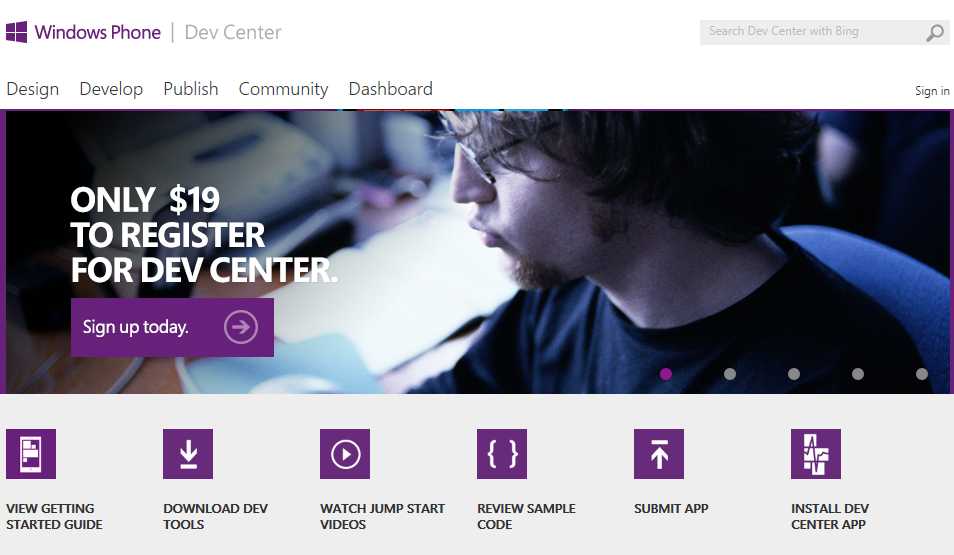
Microsoft permanently lowers annual Windows Phone Dev Center fee to $19

image

As mentioned on twitter by Todd Brix, general manager of the Windows Phone Apps and Store team at Microsoft: 

‘Summer break’ promo ends today, but great news – we’re keeping the price at $19. Join Dev Center and publish those apps.

This is great news for anyone who hasn’t already jumped in to the Windows Phone development.

Sources

https://twitter.com/toddbrix/status/372444926099070976
http://www.neowin.net/news/microsoft-permanently-lowers-annual-windows-phone-dev-center-fee-to-19

DesignDevelopment

Article Links for Using Expression Design for Windows Store and Windows Phone Logo Assets

2 great articles on how to use Microsoft Expression Design for creating Windows Store and Windows Phone logo assets for every resolution.

Generating Windows Store Logo Assets At Every Resolution by Kyle Anthony Mitofsky

Windows 8 apps need 28 logo varietals; enter Expression Design by Jerry Nixon

Enjoy!

DesignDevelopmentWeb

Expression Design is Now Available for Free

image

Microsoft Expression Design is now available as a free download from the Microsoft Download Center and as stated by Microsoft, no new versions will be developed.

It’s unfortunate that these tools will no longer be developed, however it looks like Microsoft will shift their focus to help improve the tooling in Visual Studio and Blend for Visual Studio for creating new applications.


Expression Design is a tool for creative professionals and developers who want to build graphics for application user interfaces, the web, or any other medium.

The convenience and ease of editing vector graphics in Expression Design can be a cornerstone of your Windows Presentation Foundation (WPF), Microsoft Silverlight, and web images. Whether you’re a veteran professional illustrator, a designer building a dazzling website, or a budding artist eagerly experimenting with various styles and techniques, you will find Expression Design an indispensable tool for your creative tasks.

image

You can download Expression Design here.

Related

Microsoft Expression Web is also available for Free and can be downloaded from here.

For more information on Microsoft’s Expression product line, please see the Expression Website.

Enjoy!

Development

Good Article on Splitting Up Epic User Stories

I came across an excellent post on Slicing and Dicing Epic User Stories.

I particularly liked the discussions going on in the Comments section. Definitely check it out the following link to a PDF document that someone posted regarding User Stories.

Enjoy!

DesignDevelopment

FREE Themes for WPF and Silverlight Microsoft Controls

I came across some blog posts about how Infragistics is giving out FREE themes for WPF and Silverlight Microsoft Controls. Links for each of these themes is below. Please take a look and download.

Hopefully Infragistics continues to release more themes.

Free Metro Light and Dark Themes
http://brianlagunas.com/free-metro-light-and-dark-themes-for-wpf-and-silverlight-microsoft-controls/

Free IG Theme
http://brianlagunas.com/free-ig-theme-for-wpf-and-silverlight-microsoft-controls/

Enjoy!