
Excellent post on Telerik blog on how to update your server to recognize IE11:
http://blogs.telerik.com/blogs/13-12-19/how-to-get-your-asp.net-application-working-in-ie11
Enjoy!

Excellent post on Telerik blog on how to update your server to recognize IE11:
http://blogs.telerik.com/blogs/13-12-19/how-to-get-your-asp.net-application-working-in-ie11
Enjoy!
One of the tools I use for development is Code Compare from Devart, which allows me to easily and efficiently compare source code, whether it’s a file or a folder comparison. This tool rocks and they have a free version to boot!
Ok so what is Code Compare?
Code Compare is a free tool designed to compare and merge differing files and folders. Code Compare integrates with all popular source control systems: TFS, SVN, Git, Mercurial, and Perforce. Code Compare is shipped both as a standalone file diff tool and a Visual Studio extension.
Code Compare introduces the concept of Code Orientation, ultimately making it stand out from competitive file diff software. The concept implies syntax highlighting, similar lines detection as well as unique structure and lexical comparison algorithms. The file compare tool takes into account language specifics, which allows comparing sources in several of the most popular programming languages as code!
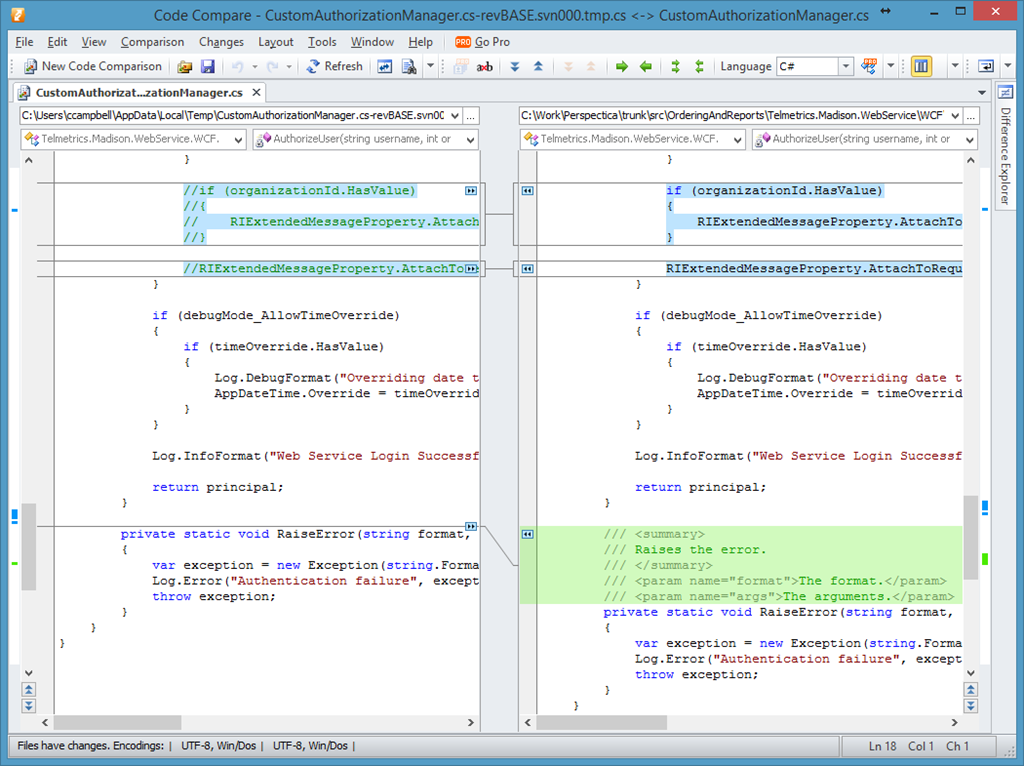
One of the great benefits about Code Compare is that it can be integrated with a number of version control systems. This means you’re not stuck using the comparison tool that comes with each version control system and you can have a consistent experience across all your comparisons.
I have Code Compare integrated with TortoiseSVN and TFS.
For a list of version control systems that Code Compare can integrate with, checkout the following page.
http://www.devart.com/codecompare/
http://www.devart.com/codecompare/integration/
http://www.devart.com/codecompare/integration/integration_tortoisesvn.html
Get your “Achievement Unlocked” t-shirt by completing 2 or more of Microsoft Virtual Academy courses:
Microsoft Virtual Academy has courses that cover the entire Microsoft developer platform. Complete two (2) or more of any of these MVA courses and we’ll send you an awesomely geeky t-shirt that will help you share the knowledge achievement that you’ve unlocked!
To claim your “Achievement Unlocked” t-shirt:
- Start and complete two (2) more modules of any course listed below between 12/1/2013 and 1/31/2014.
- Take a screenshot of the course page (as shown below) showing you logged in, Canada as your country, and at least 2 completed (green) modules.

- Send your screenshot to mvachallenge@microsoft.com with
Your first name
Last name
Mailing address.Your transcript will be validated and your t-shirt will be sent to you! Simple as that!
Please see the following post from the Canadian Developer Connection blog for more details:
http://blogs.msdn.com/b/cdndevs/p/mvachallenge_msdn.aspx
Offer expires January 31 2014.
Enjoy!
Came across an excellent resource for Windows Store app development that goes over the app features from start to finish.
This start-to-finish series helps you add features to your app to engage your customers and to create the kind of experiences that draws people in and delight them. Each guide walks you through building an app from scratch to app certification. Start with a basic flat or hierarchical app and add features from there!
List of app features lists on the site are:
Each of these features includes both an HTML and XAML guide. Check it out.
http://msdn.microsoft.com/en-us/library/windows/apps/dn263202.aspx
Enjoy!
Came across a great post on the Windows App Builder Blog for creating Windows Store apps.
Create great Windows Store apps that provide elegant, engaging, consistent and compelling user experiences in Windows. Idea books are a great starting point to inspire you when designing your Windows Store app. Idea books target different app categories and show what’s possible as well as how to create best-in-class experiences in your app.
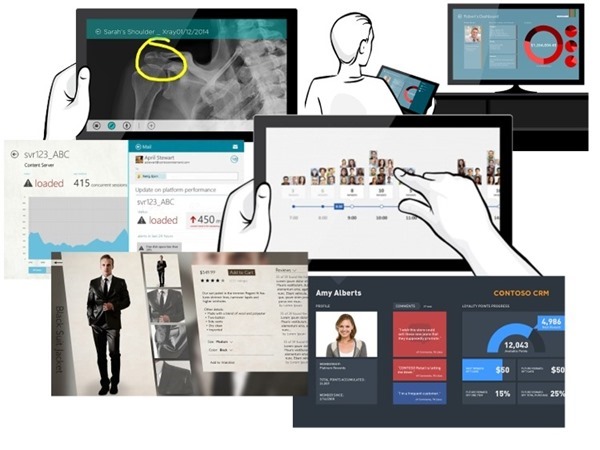
From the blog post, you can see the current list of idea books that have an accompanying code sample:
Enjoy!
Have you ever downloaded a file from the Internet or copied it from another computer and noticed that the file doesn’t behave as expected. This is most likely the result of certain security warnings that Windows has imposed on the file as it can’t determine trust.
To solve this issue, you need to Unblock the file.
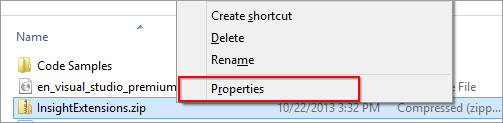
To “unblock” a file, right-click the file in Windows Explorer and choose Properties from the context menu:
Then click the Unblock button in the lower right-hand corner of the Properties dialog, and click OK or Apply:
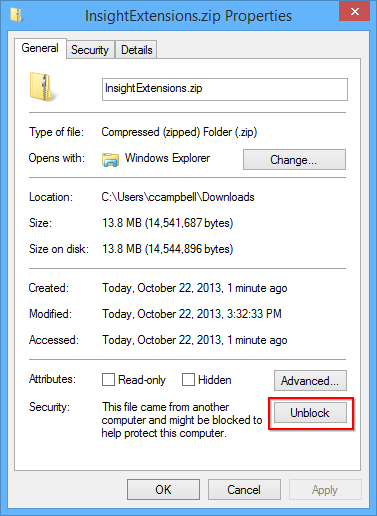
It’s important to note that ZIP files need to be “unblocked” before their contents are extracted otherwise the contents won’t be extracted and/or behave correctly.
Enjoy!
Came across a great little video that Brian Keller created on his top 5 reasons for liking Team Foundation Service that I would like to share…
http://vimeo.com/microsoftvisualstudio/review/74686407/42c694668d
Enjoy!
Today Microsoft announced the release of Visual Studio 2013 and .NET Framework 4.5.1. You can checkout what’s new with Visual Studio 2013 page for more information.
Visual Studio 2013 is the best tool for developers and teams to build and deliver modern, connected applications on all of Microsoft’s platforms. From Windows Azure and SQL Server to Windows 8.1 and Windows Phone 8, Visual Studio 2013 supports the breadth of Microsoft’s developer platforms.
As part of the Cloud OS vision, Visual Studio 2013 enables developers to build modern business applications that take advantage of the cloud and target a variety of devices and end-user experiences, all delivered within today’s rapid and dynamic application lifecycles.
There are great new features and capabilities in Visual Studio 2013 for every developer, including innovative editor enhancements such as Peek and CodeLens, diagnostics tools for UI responsiveness and energy consumption, major updates for ASP.NET web development, expanded ALM capabilities with Git support and agile portfolio management, and much, much more.
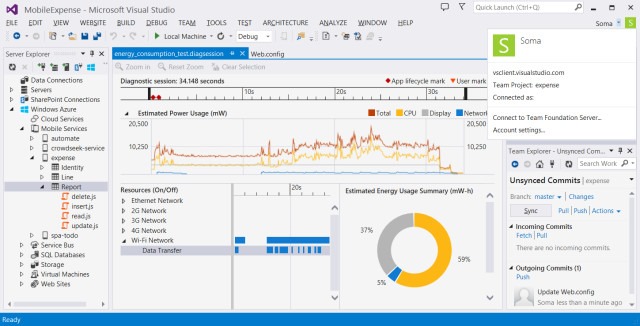
You can download these tools now and start using them today. They’re also available to download through MSDN Subscriber Downloads page.
Enjoy!
http://blogs.msdn.com/b/somasegar/archive/2013/10/17/visual-studio-2013-available-for-download.aspx
With the introduction of Internet Explorer 11, Microsoft completely overhauled the F12 Developer Tools.
We rebuilt the F12 tools from the ground up in IE11. They have a brand new UI and new functionality to make your developing and debugging faster and easier.
With the new F12 Developer tools, you can debug, test, profile, update the CSS layout, find a memory leak, emulate and checkout UI responsiveness, plus a lot more.
There is a great article on the Internet Explorer Dev Center for Using the F12 developer tools. I recommend you take a look at the article as it goes in depth for how to use the new tool.
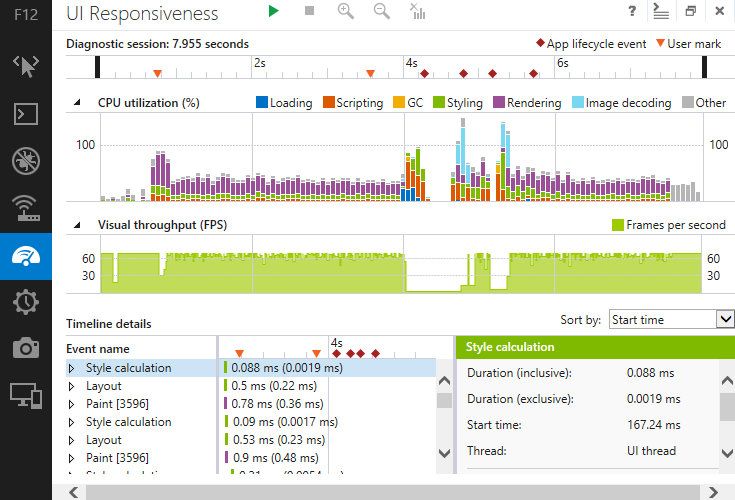
Internet Explorer 11 comes with Windows 8.1 and will be made available for Windows 7 at around the same time that Windows 8.1 is released or shortly there after I would imagine. There is a IE11 RC available for Windows 7 now.
These updated developer tools are a welcome breath of fresh air and should provide to be very useful for every developers needs.
Enjoy!
http://msdn.microsoft.com/en-US/library/ie/bg182326(v=vs.85).aspx
The other day I found myself looking at how I can include reference data in a new database as part of my SQL Server Database Project. Typically for my existing databases, I’ve just create post-deployment scripts to add/update/delete reference data as needed with each release. However with my new database, I have a number of tables and rows in each that I’ll need to deploy the first time.
The first option that comes to mind would be that I can do this as per usual and create a v1.0 script to populate the data, but I thought there should be a better way to maintain and deploy this data. What if it ever changes and I need it updated? I’ll then have to script specific post-deployment scripts. Not ideal.
I did a little searching and came across this old post on the SQL Server Data Tools Team Blog for Including Data in SQL Server Database Projects. This seems like a great option, but I already see there are a number of people complaining that this isn’t good enough and I would agree. I also have the added annoyance that I’m still stuck using SQL Server 2005, so the MERGE option isn’t even an option for me.
Further research shows another post on how to Mimic MERGE with the OUTPUT statement in SQL Server 2005. This looks like it will work for SQL Server 2005, but makes things more complex in my opinion. I really just want to declare in my database project the values the table should have on deployment and then let the build and deployment process determine what needs to be done.
I think for now I’ll stick with my first option and create an initial v1.0 post-deployment script. I’ll then take a look at what comes in Visual Studio 2013 later this year and if there are new options for addressing this issue.
We are moving to SQL Server 2012 by year end, so I can at least migrate to doing the MERGE approach at that time if there is nothing else available.
I hope this helps others in the same situation.
Enjoy!
A French word, a photo, and a slice of life in Provence
Microsoft MVP on Azure IoT & Real-Time Intelligence | International Speaker | Principle architect at Alten-SDG Group
It's all about Microsoft Business Applications
AI & Cloud Consulting for Modern Enterprises
Author: John Lunn @jonnychipz
If you're not having fun, you're doing it wrong.
Code. Fun. Serverless
Intelligent Apps for Pilots
My personal blog about everything technical
coding facts and opinions
Sponsored by Cloud Formations Ltd
Exploring the world of Azure, IoT and other interesting topics
where learning never ends...
Practical Coding Tutorial
A blog about Microsoft Azure
Christian Nagel and the CN innovation team about .NET Aspire, C#, Azure, ASP.NET Core, WinUI, .NET MAUI, and more
Cloud Computing & DevOps Tips & Tricks with Hammad Aslam.

 The Flying Maverick