Unknown's avatar

All posts by Callon Campbell [MVP]

Uncategorized

How Azure Functions Pricing Works

Chris Pietschmann's avatarBuild5Nines

Serverless computing is a growing trend in cloud computing, and it’s a natural next step in the Platform as a Service (PaaS) area. First PaaS allowed applications to be hosted without requiring Virtual Machines to manage, then serverless computing further removes the construct of a server. Azure Functions is the service within the Microsoft Azure cloud that offers serverless hosting and execution of application code. With serverless architecture removing the construct of a server from the equation of application hosting the concept of pricing begins to get a little fuzzy. This articles explains how Azure Functions pricing works.

Azure Functions is available with the 2 following pricing methods:

Dynamic Hosting Plan

functions_colorWith Dynamic hosting, Azure Functions completely abstracts away the server construct. You no longer pay for reserving CPU Cores and RAM of the underlying Virtual Machine (VM). You only pay for the time your code runs, and not for the time…

View original post 468 more words

AzureDatabase

Azure SQL Database DTU Calculator

When considering an Azure SQL instance, one of the decisions you need to make is the pricing level (Basic, Standard or Premium) and then for the selected level the number of DTU’s you need. Now you might be asking, "which service tier and performance level should I use and how many database throughput units (DTUs) am I using now?" 

First lets look at explaining what a DTU is and then we can look at how the DTU Calculator will help.

What are Database Transaction Units (DTUs)?

“A DTU is a unit of measure of the resources that are guaranteed to be available to a standalone Azure SQL database at a specific performance level within a standalone database service tier. A DTU is a blended measure of CPU, memory, and data I/O and transaction log I/O in a ratio determined by an OLTP benchmark workload designed to be typical of real-world OLTP workloads. Doubling the DTUs by increasing the performance level of a database equates to doubling the set of resource available to that database.”

How can I determine the number of DTUs needed by my workload?

If you are looking to migrate an existing on-premises or SQL Server virtual machine workload to Azure SQL Database, you can use the DTU Calculator to approximate the number of DTUs needed.

Following the instructions for the DTU Calculator, download either the Command Line Utility or PowerShell Script and run it to measure your server resource utilization. You want to get an hour worth of data.

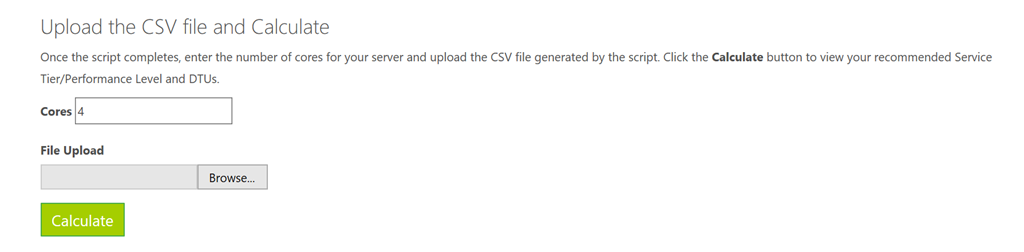
Once the script completes, go to the DTU Calculator website and enter in the number of cores for your server and then upload the CSV file that was generated. Then click on the “calculate” button as show below.

image

After the DTU Calculator measures your server resource utilization, it will provide you the best recommendation for the number of DTU’s you should be using in Azure SQL.

Resources

Uncategorized

Free Website Hosting in Microsoft Azure

Chris Pietschmann's avatarBuild5Nines

App ServiceThere are many excellent reasons to use Microsoft Azure to host applications and enterprise systems. There’s even plenty of criticisms on it being expensive to host small websites, however the App Service offering in Microsoft Azure does offer the ability to easily host a website in the cloud completely FREE!

View original post 182 more words

AzureDevelopment

Real World Usage for Azure Functions

Came across an excellent blog post from @TroyHunt on using Azure Functions to track abusive IP addresses to a website and log them to an Azure storage account and then have another Azure Function on a timer to validate those IP addresses and block them if necessary.

https://www.troyhunt.com/azure-functions-in-practice/

Enjoy!

Windows

How to enable PIN and Fingerprint sign-in options in Windows 10 Anniversary Edition (build 1607) when on a Domain

Windows 10 has some very handy sign-in options for unlocking your computer including using a fingerprint, a picture or a numeric PIN. I’ve used all three and by far my favorite is the PIN option.

Recently I reformatted my Surface Pro 3 and after installing Windows 10 Anniversary edition (build 1607), I noticed that as soon as I joined my work domain, the PIN option for sign-in was disabled. This was strange since hours earlier I was using this sign-in option with Windows 10 Anniversary edition prior to reformatting my device. I decided to try signing in to my device using a local profile and the PIN sign-on option was now available, but strangely on my Windows Domain account it was not.

After doing some research online I found that with Windows 10 Anniversary edition, this feature has reverted back to how it functioned in Windows 8, which requires it to be authorized before you can use it when on a Windows Domain.

Here is what you need to do to enable it.

Steps to Enable PIN Sign-In Option for Windows 10

  1. Open up regedit.exe
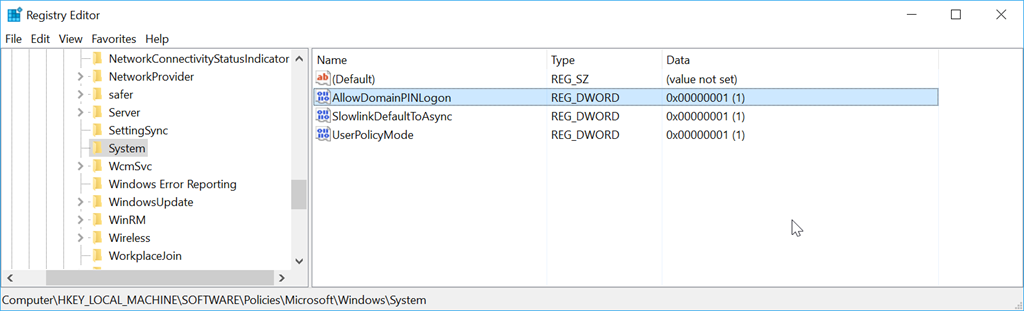
  2. Browse to [HKEY_LOCAL_MACHINE\SOFTWARE\Policies\Microsoft\Windows\System]
  3. Add a new DWORD key named “AllowDomainPINLogon” and set its value to “1”
    sshot-3
  4. Restart your computer
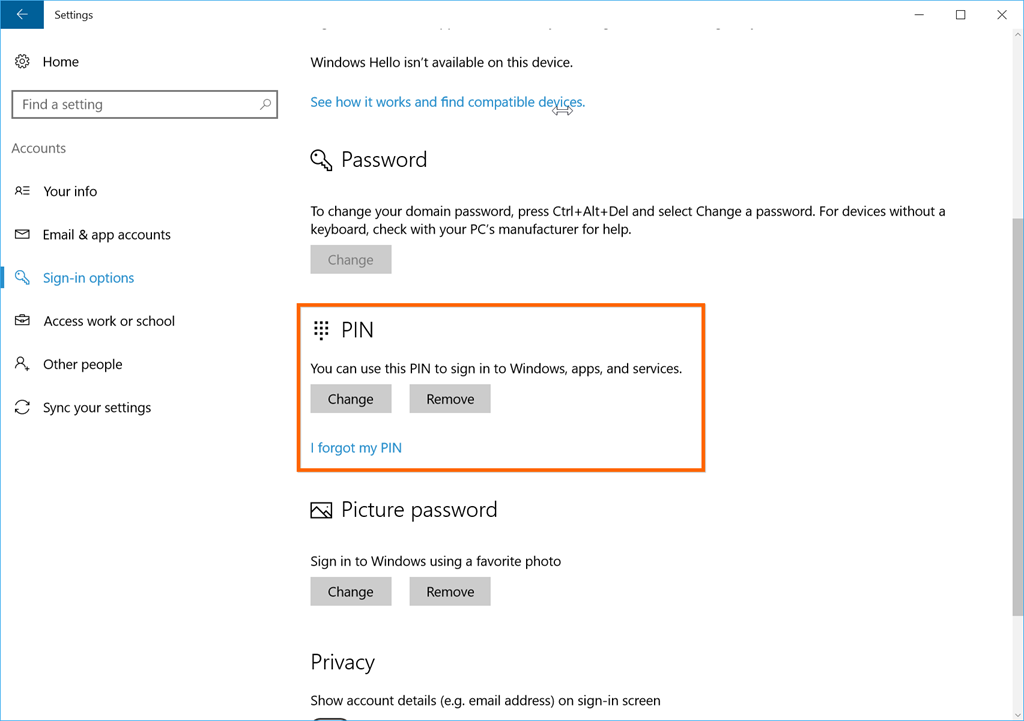
  5. After logging back in to your computer, go to SETTINGS, ACCOUNTS, SIGN-IN OPTIONS and you should see that the PIN option is now available to be set
    image

Enjoy!

References

https://social.technet.microsoft.com/Forums/en-US/84a0bd50-1360-4a94-bfb3-b049ecace521/pin-and-fingerprint-signin-options-unavailable-greyed-out-in-windows-10-1607-enterprise?forum=win10itprogeneral&prof=required

https://social.technet.microsoft.com/Forums/en-US/b975932a-b50b-4759-b43a-c94854c6da83/cant-enable-windows-hello-with-fresh-install-of-anniversity-upgrade-on-domain-account?forum=win10itprosetup

AzureCloud

Azure Monitor

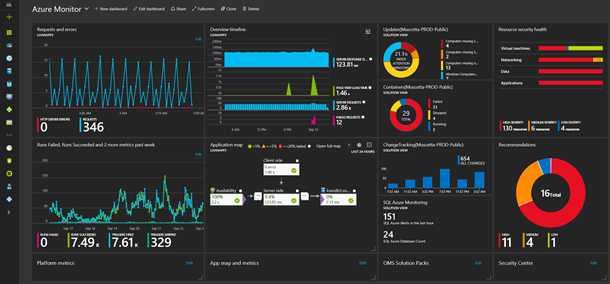
This week saw the announcement of the public preview of Azure Monitor. Azure Monitor allows you to manage and explore all common tasks from a single view. Azure Monitor provides the following types of data – Activity Log, Metrics and Diagnostics Logs.

You can access the Azure Portal by clicking on the Monitor tab in the Azure Portal.

1eeeafee-e790-4ee8-bb11-58c925e01b24

Enjoy!

Web

TypeScript 2.0 is now available

MSPUImage

Today Microsoft released the final version of TypeScript 2.0, adding new features and improvements. TypeScript is what Microsoft likes to calls “JavaScript that scales” – providing better performance and scalability for large applications, along with developer goodness of a typed language.

Here is a list of some of the new features found in TypeScript 2.0:

  • Simplified Declaration File (.d.ts) Acquisition
  • Non-nullable Types
  • Control Flow Analysis for Types
  • Easier Module Declarations
  • Async/Await down level support
  • Readonly Modifier

TypeScript’s future looks promising. In a blog post by the TypeScript team…

“Going forward, we will continue to work with our partners and the community to evolve TypeScript’s type system to allow users to further express JavaScript in a statically typed fashion. In addition, we will focus on enhancing the TypeScript language service and set of tooling features so that developer tools become smarter and further boost developer productivity.”

TypeScript 2.0 is available now to download with Visual Studio 2015 Update 3. You can also use npm to install TypeScript 2.0 by running the following command:

npm install –g typescript@2.0


Reference

https://blogs.msdn.microsoft.com/typescript/2016/09/22/announcing-typescript-2-0/

Communication

Comparison of Bot Frameworks on the Market

Came across a great article on a comparing different bot frameworks on the market. Check it out.

“Bots are in the spotlight. Tech superpowers like Microsoft and Facebook released comprehensive frameworks aimed to mass-produce bots. There are numerous startups with their own frameworks and specialized offerings. More established players, including Aspect Software, also joined the race. This post examines some of these frameworks and offerings, based on the first experience. Note that we are not looking at the bot publishing platforms, as this is a different area.”

References

http://blogs.aspect.com/bot-framework-s-comparison/

CommunicationDevelopment

Introduction to the Microsoft Bot Framework

At the Microsoft BUILD 2016 conference this year, Microsoft released the public preview of the Microsoft Bot Framework. The Microsoft Bot Framework provides just what you need to build and connect intelligent bots that interact naturally wherever your users are talking, from text/SMS to Skype, Slack, Facebook Messenger, Kik, Web Chat, Office 365 email and many other popular services which are constantly being added.

bot-framework-website

The Bot Framework enables organizations to build Bots, also known as intelligent conversation agents. It lets users interact with intelligent solutions as though they were conversing with a real person and interactions can take place in many forms, from text/SMS to Office 365 email, to Skype and Slack.

Bots are quickly becoming an integral part of the digital experience for users to interact with a service or application. The Bot Framework provides automatic translation to more than 30 languages, user and state management, tools for debugging, an embeddable chat control and the means for a user to discover, try and add bots to their conversation experience of choice.

“Bots are like new applications,” Microsoft chief executive Satya Nadella said. “And digital assistants are meta apps, or like the new browsers. And intelligence is infused into all of your interactions. That’s the rich platform that we have.”

The Bot Framework consists of three main components, the Bot Builder SDK, Developer Portal and the Bot Directory.

botframework_overview_july

Bot Builder SDK

The Bot Builder SDK is available on GitHub and is a set of code libraries in C# and Node.js to help with building the bot. It also provides integration with LUIS which is the Language Understanding Intelligent Service, which gives support for natural language interaction.

Bot Developer Portal

The Bot Framework Developer Portal is where you can go to connect your bot to any of the available channels. Here is a listing of all available services:

  • Register your bot
  • Connect to channels
  • Test
  • Publish
  • Manage
  • Measure

Bot Directory

The Bot Directory is a public directory of all available registered bots. From the Bot Directory you can browser, try and add bots to your favorite conversation experience.

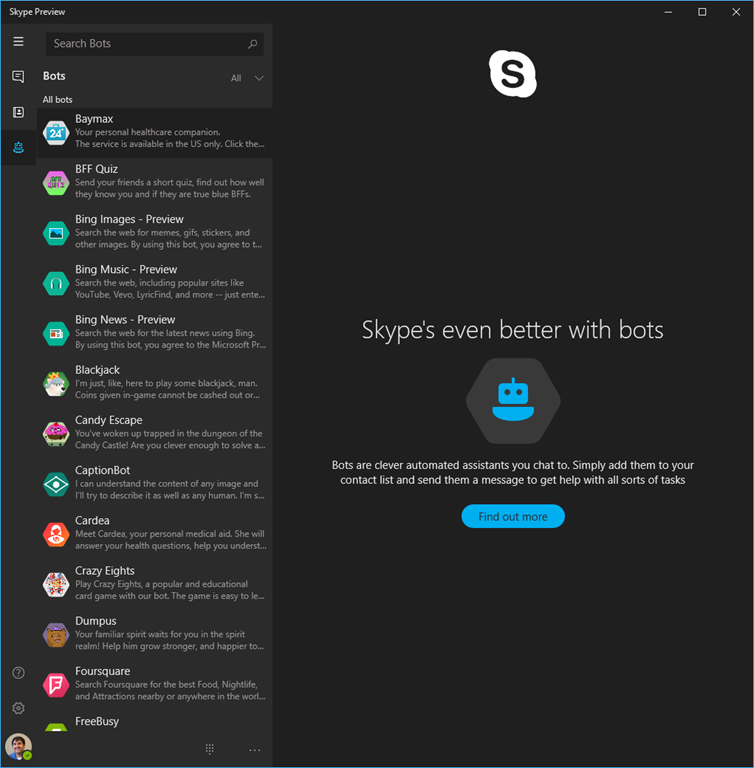
You can also see a listing of available bots from Skype. Here is the Skype Preview app and if you click on the bots section, you can see 38 bots (at time of posting).

SkypeBots

You can checkout the Bot Directory for a full listing of registered bots.

In a future article I will explore creating a bot and deploying it to Azure.

Resources

Get started with the Bot Connector.

Microsoft Bot Samples: https://github.com/Microsoft/BotBuilder

Get started developing your first bot bot: https://dev.botframework.com/

Documentation: http://docs.botframework.com/sdkreference/

CloudDevelopment

Getting Started with Azure Functions

The first article of this series, Introduced what Azure Functions are and the capabilities they offer when used by themselves or combined with other Azure resources. This article will focus on getting started with just one of the types of Azure Functions available…the HttpTrigger function.

Creating the Azure Function

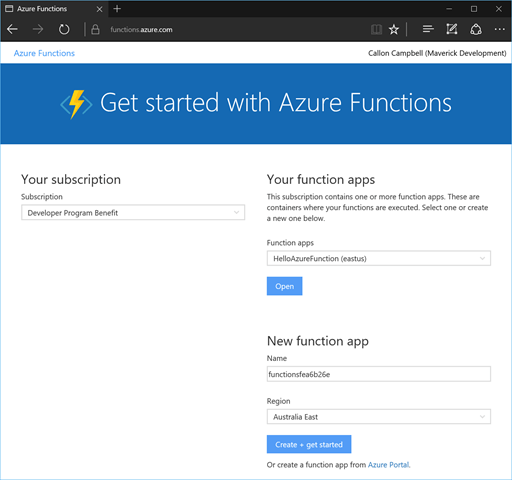
You can quickly get started with creating an Azure Function by going to the Azure Functions Get Started Portal. After logging in you will be taken to the Azure Functions getting started portal as shown below.
Portal1

Using the above Getting Started portal, enter the name and location of your Azure Function app, in my case I’m using a name of  GettingStartedAzureFunction and a location of East US.

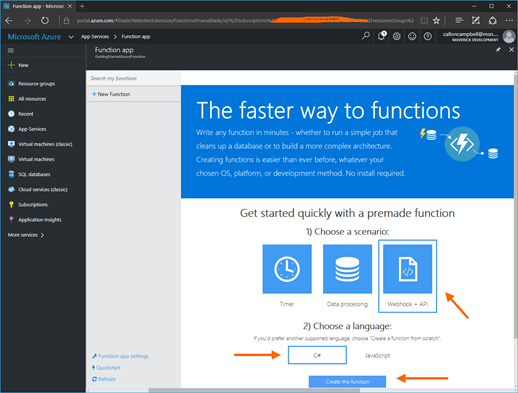
Then then click on Create + get started button. This will then take you to the Azure portal inside your Azure Function app. From here you can get started quickly with a premade function, in my case I went with Webhook + API, and C# for the language. Finally click on the Create the function button to create this function.
AzureFunctionAppBlade-01

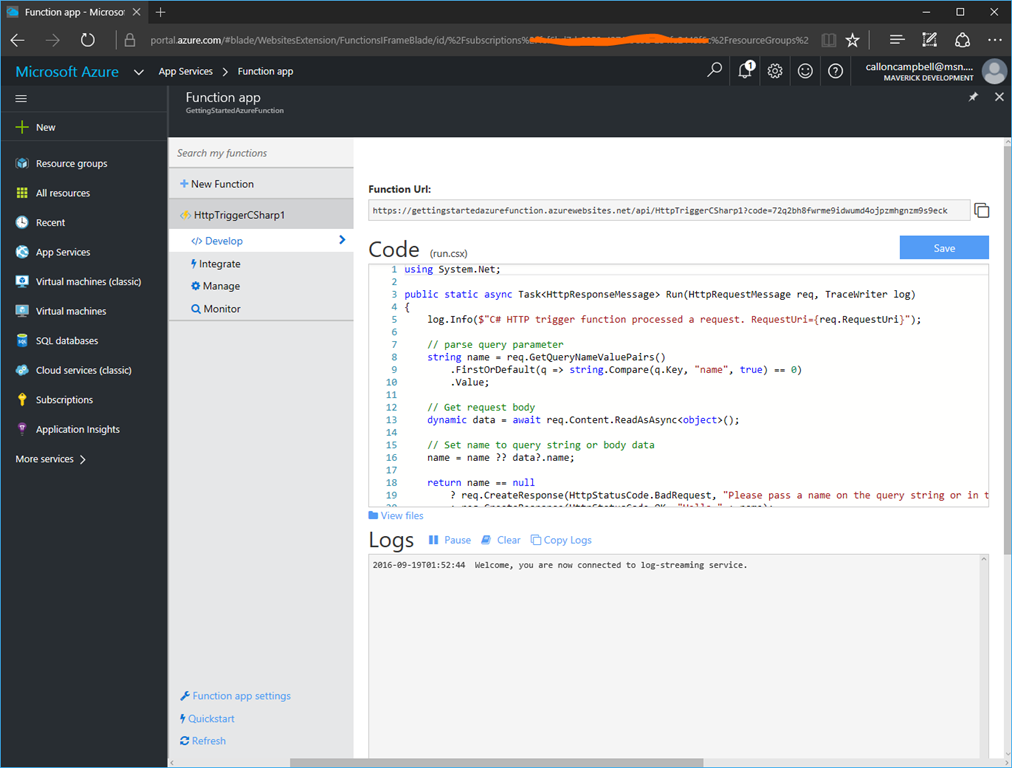
A new function named HttpTriggerCSharp1 will be generated for you, which will be based on C# and this function will be run whenever it receives an HTTP request.

HttpTriggerFunction-Code

At this point your function is ready to go. You can see the Function URL at the top and below is the generated code for the Http trigger.

Testing your Function

Since this function is generated from the quick starts, it already contains functional code which you can immediately run and test.

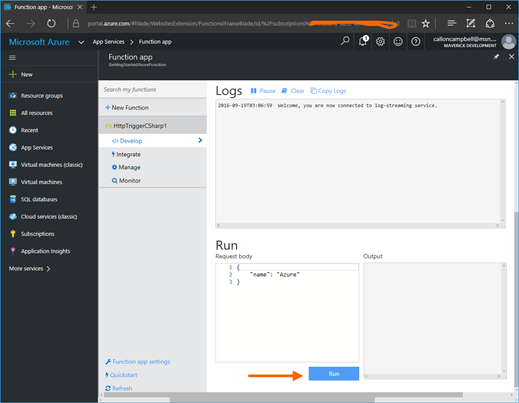
In this example you can quickly test the function by clicking on the Run button at the bottom of the page. It will pass a request body with the named parameter of “Azure” to the function, which will then show up in the Output pane to the right.
HttpTriggerFunction-Run

Alternatively you can also test the function by browsing to the URL to trigger the function. In this case I’ll navigate to the URL provided and the pass in the parameter name of “callon” to the query string like so.

HttpTriggerFunction-Test2

Monitoring your Function

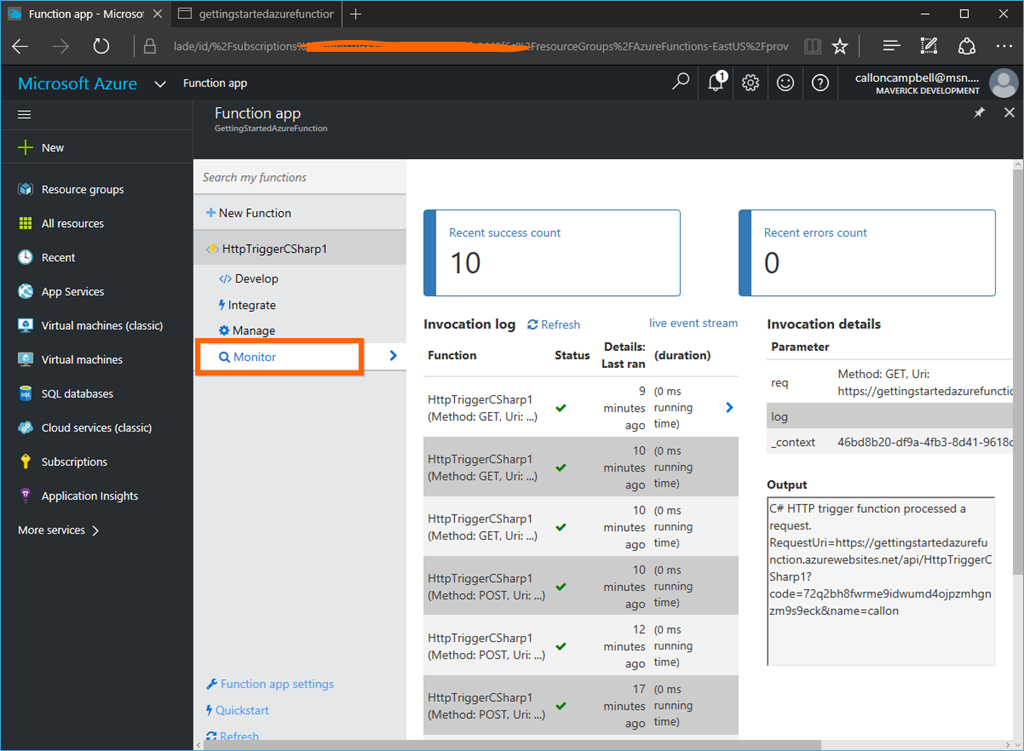
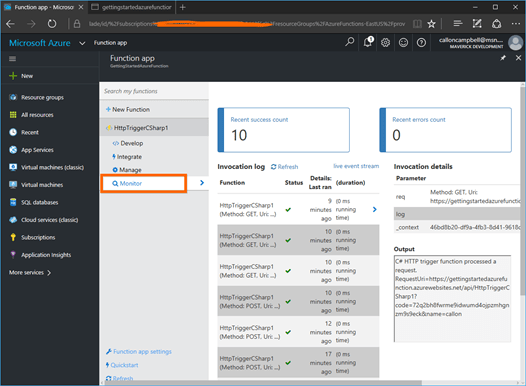
Now that your function is up and running you can easily monitor it by going to the Monitor tab of your function. From here you can see recent success and error counts and inspect the function requests.
HttpTriggerFunction-Monitor

Managing your Functions

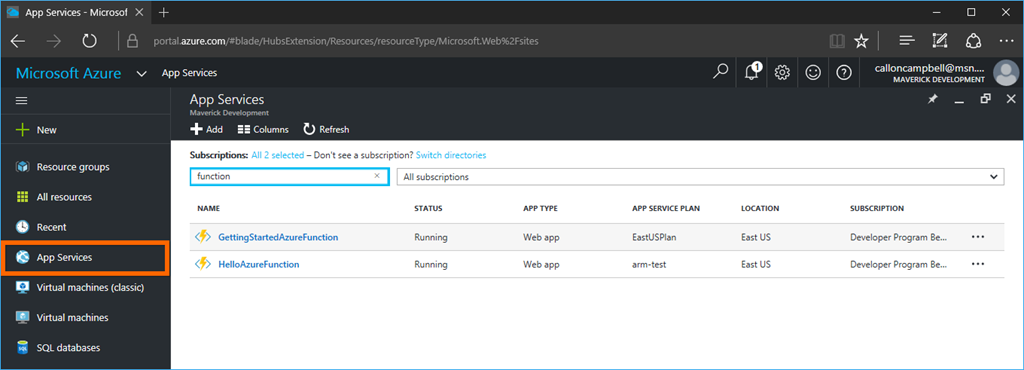
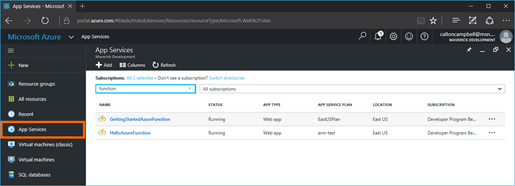
After creating your Azure Function app, you will be taken to your Azure Function app blade where you can create and manage your functions. If you need to get back to your Azure Function apps at a later time, you can navigate to the App Services blade and then filter by function as shown here.
AppServices-AzureFunctions

Next Steps

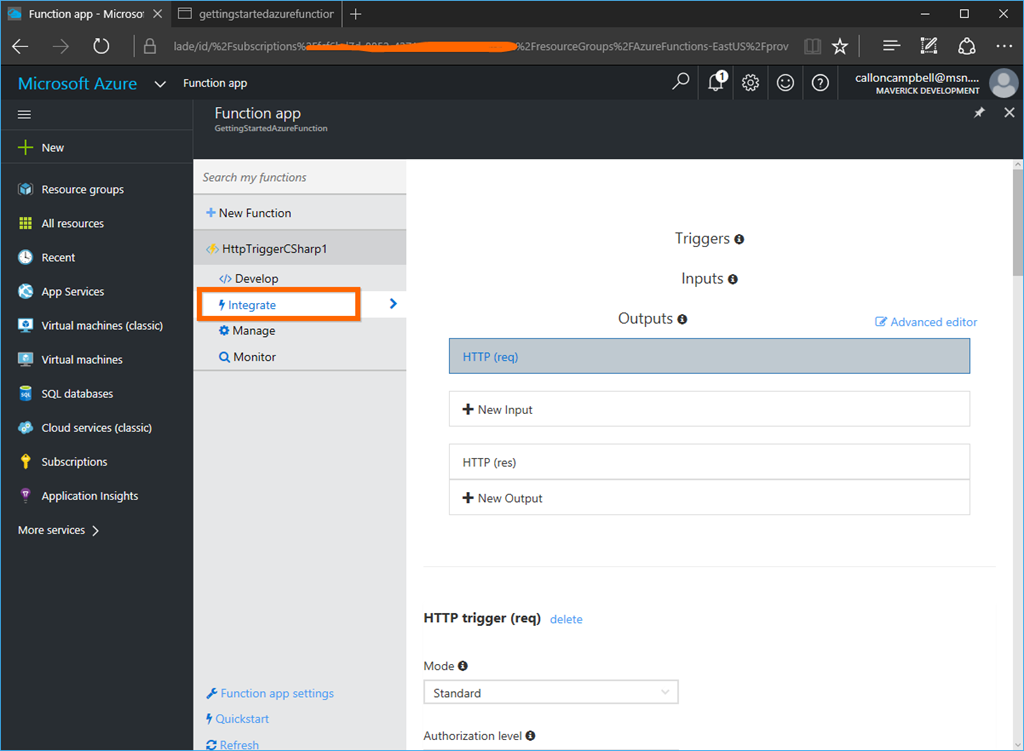
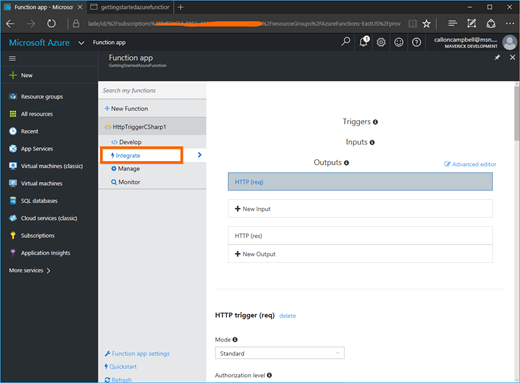
Now that you have your Azure Function you will most likely want to integrate it into other Azure resources or other apps. If you click on the Integrate tab of the function, you can quickly define an integration (triggers, inputs and outputs) and there is also an advanced editor available if needed.
HttpTriggerFunction-Integrate

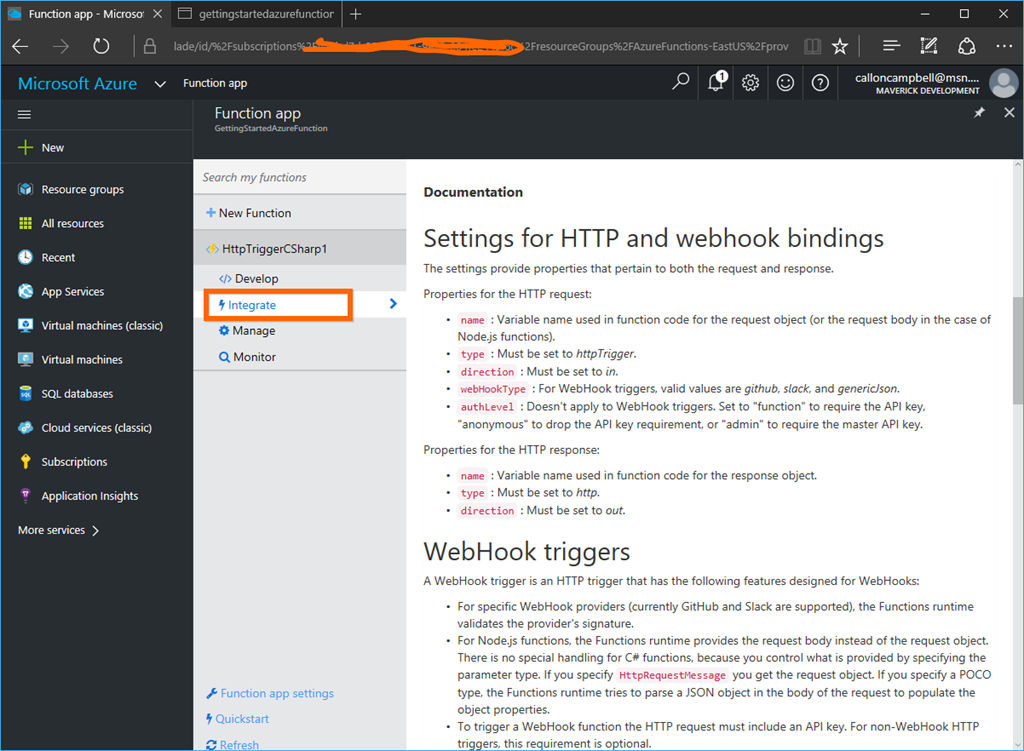
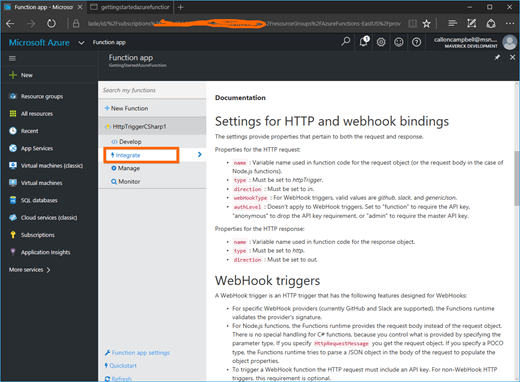
Lastly if you scroll down on the Integrate tab, you will come to some handy documentation.
HttpTriggerFunction-Integrate2

In a future post I will walk through integrating an Azure function with another Azure resource.

Enjoy!

References

Azure Functions
Azure Functions Documentation
Testing Azure Functions