Unknown's avatar

All posts by Callon Campbell [MVP]

Uncategorized

Microsoft Azure Architecture Blueprints & Free Visio Symbols

Unknown's avatarBuild5Nines

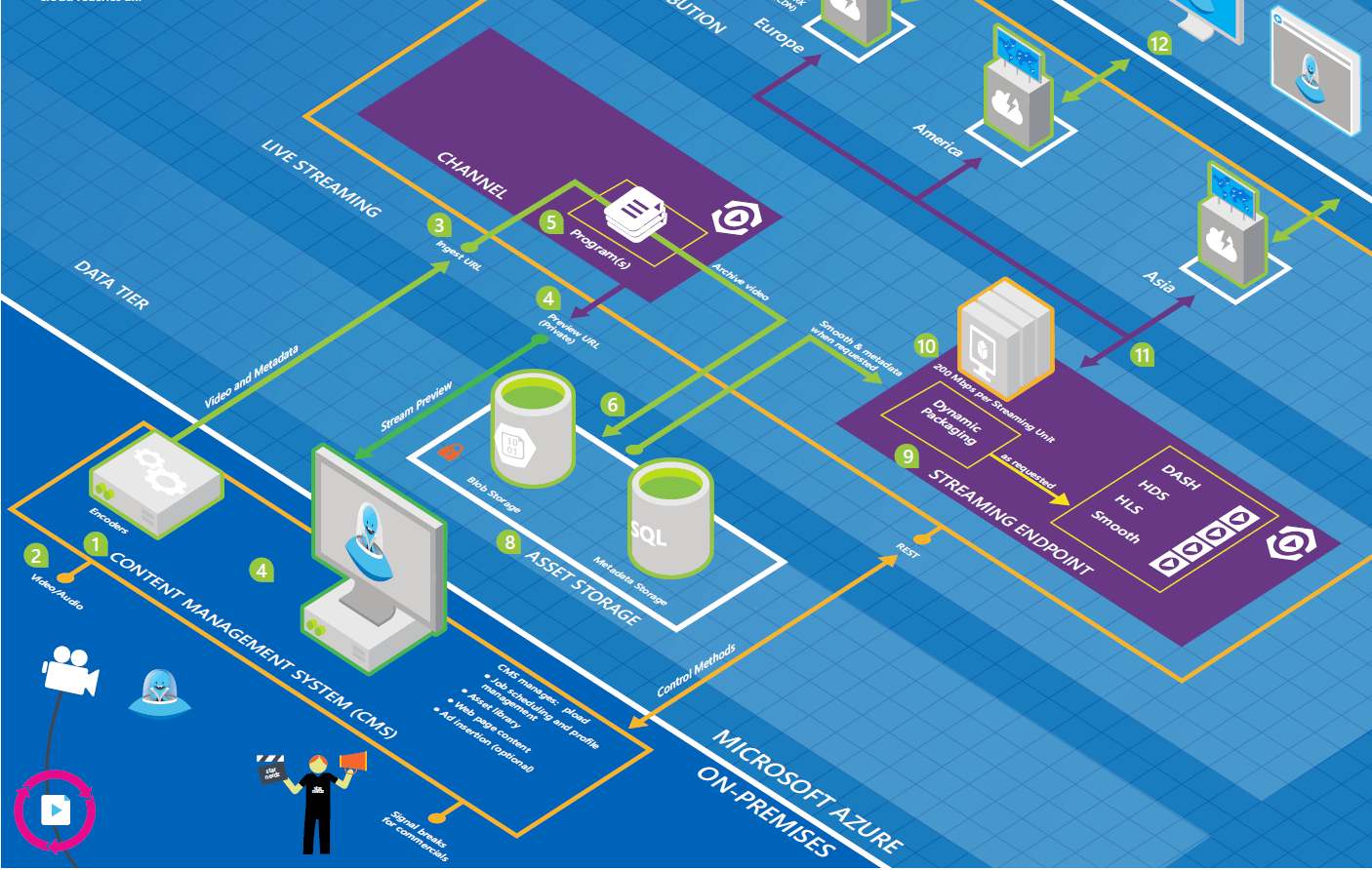
AzureBlueprintThumb2

Microsoft distributes some really nice looking Azure architecture diagrams / blueprints (like the one on the right) in various materials and even includes them in keynotes, presentations and other places. These really seem like they must be created with Photoshop by a graphic designer. However, this is not the case.

These architecture diagrams are created using Visio! If you have Visio, you too can get your hands on the various assets necessary to create your own awesome architecture diagrams like these!

View original post 145 more words

Uncategorized

Microsoft Certified for IoT Device Catalog

Chris Pietschmann's avatarBuild5Nines

There are a number of Microsoft Certified for IoT Starter Kits available. These are tailors mostly to prototyping solutions, as they come with a number of sensors and things necessary to get started building. However, if you know what platforms you want to target, or are looking for a number of platforms to choose from, then you’ll want to look through the catalog of Microsoft Certified for IoT devices.

Rather than just having a documentation page or PDF that lists out what all the Certified for IoT Devices are, Microsoft has created a catalog website that’s easily searchable and filterable. Using the official Azure Certified for IoT device catalog can really help you find the perfect IoT hardware for your next IoT project; especially industrial or commercial projects.

The Azure Certified for IoT device catalog is located at: https://catalog.azureiotsuite.com

msazurecertifiediotdevicecatalog

View original post

Uncategorized

Static Website Hosting in Azure Storage

Chris Pietschmann's avatarBuild5Nines

Traditional shared hosting providers generally cost anywhere between $8 – $10 USD per month. The reason is you need to reserve some CPU and Memory resources on a VM to host your website. These are very useful for hosting dynamic web sites or applications with small amounts of traffic. However, if you have a static website then you don’t need CPU and Memory on a VM, all you need is storage and bandwidth. Since hosting a static website or static front-end to an API powered web application only requires storage and bandwidth, it makes Azure Storage a perfect service to host such a website. In this article I’ll explain what’s necessary to host static website in Azure Blob Storage, then I’ll show how you can estimate the hosting cost of the site as well. (Hint: It’s really cheap!)

View original post 651 more words

Uncategorized

Azure Storage Explorer now supports Linux and more

Chris Pietschmann's avatarBuild5Nines

When the Microsoft Azure Storage Explorer was first released, it did seem a little odd that Microsoft would neglect supporting Linux. However, they did support both Windows and Mac OSX initially. In good news, there have been a number of updates to the Microsoft Azure Storage Explorer announced with a short roadmap of what’s to come in the future.

View original post 80 more words

Uncategorized

Single Instance VMs Now With 99.9% SLA

Chris Pietschmann's avatarBuild5Nines

Since the initial release of the Virtual Machine (VM) hosting service within Microsoft Azure there’s been a limitation on achieving the minimum requirements for the 99.9% SLA guarantee. This limitation has been that you needed to provision at least 2 VMs to get the SLA guarantee. That is until now. Now, there is an option to provision a single instance VM and have the 99.9% SLA guarantee too!

Microsoft is constantly working to improve and add new features / services to the Microsoft Azure platform. Among the latest of these changes is to support a 99.9% SLA with SINGLE instance VMs. While this isn’t a replacement for multi-instance VM configurations, this offers enhanced reliability for workloads where a single VM instance works.

Single Instance VM SLA Requirement

There are a few requirements that need to be met in order to achieve the 99.9% SLA guarantee for a single instance VM…

View original post 230 more words

AzureDevelopment

Azure Bot Service (Preview)

dev_botframework

Last week at Microsoft’s Developer Connect(); // 2016 event, a new public cloud bot service powered by Microsoft Bot Framework is now available on Azure called the Azure Bot Service.

The Azure Bot Service will allow you to:

  • Use the Bot Framework with Azure serverless platform to run and scale your bots while only paying for your usage
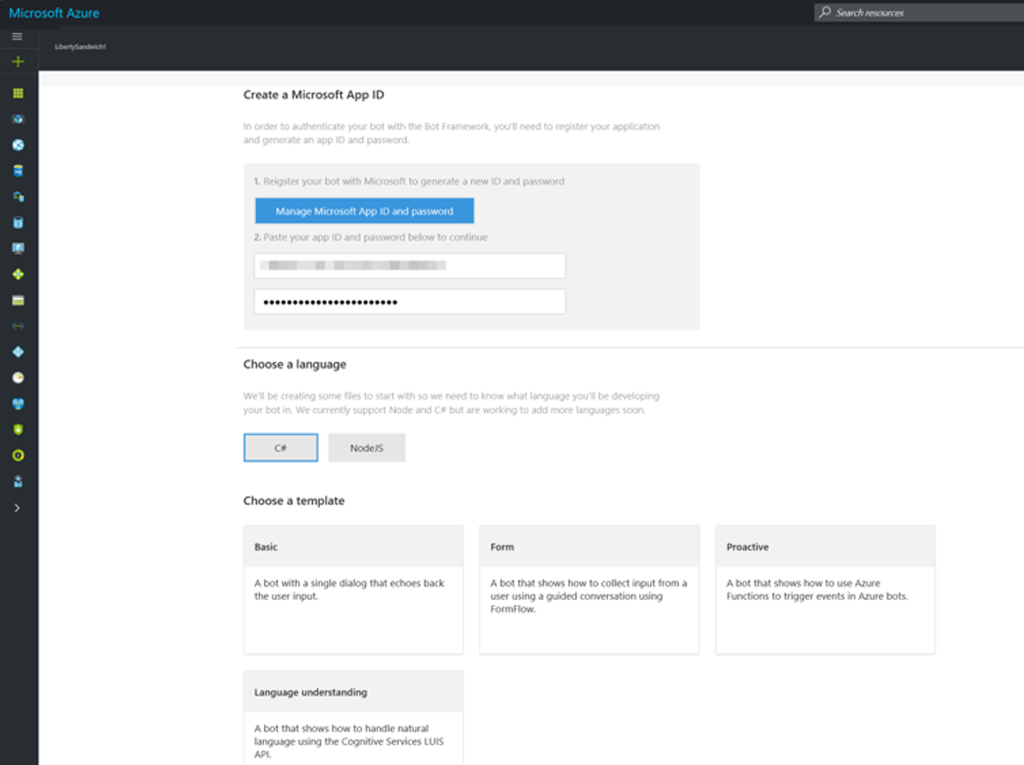
  • Get started quickly with out of the box templates for .NET and Node.js. These templates allow you to create a basic bot, a language understanding bot (LUIS), a form bot or a proactive bot:

image

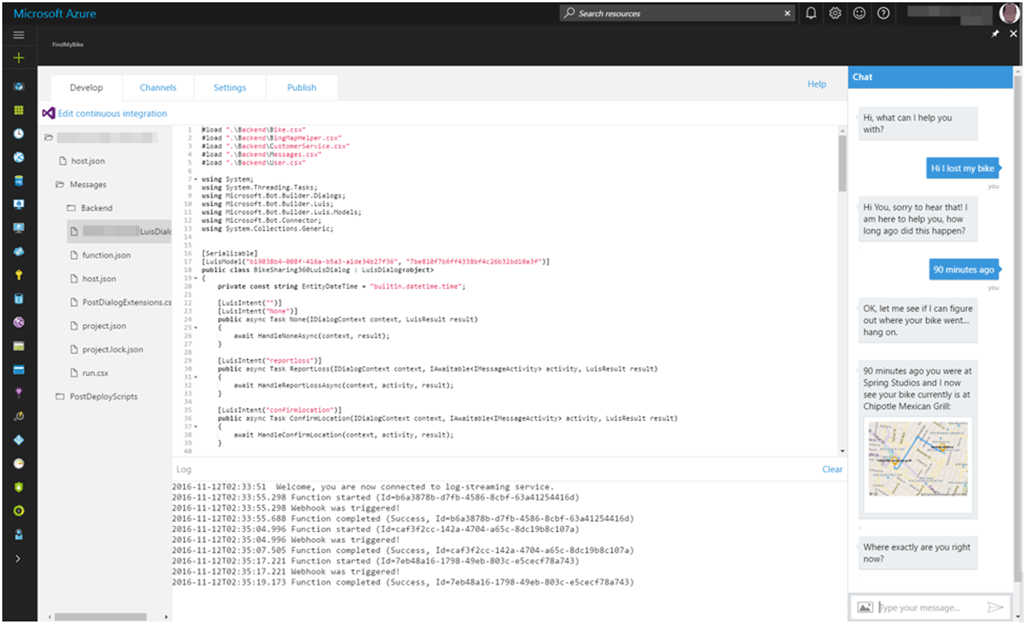
  • Write code for your bot directly in the browser within Azure. You will also be able to test your bot with the included Web Chat control:

image

  • Configure conversation channels
  • Take advantage of integrated continuous deployment (DevOps)

Now more than ever it’s so easy to get started with creating your bots and having them run on Azure.

Enjoy!

References

Azure Bot Service

LUIS: Language Understanding Intelligent Service

Uncategorized

Deploy Docker Containers to Azure Web Apps on Linux

Chris Pietschmann's avatarBuild5Nines

The PaaS (Platform as a Service) offerings within Microsoft Azure have been getting expanded out pretty impressively lately. The “extreme PaaS” that is the serverless computing of Azure Functions is a really interesting direction for cloud computing. However, one of the of the latest changes is the ability to host Docker Containers on Linux within Azure App Service Web Apps! It seems Microsoft is starting to add Docker support to everything.

App Service Web Apps on Linux

A few weeks ago the initial preview release of Azure App Service Web Apps for Linux was released. This offers a way to host OSS applications (Node.js, Python, PHP, etc) in Azure App Service with the use of a Linux Virtual Machine (VM). This provides a great alternative to hosting all Azure Web Apps with a Windows Server VM and IIS. While IIS works, the option of using Linux is definitely more…

View original post 744 more words

Uncategorized

Manage Azure App Service Deployments with Deployment Slots

Chris Pietschmann's avatarBuild5Nines

Every App Service resource in Azure has the ability to have multiple deployment slots configure. These deployments slots are a feature than can greatly help with the implementation of streamlined testing, staging, and deployment process. Along with the ability to configure multiple hosting environments, the use of Deployment Slots enables zero downtime when deploying application changes, or even rolling back a failed deployment.

Creating Deployment Slots

Deployment slots are a feature of Azure App Service Plans. As a result, every App Service resource (Web App, Web API, Mobile App) in Microsoft Azure has the ability to create up to 4 additional deployment slots with the Standard tiers, and up to 20 deployment slots with the Premium tiers.

Each App Service (in Standard tiers) can have up to 4 additional Deployment Slots in addition to the Production slot.

Each Deployment Slot allows for a separate instance of the application to be…

View original post 697 more words

Uncategorized

How Azure Functions Pricing Works

Chris Pietschmann's avatarBuild5Nines

Serverless computing is a growing trend in cloud computing, and it’s a natural next step in the Platform as a Service (PaaS) area. First PaaS allowed applications to be hosted without requiring Virtual Machines to manage, then serverless computing further removes the construct of a server. Azure Functions is the service within the Microsoft Azure cloud that offers serverless hosting and execution of application code. With serverless architecture removing the construct of a server from the equation of application hosting the concept of pricing begins to get a little fuzzy. This articles explains how Azure Functions pricing works.

Azure Functions is available with the 2 following pricing methods:

Dynamic Hosting Plan

functions_colorWith Dynamic hosting, Azure Functions completely abstracts away the server construct. You no longer pay for reserving CPU Cores and RAM of the underlying Virtual Machine (VM). You only pay for the time your code runs, and not for the time…

View original post 468 more words

AzureDatabase

Azure SQL Database DTU Calculator

When considering an Azure SQL instance, one of the decisions you need to make is the pricing level (Basic, Standard or Premium) and then for the selected level the number of DTU’s you need. Now you might be asking, "which service tier and performance level should I use and how many database throughput units (DTUs) am I using now?" 

First lets look at explaining what a DTU is and then we can look at how the DTU Calculator will help.

What are Database Transaction Units (DTUs)?

“A DTU is a unit of measure of the resources that are guaranteed to be available to a standalone Azure SQL database at a specific performance level within a standalone database service tier. A DTU is a blended measure of CPU, memory, and data I/O and transaction log I/O in a ratio determined by an OLTP benchmark workload designed to be typical of real-world OLTP workloads. Doubling the DTUs by increasing the performance level of a database equates to doubling the set of resource available to that database.”

How can I determine the number of DTUs needed by my workload?

If you are looking to migrate an existing on-premises or SQL Server virtual machine workload to Azure SQL Database, you can use the DTU Calculator to approximate the number of DTUs needed.

Following the instructions for the DTU Calculator, download either the Command Line Utility or PowerShell Script and run it to measure your server resource utilization. You want to get an hour worth of data.

Once the script completes, go to the DTU Calculator website and enter in the number of cores for your server and then upload the CSV file that was generated. Then click on the “calculate” button as show below.

image

After the DTU Calculator measures your server resource utilization, it will provide you the best recommendation for the number of DTU’s you should be using in Azure SQL.

Resources