Unknown's avatar

All posts by Callon Campbell [MVP]

Uncategorized

CloudDays™ – Quick Start to Azure Redis Cache

Bruce D Kyle's avatarDevDays®

redisAzure Redis Cache helps your application become more responsive even as user load increases and leverages the low latency, high-throughput capabilities of the Redis engine. This separate distributed cache layer allows your data tier to scale independently for more efficient use of compute resources in your application layer.

Redis is an open source, BSD licensed, advanced key-value cache and store. It is often referred to as a data structure server since keys can contain strings, hashes, lists, sets, sorted sets, bitmaps and hyperloglogs. Redis supports a set of atomic operations on these data types.

Microsoft Azure Redis Cache is based on this cache and store. It gives you access to a secure, dedicated Redis cache, managed by Microsoft, providing the best of both worlds: the rich features and ecosystem of Redis, and reliable hosting and monitoring by Microsoft.

You can use Redis from

View original post 1,771 more words

Uncategorized

CloudDays™ – Choosing the Right Azure Cache Technology

Bruce D Kyle's avatarDevDays®

azurecloudMicrosoft Azure Cache is a family of distributed, in-memory, scalable solutions that enable you to build highly scalable and responsive applications by providing super-fast access to your data. But what do you choose?

This post provides you with an overview of the options you have when you are considering caching technologies.

Microsoft Azure Cache is available in the following offerings.

Microsoft offers a strong recommended choice for these caches. “Microsoft recommends all new developments use Azure Redis Cache.”

That said, this post discusses each to give you a quick overview. This article also introduces you to one other cache.

Here’s the short answer:

  • Use Azure Redis Cache when you want to cache string, hashes, .NET classes, data.
  • Use CDN when you want to cache audio, video, applications, images, and other files.

View original post 592 more words

Azure

Get Azure invoices emailed directly to your inbox

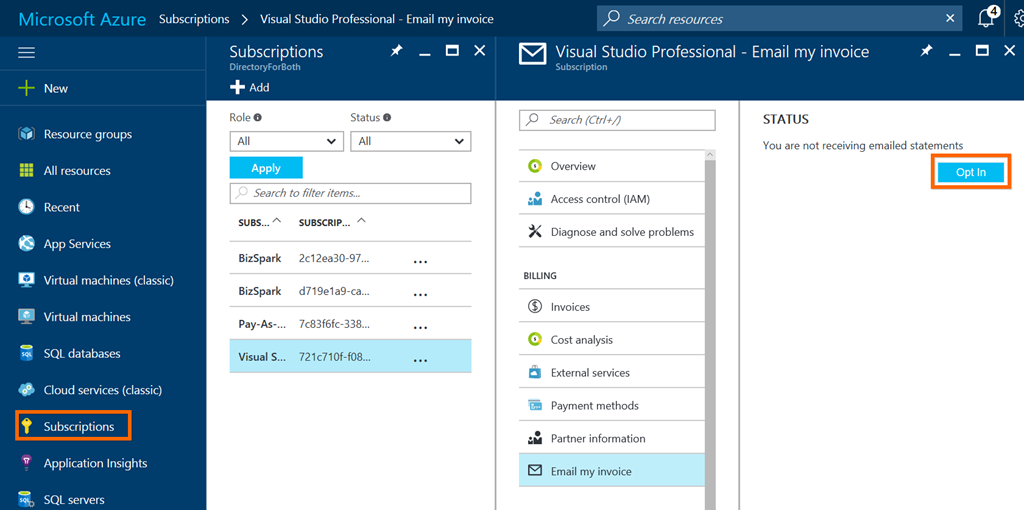
You can now get your Azure invoices sent to your inbox instead of logging in and downloading them every month. Once you’ve opted in, your  invoice will be attached to your monthly billing email.

To get started, go to your subscriptions from the Subscriptions blade and select the Send my invoice link and then select Opt In. If you don’t see this link, then your not the account admin.

image

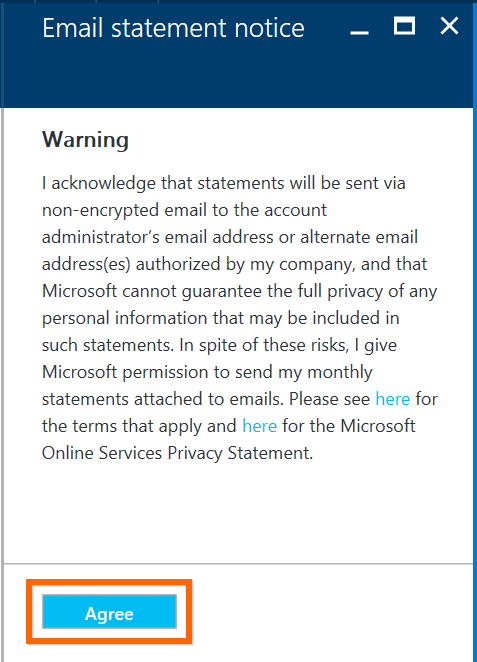
Next you will need to agree to the email statement notice:

image

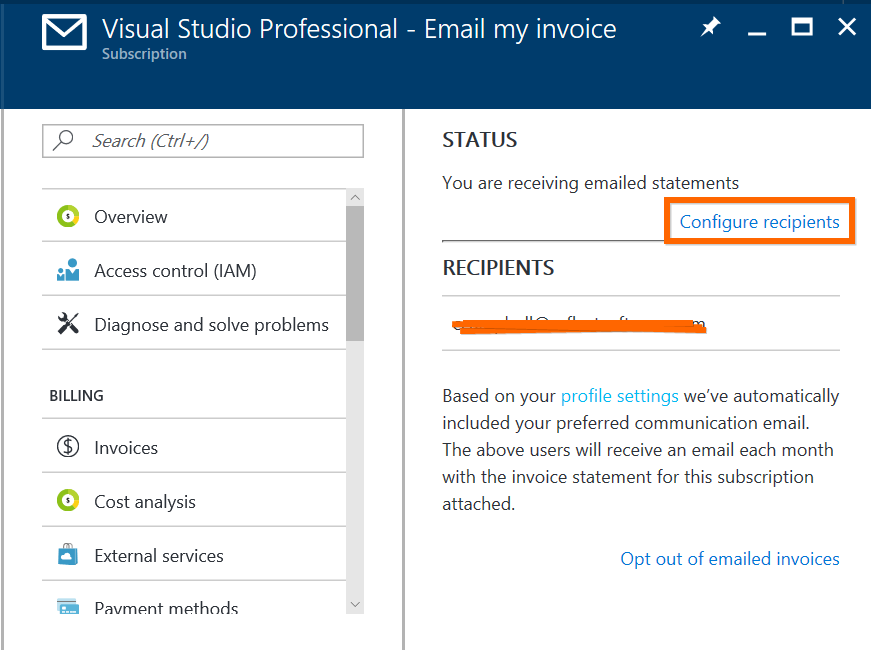
Once you’ve opted in you can configure additional recipients to be added:

image

That’s it!

Enjoy

Uncategorized

Happy 7th Birthday Microsoft Azure!

Chris Pietschmann's avatarBuild5Nines

February 1, 2017 marks the 7th anniversary of when Microsoft turned on billing for the new Microsoft Azure service. Happy birthday Azure! Initially the service had a fraction of the features and services it has today. There’s been a tremendous growth on the platform over the years as a result of incredible investment by Microsoft.

Here’s a little timeline information about Microsoft Azure that you may or may not know:

  • October 2008  – At the Microsoft Professional Developers Conference (PDC), Microsoft Chief Software Architect Ray Ozzie announces a new cloud computing platform from Microsoft called Windows Azure. The initial announcement includes the Azure services of: Cloud Services, and Blob Storage.
  • March 2009 – Azure SQL Database service was announced.
  • November 2009 – An updated Windows Azure CTP is released enabling Full Trust, PHP, Java, including a CDN CTP and more
  • January 2010 – Windows Azure become Generally Available, currently free…

View original post 380 more words

Azure

Understanding Azure – a guide for developers

image

Microsoft recently published a free e-book on how to develop on Azure. This guides shows you how to use common design scenarios and see how the comprehensive set of application platform services can suit your needs.

Download and check it out now.

Enjoy!

Uncategorized

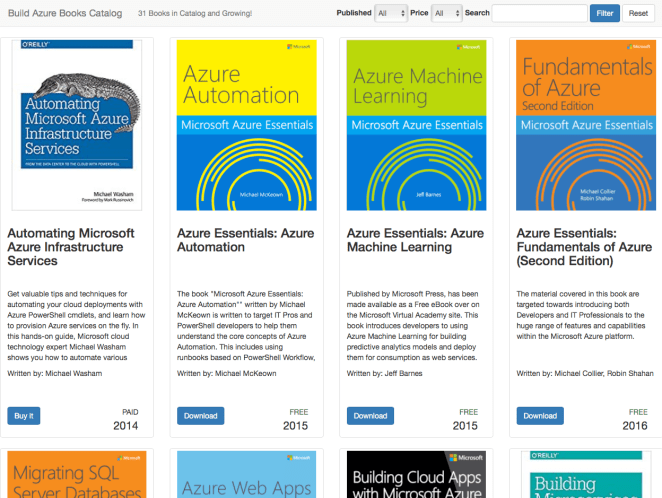
Searchable Azure Book Catalog from Build Azure

Great resource for finding Azure related material.

Unknown's avatarBuild5Nines

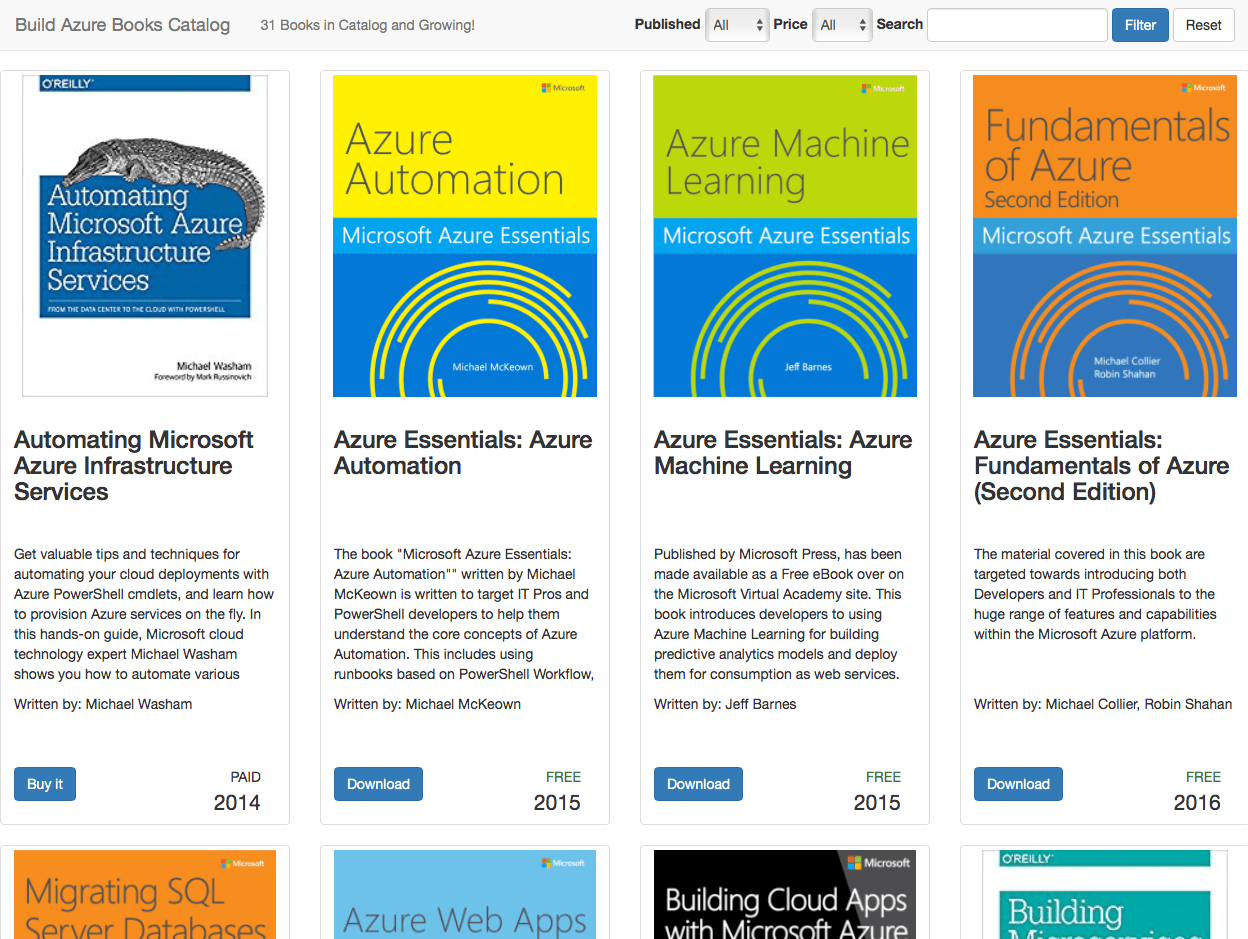
It’s generally difficult to find a good book on cloud and Microsoft Azure related material to help learn from. This can be extremely frustrating when you’re new to a technology and are looking for a concise source to get up to speed, and good books are the perfect solution to this. After some deliberation, I’ve decided to start a new project for Build Azure. The new project is the Build Azure Book Catalog, and it’s located at http://books.buildazure.com

buildazurebookcatalogscreenshot001

View original post 335 more words

Uncategorized

Azure Web Apps only in Current Portal from February 1, 2017

Unknown's avatarBuild5Nines

azure-app-service-web-app_colorMicrosoft has been working for a couple years to add support to all existing Azure services, as well as a plethora of new services, within the Current Azure Portal (http://portal.azure.com). One of the huge services that wasn’t available in the Current Azure Portal until recently is Azure AD; which is still in Preview within the Current Portal. However, Azure Web Apps have been supported in the Current Azure Portal for about 2 years or so at this point, and Microsoft is taking this new / current portal migration even further…

Starting February 1, 2017, Azure Web Apps will no longer be available in the “Classic” Azure Portal (http://manage.windowsazure.com). For most the duality of the Portals has been a bit frustrating, and it’s relieving to see that Microsoft is making the move to not just add support for services in the Current Portal, but also remove them…

View original post 80 more words

Development

Error when opening an ASP.NET Core project with Visual Studio 2015 after installing Visual Studio 2017 RC : The following error occurred attempting to run the project model server process 1.0.0-preview4-004223

Ok so if your like me and tried installing Visual Studio 2017 RC, you were probably astonished at how fast it installs compared to previous version of Visual Studio. But as impressive at it is at installing, I ran into some compatibility issues with Visual Studio 2015, so I had to uninstall Visual Studio 2017 RC.

Now even with Visual Studio 2017 RC uninstalled, I ended up running into an issue when I was trying to open a  new or existing ASP.NET Core project. Here is the error I would get when trying to open my ASP.NET Core projects in Visual Studio 2015:

The following error occurred attempting to run the project model server process 1.0.0-preview4-004223

image

To resolve this, I had to go to directory “C:\Program Files\dotnet\sdk” and delete folder “1.0.0-preview4-004233” as shown here:

image

This then resolved my issue when trying to open an existing or new ASP.NET Core project in Visual Studio 2015.

Enjoy!

AzureDevelopment

Azure Tools Extension for Visual Studio Code

Came across an awesome Visual Studio Code extension called “Azure Tools for Visual Studio Code” by Brady Gaster. Check it out!

This extension for Visual Studio Code gives Azure developers some convenient commands for creating or accessing resources directly in the editor.

Features

  • Search the Azure QuickStart Templates GitHub repository
  • Download Azure Resource Manager (ARM) template and parameter files to workspace
  • Uses the Azure Resource Manager Tools extension to simplify the template-editing experience
  • ARM template deployment to live Azure subscription
  • Login with Microsoft Account (@hotmail.com, @live.com, etc.)
  • Login with Azure Active Directory (or "Organizational") account
  • Create App Service Web Apps
  • Create App Service Function Apps
  • Create Storage Accounts
  • Get Storage Account connection string
  • Browse to resource in portal
  • Browse to resource group in portal
  • Support for multiple Azure subscriptions
  • Supports all Azure data centers

Each of these commands is visible directly from commands visible in the command palette.

Installation

Azure Tools Extension for Visual Studio Code can be installed from the built-in extension tab in Visual Studio Code. Just search for “Azure Tools” and it will be the first result. Click on the extension and then click on the green “Install” button.

image

This extension is available as an open-source project and can be found in the GitHub repository https://github.com/bradygaster/azure-tools-vscode.

Enjoy!

References

Announcing the Azure Tools Extension for Visual Studio Code

Uncategorized

Observable’s in Angular 2 (RxJS)

Aamol Gote's avatarmytechnetknowhows

Observables in Angular 2 can be achieved using RxJS(Reactive Extensions for JavaScript). Observables is an ES7 feature so you need to make use of an external library to use it today. RxJS is a library that allows you to work with asynchronous data streams. So what are asynchronous data streams?

  • Asynchronous – we can call a function and register a callback to be notified when results are available, so we can continue with execution and avoid the Web Page from being unresponsive. This is used for ajax calls, DOM-events, Promises, WebWorkers and WebSockets.
  • Data – raw information in the form of JavaScript data types as: Number, String, Objects (Arrays, Sets, Maps).
  • Streams – sequences of data made available over time. Technically everything is stream.

Observables can help manage async data and a few other useful patterns. Observables are similar to Promises but with a few key differences. The first is Observables emit multiple…

View original post 853 more words