
Here is a great post on inserting data into Azure Data Explorer using C# SDK.
Enjoy!
Here is a great post on inserting data into Azure Data Explorer using C# SDK.
Enjoy!
For the past few months, I’ve been diving into learning Azure Data Explorer (ADX) and using it for a few projects. What is Azure Data Explorer, and what would I use it for? Great questions. Azure Data Explorer is like your data’s best friend when it comes to real-time, heavy-duty analytics. It’s built to handle massive amounts of data—whether it’s structured, semi-structured, or all over the place—and turn it into actionable insights. With its star feature, the Kusto Query Language (KQL), you can dive deep into the data for tasks like spotting trends, detecting anomalies, or analyzing logs, all with ease. It’s perfect for high-speed data streams, making it a go-to for IoT and time-series data. Plus, it’s secure, scalable, and does the hard work fast so you can focus on making more intelligent decisions.
Azure Data Explorer is ideal for enabling interactive analytics capabilities over high-velocity, diverse raw data. Use the following decision tree to help you decide if Azure Data Explorer is right for you:
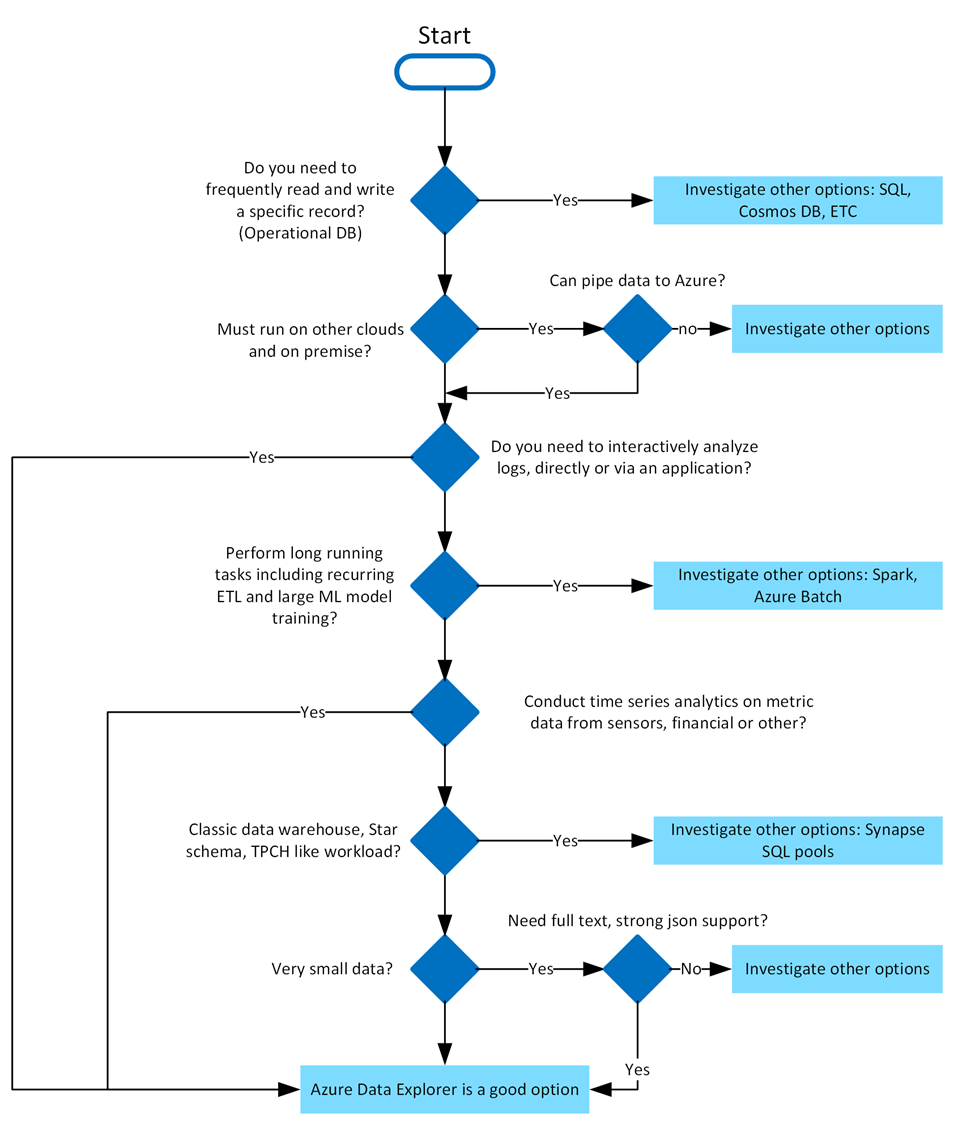
Azure Data Explorer stands out due to its exceptional capabilities in handling vast amounts of diverse data quickly and efficiently. It supports high-speed data ingestion (terabytes in minutes) and querying of petabytes with millisecond-level results. Its Kusto Query Language (KQL) is intuitive yet powerful, enabling advanced analytics and seamless integration with Python and T-SQL. With specialized features for time series analysis, anomaly detection, and geospatial insights, it’s tailored for deep data exploration. The platform simplifies data ingestion with its user-friendly wizard, while built-in visualization tools and integrations with Power BI, Grafana, Tableau, and more make insights accessible. It also automates data ingestion, transformation, and export, ensuring a smooth, end-to-end analytics experience.
In Azure Data Explorer, we use the Kusto Query Language (KQL) to write queries. KQL is also used in other Azure services like Azure Monitor Log Analytics, Azure Sentinel, and many more.
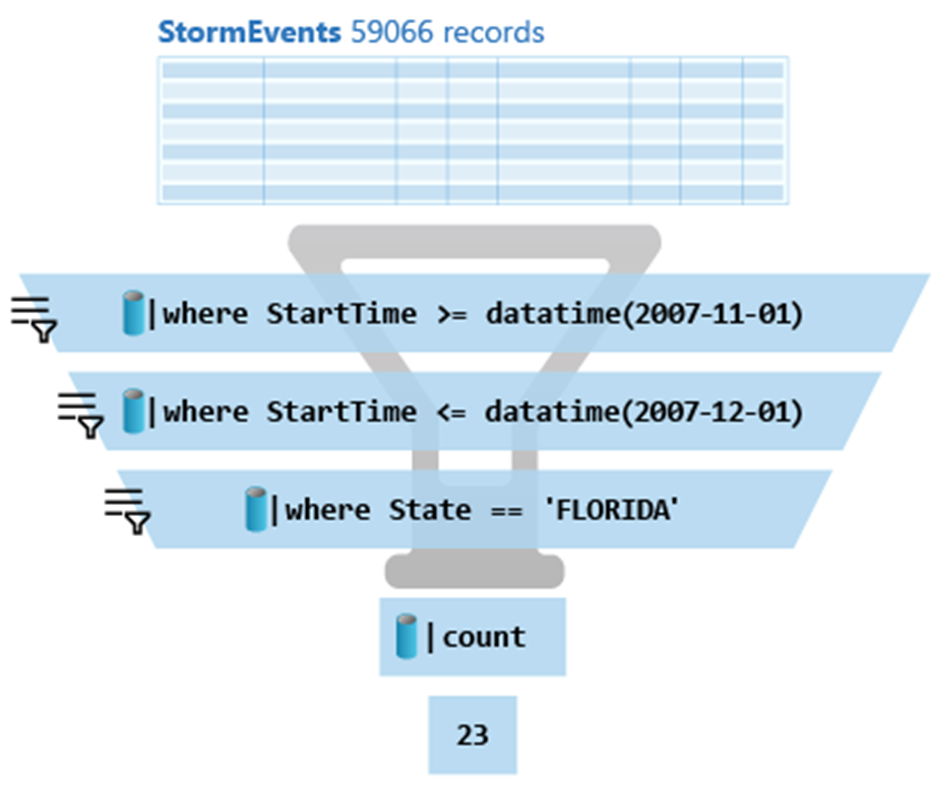
Here is the above query:
StormEvents
| where StartTime >= datetime(2007-11-01)
| where StartTime <= datetime(2007-12-01)
| where State == 'FLORIDA'
| count
Azure Data Explorer query editor also supports the use of T-SQL in addition to its primary query language, Kusto query language (KQL). While KQL is the recommended query language, T-SQL can be useful for tools that are unable to use KQL. For more details, check out how to query data with T-SQL.
When it comes to writing commands for managing tables, the first character of the text of a request determines if the request is a management command or a query. Management commands must start with the dot (.) character, and no query may start with that character.
Here are some examples of management commands:
You can try Azure Data Explorer for free using the free cluster. Head over to https://dataexplorer.azure.com/ and log in with any Microsoft Account.
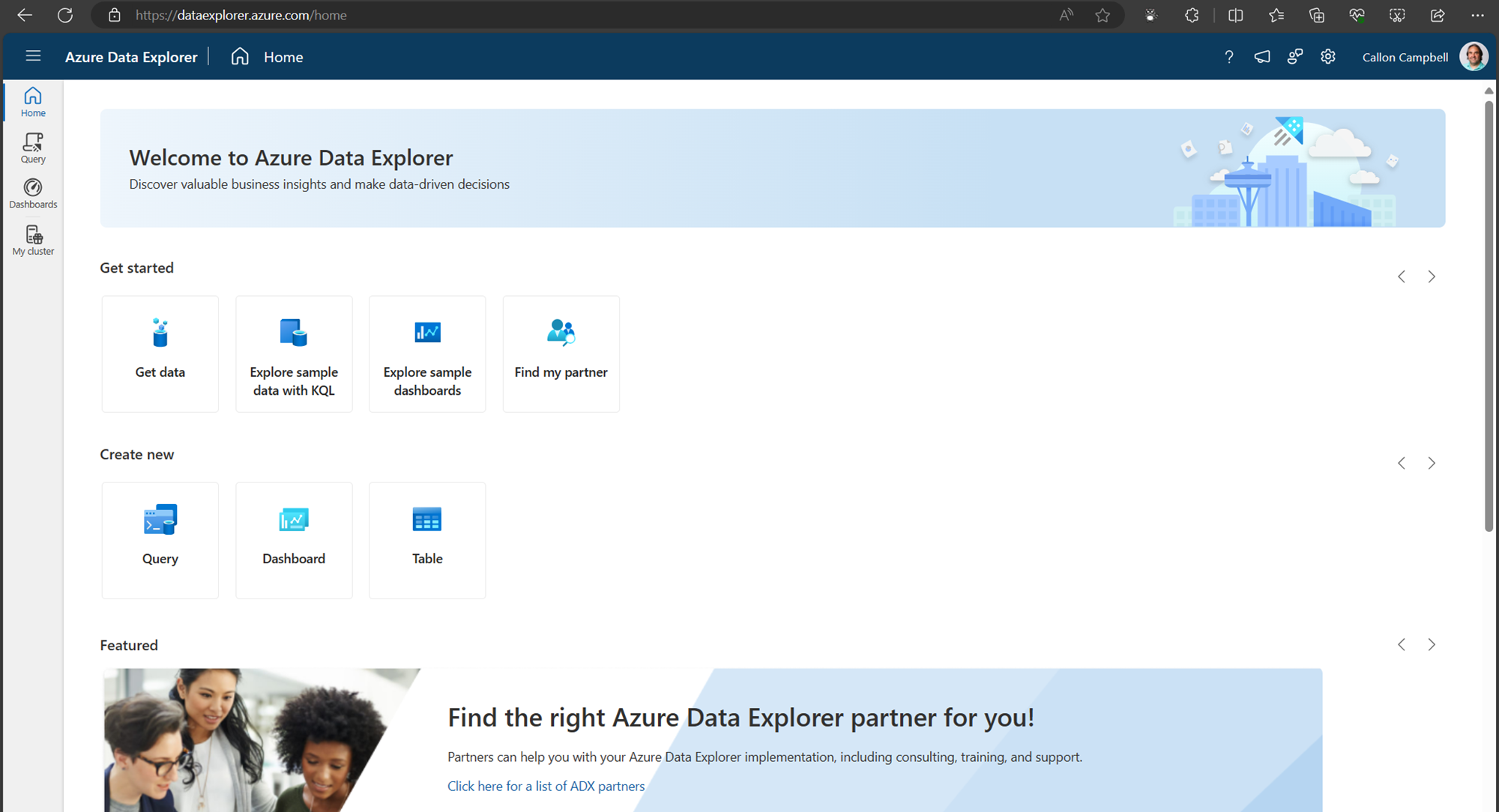
Navigate to the My cluster tab on the left to get access to your cluster URI.
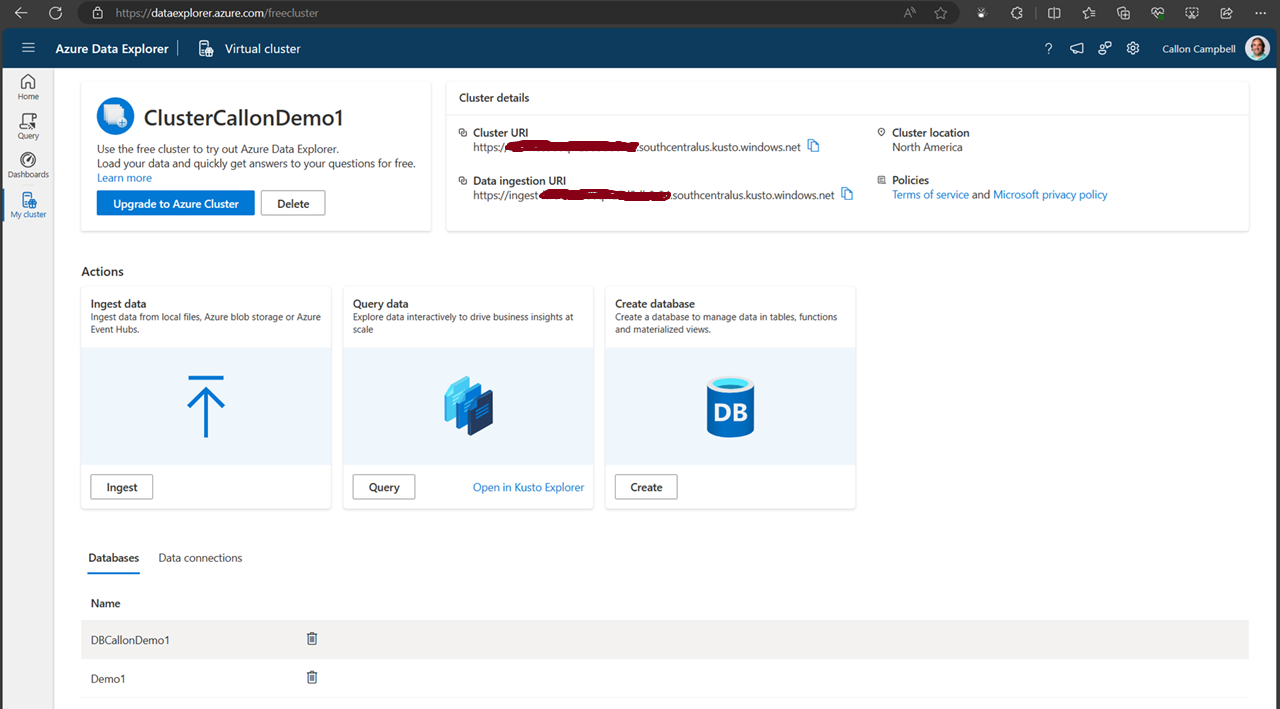
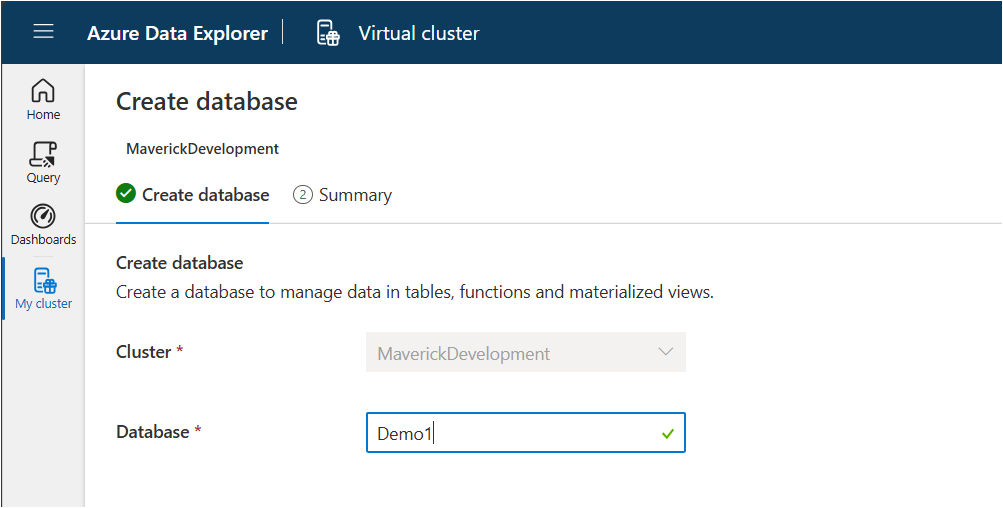
Next, let’s create a new database. While on the My cluster tab, click on the create database button. Give your database a name. In this case, I’m using ‘Demo1’ and then click on the ‘NextCreateDatebase’ button.
Now navigate over to the Query table and lets create our first table, insert some data and run some queries.
.create-merge table customers
(
    FullName: string,
    LastOrderDate: datetime,
    YtdSales: decimal,
    YtdExpenses: decimal,
    City: string,
    PostalCode: string
)
If we run the .show table customers command, we can see the table definition:
.show table customers
There are several ways we can ingest data into our table. Here are a few options:
Today we’re going to be using the inline ingestion, which goes as follows:
.ingest inline into table customers <|
'Bill Gates', datetime(2022-01-10 11:00:00), 1000000, 500000, 'Redmond', '98052'
'Steve Ballmer', datetime(2022-01-06 10:30:00), 150000, 50000, 'Los Angeles', '90305'
'Satya Nadella', datetime(2022-01-09 17:25:00), 100000, 50000, 'Redmond', '98052'
'Steve Jobs', datetime(2022-01-04 13:00:00), 100000, 60000, 'Cupertino', '95014'
'Larry Ellison', datetime(2022-01-04 13:00:00), 90000, 80000, 'Redwood Shores', '94065'
'Jeff Bezos', datetime(2022-01-05 08:00:00), 750000, 650000, 'Seattle', '98109'
'Tim Cook', datetime(2022-01-02 09:00:00), 40000, 10000, 'Cupertino', '95014'
'Steve Wozniak', datetime(2022-01-04 11:30:00), 81000, 55000, 'Cupertino', '95014'
'Scott Guthrie', datetime(2022-01-11 14:00:00), 2000000, 1000000, 'Redmond', '98052'Now, let’s start writing KQL queries against our data. In the following query I’m just using the name of the table with no where clause. This is similar to the “SELECT * FROM Customers” in SQL.
customers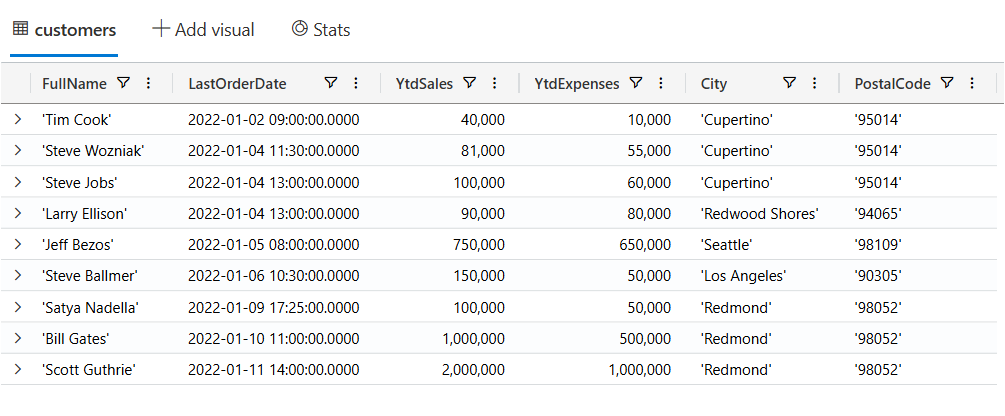
Now let’s filter our data looking for customers where the YtdSales is less than $100,000:
customers
| where YtdSales < 100000
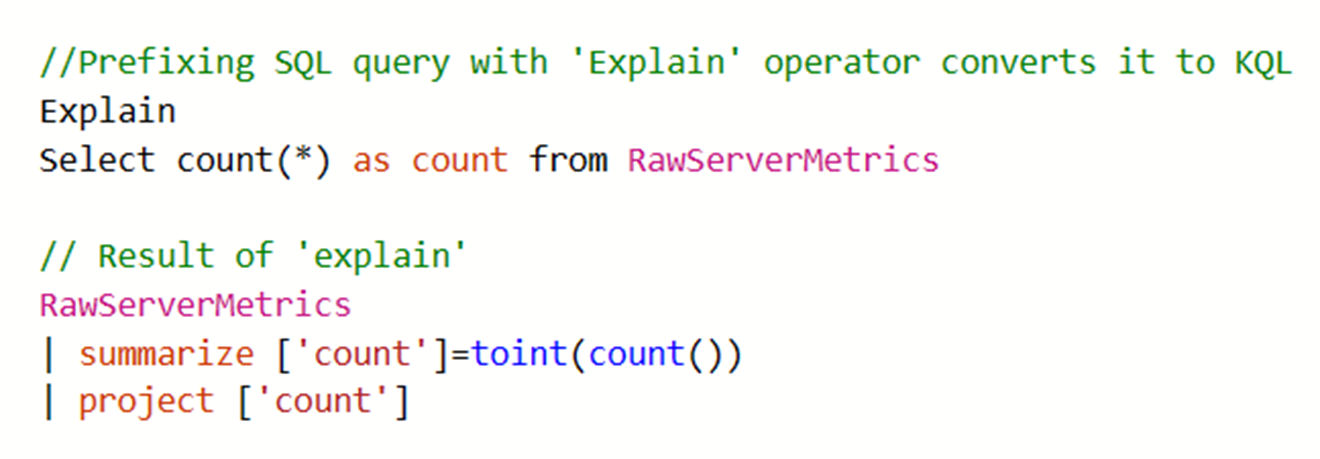
If you’re unfamiliar with KQL but are familiar with SQL and want to learn KQL, you can translate your SQL queries into KQL by prefacing the SQL query with a comment line, --, and the keyword explain. The output shows the KQL version of the query, which can help you understand the KQL syntax and concepts. Here is an example of the ‘EXPLAIN’ operator as follows:
Try the SQL to Kusto Query Language cheat sheet.
In this post we looked at what Azure Data Explorer is, when it should be used, how to use the free personal cluster to create a sample database and ingest data and the run some queries. I hope this was insightful and I look forward to my next post where I’ll go deeper on ingesting data in real-time and running more complicated queries and how we can access this data from dashboards and APIs.
Enjoy!
A French word, a photo, and a slice of life in Provence
Microsoft MVP on Azure IoT & Real-Time Intelligence | International Speaker | Principle architect at Alten-SDG Group
It's all about Microsoft Business Applications
AI & Cloud Consulting for Modern Enterprises
Author: John Lunn @jonnychipz
If you're not having fun, you're doing it wrong.
Code. Fun. Serverless
Intelligent Apps for Pilots
My personal blog about everything technical
coding facts and opinions
Sponsored by Cloud Formations Ltd
Exploring the world of Azure, IoT and other interesting topics
where learning never ends...
Practical Coding Tutorial
A blog about Microsoft Azure
Christian Nagel and the CN innovation team about .NET Aspire, C#, Azure, ASP.NET Core, WinUI, .NET MAUI, and more
Cloud Computing & DevOps Tips & Tricks with Hammad Aslam.
 The Flying Maverick